
Ahrefs Review 2026: Is It Worth the Money?
Is Ahrefs Review 2026 Worth It?
1. What Is Ahrefs and What Is It Used For?
2. Who Should Buy Ahrefs—and Who Should Skip It for Now?
3. Ahrefs Free: What You Get Without Paying
Where Ahrefs Free Becomes Limiting
4. Ahrefs Pricing in 2026: Plans, Credit Limits & Real-World Cost
The Unspoken Frustration: How the Credit System Works
How the Credit Consumption Model Works
The $29 Starter vs. $129 Lite vs. $249 Standard Reality
5. Per-Seat Charges and Account Access Guidelines
Account Security & Concurrent Logins
6. How I Tested Ahrefs for This Review
7. Core Feature Deep-Dive: Where Ahrefs Delivers—and Where It Falls Short
1. Site Explorer & Backlink Indexing
2. Keywords Explorer & Traffic Potential
8. Is Ahrefs Accurate? Where Its Data Comes From
9. Ahrefs Ease of Use and Learning Curve
12. Ahrefs vs Semrush: Which One Should You Choose?
13. Ahrefs Alternatives: What Should You Use Instead?
14. The Final Verdict: Is Ahrefs Worth the Money in 2026?
15. Frequently Asked Questions About Ahrefs
How Can I Use Ahrefs for Free?
Where Does Ahrefs Get Its Backlink Data?
Does Ahrefs Offer a Free Trial?
Which Ahrefs Plan Should I Choose?
Yes. This Ahrefs Review 2026 shows that Ahrefs is worth it for SEO professionals, agencies, and businesses that need accurate backlink and keyword data. Beginners with limited budgets may find better value in lower-cost alternatives.
If you spend any time reading SEO blogs, you’ve probably seen the same narrative over and over: Ahrefs is the absolute gold standard, you need it on day one, and without it, your organic search strategy is dead in the water.
That advice is not only lazy—for many site owners, it is downright expensive bad advice.
Ahrefs is indeed an incredible piece of software. Its crawler infrastructure and backlink index are among the best ever built. But buying an Ahrefs subscription at the wrong stage of your business is one of the fastest ways to burn through your monthly digital marketing budget with almost zero return on investment (ROI).
With credit limits on the Starter and Lite plans, extra charges for additional users, and a one-person-per-login rule, the question is no longer just, “Is Ahrefs good?” The real question is: “Is Ahrefs worth it for your specific situation right now?”
In this guide, we are dropping the affiliate hype and looking at the ground reality of Ahrefs in 2026—what it does best, where it burns your money, and whether you should open your wallet or save your budget.
This Ahrefs Review 2026 is based on real testing, pricing analysis, and hands-on experience to help you decide whether Ahrefs is worth buying..
1. What Is Ahrefs and What Is It Used For?
Ahrefs is a cloud-based SEO platform used for keyword research, backlink analysis, competitor research, rank tracking, content research, and technical SEO audits.
It is best known for Site Explorer and its backlink database, but Ahrefs does much more than check links. You can use it to find the keywords your competitors rank for, analyse their highest-traffic pages, discover content gaps, monitor keyword positions, audit technical problems, and identify websites that may be worth approaching for backlinks.
Ahrefs is a SaaS platform, which means you use it through an online account instead of installing software on your computer.
How Does Ahrefs Work?
Ahrefs operates its own web crawler, which continuously discovers pages, links, and changes across the web. It processes that information and turns it into reports inside tools such as Site Explorer, Keywords Explorer, Site Audit, Rank Tracker, and Content Explorer.
The data helps you understand what is happening in search, but it is still estimated third-party data. Ahrefs can show opportunities and patterns, but you still need to check search intent, page quality, relevance, and actual Google Search Console data before making final decisions.
2. Who Should Buy Ahrefs—and Who Should Skip It for Now?
Before looking at menus or feature dashboards, let’s answer the most critical decision question: Should you actually buy this tool today?
Quick Decision Matrix
| SKIP FOR NOW (Save Your Money) | STRONG FIT (High ROI Potential) |
| • Absolute beginners & new blogs | • Established SaaS companies |
| • Sites not doing regular competitor research | • Dedicated link-building agencies |
| • Solo creators on tight budgets | • Senior SEO consultants & pros |
| • Teams needing multi-user seats | • Mature affiliate site portfolios |
🔴 RED LIGHT: Who Should NOT Buy Ahrefs
1. Absolute Beginners & New Bloggers
If your website is new, you are still publishing inconsistently, and you are not yet doing regular competitor, backlink, or keyword research, the $129/month Lite plan is probably overkill.
Ahrefs does offer a $29 Starter plan with 200 monthly credits, but even that only makes sense if you will actually use the data. At this stage, content, technical fixes, and a consistent publishing system may deliver a better return.
Traffic alone should not decide the purchase. A new SaaS company entering a competitive market may need Ahrefs before reaching 10,000 monthly visits, while a simple blog may manage perfectly well without it.
2. Businesses Needing Shared Team Access
If three or four people need Ahrefs regularly, check the full seat cost—not just the advertised plan price. Lite, Standard, and Advanced include one user, while additional users cost extra.
Sharing one login is not a dependable workaround. Ahrefs says each login is intended for one person, and simultaneous use from multiple devices can trigger verification and force the user to sign in again.
3. Outreach Managers Wanting an All-in-One CRM
While Ahrefs is great at finding backlink opportunities, it does not send outreach emails, manage contact responses, or run cold email campaigns. You will still need to pay extra for dedicated outreach platforms like Pitchbox, BuzzStream, or Hunter.io.
🟢 GREEN LIGHT: Who Gets the Most Value From Ahrefs
1. SaaS Brands & Scaling Companies
If you are running a SaaS platform where customer acquisition costs (CAC) are high and a single organic sign-up is worth hundreds of dollars in lifetime value (LTV), Ahrefs can pay for itself quickly—but only if your team acts on the data.
Backlink gaps, competitor feature pages, and commercial keywords have value only when they turn into better pages, relevant links, and qualified sign-ups.
2. Link Building Specialists & Digital Agencies
If client reporting, backlink prospecting, anchor text analysis, and competitor link research are core parts of your deliverables, Ahrefs remains one of the strongest tools available.
But the data still needs manual checking. High DR alone does not make a link relevant, safe, or valuable.
3. Experienced Affiliate Marketers
If you manage a portfolio of monetized sites and rely on reverse-engineering competitor ranking strategies, finding broken link opportunities, and spotting low-competition keyword clusters, Ahrefs remains a core operational tool.
3. Ahrefs Free: What You Get Without Paying
One of the biggest misunderstandings among newcomers is thinking they have to pay immediately just to check their own website’s data.
What Is Ahrefs Free?
Ahrefs Free—previously known as Ahrefs Webmaster Tools—is a permanent free account for website owners. After verifying your domain through Google Search Console, DNS, an HTML file, or an HTML tag, you get limited access to Ahrefs for websites you own.
The three most useful tools are:
Site Audit: Crawls your website for more than 170 technical and on-page SEO issues. Free accounts receive 5,000 crawl credits per verified project each month.
Site Explorer: Shows up to 1,000 backlinks and 1,000 organic keywords at once for a verified website, along with referring domains, top pages, and estimated organic traffic.
Web Analytics: Shows traffic sources, top pages, visitor locations, and other basic analytics data. The free account currently supports up to one million events per verified project.
Ahrefs Free vs. Paid Ahrefs
| Feature | Ahrefs Free | Paid Plans |
| Audit Your Own Website | YES — 5,000 crawl credits per verified project/month | YES — higher limits depend on plan |
| Check Your Own Backlinks | YES — up to 1,000 visible | YES — expanded data |
| View Your Own Keywords | YES — up to 1,000 visible | YES — expanded data |
| Use Web Analytics | YES — up to 1 million events | YES |
| Analyze Competitor Websites | NO — free access is limited to verified websites | YES — paid access depends on plan limits |
| Use Keywords Explorer | NO | YES |
| Use Rank Tracker | NO | YES |
| Export Reports | NO | Depends on plan |
| Use Batch Analysis | NO | Available on eligible plans |
Where Ahrefs Free Becomes Limiting
Ahrefs Free is mainly built for websites you own and can verify. It is enough for checking your own technical health, backlinks, and existing keyword data, but it is not a complete competitor-research setup.
Full competitor analysis, Keywords Explorer, larger reports, exports, and deeper historical data require a paid plan.
Takeaway: Use Ahrefs Free while your main priority is monitoring your own website. Move to Starter when you need occasional competitor and keyword research. Pay for Lite or a higher plan only when that research becomes a regular part of your work.
4. Ahrefs Pricing in 2026: Plans, Credit Limits & Real-World Cost
The Unspoken Frustration: How the Credit System Works
Ahrefs does not apply the same usage system to every paid plan.
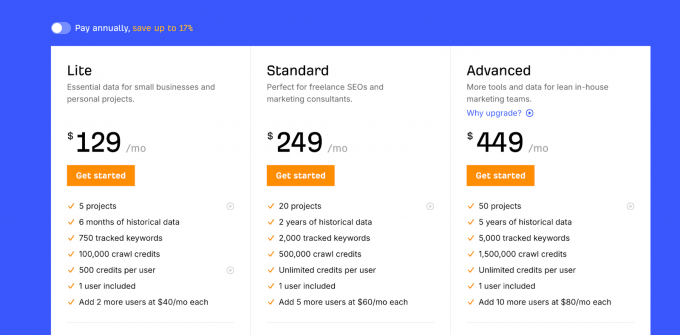
The current Starter and Lite plans use monthly credits, while Standard, Advanced, and Enterprise provide unlimited fair usage for active users. This distinction matters because the credit frustration mainly affects buyers considering the two lower-priced plans—not every Ahrefs customer.
Before paying for Starter or Lite, you need to understand which actions consume credits and which actions do not.
How the Credit Consumption Model Works
On the current Starter and Lite plans, credits are mainly consumed when you request fresh data in Site Explorer, Keywords Explorer, Competitive Analysis, and Page Inspect.
Content Explorer and Batch Analysis should not be treated as normal credit drains for current Starter or Lite buyers. Both tools become available from Standard, and current Standard plans provide unlimited fair usage.
On a credit-based plan, one credit is normally consumed when you:
Open a New Report: Loading a fresh report in a credit-consuming tool costs 1 credit.
Apply Filters: You can select several filters together, but Ahrefs charges 1 additional credit when you click “Show results.”
Change the Date: Requesting data for a different date costs another credit.
Open SERP or Position History Data: Opening the SERP Viewer or Position History graph consumes 1 credit.
Change the Report Mode: Switching to modes such as “One link per domain,” “New,” “Lost,” or “Group similar” consumes another credit.
Inspect a URL: Opening the Inspect window for a URL consumes 1 credit.
Update a SERP: Manually updating a keyword SERP in Site Explorer consumes 1 credit per keyword.
Keywords Explorer: You can submit up to 10,000 keywords in one 1-credit request.
Pagination and table sorting do not consume credits.
| Action | Credit Cost | Important Detail |
| Open a new report | 1 credit | Applies only in credit-consuming tools |
| Apply filters and click “Show results” | 1 credit | Any number of filters can be submitted together |
| Change report date | 1 credit | Charged for requesting the new date |
| Open SERP Viewer | 1 credit | Each requested SERP view |
| Open Position History | 1 credit | Each requested graph |
| Search up to 10,000 keywords | 1 credit | Keywords Explorer |
| Update a SERP in Site Explorer | 1 credit | Charged separately for each keyword update |
| Pagination or table sorting | 0 credits | Does not consume credits |
The $29 Starter vs. $129 Lite vs. $249 Standard Reality
Starter Plan ($29/month): Includes 200 monthly credits. It is designed for occasional competitor checks and lightweight keyword research. You cannot purchase additional users or extra credits on this plan.
Verified-Project Allowance: On credit-based access, verifying ownership of your website gives you 500 additional monthly credits that can only be used for URLs within verified projects. These are separate from the 5,000 monthly Site Audit crawl credits provided for each verified project.
Lite Plan ($129/month): Includes 1,000 monthly credits. It suits solo professionals and small businesses that need more regular competitor research, exports, and access to larger reports. Additional credits can be purchased when required.
Standard Plan ($249/month): Uses unlimited fair usage rather than a fixed monthly credit allowance. It also unlocks more reports, Content Explorer, Batch Analysis, larger exports, more projects, and deeper historical data.
The jump from Lite to Standard is therefore not simply an increase from 1,000 to 5,000 credits. It removes the normal monthly credit restriction altogether, subject to Ahrefs’ fair-use rules.
Where Credits Burn Fastest
Credits disappear fastest when you repeatedly request different versions of the same report.
Common credit drains include:
Repeated Filter Changes: Applying DR, traffic, language, link-type, and anchor-text filters separately costs more than selecting them together and clicking “Show results” once.
Opening Multiple Report Modes: Switching repeatedly between All, New, Lost, One Link per Domain, and Group Similar creates additional requests.
Changing Dates Repeatedly: Checking several dates one by one consumes an additional credit for each requested date.
Opening SERP and Position History Data: These deeper views consume credits separately from the main report.
Running Small Searches Separately: Searching ten keywords one at a time is wasteful when Keywords Explorer allows up to 10,000 keywords in one credit-based request.
Practitioner Tip: Decide what you need before running the report. Combine filters before clicking “Show results,” submit keywords in batches, and avoid reopening several report modes without a clear research purpose.
Pagination and table sorting are not credit traps. Ahrefs currently states that moving between results pages and sorting columns do not consume credits.
5. Per-Seat Charges and Account Access Guidelines
Another important cost consideration for growing teams is how Ahrefs manages user access and multi-device logins.
Single-Seat Base Plans
The Starter plan is limited to one user and does not support additional users.
Lite, Standard, and Advanced include one user by default, but additional seats can be purchased within each plan’s user limit. Lite supports up to two additional users, Standard up to five, and Advanced up to ten.
If several employees need regular access, the correct options are:
Purchase Separate Seats: Every person receives their own login and joins the shared workspace.
Additional seats are not priced the same across every plan. The cost increases with the plan tier, so calculate the full team bill from Ahrefs’ current pricing page before subscribing.
Limit Access to One Named User: One person operates Ahrefs and shares the resulting reports with the rest of the team.
Rotating one shared login between several team members is not an approved workaround because Ahrefs states that each login is intended for one person.
Account Security & Concurrent Logins
Ahrefs strictly enforces its one-person-per-login guideline. Attempting to share a single account login across different team members in different physical locations or devices simultaneously can lead to:
Email Verification: Logging in from a new device, browser, IP address, or incognito window can trigger a confirmation email.
Fresh Sign-In Requirements: Simultaneous use on several devices can force the user to verify the account and log in again.
Account Restrictions: Sharing credentials can violate Ahrefs’ terms. Repeated or serious violations may result in temporary or permanent account blocking.
6. How I Tested Ahrefs for This Review
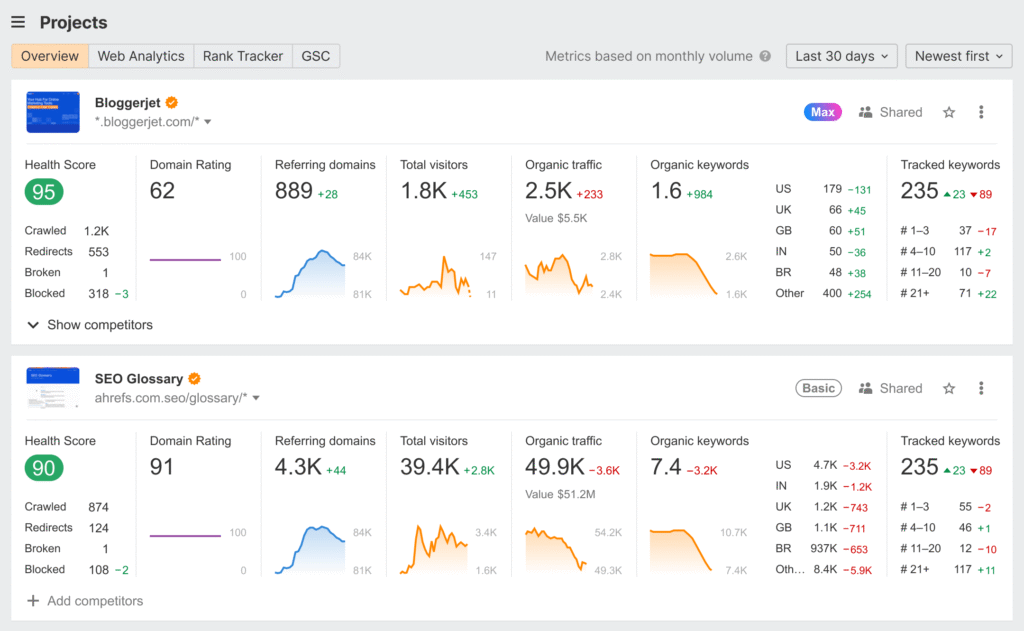
I tested the parts of Ahrefs that I could access inside a verified Ahrefs Free project, including the project dashboard, Site Audit, Site Explorer for my own website, backlink and referring-domain reports, organic keyword data, internal-linking issues, GSC Insights, and Web Analytics.
For features that are not fully available in the free account, I checked Ahrefs’ current pricing page, product information, and official support documentation instead of pretending that I had unrestricted access to every paid feature. This included credit consumption, user-seat rules, exports, Rank Tracker updates, Content Explorer access, and Brand Radar limits.
I treated Ahrefs’ traffic, keyword, and backlink figures as third-party estimates—not exact Google data. The purpose of the testing was to see whether the platform helps users make better SEO decisions, not whether every number inside the dashboard looks impressive.
This review therefore separates direct hands-on testing from paid-plan and feature verification. That distinction matters because many Ahrefs reviews mix old pricing, current restrictions, and paid-only features without clearly explaining which parts were actually tested.
Core Feature Deep-Dive: Where Ahrefs Delivers—and Where It Falls Short
Once you move past pricing and usage rules, the value of Ahrefs comes down to six main areas: Site Explorer, Keywords Explorer, Rank Tracker, Site Audit, Content Explorer, and Brand Radar.
7. Core Feature Deep-Dive: Where Ahrefs Delivers—and Where It Falls Short
Once you move past pricing and usage rules, the value of Ahrefs comes down to six main areas: Site Explorer, Keywords Explorer, Rank Tracker, Site Audit, Content Explorer, and Brand Radar.
1. Site Explorer & Backlink Indexing
Site Explorer remains Ahrefs’ flagship competitive-research feature. It brings three major data areas into one dashboard: organic search performance, backlink profiles, and paid search activity.
| Feature | Practical Utility |
| Domain Rating (DR) | Measures backlink-profile strength on a logarithmic 0–100 scale |
| Backlinks & Referring Domains | Shows live, new, lost, and broken links |
| Organic Keywords | Shows the keywords a website ranks for |
| Top Pages | Finds pages receiving the most estimated organic traffic |
| Paid Search | Shows paid keywords, ads, and paid pages |
Where It Delivers: Site Explorer is powered by a backlink database containing roughly 35 trillion external backlinks, while fresh backlink data is added every 15–30 minutes.
The broken backlinks and referring domains reports make it easy to find competitor pages that have lost links or now return errors. However, finding the report is the easy part; deciding whether an opportunity is relevant and worth pursuing still requires manual review.
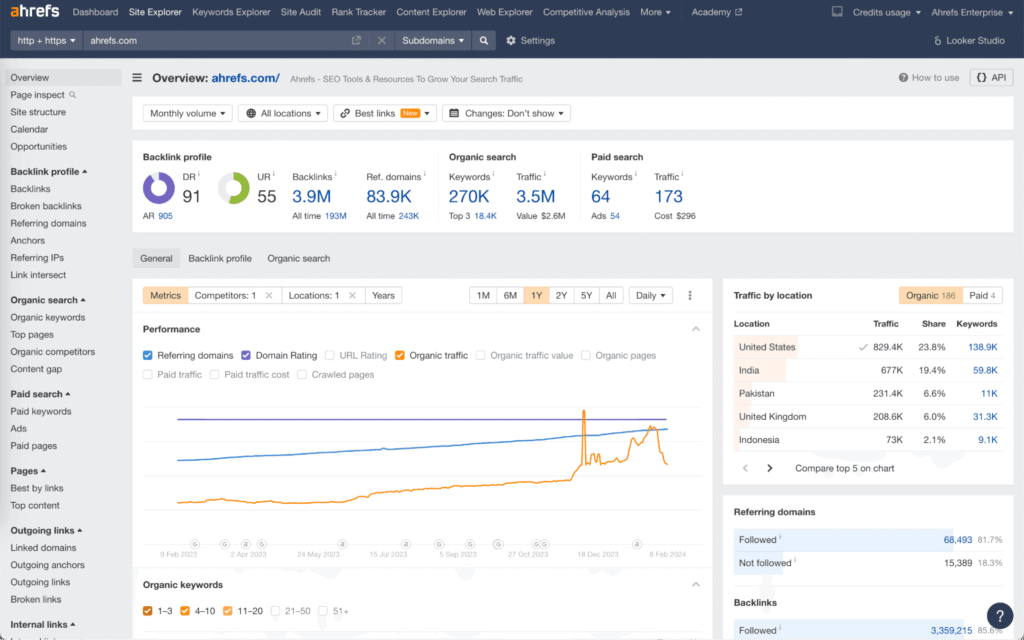
Where It Falls Short: Domain Rating measures backlink-profile strength—not website quality, relevance, organic traffic, or conversion potential.
A high DR website can still have weak traffic, irrelevant content, or a poor-quality link profile. Always check organic traffic trends, ranking keywords, topical relevance, outgoing links, and the actual linking page before judging a backlink opportunity.
2. Keywords Explorer & Traffic Potential
Keywords Explorer goes beyond traditional search volume by giving you Traffic Potential (TP), Parent Topics, and multi-engine data (Google, YouTube, Amazon, Bing).
Traffic Potential vs. Search Volume: Search volume estimates how often a specific keyword is searched each month. Traffic Potential estimates the total organic traffic received by the current #1 ranking page for the keyword’s Parent Topic, including traffic from the other keywords that page ranks for.
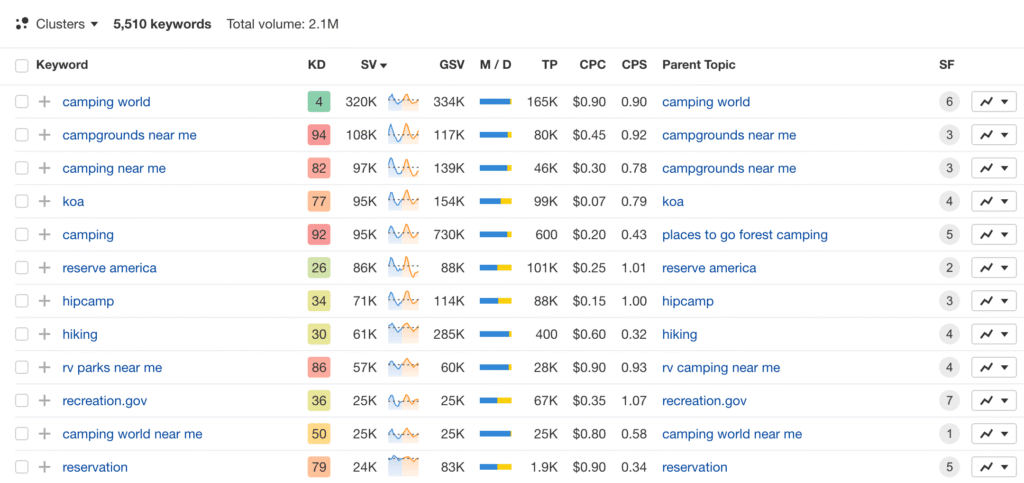
Keyword Difficulty (KD): Ahrefs calculates KD from the number of referring domains pointing to the current top-10 ranking pages.
It is useful as an initial backlink-competition filter, but it does not evaluate on-page quality, search-intent alignment, brand authority, or the strength of your internal linking.
Practitioner Takeaway: Never skip manual SERP checks just because KD says “Easy” (e.g., KD 12). If the top 3 results are dominated by high-authority brands (like Reddit, Quora, or Forbes) with dedicated content, ranking will still require substantial effort regardless of a low KD score.
3. Rank Tracker
Rank Tracker monitors selected keywords across desktop and mobile search results and supports location-specific tracking.
The default update frequency is weekly across Ahrefs subscription plans—not daily. This makes it useful for monitoring longer-term ranking movement, but users who need fresh daily changes may find the standard schedule limiting.
Where It Delivers: The reports clearly show ranking history, visibility trends, SERP features, competitor movement, and estimated traffic changes.
Where It Falls Short: Weekly updates may not be enough during migrations, algorithm updates, product launches, or fast-moving campaigns. Ahrefs rankings can also differ slightly from a manual Google search because of timing, location, personalisation, and normal SERP volatility.
4. AI Prompt Tracking Through Brand Radar
Brand Radar is separate from Rank Tracker. It monitors how brands appear across AI platforms and allows users to track selected prompts in services including Google AI Overviews, Google AI Mode, ChatGPT, Perplexity, Gemini, and Copilot.
Lite and higher plans currently include a limited number of custom prompt checks, while larger Brand Radar datasets and additional checks may require separate payment.
5. Site Audit
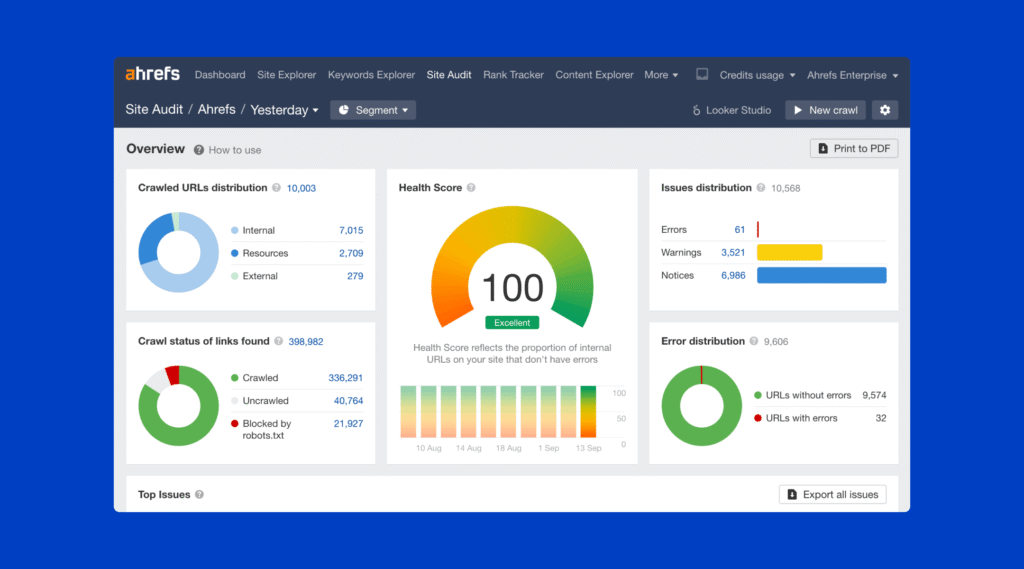
Site Audit crawls a website and checks it against more than 170 predefined technical and on-page SEO issues. It groups findings into errors, warnings, and notices, making it easier to separate serious crawl or indexability problems from lower-priority improvements.
Where It Delivers: The tool is particularly useful for finding broken internal links, redirect problems, canonical conflicts, missing metadata, orphan pages, indexability issues, and internal-linking opportunities. Crawl comparisons also help show whether technical problems are improving or getting worse over time.
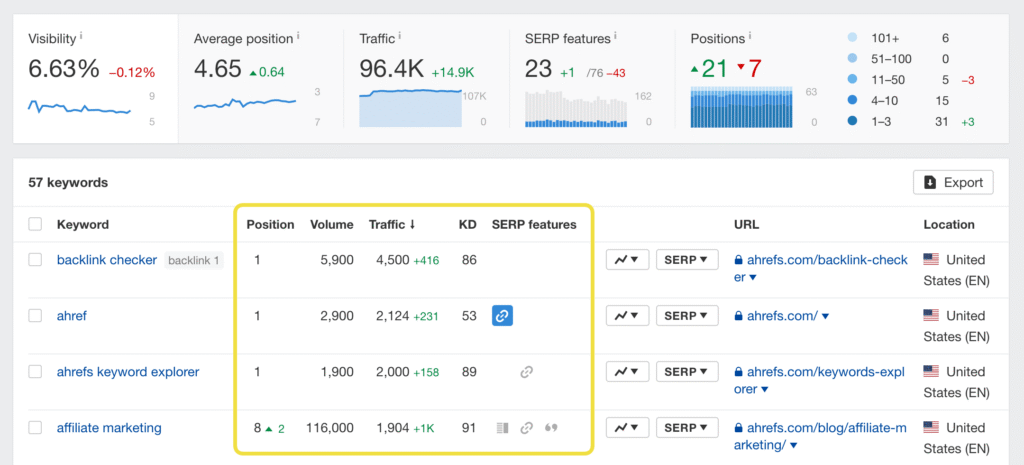
Where It Falls Short: The Health Score can become a vanity metric if you chase 100 instead of fixing issues that genuinely affect crawling, indexing, rankings, or users. Ahrefs also acknowledges that its predefined rules are not universally correct for every website, so each warning still needs human review.
6. Content Explorer
Content Explorer is built for researching successful content, link prospects, brand mentions, and broken-page opportunities across Ahrefs’ web-page database.
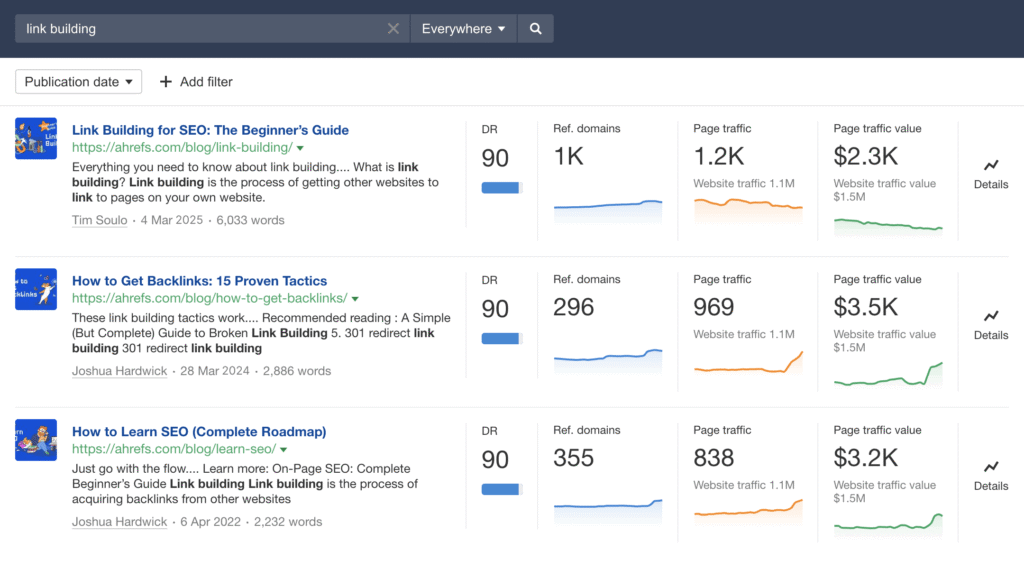
You can filter pages by organic traffic, referring domains, Domain Rating, publication date, language, author, word count, and page status. This makes it useful for finding content ideas that already attract traffic or backlinks instead of relying only on keyword volume.
Where It Delivers: It can uncover unlinked brand mentions, guest-post prospects, outdated resources, highly linked content, and broken pages that still have backlinks.
Where It Falls Short: Content Explorer is not included with the Lite plan; current access starts with Standard. Some report values also rely on cached data and may temporarily differ from the fresher numbers shown in Site Explorer.
8. Is Ahrefs Accurate? Where Its Data Comes From
Ahrefs is accurate enough to guide SEO research, but it is not accurate enough to replace first-party data. That distinction matters.
For backlinks and web-page data, Ahrefs operates its own crawlers, including AhrefsBot. It does not simply copy Google’s index. New backlink data is added throughout the day, but discovery speed depends on how often a page is crawled. Popular and frequently linked pages may update quickly, while weaker or rarely crawled pages can take longer.
Keyword data is collected differently. Ahrefs combines information from sources such as Google Keyword Planner, Google Trends, anonymised Google Search Console data, and other third-party sources. Search volume, clicks, Traffic Potential, and CPC should therefore be treated as estimates—not exact Google numbers.
Organic traffic inside Ahrefs is also an estimate. The platform looks at the keywords a website ranks for, its ranking positions, estimated search volumes, and expected click-through rates. It then combines those numbers to estimate monthly organic traffic.
Where It Delivers: Ahrefs is strong for directional analysis. If one competitor consistently has more ranking keywords, stronger backlinks, and higher estimated traffic, that pattern is still useful even when the exact numbers are not perfect.
Where It Falls Short: Users sometimes treat estimated traffic, search volume, Domain Rating, and backlink counts as exact facts. They are not. A missing backlink may simply not have been crawled yet, while estimated traffic can be higher or lower than the website’s real results.
Practitioner Takeaway: Use Ahrefs to compare competitors, discover opportunities, and prioritise SEO work. For your own website, use Google Search Console for actual Google search clicks and impressions, and use GA4 or Ahrefs Web Analytics for real visitor data.
9. Ahrefs Ease of Use and Learning Curve
Ahrefs is easier to navigate than it first appears, but that does not automatically make it beginner-friendly.
The main tools are clearly separated, and most reports follow a similar layout: headline metrics at the top, filters above the results, and detailed tables underneath. A new user can open Site Explorer and find a website’s DR, backlinks, ranking keywords, and estimated traffic within a few minutes.
The harder part is understanding what those numbers actually mean.
It is easy for a beginner to treat Domain Rating, Keyword Difficulty, search volume, or estimated traffic as final answers. It is also easy to waste credits by opening reports and applying filters without having a clear research question first.
Where It Delivers: The interface is clean, the filters are powerful, and it is easy to move from a competitor’s domain to its top pages, keywords, and backlinks. Ahrefs also provides a free Academy and a detailed Help Center, so most tools have tutorials and practical explanations.
Where It Falls Short: The number of reports, filters, metrics, and plan restrictions can overwhelm new users. Some tutorials may also cover features that are unavailable on Starter or Lite, which can be frustrating when you are still learning the platform.
Practitioner Takeaway: Learn one workflow at a time. Start with Site Explorer, Keywords Explorer, and Site Audit. Do not try to understand every Ahrefs metric or report during your first week.
10. Ahrefs Customer Support
Ahrefs provides support through live chat, email, and a detailed Help Center. The documentation is usually the best first stop because many questions about billing, credits, account access, Site Explorer, Site Audit, Rank Tracker, and other tools already have step-by-step answers.
I did not contact support simply to manufacture a response-time test for this review, so I will not claim that every question is answered within a specific number of minutes. What I can verify is that Ahrefs directs users to live chat or email when its documentation does not solve the problem.
Where It Delivers: The Help Center is detailed and organised by tool, making it relatively easy to find instructions for specific reports, account settings, billing issues, and common technical problems.
Where It Falls Short: Ahrefs has complicated rules around credits, exports, seats, and feature access. The answer may exist in the documentation, but users sometimes need to read several support articles before understanding the full limitation.
Practitioner Takeaway: Use the Help Center for feature-related questions. Use live chat or email for billing, account access, plan restrictions, or technical problems that require someone to check your specific account.
11. Ahrefs Pros and Cons
Ahrefs is powerful, but its strengths and weaknesses depend heavily on your workflow…
Pros of Ahrefs
Ahrefs is powerful, but its strengths and weaknesses depend heavily on your workflow. A link-building agency may consider it essential, while a new blogger may struggle to justify even the Starter plan.
Pros of Ahrefs
1. Strong Backlink Research
Ahrefs’ backlink database contains roughly 35 trillion external backlinks. Site Explorer makes it easy to investigate referring domains, anchor text, new and lost links, broken backlinks, and competitor link gaps.
2. Excellent Competitor Analysis
You can move from a competitor’s domain to its highest-traffic pages, ranking keywords, paid keywords, backlinks, and content gaps without switching between several disconnected tools.
3. Useful Keyword Metrics
Traffic Potential, Parent Topic, Keyword Difficulty, and SERP history provide more context than search volume alone. These metrics help narrow down opportunities before manually reviewing the search results.
4. Detailed Technical Auditing
Site Audit checks websites against more than 170 predefined technical and on-page SEO issues. It is useful for discovering broken links, redirect problems, canonical conflicts, orphan pages, indexability issues, and internal-linking opportunities.
5. Strong Filters and Research Workflows
Ahrefs allows users to filter reports by traffic, DR, link type, language, date, page status, word count, and many other conditions. This can save hours when analysing large competitor or backlink datasets.
6. Useful Free Access for Website Owners
Ahrefs Free provides limited Site Explorer, Site Audit, and Web Analytics access for verified websites. This gives site owners a practical way to monitor their own domain before purchasing a full subscription.
Cons of Ahrefs
1. Starter and Lite Still Use Credits
Starter includes 200 monthly credits, while Lite includes 1,000. Opening reports, changing dates, applying filters, and requesting additional data can consume credits, so careless research can exhaust the allowance faster than expected.
2. The Cost Increases Quickly for Teams
The advertised subscription price does not represent the full cost when several people need access. Additional seats cost extra, and account sharing is not an approved solution.
3. Important Features Are Locked Behind Standard
Content Explorer, Batch Analysis, deeper historical data, larger reports, and unlimited fair usage require Standard or a higher plan. Lite users may therefore reach feature restrictions despite paying a substantial monthly fee.
4. Rank Tracker Updates Weekly by Default
Weekly tracking is sufficient for long-term SEO monitoring, but it may feel slow during migrations, product launches, algorithm updates, or campaigns where daily movement matters.
5. Competitor Traffic and Keyword Data Are Estimates
Ahrefs does not have access to a competitor’s Google Search Console or analytics account. Traffic, search volume, and click estimates are useful for comparison, but they should not be treated as exact figures.
6. It Is Not an Outreach Platform
Ahrefs can find backlink opportunities, but it does not replace email-finding tools, outreach automation, follow-up management, or a complete link-building CRM.
7. Beginners Can Misread the Metrics
A clean interface does not remove the learning curve. New users may rely too heavily on DR, KD, search volume, or estimated traffic without checking relevance, search intent, actual page quality, and business value.
Overall Takeaway: Ahrefs delivers the most value when competitor, keyword, backlink, and technical research are already part of a repeatable SEO process. It becomes expensive when users collect data without turning it into content, links, technical fixes, or measurable business decisions.
12. Ahrefs vs Semrush: Which One Should You Choose?
Ahrefs and Semrush overlap in keyword research, competitor analysis, rank tracking, backlink research, and technical SEO. However, they are not identical tools with different branding.
Choose Ahrefs if your work depends heavily on backlink analysis, competitor link research, organic keyword discovery, content-gap analysis, and investigating which pages generate traffic and links for competing websites. Its reports feel more focused around organic search and competitor research.
Choose Semrush if you need a broader digital-marketing platform. In addition to SEO research, Semrush offers dedicated tools for PPC, advertising research, local SEO, social-media management, market analysis, content workflows, and digital PR.
Where Ahrefs Has the Edge
Ahrefs is particularly strong when you want to move quickly between a competitor’s organic keywords, top pages, referring domains, backlinks, content gaps, and historical search performance.
Its interface is generally less crowded because the main workflow stays focused on search, content, backlinks, website performance, and brand visibility.
Where Semrush Has the Edge
Semrush makes more sense for teams combining SEO with paid search, local marketing, social media, advertising research, and broader campaign management.
A business managing Google Ads, local listings, social publishing, competitor advertising, and organic SEO may get more value from keeping those workflows inside one platform.
Which One Is Better for You?
Choose Ahrefs if:
– Backlink and competitor research are central to your work.
– You primarily focus on organic SEO and content strategy.
– You prefer focused reports instead of a larger marketing toolkit.
– You regularly analyse competitor pages, keywords, and link profiles.
Choose Semrush if:
– You manage SEO and PPC together.
– Local SEO and Google Business Profile management matter.
– Your team also needs social-media or advertising tools.
– You want a broader marketing suite instead of a search-focused platform.
Practitioner Verdict: Ahrefs is the stronger fit for focused backlink, competitor, and organic-search research. Semrush is the stronger fit for teams that need SEO alongside PPC, local SEO, social media, and wider marketing workflows.
There is no universal winner. The better choice is the platform that matches the work you perform every week—not the one with the longest feature list.
13. Ahrefs Alternatives: What Should You Use Instead?
If Ahrefs’ price tag or credit limitations do not fit your operational model, several alternatives offer different strengths:
| Alternative | Best For | Why You Might Choose It |
| Semrush | Broader digital-marketing workflows | Combines SEO with PPC research, local SEO, social-media tools, and advertising features |
| Google Search Console | Website owners needing free first-party Google data | Provides actual Google clicks, impressions, queries, indexing, and crawl information for your own website |
| SE Ranking | Agencies needing branded client reporting | Offers team/client access and custom white-label reports |
| LowFruits | Long-tail and weak-SERP research | Uses pay-as-you-go options and identifies weak websites already ranking in the SERPs |
14. The Final Verdict: Is Ahrefs Worth the Money in 2026?
Final Verdict: Is Ahrefs Review 2026 worth your money? Based on our testing, Ahrefs remains one of the best SEO tools, but it is not the right choice for every user.
Ahrefs is not a magic tool that automatically boosts your rankings. It is an industry-grade analytics database.
The Decision Checklist:
BUY IT IF: You are a SaaS brand, an established affiliate publisher, a senior consultant, or a link-building agency actively executing competitor gap analysis and monthly client link acquisition.
SKIP IT IF: You mainly need to monitor your own website, do not perform regular competitor or backlink research, cannot yet turn the data into action, or need several low-cost team accounts.
Final Recommendation: Start with Ahrefs Free to monitor your own domain’s technical health and backlink profile. Only step up to Starter ($29/mo) or Lite ($129/mo) when competitor research becomes a regular part of your SEO workflow and you can act on the data.
15. Frequently Asked Questions About Ahrefs
Is Ahrefs Worth It in 2026?
Ahrefs is worth it when backlink research, competitor analysis, keyword discovery, rank tracking, or technical auditing are part of your regular SEO workflow.
It is harder to justify when you only need to monitor your own website, perform occasional keyword checks, or are not yet turning SEO data into content, links, and technical improvements.
Is Ahrefs Worth the Money?
Ahrefs can be worth the money for SaaS companies, experienced consultants, established publishers, and link-building agencies because one successful keyword opportunity, technical fix, or qualified backlink may cover the subscription cost.
It is not worth the money simply because it provides a large amount of data. The return depends on whether you can use that data to make better decisions and execute consistently.
Is Ahrefs Free?
Yes. Ahrefs offers a permanent free account for websites you can verify ownership of.
The free account provides limited access to Site Explorer, 5,000 monthly Site Audit crawl credits per verified project, Web Analytics, and several additional free tools. It does not provide complete competitor research or full Keywords Explorer access.
How Can I Use Ahrefs for Free?
Create an Ahrefs Free account and verify your website through Google Search Console, DNS, an HTML file, or an HTML tag.
After verification, you can audit your website, check limited backlink and organic-keyword data, and monitor website traffic. Ahrefs also provides standalone free tools, although their results are more limited than the full paid platform.
What Does Ahrefs Do?
Ahrefs helps marketers research competitors, analyse backlinks, discover keywords, find content opportunities, track rankings, audit technical SEO problems, and measure brand visibility across search and AI platforms.
Its best-known tools include Site Explorer, Keywords Explorer, Site Audit, Rank Tracker, Content Explorer, and Brand Radar.
How Accurate Is Ahrefs?
Ahrefs is accurate enough for competitor comparison, opportunity discovery, and SEO prioritisation, but its numbers should not be treated as exact first-party data.
Backlinks come from Ahrefs’ own crawler and index. Search volume, keyword clicks, traffic estimates, and competitor traffic are calculated from several data sources and modelling methods. For your own website, use Google Search Console and analytics data alongside Ahrefs.
What Does Ahrefs Stand For?
The name Ahrefs comes from “a href,” the HTML element used to create hyperlinks.
The name reflects the company’s original focus on backlinks and link analysis, although Ahrefs has since expanded into keyword research, technical SEO, rank tracking, content research, and AI visibility.
Is Ahrefs a SaaS Platform?
Yes. Ahrefs is a cloud-based SaaS marketing and SEO platform.
You access it through an online account rather than installing the full software on your computer. Your projects, reports, usage limits, and team access are managed inside the Ahrefs workspace.
Where Does Ahrefs Get Its Backlink Data?
Ahrefs collects backlink and web-page data through its own crawlers, including AhrefsBot.
The crawler continuously discovers pages and follows links across the web. Fresh backlink information is added throughout the day, but the time required to discover a link depends on how frequently Ahrefs crawls the page containing it.
Can Beginners Use Ahrefs?
Yes, but beginners should start with a limited workflow instead of opening every available report.
Site Explorer, Keywords Explorer, and Site Audit are the best starting points. Beginners should also learn what DR, KD, search volume, Traffic Potential, and estimated traffic actually measure before using them to make decisions.
Does Ahrefs Offer a Free Trial?
No. Ahrefs does not currently offer a standard free trial for its paid subscription plans.
Website owners can use Ahrefs Free for verified websites, while users who need limited competitor and keyword research can consider the $29-per-month Starter plan.
Which Ahrefs Plan Should I Choose?
Choose Ahrefs Free if you mainly need to audit and monitor websites you own.
Choose Starter if you need occasional competitor and keyword research and can work within 200 monthly credits.
Choose Lite if you need more regular research, exports, additional projects, and up to 1,000 monthly credits.
Choose Standard or higher if SEO is part of your daily professional workflow and you need unlimited fair usage, Content Explorer, Batch Analysis, deeper historical data, and larger reports.
The best plan is not automatically the most expensive one. Choose the lowest plan that supports the work you perform regularly without forcing you to upgrade for features you rarely use.