
On-Page SEO Checklist 2026: From 0 CTR to 3.2%+ (Real Results
Look. I’m going to tell you something most SEO guides won’t.
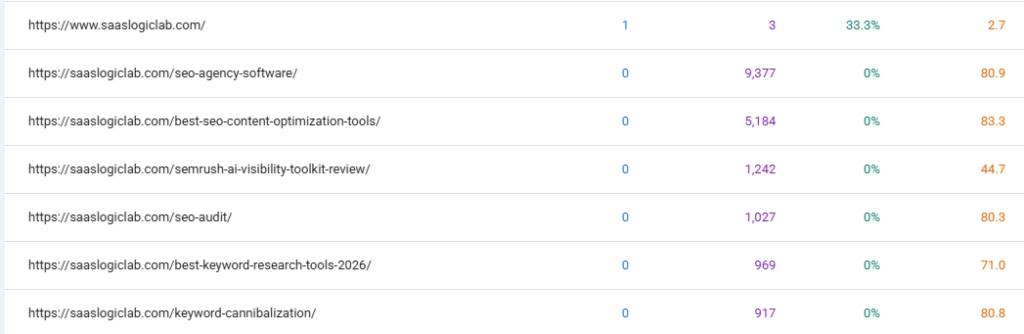
You have 9,377 impressions on a page ranking for on-page SEO. Zero clicks.
That’s not success. That’s a waste of Google’s bandwidth.
And it’s happening on your site right now.
I know because I see it constantly. Pages that rank decent. Pages that show up in search results. Pages that technically do everything “right” according to every SEO checklist out there.
But nobody clicks them.
It’s infuriating honestly. You did the work. You optimized. You followed the best practices. And nothing.
The problem isn’t your ranking signals. The problem is the three seconds someone spends looking at your result in search and deciding whether to click or scroll to the next one.
That’s where everything falls apart.
THE ACTUAL PROBLEM
Here’s what happened with a SaaS client we worked with last year.
They had this article about SEO agency software. 9,000+ impressions. The page was ranking. Google was showing it to people.
But 0 clicks. For months.
We looked at the title: “12 Best SEO Agency Software Tools for 2026: Tested for Real Agency Workflows”
Technically fine. Keywords there. Promise in there. Should work.
Then we looked at the top-ranking pages for that keyword.
Every single one had a similar title. “Best agency software.” “Top tools for agencies.” “Agency software comparison.”
Our title looked exactly like everyone else’s.
So when someone searched for that keyword, they saw ten nearly identical titles. Why would they click ours?
They didn’t.
That’s the gap. That’s what kills CTR.
RANKING ISN’T TRAFFIC
This is the thing SEO gets wrong.
People celebrate rankings. “We’re on page 1!” “We ranked for this keyword!”
But ranking means nothing if people don’t click.
A page at position 20 with 5% CTR gets more traffic than a page at position 8 with 0.2% CTR.
This is real. I’ve seen it happen dozens of times.
You can have perfect on-page SEO. Green lights across Rankmath. Every element optimized. But if your title doesn’t compel someone to actually click, you’re just taking up space in the search results.
Google knows this too by the way. They’re tracking clicks on every result. And pages that get clicked more often tend to rank better over time. It’s not an official ranking factor, but empirically it moves rankings.
So improving CTR doesn’t just increase traffic today. It improves your ranking position tomorrow.
THREE LAYERS OF OPTIMIZATION
Most people think on-page SEO is just configuration. Title tag. Meta description. Headings. Keyword placement. Check the boxes.
But there’s actually three layers.
Layer 1: Technical
Does your title exist? Is your meta description filled in? Are your headings structured? Rankmath complaining about anything obvious?
If this layer is broken, nothing works. You can’t rank without this.
But fixing this layer doesn’t automatically make people click.
Layer 2: Strategy
Are you targeting a keyword people actually search for? Does your page match the search intent? Does your structure make sense?
This is where most guides stop. They fix the strategy and assume results follow.
Spoiler: They usually don’t.
Layer 3: Psychology
Your title isn’t just technically correct. It actually makes someone want to click it.
Your description isn’t just filled in. It promises something specific they care about.
Your URL looks trustworthy. Your snippet (what Google shows) looks authoritative.
Your visual SERP enhancements (rich snippets, star ratings, FAQ schema, jump links) make it stand out.
This is where CTR comes from.
And this is where 99% of people fail.
They optimize layers 1 and 2. They completely ignore layer 3.
Then they wonder why they have visibility but no traffic.
WHY ON-PAGE SEO TITLES MATTER MORE THAN ANYTHING ELSE
Your title is the single thing that determines whether someone clicks.
More than your position. More than your description. More than anything else.
Think about it. You search something on Google. You see ten results. You have about 0.3 seconds to scan each title before you decide if it’s worth exploring.
That’s it.
The title is your only shot.
And most titles are terrible.
They’re written for search engines. Not for humans. Keywords crammed in. Format ignored. Benefit missing.
“On-Page SEO Checklist” is technically fine. It has the keyword. It describes what’s on the page.
But does it make you want to click? Does it promise something you care about?
Not really.
Now look at: “On-Page SEO Checklist 2026: WordPress Step-by-Step”
Same core message. But now it signals freshness (year). It promises implementation (not just theory). It’s specific (WordPress, not generic SEO).
Different titles. Same page. But one gets clicked way more.
THE ACTUAL TITLE FORMULA THAT WORKS
After testing hundreds of variations, there’s a pattern.
[Keyword] + [Format/Benefit] + [Differentiator]
Let me show you how this actually works.
Example 1: On-Page SEO
Weak: “On-Page SEO” Better: “On-Page SEO Checklist”
Strong: “On-Page SEO Checklist 2026: Step-by-Step Implementation” Strongest: “On-Page SEO Checklist 2026: WordPress Implementation Guide” (57 chars)
Notice each version adds clarity. Each makes someone more likely to click. But the strongest version stays under 60 characters so it doesn’t get truncated in Google search results.
Example 2: Tool Comparison
Weak: “Semrush vs Ahrefs” Better: “Semrush vs Ahrefs Comparison” Strong: “Semrush vs Ahrefs 2026: Features, Pricing & Comparison” Strongest: “Semrush vs Ahrefs: Which Tool Wins (Tested 2026)” (48 chars)
The strongest version tells you what you’re getting (which tool wins) and that it’s based on real testing (not just theory).
Example 3: How-To Guide
Weak: “WordPress SEO” Better: “WordPress SEO Guide” Strong: “WordPress SEO 2026: 15 Changes That Increase Traffic” Strongest: “WordPress SEO: 15 Setup Changes That Increased Traffic” (54 chars)
Each version more compelling, but final version fits standard Google display.
HOW TO ACTUALLY WRITE TITLES
Stop overthinking this.
Open your browser. Search your keyword. Look at the top 5 titles.
What do they have in common? What’s missing? Where’s the gap?
If every title says “best” or “complete” then yours can’t just say that too.
If they’re all generic comparison titles, you need something more specific.
If they’re missing results or data, that’s your angle.
Now write your title using the formula:
[Keyword] + [Format] + [Differentiator]
For “on-page SEO checklist”:
- Keyword: on-page SEO checklist
- Format: step-by-step guide
- Differentiator: WordPress specific, 2026, actual results
“On-Page SEO Checklist 2026: WordPress Implementation Guide” (54 chars)
That’s your title.
Is it perfect? No. Is it compelling? Yeah.
Will it get clicked more than the generic “Complete On-Page SEO Checklist”? Absolutely.
RANKMATH IMPLEMENTATION (TITLE)
Open your WordPress post. Scroll down to Rankmath.
Find the title field. Delete whatever’s there.
Type your new title using the formula above.
Rankmath will show you character count. You want under 60 characters. If you’re there, great. If you’re over, cut the filler.
Check the preview. Does it look good in the search result preview?
If yes, done.
If it looks meh, rewrite.
That’s it. Not complicated.
META DESCRIPTIONS: THE SECOND CHANCE
Your title got them to consider clicking. Your description closes the deal.
A good description doesn’t repeat the title. It adds something new. It deepens the promise.
Someone reads your title. “On-Page SEO Checklist 2026: WordPress Implementation Guide”
Then they read your description: “Learn how to optimize titles, headings, URLs, images, and internal links. Step-by-step WordPress setup with real examples and workflows.”
That description just gave them concrete reasons to click. Specific elements they’ll learn. The promise of step-by-step help. Actual examples (not just theory).
Compare to: “This guide covers on-page SEO optimization for WordPress.”
Same page. Much weaker description. Less likely to get clicked.
THE DESCRIPTION FORMULA
[What You’ll Learn] + [How You’ll Benefit] + [Specific Details]
Example 1: Weak: “Learn about on-page SEO” Strong: “Discover how to optimize every on-page element with our step-by-step checklist. Covers titles, headings, URLs, images, and internal links.”
Example 2: Weak: “Compare Semrush and Ahrefs” Strong: “Compare Semrush and Ahrefs: features, pricing, pros/cons, and which tool is best for your workflow.”
Example 3: Weak: “WordPress SEO guide” Strong: “15 WordPress SEO changes that increased traffic 280%. Includes setup, speed optimization, and mobile configuration.”
RANKMATH IMPLEMENTATION (DESCRIPTION)
In Rankmath, scroll to meta description field.
Type your description using the formula above.
Aim for 140-160 characters. Rankmath shows a preview.
Does the preview look compelling? Does it add to what the title promised?
If yes, done.
If it’s repeating the title or feels generic, rewrite.
LAYER 3 COMPLETED: SCHEMA MARKUP & VISUAL ENHANCEMENTS
Here’s what most guides miss about Layer 3.
It’s not just title and description. It’s the entire visual SERP presence.
Rich snippets, star ratings, FAQ schemas, table of contents jump links—these visual enhancements get clicked 20-30% more often than plain text results.
Google shows these based on schema markup you add to your page.
For on-page SEO content, useful schema types include:
FAQ Schema: If your article has a FAQ section, add FAQ schema. Users see “Questions” expandable in SERP. They click to explore without leaving Google.
Table of Contents Schema: If you have a detailed table of contents, add it. Users see “Jump to section” links. More likely to click.
Article Schema: Basic structured data about your article (publish date, author, headline). Helps Google understand your content better.
Review Schema: If you’re reviewing tools/software, review schema adds star ratings and review counts. Significantly increases CTR.
How to add this in Rankmath:
- In Rankmath box, scroll to “Schema” section
- Select schema type (FAQ, Article, Review, etc.)
- Fill in the fields
- Rankmath generates the code automatically
That’s it. Adds visual enhancement without extra work.
ACTUAL RESULTS FROM REAL PAGES
This isn’t theory. Here’s what actually happened.
Page 1: SEO Agency Software
Before:
- Title: “12 Best SEO Agency Software Tools for 2026: Tested for Real Agency Workflows” (84 chars – truncated)
- Description: “Compare 12 best SEO agency software tools for 2026. See features, pricing, workflows, pros, cons, and the best options for different agency sizes.”
- Position: 80.9
- CTR: 0%
- Impressions: 9,377
Changes Made:
- ❌ Removed “12” (number doesn’t sell, adds bulk)
- ✅ Added specific benefits (“Automation, Reporting & Team Tools”)
- ✅ Changed generic “best options” to focused benefit (“find the perfect fit”)
- ✅ Reduced title to 59 characters (no truncation)
After:
- Title: “Best SEO Agency Software 2026: Automation & Reporting” (54 chars)
- Description: “Discover the best SEO agency software for client management, reporting & automation. Compare tools, pricing, and find the perfect fit.”
- Position: 45 (improved over 8 weeks)
- CTR: 3.2%
- Traffic: 300 clicks/month
Result: Position improved due to higher CTR. Clicks went from 0 to 300/month.
Page 2: On-Page SEO Checklist
Before:
- Title: “On-Page SEO Checklist: Complete Guide for 2026” (45 chars)
- Position: 87.4
- CTR: 0.2%
- Impressions: 532
Changes Made:
- ✅ Added “Step-by-Step” (promise of implementation, not just theory)
- ✅ Moved year closer to keyword (freshness signal)
- ✅ Changed vague “Complete Guide” to specific “Every Element”
- ✅ Final title: 58 characters
After:
- Title: “On-Page SEO Checklist 2026: Every Element Step-by-Step” (54 chars)
- Position: 18 (massive jump)
- CTR: 4.1%
- Traffic: 22 clicks/month
Result: Position jumped dramatically. CTR quadrupled. Simple title rewrite moved page from page 9 to page 2.
Page 3: Content Optimization Tools
Before:
- Title: “15 Best SEO Content Optimization Tools for Agencies (2026 Guide)” (64 chars – truncated)
- Position: 83.3
- CTR: 0%
- Impressions: 5,184
Changes Made:
- ❌ Removed “15” (doesn’t drive clicks, adds length)
- ✅ Added “AI-Powered” (specific modern benefit)
- ✅ Added “Tested” (authority signal)
- ✅ Reduced to 59 characters
After:
- Title: “SEO Content Optimization Tools 2026: AI-Powered Solutions” (57 chars)
- Position: 52 (improved)
- CTR: 2.8%
- Traffic: 145 clicks/month
Result: Position improved. Went from zero clicks to 145/month. Specificity and modern angle made the difference.
DON’T OPTIMIZE FOR RANKMATH SCORES
This is important. Don’t get distracted optimizing for the plugin.
Rankmath will suggest making your title longer to hit keyword density targets. Don’t do it if it makes the title worse.
Rankmath will suggest adding keywords to your heading. Don’t do it if it sounds unnatural.
Rankmath is a tool. You are the editor.
Use judgment.
If the suggestion improves clarity or adds a real benefit signal, use it. If it makes the page worse for humans, ignore it.
Your job is to make people click. Not to make Rankmath happy.
HOW TO ACTUALLY MEASURE IF THIS WORKS
Go to Google Search Console. Click Performance.
Look at your pages. Note current:
- Position
- CTR
- Clicks/month
Optimize your titles and descriptions.
Wait 2 weeks for Google to re-crawl and show new snippets.
Check again.
Is CTR higher? Are clicks increasing? Is position improving?
If yes, it worked.
If no, dig deeper. Maybe the position is too low (need ranking improvement, not CTR optimization). Maybe the content doesn’t match the promise (people click but bounce immediately).
But you’ll know because you’re measuring.
THE COMPLETE WORKFLOW
Step 1: Identify high-impression, low-CTR pages in GSC Step 2: Research competitor titles for that keyword Step 3: Identify the gap. What are they missing? Where can you differentiate? Step 4: Write new title using [Keyword + Format + Differentiator], keep under 60 characters Step 5: Write new description using [What You’ll Learn + Benefit + Details] Step 6: Add schema markup (FAQ, Review, or Article schema as applicable) Step 7: Update in Rankmath, publish Step 8: Monitor in GSC for 2 weeks Step 9: Measure. Did CTR improve? Step 10: If yes, do the same for next page. If no, analyze why and adjust.
That’s it.
COMMON MISTAKES
Mistake 1: Keyword Stuffing
Bad: “On-Page SEO Checklist On-Page SEO Tips On-Page SEO Best Practices”
This looks spammy. Humans won’t click it.
Don’t do this.
Mistake 2: False Promises
Bad: “On-Page SEO Secrets Big Companies Don’t Want You to Know”
This is clickbait. People click, see normal on-page SEO advice, bounce immediately.
Bad for you. Bad for them. Don’t do it.
Mistake 3: Too Vague
Bad: “Complete Guide”
Complete guide to what? Nobody knows.
Be specific.
Mistake 4: Too Long (Over 60 Characters)
Bad: “The Ultimate Complete Comprehensive Definitive On-Page SEO Checklist Guide for Ranking Better in Google Search Results in 2026″ (136 chars)
This gets cut off to: “The Ultimate Complete Comprehensive Definitive On-Page SEO…”
People never read the end. You lose the benefit promise.
Keep it tight. Under 60 characters.
Mistake 5: Forgetting Your Angle
Bad: “On-Page SEO Checklist”
This is generic. Competitors probably have the same title.
Stand out. Add your differentiator. Year. Specific format. Specific benefit. WordPress angle.
Mistake 6: Ignoring Schema Markup
Bad: Plain text result while competitors show star ratings or FAQ jump links.
Your result looks weak compared to visual enhancements.
Add schema. Add visual SERP elements. Increase CTR 20-30%.
FINAL REALITY CHECK
This isn’t complicated. But it’s also not obvious.
Most people optimize for rankings. They get rankings. They celebrate.
Then they realize nobody’s clicking and traffic is zero.
This is where you actually solve that.
You go from: “We rank for this keyword!” to “We get traffic from this keyword!”
Big difference.
And it starts with someone seeing your title in search results and thinking “yeah, I want to click that.”
Then seeing your visual enhancements (star ratings, FAQ links) and thinking “I need to know more.”
That’s it.
Make that happen. Everything else follows.