Best SEO Tools for Beginners, Businesses & Agencies (July 2026)
Best SEO tools help you find better keywords, fix technical SEO issues, analyze competitors, and grow organic traffic faster. Choosing the right one isn’t as simple as it seems.
Introduction
Choosing the best SEO tool isn’t as simple as picking the most popular name.
Search for “best SEO tools”, and you’ll find hundreds of reviews, comparison articles, and recommendations. The challenge isn’t finding SEO software—it’s choosing the one that fits your goals, budget, and experience.
A beginner launching a new website doesn’t need the same toolset as an SEO agency managing dozens of clients. Likewise, a free SEO tool may be enough for basic keyword research, while growing businesses often need advanced features like technical audits, backlink analysis, rank tracking, and competitor research.
In this guide, we’ve compared the best SEO tools based on real-world use cases, pricing, features, ease of use, and overall value. Whether you’re a beginner, freelancer, business owner, or agency, you’ll find the right tool for your workflow.
Editor’s Choice
If you’re short on time, here are our top recommendations.
🥇 Best Overall SEO Tool: Semrush
🥈 Best for Backlink Analysis: Ahrefs
🥉 Best Free SEO Tool: Google Search Console
🏆 Best WordPress SEO Plugin: Rank Math
🚀 Best Technical SEO Tool: Screaming Frog SEO Spider
💡 Best Budget SEO Tool: Ubersuggest
📝 Best Content Research Tool: AnswerThePublic
⚡ Best Website Speed Tool: PageSpeed Insights
These recommendations are based on usability, data quality, features, pricing, and real-world SEO workflows—not popularity alone.
How We Tested These SEO Tools
We didn’t rank these SEO tools based on popularity alone.
Each tool was evaluated using the same criteria to ensure fair and practical recommendations.
Our evaluation focused on:
- SEO features and overall capabilities
- Ease of use for beginners and professionals
- Data quality and reliability
- Pricing and overall value for money
- Customer support and product updates
- Integrations with other marketing tools
- Real-world usability for bloggers, businesses, SaaS companies, and agencies
We also compared each platform against competing tools to identify where it performs well and where it has limitations.
Our goal is simple: recommend the right SEO tool for the right user—not just the most expensive one.
How We Keep This Guide Updated
The SEO industry changes constantly. New features are released, pricing changes, and search engines continue to evolve.
To keep this guide accurate, we review and update it regularly.
When necessary, we update:
- Tool pricing
- New features
- User interface changes
- AI capabilities
- Product limitations
- Overall recommendations
Last Reviewed: July 2026
Update Frequency: At least once every month or whenever a major product update is released.
Who Should Read This Guide?
This guide is designed for anyone looking for the right SEO software, regardless of their experience level.
It will be especially useful if you are:
- A beginner learning SEO for the first time.
- A blogger looking to grow organic traffic.
- A freelancer managing client websites.
- A small business owner investing in SEO.
- A SaaS company building long-term organic growth.
- An SEO agency comparing professional tools.
Whether you’re looking for a free SEO tool or an enterprise platform, this guide will help you choose the option that best fits your goals and budget.
Google Search Console
Overview
Google Search Console, often called GSC, is a free tool from Google that shows how your website performs in Google Search.
It helps you understand whether Google can find, crawl, and index your pages. You can also see which search queries bring visitors to your website, which pages receive clicks, and where technical problems may be limiting your visibility.
You do not need to be an SEO expert to use Google Search Console. If you own a website, this should be one of the first tools you set up.
Best For
Google Search Console is best for:
- New website owners
- Bloggers and content creators
- Small businesses
- SEO professionals
- SaaS companies
- Agencies managing client websites
Why We Picked It
We included Google Search Console because it provides performance and indexing information directly from Google.
Third-party SEO tools estimate keyword rankings, traffic, and backlinks. Google Search Console shows how your verified website is actually performing in Google Search.
It is also completely free, which makes it the best starting point for beginners and new websites.
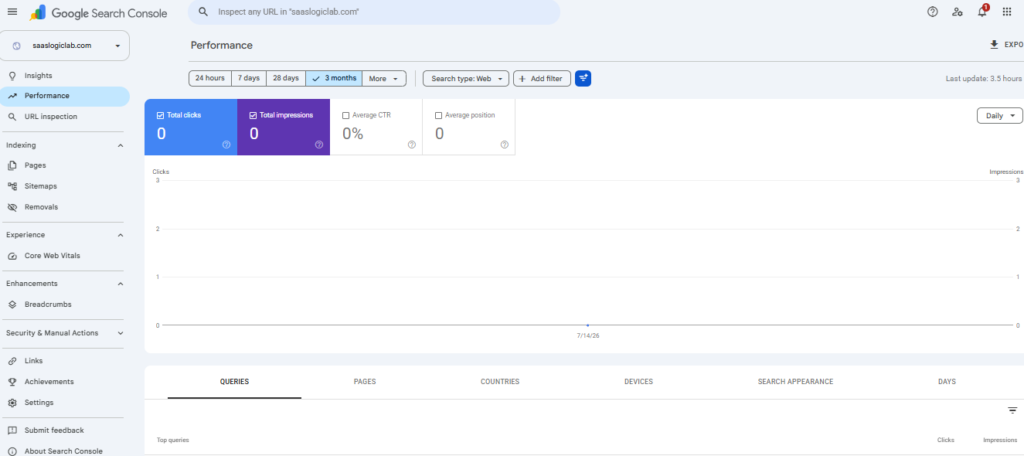
This screenshot is from our newly launched SaaSLogicLab website. As expected, a new site starts with zero clicks and impressions until Google indexes pages and begins collecting search performance data.
Key Features
Search Performance Reports:
See your website’s total clicks, impressions, average click-through rate, and average search position. You can filter the data by query, page, country, device, date, and search appearance.
Generative AI Performance:
Search Console can report impressions from Google Search features such as AI Overviews and AI Mode. This helps website owners understand how their content appears across newer search experiences.
Page Indexing Report:
Check which pages Google has indexed and which pages are excluded. The report also helps you identify possible indexing problems.
URL Inspection Tool:
Inspect an individual URL to see whether Google has indexed it. You can test the live page and request indexing after publishing or updating important content.
Core Web Vitals Report:
Monitor how groups of pages perform based on real-world loading speed, responsiveness, and visual stability data.
Sitemap Submission:
Submit your XML sitemap so Google can discover important pages more efficiently.
Link Reports:
View the websites linking to your domain, your most-linked pages, commonly used anchor text, and internal linking data.
Security and Manual Actions:
Google Search Console can warn you about security problems, hacked content, spam issues, or manual actions affecting your website.
Pros
- Completely free
- Provides first-party data directly from Google
- Helps identify crawling and indexing problems
- Shows the queries and pages generating organic clicks
- Allows XML sitemap submission
- Monitors Core Web Vitals
- Reports security issues and manual actions
- Useful for beginners, businesses, and professional SEOs
Cons
- Data may not appear immediately
- Historical performance data is limited compared with some paid platforms
- It does not provide traditional keyword difficulty scores
- It does not show complete competitor data
- Some reports can be confusing for new users
- It is not a replacement for a full keyword research or competitor analysis tool
Pricing
Google Search Console is completely free.
There are no premium plans, paid upgrades, or monthly subscription fees.
Ease of Use
★★★★☆ — 4/5
Basic reports are easy to understand once the website is verified.
Beginners can quickly check clicks, impressions, indexed pages, and sitemap status. However, technical reports related to crawling, structured data, and indexing may require some SEO knowledge.
Free Version
Yes.
Google Search Console is a fully free platform. Every verified website owner receives access to its main reports and features.
Integrations
Google Search Console works well with:
- Google Analytics 4: Connect search performance with user behavior and conversions.
- Looker Studio: Build automated SEO dashboards and client reports.
- Semrush: Combine first-party search data with keyword and competitor research.
- Ahrefs: Connect verified website data with site audit and performance reports.
- WordPress SEO Plugins: Plugins such as Rank Math can display selected Search Console data inside WordPress.
Real-World Example
Imagine you publish ten articles on a new website.
Google Search Console can show you:
- Which articles Google has indexed
- Which search queries are triggering those articles
- How many impressions each page receives
- Whether people are clicking your search results
- Which pages need stronger titles or meta descriptions
- Whether technical problems are preventing pages from being indexed
Without Search Console, you would be making SEO decisions with incomplete information.
Who Should Use It?
Every website owner should use Google Search Console.
It is especially important for new websites because it helps confirm whether Google can discover and index the site’s pages correctly.
Who Should Skip It?
No website owner should skip Google Search Console.
Even when you use paid tools such as Semrush or Ahrefs, you still need GSC because those platforms cannot replace Google’s first-party indexing and search performance data.
Should You Pay for Another Tool?
Do not buy an expensive SEO platform only to monitor your own new website.
Start with:
- Google Search Console
- Google Analytics 4
- PageSpeed Insights
- A WordPress SEO plugin such as Rank Math or Yoast
Consider a paid tool when you need deeper keyword research, competitor analysis, rank tracking, or backlink research.
SaaSLogicLab Recommendation
Best free SEO tool for every website owner
Start using Google Search Console as soon as your website goes live.
For a new website, it is more important than an expensive SEO subscription. It helps you confirm that Google can access your website and shows whether your SEO work is producing impressions and clicks.
Paid tools can support your decisions, but Google Search Console should remain part of your SEO workflow at every stage.
Bottom Line
Google Search Console is the best free tool for monitoring your website’s presence in Google Search.
It does not replace specialist tools for keyword research or competitor analysis. However, no other platform can replace the indexing and first-party search performance information it provides.
Our Verdict
Google Search Console is essential for beginners, businesses, SaaS companies, and SEO agencies.
It is free, reliable, and directly connected to Google Search. Set it up before paying for any other SEO tool.
Semrush
Overview
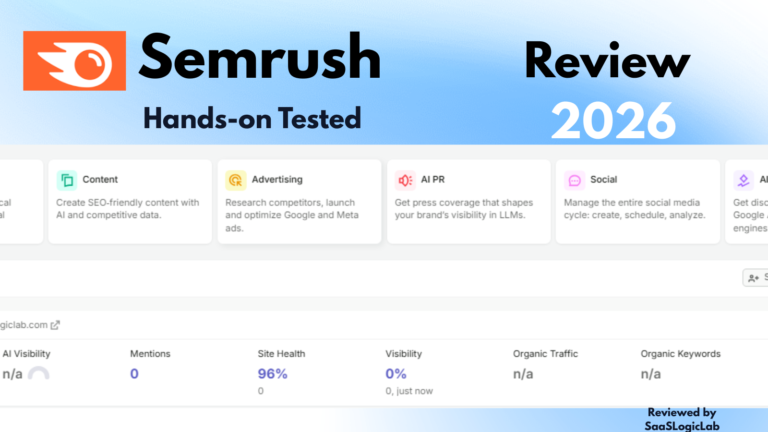
Semrush is an all-in-one digital marketing platform that helps you manage almost every part of SEO from a single dashboard. It combines keyword research, competitor analysis, technical SEO audits, backlink analysis, rank tracking, content optimization, PPC research, and reporting into one platform.
Instead of using multiple SEO tools, many businesses and agencies use Semrush to manage their entire SEO workflow.
Best For
Semrush is best for:
- SEO professionals
- Digital marketing agencies
- SaaS companies
- Growing businesses
- Content marketing teams
- In-house SEO teams
Why We Picked It
We included Semrush because it offers one of the most complete SEO platforms available today.
Whether you want to find keywords, analyze competitors, fix technical issues, monitor rankings, or plan content, Semrush provides everything in one place. This makes it an excellent choice for businesses that want a complete SEO solution instead of managing several separate tools.
Key Features
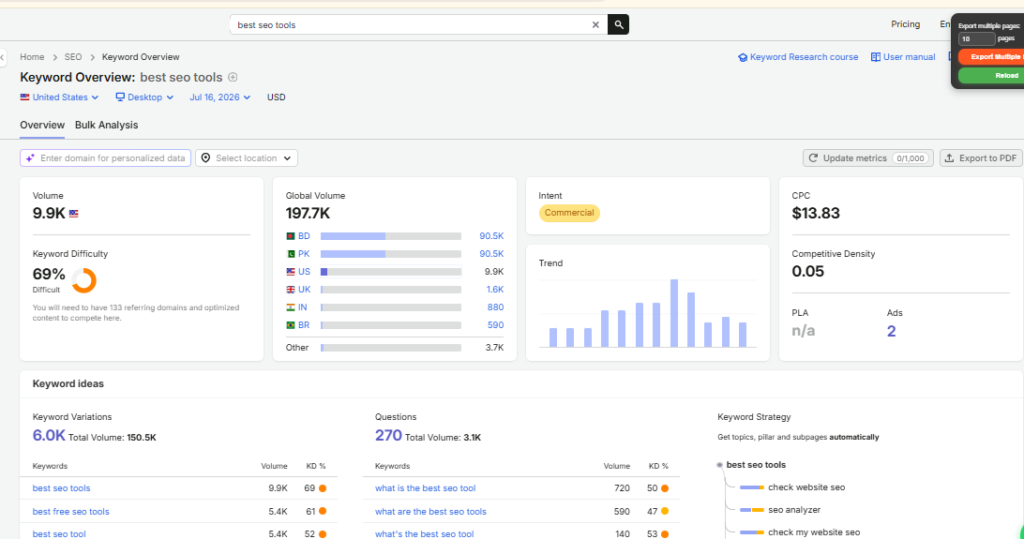
Keyword Magic Tool
Discover millions of keyword ideas along with search volume, keyword difficulty, search intent, CPC, and related keyword variations.
Site Audit
Crawl your website to identify technical SEO issues such as broken links, duplicate content, missing meta tags, crawl errors, redirect chains, and Core Web Vitals problems.
Position Tracking
Track keyword rankings daily across different countries, cities, and devices.
Organic Research
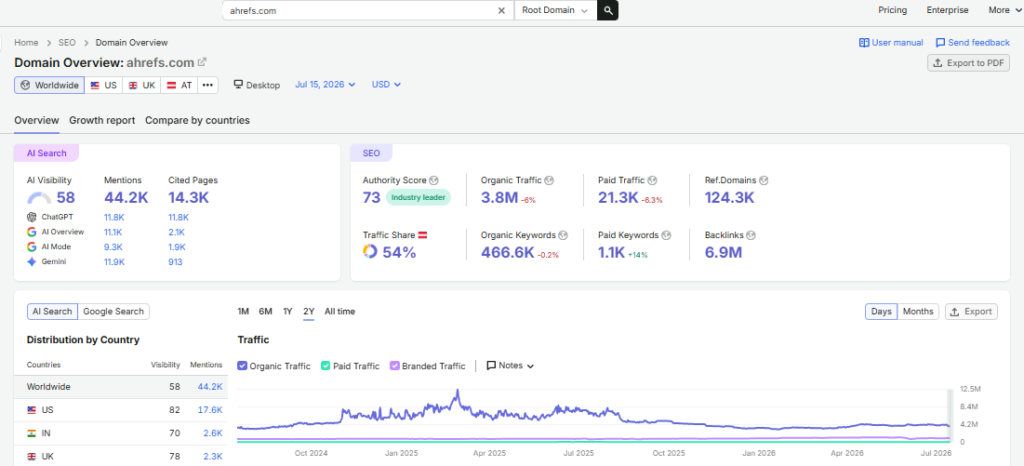
Analyze any website to discover its top-performing keywords, estimated traffic, ranking pages, and competitors.
Backlink Analytics
Review backlink profiles, referring domains, anchor text, toxic links, and new or lost backlinks.
SEO Content Toolkit
Generate SEO content briefs, optimize articles, and improve topical coverage using real-time recommendations.
Competitor Analysis
Compare your website with competitors to identify keyword gaps, backlink opportunities, and content gaps.
Local SEO
Manage local business listings, monitor reviews, and improve local search visibility.
Pros
- Complete all-in-one SEO platform
- Excellent keyword research database
- Powerful competitor analysis
- Comprehensive technical SEO audits
- Accurate rank tracking
- Strong content optimization tools
- Professional reporting for agencies
- Regular feature updates
Cons
- Expensive for beginners
- Learning curve for new users
- Usage limits apply on every plan
- Some reports require higher-tier subscriptions
- More features than many small websites actually need
Pricing
Pricing may change over time.
As of July 2026:
- Pro — Starts at $139.95/month
- Guru — Higher limits and historical data
- Business — Designed for larger companies and agencies
Always check the official Semrush website for the latest pricing.
Ease of Use
★★★★☆ (4.5/5)
The interface is modern and well organized.
However, because Semrush includes dozens of tools, beginners may need time to learn where everything is.
Free Version
Semrush offers a limited free account.
You can perform a small number of searches each day, but most advanced features require a paid subscription.
Integrations
Semrush integrates with:
- Google Search Console
- Google Analytics 4
- Google Looker Studio
- WordPress
- Google Docs
- Trello
- Monday.com
- Zapier
These integrations help combine SEO data with reporting and content workflows.
Real-World Example
Imagine you’re launching a new SaaS website.
Using Semrush, you can:
- Find keywords your customers search for
- Analyze competitors ranking on Google
- Identify content gaps
- Audit your website for technical issues
- Monitor keyword rankings every day
- Build a content strategy
- Track backlink growth
Instead of switching between multiple tools, everything is managed inside one dashboard.
Alternatives
If Semrush doesn’t fit your needs, consider:
- Ahrefs — Better for backlink research
- Google Search Console — Best free option
- SE Ranking — Budget-friendly alternative
- Ubersuggest — Good for beginners
Who Should Buy It?
Buy Semrush if you:
- Manage multiple websites
- Run an SEO agency
- Need advanced keyword research
- Want competitor intelligence
- Create SEO content regularly
- Need professional reporting
Who Should Skip It?
You probably don’t need Semrush if:
- You’re launching your first website
- You have a very limited budget
- You only need basic indexing and traffic reports
- You’re still learning SEO fundamentals
Start with Google Search Console, Google Analytics 4, and Rank Math before investing in an expensive SEO platform.
Should You Buy It?
Buy Semrush if:
✅ You manage client websites.
✅ SEO is part of your business.
✅ You publish content regularly.
✅ You need competitor research.
✅ You want one platform instead of five different tools.
Skip Semrush if:
❌ You just created your first website.
❌ Your budget is limited.
❌ You don’t yet understand basic SEO concepts.
SaaSLogicLab Recommendation
Best all-in-one SEO platform for growing businesses and agencies.
Semrush is one of the strongest investments once your website starts generating traffic and SEO becomes an important part of your business.
For beginners, spending $139.95 per month is usually unnecessary.
Learn SEO first.
Build your website.
Use free Google tools.
Upgrade to Semrush when you actually need advanced research, competitor analysis, and reporting.
Bottom Line
Semrush combines keyword research, technical SEO, competitor analysis, content optimization, backlink research, and reporting into one platform.
Although the price may be too high for beginners, it delivers excellent value for businesses and agencies that rely on SEO to generate traffic and leads.
Our Verdict
Semrush is one of the best all-in-one SEO platforms available today.
If your business depends on organic search, it can replace several standalone SEO tools and simplify your entire workflow.
Ahrefs
Overview
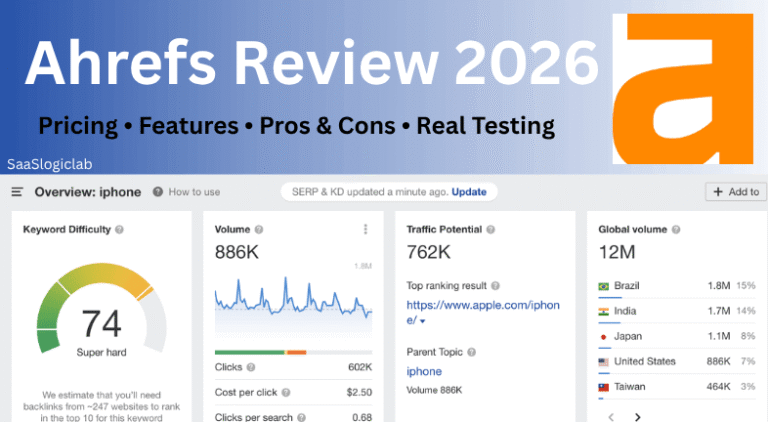
Ahrefs is a professional SEO platform best known for backlink analysis, competitor research, keyword research, and website auditing. It helps you understand why competitors rank higher, where they get backlinks, and which content drives the most organic traffic.
If link building and competitive SEO are important to your strategy, Ahrefs is one of the strongest tools available.
Best For
Ahrefs is best for:
- SEO professionals
- Link builders
- Content marketers
- SaaS companies
- Agencies
- Businesses focused on organic growth
Why We Picked It
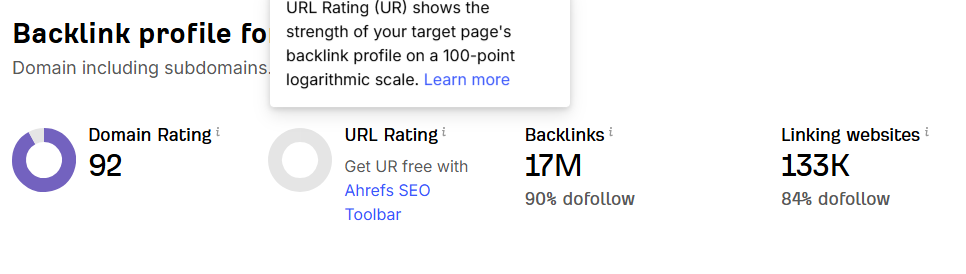
We included Ahrefs because it has one of the largest backlink databases in the SEO industry.
Beyond backlinks, it offers powerful keyword research, competitor analysis, content discovery, and technical SEO auditing. It is especially valuable for businesses that want to understand how competitors generate organic traffic and backlinks.
Key Features
Site Explorer
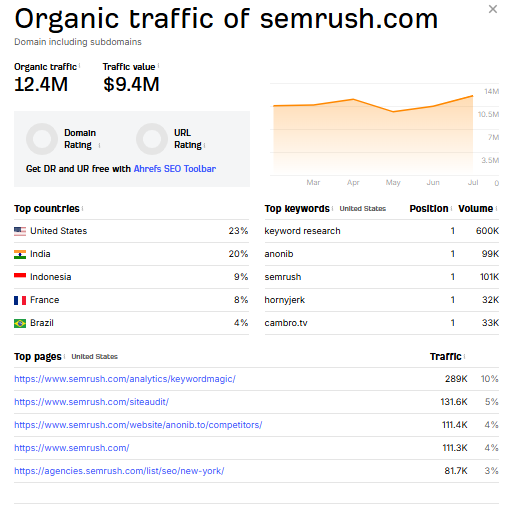
Analyze any website’s organic traffic, backlinks, referring domains, top pages, anchor text, and ranking keywords.
Keywords Explorer
Discover keyword ideas, search volume, keyword difficulty, traffic potential, search intent, and parent topics to build a stronger SEO strategy.
Site Audit
Scan your website for technical SEO issues, including broken links, duplicate content, crawl errors, redirect chains, and indexability problems.
Content Explorer
Find high-performing content based on backlinks, organic traffic, publication date, and social popularity.
Rank Tracker
Monitor keyword rankings across different locations and devices while tracking ranking improvements over time.
Link Intersect
Identify websites that link to your competitors but not to your website, making it easier to discover high-quality backlink opportunities.
Pros
- Industry-leading backlink database
- Excellent competitor research
- Reliable keyword data
- Powerful technical SEO audits
- Easy-to-understand interface
- Excellent content research
- Frequent database updates
- Great for link-building campaigns
Cons
- Expensive for beginners
- Daily usage limits apply
- No traditional free trial
- PPC and marketing features are more limited than Semrush
- Advanced reports require experience
Pricing
Pricing may change over time.
As of July 2026:
- Starter — $29/month
- Lite — $129/month
- Standard — $249/month
- Advanced — $449/month
Always check the official Ahrefs website for the latest pricing and feature limits.
Ease of Use
★★★★☆ (4.5/5)
Ahrefs has a clean and well-organized interface.
Basic reports are easy to understand, while advanced filtering and competitive analysis may take some time to master.
Free Version
Ahrefs does not offer a free version of its complete SEO platform.
However, Ahrefs Webmaster Tools is free for verified website owners and includes limited Site Audit and performance reports.
Integrations
Ahrefs integrates with:
- Google Search Console
- Google Analytics 4
- Looker Studio (via connectors)
- Google Sheets (exports)
- API (Enterprise plans)
Real-World Example
Imagine you’re trying to outrank a competitor.
With Ahrefs, you can:
- Find every website linking to your competitor.
- Discover which pages generate the most traffic.
- Analyze the keywords driving those rankings.
- Identify content gaps.
- Build a smarter backlink strategy.
Instead of guessing why competitors rank, you can use real SEO data to guide your decisions.
Alternatives
If Ahrefs doesn’t fit your needs, consider:
- Semrush — Better all-in-one marketing platform
- Google Search Console — Best free monitoring tool
- SE Ranking — More affordable SEO suite
- Moz Pro — Beginner-friendly SEO platform
Who Should Buy It?
Buy Ahrefs if you:
- Focus heavily on link building.
- Analyze competitors regularly.
- Need reliable backlink data.
- Build content based on SEO research.
- Manage SEO campaigns for clients.
Who Should Skip It?
You probably don’t need Ahrefs if:
- You’re launching your first website.
- You only need basic keyword research.
- Your SEO budget is very limited.
- You mainly monitor your own site’s indexing and performance.
In that case, Google Search Console, Google Analytics 4, and Rank Math provide a much better starting point.
Should You Buy It?
Buy Ahrefs if:
✅ Backlinks are a major part of your SEO strategy.
✅ You want industry-leading competitor research.
✅ You actively build topical authority.
✅ You work in an SEO agency.
Skip Ahrefs if:
❌ You’re just learning SEO.
❌ You only manage one small website.
❌ Your monthly SEO budget is limited.
Semrush vs Ahrefs
Choose Semrush if you want:
- An all-in-one SEO and digital marketing platform
- PPC research
- Content marketing tools
- Local SEO
- Social media features
Choose Ahrefs if you want:
- The strongest backlink research
- Better competitor backlink analysis
- Advanced content discovery
- Professional link-building workflows
Neither tool is universally “better.”
The right choice depends on your SEO goals.
SaaSLogicLab Recommendation
Best SEO platform for backlink research and competitor analysis.
If your website has started gaining traffic and you’re actively building authority through content and backlinks, Ahrefs is an excellent investment.
However, if you’re launching your first website, spend your budget on creating great content before investing in premium backlink software.
Bottom Line
Ahrefs is one of the most trusted SEO platforms for backlink analysis, competitor research, and technical SEO.
While it doesn’t include as many marketing features as Semrush, it remains one of the strongest tools for building organic search authority.
Our Verdict
Ahrefs is an outstanding choice for businesses, agencies, and SEO professionals who rely on backlink intelligence and competitor research.
Its data quality, usability, and research capabilities make it one of the best SEO platforms available today.
Google Analytics 4 (GA4)
Overview
Google Analytics 4 (GA4) is Google’s official analytics platform that helps you understand what visitors do after they arrive on your website. While Google Search Console shows how people find your website, GA4 shows how they interact with it.
You can track page views, user engagement, conversions, events, traffic sources, and customer journeys from one dashboard.
If you want to measure whether your SEO efforts are actually generating leads, sales, or business growth, GA4 is an essential tool.
Best For
Google Analytics 4 is best for:
- Website owners
- Bloggers
- Small businesses
- SaaS companies
- E-commerce stores
- Marketing teams
- SEO agencies
Why We Picked It
We included Google Analytics 4 because rankings alone don’t grow a business.
SEO brings visitors to your website, but GA4 tells you whether those visitors stay, engage, convert, or leave. This makes it one of the most important tools for measuring the real impact of SEO.
Key Features
Traffic Reports
See where your visitors come from, including Google Search, social media, referrals, email campaigns, and direct traffic.
Event Tracking
Track user actions such as button clicks, downloads, video views, scroll depth, form submissions, and purchases.
Conversion Tracking
Measure important business goals such as contact form submissions, newsletter signups, purchases, demo requests, and phone calls.
Engagement Reports
Understand how users interact with your website through engagement rate, average engagement time, and page views.
Landing Page Performance
Identify which landing pages attract the most organic traffic and generate the highest conversions.
Audience Reports
Learn about your visitors, including location, device type, browser, operating system, and demographics.
Custom Reports
Build custom dashboards focused on your business goals instead of relying only on default reports.
Pros
- Completely free
- Official Google analytics platform
- Tracks user behavior in detail
- Excellent conversion reporting
- Event-based tracking model
- Works with websites and mobile apps
- Highly customizable
- Integrates with Google’s marketing ecosystem
Cons
- Initial setup requires time
- Learning curve for beginners
- Reports can feel overwhelming
- Conversion tracking often requires Google Tag Manager
- Historical data cannot be imported from Universal Analytics
Pricing
Google Analytics 4 is completely free.
Large enterprises with advanced reporting requirements can use Google Analytics 360, which is a paid enterprise solution.
Ease of Use
★★★☆☆ (3.5/5)
GA4 is much more powerful than previous versions, but it is also more complex.
Beginners may need time to understand reports, events, and conversions.
Free Version
Yes.
The standard version includes almost every feature that small businesses, bloggers, and SaaS companies need.
Integrations
Google Analytics 4 integrates with:
- Google Search Console
- Google Tag Manager
- Google Ads
- Looker Studio
- BigQuery
- WordPress
- Shopify
- WooCommerce
Real-World Example
Imagine your website receives 5,000 organic visitors every month.
Google Search Console tells you:
- Which keywords generated clicks.
Google Analytics 4 tells you:
- Which pages visitors viewed.
- How long they stayed.
- Which forms they submitted.
- Which pages caused users to leave.
- Which traffic generated actual leads.
Without GA4, you know how people found you.
With GA4, you know whether your SEO is growing your business.
Alternatives
If GA4 doesn’t meet your needs, consider:
- Matomo
- Plausible Analytics
- Fathom Analytics
- Mixpanel
However, Google Analytics 4 remains the industry standard for most websites.
Who Should Buy It?
Every website owner should use GA4.
Whether you run a personal blog, SaaS company, agency, or online store, understanding user behavior is essential.
Who Should Skip It?
Almost no one.
The only exception is users who require fully self-hosted analytics because of strict privacy or compliance requirements.
Should You Use GA4?
Use GA4 if:
✅ You want to measure SEO results.
✅ You track leads or sales.
✅ You want better marketing decisions.
✅ You need accurate traffic insights.
Skip GA4 if:
❌ You don’t have a website.
❌ You refuse to configure analytics.
Otherwise, GA4 should be installed on every website.
Google Search Console vs Google Analytics 4
Use Google Search Console to understand:
- Rankings
- Clicks
- Impressions
- Indexing
- Search performance
Use Google Analytics 4 to understand:
- User behavior
- Engagement
- Conversions
- Revenue
- Customer journeys
Both tools work together and should be installed on every website.
SaaSLogicLab Recommendation
The best free analytics platform for measuring SEO success.
Install GA4 immediately after launching your website.
Connect it with Google Search Console so you can measure not only how visitors find your website but also what they do after they arrive.
This combination provides the foundation for making smarter SEO decisions.
Bottom Line
Google Analytics 4 helps you understand whether your SEO efforts are producing meaningful business results.
While it takes time to configure correctly, it is one of the most valuable free tools available for tracking traffic, engagement, and conversions.
Our Verdict
Google Analytics 4 is an essential analytics platform for every website.
When combined with Google Search Console, it provides everything you need to measure organic traffic, user behavior, and business growth.
Screaming Frog SEO Spider
Overview
Screaming Frog SEO Spider is a desktop-based technical SEO crawler that scans your website the same way search engines crawl web pages. It helps you find technical SEO issues that can affect crawling, indexing, rankings, and user experience.
Unlike cloud-based SEO platforms, Screaming Frog runs on your own computer, giving you complete control over your website audits.
If technical SEO is an important part of your workflow, Screaming Frog is one of the most valuable tools you can own.
Best For
Screaming Frog is best for:
- Technical SEO specialists
- SEO agencies
- Web developers
- SaaS companies
- Large websites
- Businesses managing hundreds or thousands of pages
Why We Picked It
We included Screaming Frog because it is one of the most trusted technical SEO tools in the industry.
It helps you discover problems that are difficult to identify manually, such as broken links, redirect chains, duplicate content, missing metadata, orphan pages, and crawl errors.
For anyone serious about technical SEO, Screaming Frog is an essential part of the workflow.
Key Features
Website Crawling
Scan your website to discover every accessible page and identify technical SEO issues.
Broken Link Detection
Find 404 errors, broken internal links, and broken external links before they negatively impact users and search engines.
Redirect Analysis
Identify redirect chains, redirect loops, temporary redirects, and unnecessary redirects that waste crawl budget.
Duplicate Content Detection
Find duplicate titles, duplicate meta descriptions, duplicate headings, and duplicate pages.
XML Sitemap Generation
Generate XML sitemaps for search engines or validate your existing sitemap.
Structured Data Audit
Check Schema Markup implementation and identify validation issues.
JavaScript Rendering
Render JavaScript websites to see how Googlebot may interpret dynamic content.
Custom Extraction
Extract structured data, headings, prices, author names, or any custom information using CSS selectors or XPath.
API Integrations
Connect with Google Search Console, Google Analytics 4, and PageSpeed Insights to combine technical SEO data with performance metrics.
Pros
- Industry-leading technical SEO crawler
- Extremely detailed audit reports
- Fast website crawling
- Excellent for large websites
- Supports JavaScript rendering
- Advanced filtering options
- One annual license instead of monthly pricing
- Strong integration with Google tools
Cons
- Not beginner-friendly
- Desktop software only
- Large crawls require more RAM
- Interface looks technical
- Doesn’t provide keyword research
- Doesn’t replace an all-in-one SEO platform
Pricing
Pricing may change over time.
As of July 2026:
- Free Version — Crawl up to 500 URLs
- Paid License — Approximately £199/year per user
Always check the official Screaming Frog website for the latest pricing.
Ease of Use
★★★☆☆ (3/5)
The interface is simple but highly technical.
Beginners can perform basic website audits after a short learning period, while advanced users will appreciate the powerful filtering, extraction, and crawl configuration options.
Free Version
Yes.
The free version allows you to crawl up to 500 URLs, making it suitable for small websites and learning the software.
The paid version removes the crawl limit and unlocks advanced features such as JavaScript rendering, scheduling, API integrations, and crawl comparison.
Integrations
Screaming Frog integrates with:
- Google Search Console
- Google Analytics 4
- Google PageSpeed Insights
- Looker Studio (via exports)
- OpenAI
- Gemini
- Custom APIs
Real-World Example
Imagine your website has published 150 articles.
Instead of opening every page manually, Screaming Frog can crawl the entire website and quickly show:
- Broken internal links
- Missing title tags
- Missing meta descriptions
- Duplicate H1 headings
- Redirect chains
- 404 pages
- Large image files
- Canonical errors
- Pages blocked by robots.txt
A task that would normally take several days can often be completed in less than an hour.
Alternatives
If Screaming Frog isn’t the right fit, consider:
- Sitebulb
- Semrush Site Audit
- Ahrefs Site Audit
- SE Ranking Website Audit
Who Should Buy It?
Buy Screaming Frog if you:
- Perform technical SEO regularly.
- Manage medium or large websites.
- Audit client websites.
- Need advanced crawl analysis.
- Want complete control over website audits.
Who Should Skip It?
You probably don’t need Screaming Frog if:
- You only manage a small website with a few pages.
- You are just starting to learn SEO.
- You only need basic indexing reports.
For beginners, Google Search Console is usually enough until the website grows.
Should You Buy It?
Buy Screaming Frog if:
✅ Technical SEO is part of your work.
✅ You regularly audit websites.
✅ You manage large websites.
✅ You need deep crawl analysis.
Skip Screaming Frog if:
❌ You only publish a few blog posts.
❌ You’re looking for keyword research.
❌ You don’t understand technical SEO yet.
SaaSLogicLab Recommendation
The best technical SEO crawler for professionals.
Screaming Frog is not the first SEO tool you should buy.
Start with:
- Google Search Console
- Google Analytics 4
- Rank Math
Once your website grows or you begin working with clients, Screaming Frog becomes one of the best investments for identifying technical SEO issues before they affect rankings.
Bottom Line
Screaming Frog is one of the most powerful technical SEO tools available.
While it has a learning curve, it provides the depth of analysis needed to maintain a healthy website and solve technical problems that many other tools miss.
Our Verdict
Screaming Frog is the industry standard for technical SEO auditing.
If technical SEO is an important part of your workflow, it offers exceptional value and should be a permanent part of your SEO toolkit.
Rank Math
Overview
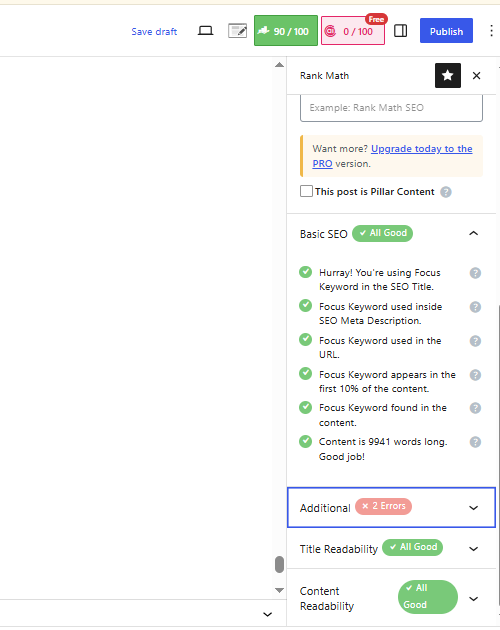
Rank Math is an all-in-one WordPress SEO plugin that helps you optimize your website for search engines without installing multiple SEO plugins. It combines on-page SEO, XML sitemaps, schema markup, redirections, 404 monitoring, and SEO analysis into one solution.
If your website runs on WordPress, Rank Math can simplify many technical SEO tasks and make content optimization much easier.
Best For
Rank Math is best for:
- WordPress website owners
- Bloggers
- Small businesses
- SaaS companies
- SEO professionals
- Digital marketing agencies
Why We Picked It
We included Rank Math because it offers more built-in SEO features than most WordPress SEO plugins.
Instead of installing separate plugins for schema markup, redirects, XML sitemaps, and SEO analysis, Rank Math combines everything into a single plugin. This reduces plugin clutter and simplifies website management.
Key Features
SEO Setup Wizard
A beginner-friendly setup wizard helps configure your website’s SEO settings in just a few minutes.
Advanced Schema Markup
Add structured data for articles, products, FAQs, recipes, local businesses, and many other content types without writing code.
XML Sitemap
Automatically generate XML sitemaps and keep them updated whenever you publish new content.
Content Optimization
Analyze your content and receive recommendations for titles, headings, keyword placement, readability, and metadata.
Redirection Manager
Create and manage 301, 302, and 307 redirects directly inside WordPress.
404 Monitor
Track broken URLs so you can fix them before they affect user experience or SEO.
Google Search Console Integration
View clicks, impressions, average position, and keyword performance inside your WordPress dashboard.
SEO Analyzer
Run a complete SEO audit of your website and identify technical issues that may affect rankings.
Pros
- Feature-rich free version
- Easy setup process
- Excellent schema support
- Built-in redirection manager
- Built-in 404 monitor
- Fast and modern interface
- Supports multiple focus keywords
- Regular updates and improvements
Cons
- Large number of settings may overwhelm beginners
- Some AI features require paid plans
- Enabling every module can add unnecessary complexity
- Advanced options require basic SEO knowledge
Pricing
Pricing may change over time.
As of July 2026:
- Free Version — Available
- Pro — Starts at approximately $69/year
Always check the official Rank Math website for the latest pricing and available plans.
Ease of Use
★★★★★ (5/5)
Rank Math has one of the easiest setup processes among WordPress SEO plugins.
Most users can complete the setup in less than 15 minutes using the guided configuration wizard.
Free Version
Yes.
The free version includes:
- Meta title and description management
- XML sitemaps
- Basic schema markup
- 404 monitor
- Redirection manager
- SEO analysis
- Google Search Console integration
For many websites, the free version is enough.
Integrations
Rank Math integrates with:
- Google Search Console
- Google Analytics 4
- Elementor
- Divi
- Gutenberg
- WooCommerce
- Easy Digital Downloads
Real-World Example
Imagine you’ve just published a new blog post.
Rank Math helps you:
- Optimize your SEO title.
- Improve your meta description.
- Add FAQ Schema.
- Generate sitemap updates automatically.
- Monitor indexing performance.
- Fix broken links.
- Improve on-page SEO before publishing.
Everything happens without leaving your WordPress dashboard.
Alternatives
If Rank Math isn’t the right fit, consider:
- Yoast SEO
- All in One SEO (AIOSEO)
- The SEO Framework
Who Should Buy It?
Buy Rank Math if you:
- Use WordPress.
- Want an all-in-one SEO plugin.
- Need schema markup.
- Want built-in redirects and 404 monitoring.
- Publish content regularly.
Who Should Skip It?
You probably don’t need Rank Math if:
- Your website isn’t built on WordPress.
- You prefer separate plugins for every SEO task.
- You only need basic meta tag editing.
Should You Buy It?
Buy Rank Math if:
✅ You use WordPress.
✅ You want multiple SEO features in one plugin.
✅ You don’t want to install several SEO plugins.
Skip Rank Math if:
❌ Your website doesn’t use WordPress.
❌ You already have another SEO plugin properly configured.
Rank Math vs Yoast SEO
Choose Rank Math if you want:
- More free features
- Built-in schema markup
- Built-in redirects
- Built-in 404 monitoring
- Multiple focus keywords
Choose Yoast SEO if you want:
- A simpler interface
- Beginner-friendly recommendations
- A long-established plugin with a conservative approach
Both plugins are excellent.
The right choice depends on your workflow and personal preference.
SaaSLogicLab Recommendation
The best WordPress SEO plugin for most websites.
If you’re launching a new WordPress website today, Rank Math offers the best balance of features, ease of use, and value.
For most beginners, the free version provides everything needed to build a solid SEO foundation.
Bottom Line
Rank Math combines many essential SEO features into one plugin, making it one of the most complete WordPress SEO solutions available.
Its generous free version and modern interface make it an excellent choice for beginners, businesses, and agencies alike.
Our Verdict
Rank Math is our top recommendation for WordPress users looking for an all-in-one SEO plugin.
It delivers outstanding value, reduces the need for multiple plugins, and simplifies both technical and on-page SEO.
Yoast SEO
Overview
Yoast SEO is one of the oldest and most trusted WordPress SEO plugins. It helps website owners optimize pages, blog posts, XML sitemaps, meta tags, and readability without needing advanced technical knowledge.
For more than a decade, Yoast SEO has been one of the most popular SEO plugins for WordPress, making it a reliable choice for beginners and small businesses.
Best For
Yoast SEO is best for:
- WordPress beginners
- Bloggers
- Small business websites
- Content creators
- Personal websites
- Businesses looking for a simple SEO plugin
Why We Picked It
We included Yoast SEO because it remains one of the easiest SEO plugins to learn.
Its clean interface, readability analysis, and straightforward setup make it an excellent option for users who want basic SEO guidance without dealing with too many advanced settings.
Key Features
SEO Analysis
Receive recommendations for improving SEO titles, meta descriptions, keyword usage, headings, image alt text, and internal linking.
Readability Analysis
Analyze sentence length, paragraph structure, passive voice, transition words, and readability to make content easier to understand.
XML Sitemap
Automatically create and update XML sitemaps for search engines.
Meta Tags
Customize SEO titles, meta descriptions, canonical URLs, and social media previews.
Schema Markup
Automatically add structured data to improve search engine understanding.
Breadcrumbs
Generate breadcrumb navigation to improve website structure and user experience.
Internal Linking Suggestions (Premium)
Receive recommendations for linking related articles to improve topical authority.
Pros
- Beginner-friendly interface
- Easy installation
- Reliable and stable
- Excellent readability analysis
- Automatic XML sitemaps
- Regular updates
- Strong documentation
- Large WordPress community
Cons
- Fewer free features than Rank Math
- Many advanced features require Premium
- No built-in redirection manager in the free version
- Schema customization is more limited
- Premium upgrade prompts appear frequently
Pricing
Pricing may change over time.
As of July 2026:
- Free Version — Available
- Premium — Starts at approximately $99/year
Always check the official Yoast SEO website for the latest pricing.
Ease of Use
★★★★★ (5/5)
Yoast SEO is one of the easiest SEO plugins for beginners.
Most users can configure the plugin in just a few minutes and start optimizing content immediately.
Free Version
Yes.
The free version includes:
- SEO titles
- Meta descriptions
- XML sitemaps
- Basic schema
- Readability analysis
- Content optimization
It provides enough features for many personal blogs and small business websites.
Integrations
Yoast SEO integrates with:
- Gutenberg
- Elementor
- WooCommerce
- Semrush
- Wincher
- WordPress
Real-World Example
Imagine you’re publishing your first blog post.
Yoast SEO checks:
- Whether your SEO title is too long.
- Whether your meta description is missing.
- If your paragraphs are too long.
- Whether headings are used correctly.
- If your article is easy to read.
This helps beginners publish more SEO-friendly content without needing deep SEO knowledge.
Alternatives
If Yoast SEO isn’t the right fit, consider:
- Rank Math
- All in One SEO (AIOSEO)
- The SEO Framework
Who Should Buy It?
Buy Yoast SEO if you:
- Want a simple SEO plugin.
- Prefer a clean interface.
- Are new to WordPress SEO.
- Publish blog content regularly.
Who Should Skip It?
You probably don’t need Yoast SEO if:
- You want advanced SEO features for free.
- You need built-in redirects.
- You want extensive schema customization.
- You’re already using Rank Math successfully.
Should You Buy It?
Buy Yoast SEO if:
✅ You’re new to WordPress.
✅ You want simple SEO recommendations.
✅ You value readability analysis.
Skip Yoast SEO if:
❌ You want the most features in the free version.
❌ You already use Rank Math.
Yoast SEO vs Rank Math
Choose Yoast SEO if you want:
- A simpler interface
- Beginner-friendly recommendations
- Strong readability analysis
- Long-term stability
Choose Rank Math if you want:
- More free features
- Advanced schema support
- Built-in redirects
- Built-in 404 monitoring
- Multiple focus keywords
Both plugins are excellent.
Most users should choose one and stick with it instead of switching frequently.
SaaSLogicLab Recommendation
Best WordPress SEO plugin for beginners.
If you’re completely new to WordPress SEO, Yoast SEO is an excellent place to start.
However, if you’re building a modern website and want more features without installing extra plugins, Rank Math offers better overall value.
Bottom Line
Yoast SEO remains one of the most trusted WordPress SEO plugins available.
Its simplicity, stability, and ease of use make it a great choice for beginners, bloggers, and small business websites.
Our Verdict
Yoast SEO is still an excellent SEO plugin.
While Rank Math offers more built-in features, Yoast SEO continues to be one of the easiest and most reliable options for WordPress users.
Ubersuggest
Overview
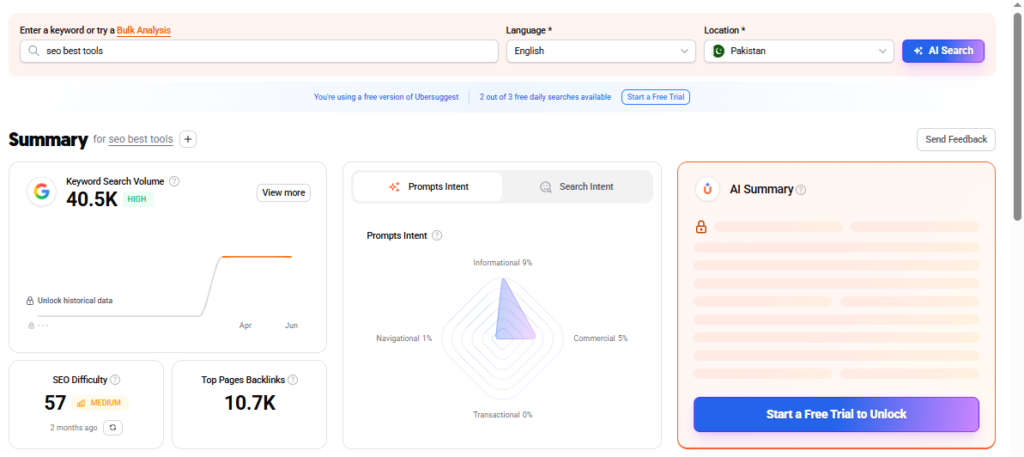
Ubersuggest is an affordable SEO platform designed for beginners, bloggers, freelancers, and small businesses. It combines keyword research, competitor analysis, site audits, backlink tracking, and rank monitoring in a simple dashboard that’s easy to understand.
Unlike enterprise SEO platforms that can feel overwhelming, Ubersuggest focuses on the SEO features most website owners actually use.
Best For
Ubersuggest is best for:
- Beginners learning SEO
- Bloggers
- Freelancers
- Small businesses
- Startup websites
- Budget-conscious marketers
Why We Picked It
We included Ubersuggest because it offers an excellent balance between price, simplicity, and useful SEO features.
If Semrush or Ahrefs feel too expensive, Ubersuggest provides many core SEO functions at a much lower monthly cost, making it a practical starting point for growing websites.
Key Features
Keyword Research
Discover keyword ideas, monthly search volume, SEO difficulty, paid difficulty, CPC, and long-tail keyword opportunities.
Domain Overview
Analyze any website’s estimated organic traffic, top-performing pages, keywords, backlinks, and competitors.
Site Audit
Scan your website for technical SEO issues, including missing meta tags, slow pages, broken links, and other optimization opportunities.
Rank Tracking
Track keyword rankings over time and monitor SEO progress across different locations.
Backlink Analysis
View referring domains, backlinks, domain authority metrics, and new or lost backlinks.
Content Ideas
Find popular articles based on backlinks, social shares, and estimated traffic to help plan future content.
Pros
- Affordable pricing
- Easy-to-use dashboard
- Beginner-friendly interface
- Good keyword research
- Helpful competitor analysis
- Built-in site audits
- Daily rank tracking
- Suitable for small websites
Cons
- Smaller keyword database than Semrush or Ahrefs
- Backlink database is less comprehensive
- Limited advanced reporting
- Fewer enterprise features
- Usage limits apply on lower plans
Pricing
Pricing may change over time.
As of July 2026:
- Individual — Starts at approximately $12–13/month
- Business and Enterprise plans are available with higher limits.
Always check the official Ubersuggest website for the latest pricing.
Ease of Use
★★★★★ (5/5)
Ubersuggest has one of the easiest interfaces among SEO tools.
Even users with little SEO experience can quickly perform keyword research, analyze competitors, and run website audits.
Free Version
There is no completely free plan.
However, Ubersuggest allows limited daily searches before requiring a paid subscription.
Integrations
Ubersuggest supports:
- Chrome Extension
- Google Search
- CSV Export
- SEO Dashboard Reports
While its integrations are fewer than enterprise platforms, they are sufficient for most beginners.
Real-World Example
Imagine you’re launching your first blog.
You want to write an article about “best email marketing software.”
Using Ubersuggest, you can:
- Find keyword ideas.
- Estimate search volume.
- Check SEO difficulty.
- Analyze competing pages.
- Discover related topics.
Instead of guessing what people search for, you can create content based on actual search demand.
Alternatives
If Ubersuggest isn’t the right fit, consider:
- Google Search Console (Free)
- Semrush
- Ahrefs
- SE Ranking
- Mangools
Who Should Buy It?
Buy Ubersuggest if you:
- Are learning SEO.
- Run a personal blog.
- Have a limited budget.
- Need basic keyword research.
- Manage a small business website.
Who Should Skip It?
You probably don’t need Ubersuggest if:
- You run a large SEO agency.
- You require enterprise-level backlink research.
- You need advanced reporting and automation.
- You already use Semrush or Ahrefs.
Should You Buy It?
Buy Ubersuggest if:
✅ You’re just getting started with SEO.
✅ You need an affordable SEO toolkit.
✅ Your website has a limited marketing budget.
Skip Ubersuggest if:
❌ You need enterprise-level SEO data.
❌ You manage multiple large client websites.
❌ You rely heavily on backlink research.
Ubersuggest vs Semrush
Choose Ubersuggest if you want:
- Lower monthly costs
- Simpler interface
- Basic SEO tools
- Beginner-friendly experience
Choose Semrush if you want:
- Advanced keyword research
- Technical SEO
- PPC research
- Competitor intelligence
- Agency reporting
Semrush is significantly more powerful, but Ubersuggest offers better value for users who don’t need enterprise-level features.
SaaSLogicLab Recommendation
Best budget-friendly SEO tool for beginners.
If you’re learning SEO or launching your first website, Ubersuggest gives you enough features to build a solid foundation without paying for an expensive enterprise platform.
As your website grows, you can upgrade to Semrush or Ahrefs when you need deeper research and larger datasets.
Bottom Line
Ubersuggest is an affordable and beginner-friendly SEO platform that covers the most important SEO tasks without overwhelming new users.
While it cannot match the depth of enterprise SEO suites, it provides excellent value for bloggers, freelancers, and small businesses.
Our Verdict
Ubersuggest is one of the best entry-level SEO platforms available today.
It is easy to use, reasonably priced, and offers enough functionality to help beginners build a strong SEO foundation before investing in more advanced tools.
AnswerThePublic
Overview
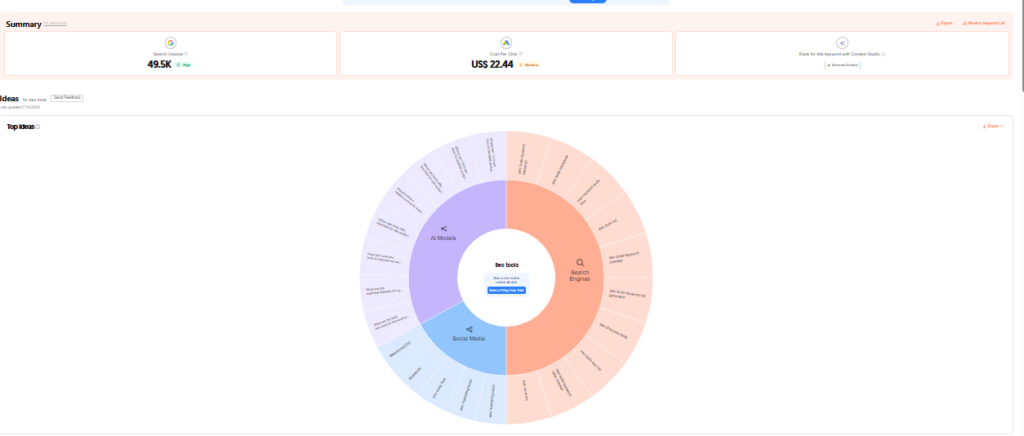
AnswerThePublic is a keyword research and content ideation tool that helps you discover the questions people are actually searching for on Google. Instead of focusing only on search volume, it organizes real search queries into categories such as Who, What, Why, When, Where, How, Can, and Vs, making it easier to understand search intent.
If your goal is to create helpful content that answers real user questions, AnswerThePublic is one of the best tools available.
Best For
AnswerThePublic is best for:
- Content marketers
- Bloggers
- SEO professionals
- SaaS companies
- Freelancers
- Businesses building topical authority
Why We Picked It
We included AnswerThePublic because keyword volume alone doesn’t tell you what people really want to know.
AnswerThePublic helps you understand the questions behind a keyword. This makes it easier to build topic clusters, improve topical authority, and create content that matches real search intent.
Key Features
Question-Based Keyword Research
Discover hundreds of questions people ask around your main keyword, including “how,” “why,” “what,” and “when” searches.
Comparison Keywords
Find comparison searches such as:
- Semrush vs Ahrefs
- Notion vs ClickUp
- Slack vs Microsoft Teams
These keywords are ideal for comparison articles.
Prepositions
Generate keyword ideas using phrases like:
- for
- with
- without
- near
- versus
This helps uncover long-tail search opportunities.
Alphabetical Suggestions
View keyword ideas from A to Z to discover additional content opportunities.
Search Listening
Monitor changes in search behavior over time and identify emerging topics.
Visual Search Maps
Display keyword ideas in interactive visual maps that make content planning easier.
Pros
- Excellent for content planning
- Helps identify search intent
- Finds long-tail keyword opportunities
- Easy-to-use interface
- Great for topic clusters
- Useful for FAQ research
- Supports content brainstorming
Cons
- Not a complete SEO platform
- No backlink analysis
- No technical SEO audits
- Limited keyword metrics
- Daily search limits on lower plans
Pricing
Pricing may change over time.
As of July 2026:
- Individual Plan — Starts at approximately $11–13/month
- Team and Enterprise plans are available.
Always check the official AnswerThePublic website for the latest pricing.
Ease of Use
★★★★★ (5/5)
The platform is extremely beginner-friendly.
Simply enter a keyword, and AnswerThePublic automatically generates hundreds of related search questions.
Free Version
A limited free version is available with a restricted number of daily searches.
Paid plans unlock additional searches, projects, and historical data.
Integrations
AnswerThePublic supports:
- CSV Export
- Image Export
- Search Listening Projects
It is commonly used alongside:
- Google Search Console
- Semrush
- Ahrefs
- Google Sheets
Real-World Example
Imagine you’re writing an article about CRM software.
Instead of guessing what users want, AnswerThePublic might reveal questions like:
- What is CRM software?
- Which CRM is best for startups?
- Is CRM worth it for small businesses?
- How much does CRM software cost?
- CRM vs ERP
Each question can become a section in your article or even a separate article, helping you build topical authority.
Alternatives
If AnswerThePublic isn’t the right fit, consider:
- AlsoAsked
- Google Autocomplete
- Google People Also Ask
- Semrush Keyword Magic Tool
- Ahrefs Keywords Explorer
Who Should Buy It?
Buy AnswerThePublic if you:
- Create SEO content regularly.
- Build topic clusters.
- Want more long-tail keywords.
- Need content ideas quickly.
- Focus on informational search intent.
Who Should Skip It?
You probably don’t need AnswerThePublic if:
- You only need backlink analysis.
- You want technical SEO audits.
- You already use an enterprise SEO suite and rarely perform content research.
Should You Buy It?
Buy AnswerThePublic if:
✅ Content marketing is a major part of your SEO strategy.
✅ You publish blog content regularly.
✅ You want to answer real user questions.
Skip AnswerThePublic if:
❌ You only need technical SEO.
❌ You primarily focus on backlink research.
❌ You already have enough content ideas from other tools.
AnswerThePublic vs Semrush
Choose AnswerThePublic if you want:
- Search intent research
- Content ideas
- Long-tail questions
- Topic cluster planning
Choose Semrush if you want:
- Keyword difficulty
- Search volume
- Competitor analysis
- Technical SEO
- Rank tracking
Many SEO professionals use both tools together because they solve different problems.
SaaSLogicLab Recommendation
Best tool for finding content ideas and building topical authority.
If you’re serious about content marketing, AnswerThePublic can help you discover the exact questions your audience is searching for.
Use it before writing every article to uncover missed opportunities and build more helpful content.
Bottom Line
AnswerThePublic is one of the easiest ways to understand search intent and generate content ideas.
While it isn’t a complete SEO platform, it fills an important gap that many keyword research tools overlook—understanding the real questions behind a search.
Our Verdict
AnswerThePublic is an excellent research tool for bloggers, SaaS companies, and content marketers.
If your goal is to create content that answers real user questions, it deserves a place in your SEO toolkit.
Overall Rating: 9.2/10
Quick Decision
Budget: 💰💰☆☆☆
Difficulty: Beginner
Setup Time: Less than 5 minutes
Best For: Content Planning & Topic Clusters
SaaSLogicLab Score: ⭐ 9.2/10
PageSpeed Insights
Overview
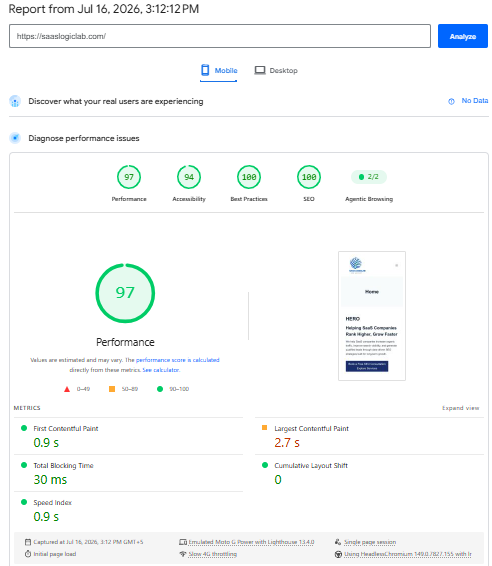
PageSpeed Insights (PSI) is a free performance testing tool developed by Google that measures how fast your web pages load and how well they perform for real users. It analyzes both mobile and desktop versions of a page and provides recommendations to improve speed, Core Web Vitals, and overall user experience.
Unlike many speed testing tools, PageSpeed Insights combines real-world user data (Field Data) with lab testing (Lab Data), making it one of the most trusted resources for diagnosing performance issues.
Best For
PageSpeed Insights is best for:
- Website owners
- Bloggers
- WordPress users
- Developers
- SEO professionals
- SaaS companies
- Agencies
Why We Picked It
We included PageSpeed Insights because website speed directly affects user experience and can influence search performance.
A slow website often leads to higher bounce rates, lower conversions, and poor Core Web Vitals scores. PageSpeed Insights helps identify these issues and provides practical recommendations to improve loading speed.
Since it is built by Google, it should be one of the first tools you use when testing website performance.
Key Features
Core Web Vitals
Measure Google’s three Core Web Vitals:
- Largest Contentful Paint (LCP)
- Interaction to Next Paint (INP)
- Cumulative Layout Shift (CLS)
These metrics help evaluate loading speed, responsiveness, and visual stability.
Performance Score
Receive an overall performance score for both mobile and desktop versions of your website.
Field Data
Analyze real-world performance data collected from actual Chrome users.
Lab Data
Run controlled Lighthouse tests to identify performance bottlenecks before users experience them.
Optimization Opportunities
Receive recommendations such as:
- Compress images
- Remove unused CSS
- Reduce JavaScript
- Enable browser caching
- Improve server response time
- Optimize fonts
Diagnostics
Identify issues affecting page speed, accessibility, SEO, and best practices.
Pros
- Completely free
- Built by Google
- Measures Core Web Vitals
- Uses real user performance data
- Provides clear optimization recommendations
- Works for mobile and desktop
- No account required
- Easy to access from any browser
Cons
- Doesn’t automatically fix problems
- Some recommendations require developer knowledge
- Scores may vary between tests
- Large websites may require additional tools for deeper analysis
Pricing
PageSpeed Insights is completely free.
There are no paid plans or premium subscriptions.
Ease of Use
★★★★☆ (4/5)
Running a speed test takes only a few seconds.
Understanding advanced recommendations may require basic technical knowledge, but most website owners can quickly identify major performance issues.
Free Version
Yes.
All features are available free of charge.
There are no usage limits for normal website testing.
Integrations
PageSpeed Insights works well with:
- Lighthouse
- Google Search Console
- Chrome DevTools
- Google Analytics 4
- Screaming Frog
- Looker Studio
Real-World Example
Imagine you’ve just redesigned your homepage.
It looks great, but visitors complain that it loads slowly.
Running the page through PageSpeed Insights reveals:
- Large images delaying loading
- Unused JavaScript
- Slow server response time
- Poor mobile performance
After fixing these issues, your website loads faster, users stay longer, and your Core Web Vitals improve.
Alternatives
If you need additional performance testing, consider:
- GTmetrix
- Pingdom Website Speed Test
- WebPageTest
- Lighthouse (Chrome DevTools)
Who Should Use It?
Every website owner should use PageSpeed Insights.
Whether you run a personal blog, SaaS business, online store, or agency website, monitoring page speed should be part of your regular SEO workflow.
Who Should Skip It?
No one.
Every website benefits from regular performance testing.
Should You Use It?
Use PageSpeed Insights if:
✅ You want a faster website.
✅ You care about Core Web Vitals.
✅ You want better user experience.
✅ You want to identify performance issues before they affect rankings.
Skip It if:
❌ There is no reason to skip it.
Since it is free and maintained by Google, every website should use it.
PageSpeed Insights vs GTmetrix
Choose PageSpeed Insights if you want:
- Google’s Core Web Vitals
- Real user data
- Official Google recommendations
- Free performance testing
Choose GTmetrix if you want:
- Waterfall charts
- Advanced loading analysis
- Historical monitoring
- Detailed performance debugging
Many professionals use both tools together because they provide different insights.
SaaSLogicLab Recommendation
The best free tool for monitoring website speed and Core Web Vitals.
Test your important pages regularly, especially after changing themes, installing plugins, or redesigning your website.
Improving page speed isn’t just about SEO—it also improves user experience and conversion rates.
Bottom Line
PageSpeed Insights is one of the most valuable free tools available for improving website performance.
It helps you identify speed issues, monitor Core Web Vitals, and make data-driven improvements that benefit both users and search engines.
Our Verdict
PageSpeed Insights should be part of every website owner’s SEO toolkit.
Combined with Google Search Console, Google Analytics 4, and Screaming Frog, it provides a strong foundation for maintaining a fast, healthy, and search-friendly website.
Overall Rating: 9.8/10
Quick Decision
Budget: 💚 Free
Difficulty: Beginner
Setup Time: Less than 1 minute
Best For: Website Speed & Core Web Vitals
SaaSLogicLab Score: ⭐ 9.8/10
Best SEO Tools by Use Case
Not every SEO tool is built for the same type of user.
Some tools are perfect for beginners, while others are designed for agencies managing dozens of client websites.
Use the table below to quickly choose the right SEO tool based on your needs.
| Your Goal | Recommended Tool | Why We Recommend It |
|---|---|---|
| Launching your first website | Google Search Console | Free, easy to use, and essential for monitoring indexing and search performance. |
| Tracking website traffic | Google Analytics 4 | Understand user behavior, conversions, and traffic sources. |
| Finding keyword opportunities | Semrush | Powerful keyword database with competitor insights. |
| Backlink research | Ahrefs | Industry-leading backlink analysis and link-building research. |
| Technical SEO audits | Screaming Frog | Deep website crawling and technical issue detection. |
| WordPress SEO | Rank Math | Excellent free features with built-in schema, redirects, and SEO tools. |
| Simple WordPress SEO | Yoast SEO | Beginner-friendly plugin with an easy setup process. |
| Budget SEO | Ubersuggest | Affordable keyword research and competitor analysis. |
| Content ideas | AnswerThePublic | Discover real questions people search on Google. |
| Website speed testing | PageSpeed Insights | Official Google tool for Core Web Vitals and performance optimization. |
Our Recommended SEO Stack
Beginners (Free)
- Google Search Console
- Google Analytics 4
- Rank Math
- PageSpeed Insights
Bloggers & Freelancers
- Google Search Console
- Google Analytics 4
- Ubersuggest
- Rank Math
Growing Businesses
- Semrush
- Google Search Console
- Google Analytics 4
- Rank Math
SaaS Companies
- Semrush
- Ahrefs
- Google Search Console
- Google Analytics 4
- Screaming Frog
SEO Agencies
- Semrush
- Ahrefs
- Screaming Frog
- Google Search Console
- Google Analytics 4
- Rank Math
Best SEO Tools for Agencies
SEO agencies need more than a basic keyword research tool. When you manage multiple client websites, your software must help you audit technical issues, analyze competitors, track rankings, research backlinks, and create reports without wasting hours switching between different platforms.
For most agencies, Semrush is the strongest all-in-one option. It combines keyword research, competitor analysis, site auditing, position tracking, backlink analysis, content planning, and client reporting in one platform. This makes it particularly useful for agencies that manage complete SEO campaigns rather than focusing on only one service. Read our complete Semrush Review 2026 to see its features, pricing, strengths, and limitations in more detail.
Ahrefs is a better fit for agencies focused heavily on backlink research, competitor analysis, and link-building campaigns. Its Site Explorer, Content Explorer, and Link Intersect tools help agencies understand why competitors rank, which pages attract backlinks, and where new outreach opportunities may exist. Our detailed Ahrefs Review 2026 explains whether its credit limits and pricing make sense for regular agency use.
For technical SEO, Screaming Frog SEO Spider remains one of the most practical tools available. It can crawl client websites and quickly identify broken links, redirect chains, duplicate metadata, canonical problems, missing headings, and indexability issues.
Agencies should also connect Google Search Console and Google Analytics 4 for every client. These tools provide first-party data about search queries, clicks, impressions, landing pages, engagement, and conversions.
A small agency does not need to buy every premium SEO platform immediately. A practical starting stack is Google Search Console, GA4, Screaming Frog, and either Semrush or Ahrefs. Add more tools only when your client workload and reporting requirements justify the additional cost.
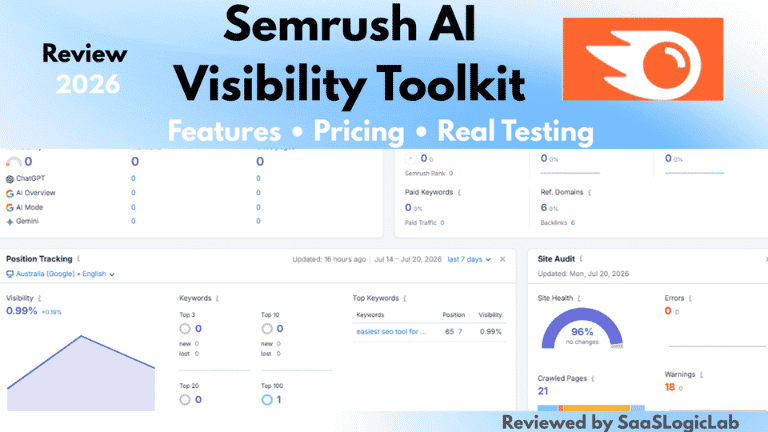
Semrush also includes tools for monitoring brand visibility across AI search platforms. Read our Semrush AI Visibility Toolkit Review for a complete breakdown of its AI tracking features.
Frequently Asked Questions (FAQs)
1. What is the best SEO tool for beginners?
Google Search Console is the best SEO tool for beginners because it’s completely free and provides first-party data directly from Google. Pair it with Google Analytics 4 and Rank Math to build a strong SEO foundation before investing in paid tools like Semrush or Ahrefs.
2. Which SEO tool is the most accurate?
Google Search Console provides the most accurate data about your own website because it comes directly from Google. For competitor research and keyword analysis, Semrush and Ahrefs are among the most trusted SEO platforms.
3. Is Semrush better than Ahrefs?
Neither tool is better for everyone. Semrush is a better all-in-one marketing platform, while Ahrefs is stronger for backlink analysis and competitor research. Your choice depends on your SEO goals and budget.
4. Do I need paid SEO tools?
No.
Most new websites can start with Google Search Console, Google Analytics 4, Rank Math, and PageSpeed Insights. Paid SEO tools become valuable once your website starts growing and you need advanced keyword research or competitor analysis.
5. Which SEO tool is best for keyword research?
Semrush is one of the best tools for keyword research because it offers search volume, keyword difficulty, search intent, and competitor insights. Ahrefs is also an excellent option for advanced keyword analysis.
6. Which SEO tool is best for backlinks?
Ahrefs is widely considered one of the best backlink analysis tools because of its large backlink database, competitor research capabilities, and link-building features.
7. Which SEO tool is best for technical SEO?
Screaming Frog SEO Spider is one of the best technical SEO tools. It helps identify crawl errors, broken links, duplicate content, redirect chains, and many other technical issues affecting search performance.
8. Which SEO plugin is better: Rank Math or Yoast?
Both plugins are excellent. Rank Math offers more free features, while Yoast SEO focuses on simplicity and ease of use. For most WordPress websites, Rank Math provides better overall value.
9. What is the best free SEO tool?
Google Search Console is the best free SEO tool because it provides official Google search performance, indexing reports, and technical health information at no cost.
10. How many SEO tools do I actually need?
Most website owners only need four tools to start:
- Google Search Console
- Google Analytics 4
- Rank Math
- PageSpeed Insights
As your business grows, you can add tools like Semrush or Ahrefs.
11. Can I do SEO without Semrush?
Yes.
Many successful websites grow using free tools. Semrush saves time and provides deeper insights, but it isn’t required when you’re just starting.
12. Is Google Analytics 4 necessary for SEO?
Yes.
Google Analytics 4 helps you understand how visitors interact with your website after arriving from Google Search. It complements Google Search Console by measuring engagement and conversions.
13. How often should I use PageSpeed Insights?
Test your most important pages every month and after making major website changes such as installing plugins, changing themes, or redesigning pages.
14. Which SEO tool is best for small businesses?
Small businesses should start with Google Search Console, Google Analytics 4, Rank Math, and Ubersuggest. As traffic and revenue grow, upgrading to Semrush becomes a worthwhile investment.
15. Which SEO tool is best for agencies?
Most SEO agencies use a combination of Semrush, Ahrefs, Screaming Frog, Google Search Console, and Google Analytics 4 because each tool solves a different part of the SEO workflow.
16. Is Google Search Console enough?
Google Search Console is essential, but it doesn’t replace keyword research, backlink analysis, or competitor research. It works best when combined with other SEO tools.
17. Which SEO tool should I buy first?
If your website is already generating traffic and you want one complete SEO platform, Semrush is usually the best first investment.
18. Can one SEO tool do everything?
No.
Every SEO tool has strengths and weaknesses. Many professionals use multiple tools together to cover keyword research, backlinks, technical SEO, analytics, and content optimization.
19. How do I choose the right SEO tool?
Choose an SEO tool based on your goals, budget, website size, and experience level—not simply because it’s popular.
20. What is our overall recommendation?
For beginners, start with Google’s free tools. As your website grows, invest in Semrush or Ahrefs based on your SEO needs. The best SEO tool is the one you’ll actually use consistently.
Final Thoughts
Choosing the best SEO tool isn’t about buying the most expensive software.
It’s about selecting the right tool for your current stage, budget, and business goals.
If you’re launching your first website, you don’t need to spend hundreds of dollars every month.
Start with the essentials.
- Google Search Console
- Google Analytics 4
- Rank Math
- PageSpeed Insights
These free tools are more than enough to build a strong SEO foundation.
As your website grows, your needs will change.
When you begin publishing content consistently, tracking competitors, building backlinks, or managing client projects, investing in platforms like Semrush or Ahrefs becomes much more valuable.
Remember, no SEO tool can replace a solid strategy.
The best results come from combining the right tools with high-quality content, technical SEO, and a consistent publishing schedule.
Choose tools that solve your current problems—not tools you hope you’ll need someday.
Need Help Choosing the Right SEO Tool?
Finding the right SEO software can be confusing, especially when every platform claims to be the best.
If you’re unsure which tool fits your website, business, or budget, we’re here to help.
At SaaSLogicLab, we publish in-depth software reviews, comparison guides, and practical SEO resources to help businesses make smarter decisions.
If you’re looking for long-term organic growth instead of short-term SEO tricks, explore the resources below.
👉 Explore Our SEO Resources
👉 Learn About Our SEO Services
👉 Compare Popular SEO Tools
👉 Read More Software Reviews
Still have questions?
Contact us, and we’ll help you choose the right SEO strategy for your business.
Quick Recommendations
Choose the right SEO tool based on your current stage.
| If you are… | Start With |
|---|---|
| Beginner | Google Search Console + Rank Math |
| Blogger | Google Search Console + GA4 + Rank Math |
| Freelancer | Ubersuggest |
| Small Business | Semrush |
| SaaS Company | Semrush + Ahrefs |
| SEO Agency | Semrush + Ahrefs + Screaming Frog |