Semrush Review 2026: Features, Pricing, Pros & Cons – Is It Worth It?
Tested and reviewed by Ahsan Raza, SaaS SEO Specialist
Last updated: July 2026
Editorial Disclosure
This review is based on hands-on testing, original screenshots, official Semrush documentation, and analysis of real SEO workflows. We tested Semrush using SaaSLogicLab and competitor domains. Some integrations and features were reviewed through official documentation where full account-level access was unavailable. This article currently uses normal official links and is not based on an active Semrush affiliate partnership.
Semrush is one of the most comprehensive digital marketing platforms available in 2026, but it is also one of the easiest tools for beginners to misunderstand.
Its dashboard contains tools for keyword research, competitor analysis, technical SEO, backlinks, rank tracking, content optimization, paid advertising, traffic research, local marketing, and AI search visibility. That wide feature set can save hours of manual work, but it also raises an important question: is Semrush genuinely worth its price, or does it provide more tools than most users will ever need?
To answer that question, we tested Semrush across real SEO tasks instead of judging it from its feature list alone. We used it to analyze keywords, inspect competitor backlinks, create a position-tracking campaign, evaluate AI visibility, compare estimated traffic, and audit SaaSLogicLab for technical SEO problems.
The most useful result came from Site Audit. It helped us trace multiple page-level errors back to one missing global logo resource. After replacing the image, clearing the cache, and rerunning the audit, the reported errors dropped to zero and The Site Health score increased from 92% to 95%…
However, Semrush is not an automatic SEO solution. Some of its numbers are estimates, new websites may initially show little or no data, and the number of available tools can overwhelm inexperienced users. Its value depends less on how many features it offers and more on whether the user has the skills and workflows needed to turn its data into action.
This Semrush review covers our testing process, core features, AI search tools, pricing, accuracy, advantages, limitations, alternatives, and the types of users who should—or should not—pay for it.
Semrush Review 2026: Quick Verdict
Semrush is one of the best all-in-one SEO platforms for professionals, agencies, consultants, and businesses that actively use its data to make marketing decisions. Its strongest advantages are the depth of its keyword research, technical auditing, competitor intelligence, backlink analysis, position tracking, filters, and growing AI visibility toolset.
For complete beginners, however, Semrush can be expensive and unnecessarily complex. New users should first understand basic SEO through free tools such as Google Search Console, Google Analytics, and limited keyword research tools. Once they can use SEO data to improve rankings, attract clients, or generate revenue, a paid Semrush plan becomes much easier to justify.
Our verdict: Semrush is expensive at the beginning, but it can feel inexpensive once it saves billable time or helps generate measurable revenue. Skill should come before subscription.
Best for
✅ SEO Agencies
✅ SaaS Companies
✅ B2B Companies
✅ In-house Marketing Teams
- ⭐ Rating: 4.9/5
- 👍 Best For: SEO Agencies, SaaS, B2B
- 👎 Not Ideal For: Complete Beginners
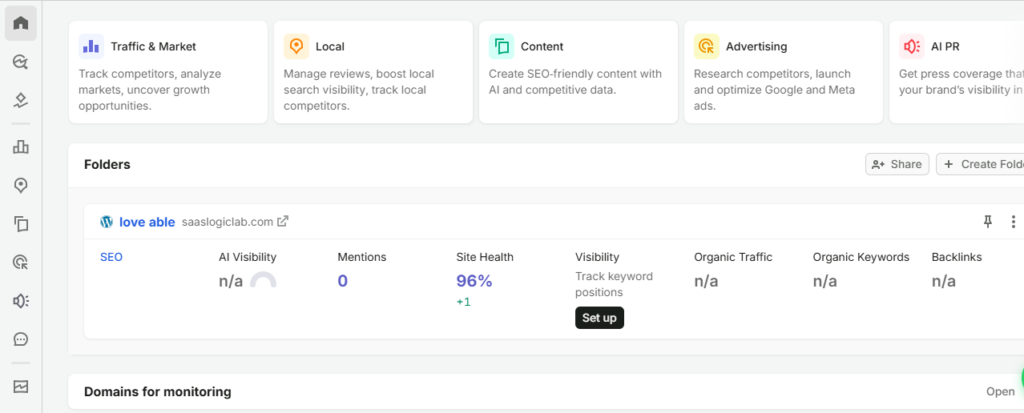
Semrush dashboard used during our hands-on testing of SaaSLogicLab in July 2026.
How We Tested Semrush
- We tested Semrush using SaaSLogicLab, a new SaaS and software-focused website, along with established competitor domains. Our goal was not to review every available tool, but to evaluate the features most relevant to real SEO work.
- The testing covered keyword research, competitor analysis, technical SEO, backlink research, position tracking, traffic estimates, AI visibility, prompt research, brand performance, and AI traffic. We also reviewed Semrush MCP through its official documentation because a full live connection was not completed during testing.
Our hands-on process included:
• analyzing the keyword “semrush review” in the United States database
• reviewing related keywords, intent, difficulty, and trend data
• auditing SaaSLogicLab for technical SEO issues
• comparing backlink profiles and competitor link gaps
• creating a six-keyword position-tracking campaign
• reviewing AI visibility, prompts, brand sentiment, and share of voice
• comparing standard traffic estimates with AI referral estimates
For every feature, we asked one simple question: did it help us find something useful faster than doing the same task manually? We also considered how easy each report was to understand, which data required manual verification, and whether the insights justified Semrush’s price.
Semrush Features We Tested
Semrush includes dozens of SEO and digital marketing tools, but most users never need every feature. Instead of trying to review the entire platform, we focused on the tools that are most useful during day-to-day SEO work.
Our testing covered technical SEO, keyword research, competitor analysis, backlink research, rank tracking, traffic analysis, and Semrush’s newer AI search features. Each feature was tested to answer one practical question: did it help us complete real SEO work faster and make better decisions than a manual process?
The following sections explain what we tested, what we found, where Semrush performed well, and where its data should be verified before making important SEO decisions.
Site Audit
Site Audit was the most valuable feature we tested. Instead of checking technical SEO issues one by one, Semrush scanned the website and grouped problems into a single report with affected pages, explanations, and recommended fixes.
We used Site Audit on SaaSLogicLab throughout the website setup process. An earlier crawl reported multiple page-level errors, but after investigating the report we found that many of them were linked to the same missing global logo resource rather than separate problems on each page.
After reuploading the missing logo, clearing the cache, confirming that the old file reference had been removed, and running a new crawl, the
reported errors dropped to zero. The Site Health score increased from 92% to 95%, showing how one shared resource can affect multiple pages at the same time.
The report also highlighted warnings, crawlability, HTTPS, internal linking, structured data, Core Web Vitals, and overall site performance. Not every warning required immediate action, but the audit made it much easier to decide what should be fixed first.
For beginners, Site Audit provides a practical starting point for technical SEO. For experienced SEO professionals, it can save hours by bringing the highest-priority issues into one place instead of checking them manually.
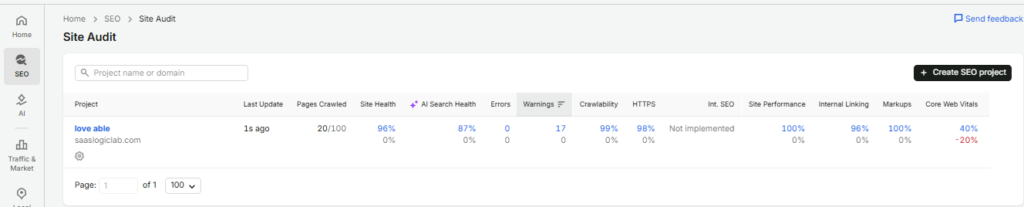
Semrush Site Audit overview for SaaSLogicLab after rerunning the crawl.
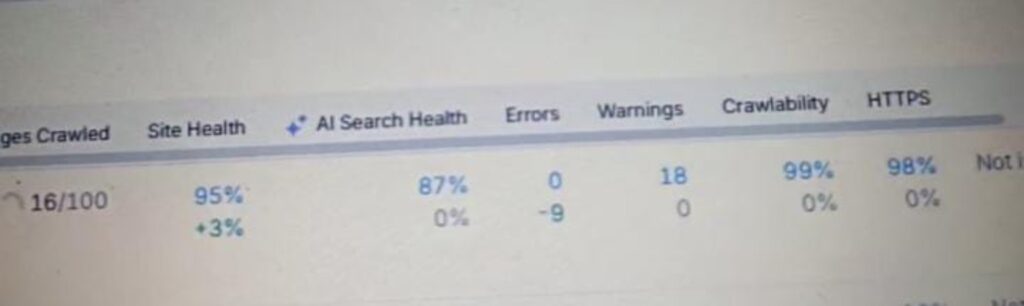
After resolving the identified technical SEO issues, the Semrush Site Audit improved to a 95% Site Health score (+3%). All 9 previously detected errors were successfully resolved, reducing the error count to 0. The audit currently reports 18 warnings, along with 99% Crawlability and 98% HTTPS implementation. The screenshot below was captured after the fixes were completed.
Issues Fixed During the Audit
• Fixed all 9 critical errors identified during the initial Site Audit.
• Resolved technical SEO issues affecting the overall Site Health.
• Improved the Site Health score from 92% to 95%.
• Increased Crawlability to 99%.
• Ensured HTTPS implementation reached 98%.
• Reduced the overall number of critical issues before publishing the website.
Keyword Research
Keyword Research is one of Semrush’s strongest features and one of the main reasons SEO professionals use the platform. Instead of relying on basic keyword suggestions, Semrush provides search volume, keyword difficulty, search intent, CPC, trend data, SERP features, and related keyword ideas in one place. This allows users to identify realistic ranking opportunities and prioritize keywords based on business goals rather than search volume alone.
We tested Keyword Research using the keyword “semrush review” in the United States database. During testing, we analyzed search volume, keyword difficulty, search intent, CPC, trend data, keyword variations, and related questions. The tool made it easy to identify both primary and long-tail keyword opportunities while showing how competitive each keyword would be before creating content.
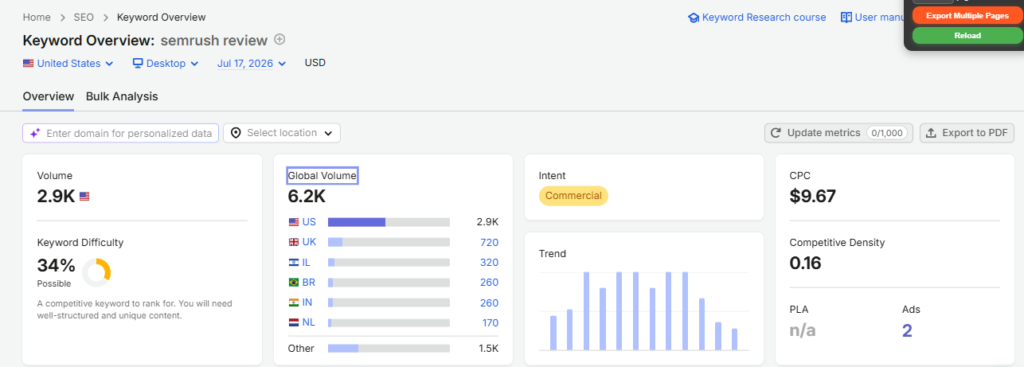
Semrush Keyword Overview report for the keyword “semrush review” (United States database), showing search volume, keyword difficulty, search intent, CPC, and trend data used during our hands-on testing.
The Keyword Overview report provides a quick snapshot of a keyword before deeper research begins. Instead of opening multiple reports, we could immediately evaluate search demand, ranking difficulty, commercial value, and search intent from a single dashboard. This made it easier to decide whether the keyword was worth targeting and what type of content would best match user intent.
What This Report Shows
• Monthly search volume for the keyword
• Keyword Difficulty (KD) score
• Search Intent (Informational, Commercial, Navigational, or Transactional)
• Cost Per Click (CPC)
• Search trend over time
• Related keyword opportunities
What We Learned During Testing
During testing, we found that Keyword Overview is best used as a decision-making tool rather than a keyword generator. Before writing content, it helped us quickly understand whether a keyword had enough search demand, how difficult it would be to rank, and whether it matched our content goals. This saved time by preventing us from targeting keywords that were either too competitive or not relevant to our audience.
Pro Tip
Don’t choose a keyword based only on high search volume. Always consider search intent, ranking difficulty, and whether the keyword matches the content you plan to create. A lower-volume keyword with clear user intent often delivers better results than a broad, highly competitive keyword.
Keyword Magic Tool
Keyword Magic Tool expands a single keyword into thousands of related keyword ideas. Instead of manually searching for variations, it groups keywords by topic, search intent, questions, and modifiers, making it easier to build complete content clusters and topical authority.
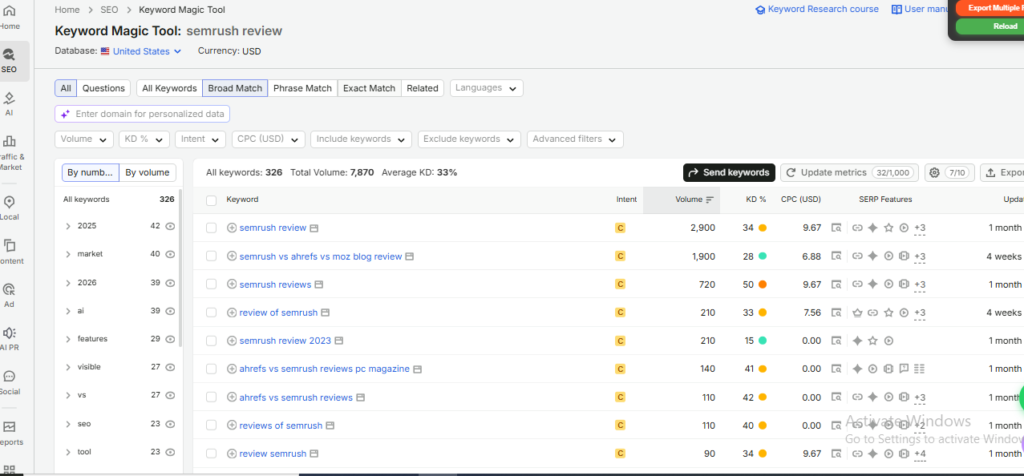
Semrush Keyword Magic Tool showing related keyword ideas, search volume, keyword difficulty, and search intent used during our hands-on testing.
During testing, Keyword Magic Tool generated thousands of related keyword ideas from a single search query. We used its filters to narrow results by search intent, keyword difficulty, search volume, and question-based queries. This made it much easier to discover long-tail keywords, identify content opportunities, and organize topics into logical content clusters instead of targeting isolated keywords.
What This Report Shows
• Thousands of related keyword ideas
• Search volume for each keyword
• Keyword Difficulty (KD)
• Search Intent
• Question-based keyword suggestions
• Filters for volume, KD, CPC, and SERP features
What We Learned During Testing
Instead of manually searching Google for keyword variations, Keyword Magic Tool generated thousands of related ideas from a single seed keyword in seconds. During testing, we used its filters to narrow results by search intent, keyword difficulty, and search volume. This made it much easier to identify long-tail keywords, discover content cluster opportunities, and build a structured topical authority strategy.
Pro Tip
Don’t export thousands of keywords and try to target everything. Start with keywords that have clear search intent, realistic ranking difficulty, and strong relevance to your business. Building several focused content clusters usually delivers better long-term SEO results than publishing dozens of unrelated articles.
Backlink Gap
We used Backlink Gap to compare SaaSLogicLab with competing websites and identify domains that link to our competitors but not to our website. This helped us discover potential backlink opportunities, prioritize outreach targets, and build a stronger link-building strategy based on real competitor data rather than guesswork.
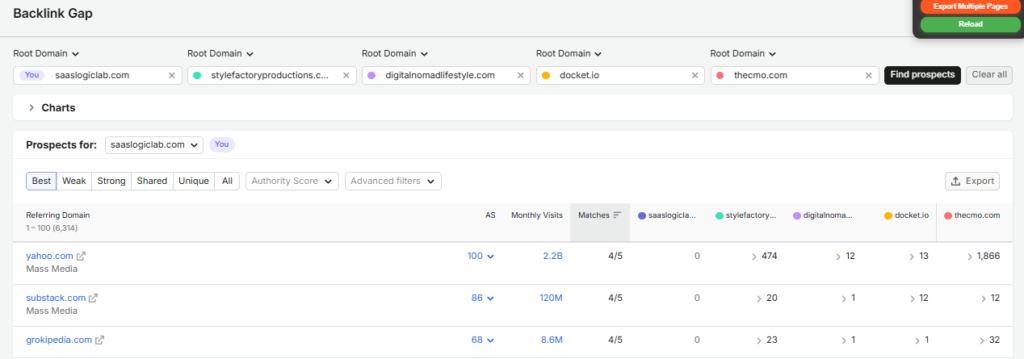
Semrush Backlink Gap report comparing SaaSLogicLab with competitor websites to identify backlink opportunities.
During testing, Backlink Gap quickly revealed websites that were linking to our competitors but not to SaaSLogicLab. Instead of manually comparing backlink profiles one domain at a time, we instantly found potential outreach opportunities. This made it much easier to prioritize high-value websites for future link-building campaigns and build a data-driven outreach strategy rather than relying on guesswork.
What This Report Shows
• Websites linking to your competitors but not to your site
• Authority Score of referring domains
• Number of competitors each website links to
• Monthly traffic of referring domains
• Filters to prioritize the best outreach opportunities
What We Learned During Testing
Instead of searching for backlink opportunities manually, Backlink Gap immediately highlighted websites that were already linking to multiple competitors but not to SaaSLogicLab. This allowed us to build a more focused outreach list and spend time contacting websites that were more likely to accept relevant content or collaborations.
Pro Tip
Prioritize websites that link to several of your competitors instead of chasing every backlink opportunity. If a website regularly links to businesses similar to yours, there is a much higher chance that it will also consider linking to your content if you provide genuine value.
Common Beginner Mistake
Many beginners focus only on getting as many backlinks as possible. In reality, earning links from a few high-authority and relevant websites is usually far more valuable than collecting hundreds of low-quality backlinks.
Backlink Analytics
We tested Backlink Analytics by reviewing competitor websites with stronger domain authority than SaaSLogicLab. Instead of simply counting backlinks, we analyzed referring domains, Authority Score, anchor text distribution, new and lost backlinks, and link growth trends to understand why competitors were performing better in search results.
The report helped us identify which backlinks were genuinely valuable and which websites consistently linked to multiple competitors. This made it easier to build a realistic outreach list and avoid wasting time on low-quality backlink opportunities.
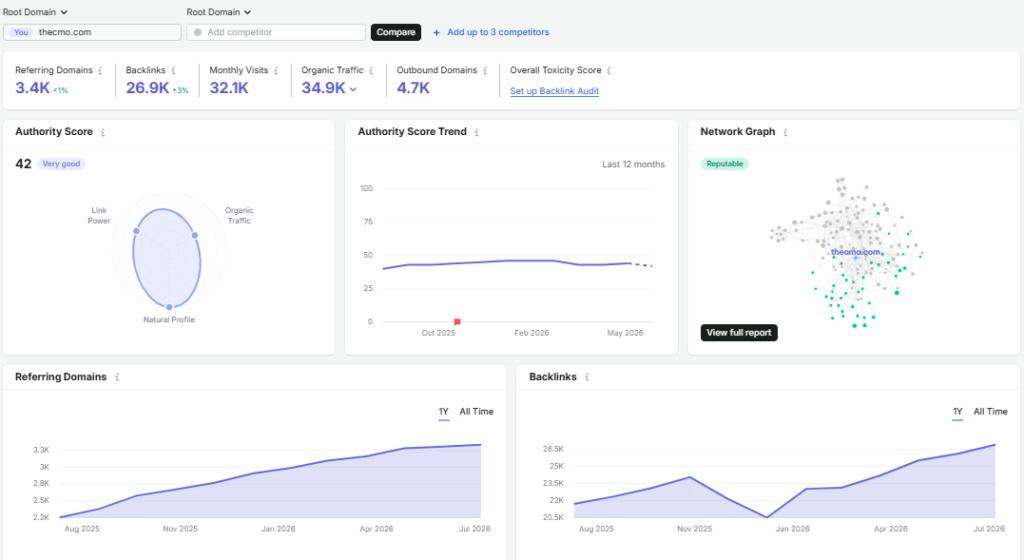
Semrush Backlink Analytics report showing referring domains, Authority Score, backlink trends, and link profile insights during our hands-on testing.
Rather than treating every backlink as equally valuable, Backlink Analytics helps explain why some websites rank higher than others. For beginners, it provides a clear picture of a website’s authority and backlink profile. For SEO professionals and agencies, it becomes a practical tool for competitor research, link audits, and planning high-quality outreach campaigns based on real data instead of assumptions.
Position Tracking
Position Tracking monitors keyword rankings over time instead of showing a one-time snapshot. It tracks daily ranking changes, visibility trends, SERP features, and competitor performance, helping SEO professionals measure the impact of their optimization efforts and identify ranking opportunities before significant traffic changes occur.
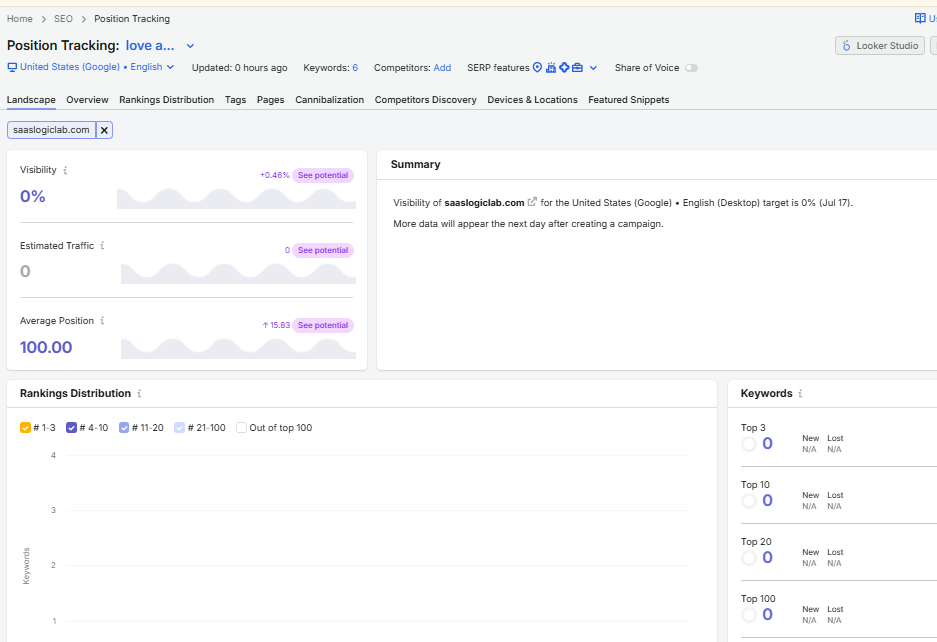
Semrush Position Tracking campaign monitoring keyword rankings, visibility, and daily ranking changes during our hands-on testing.
We created a Position Tracking campaign to monitor target keywords over time and evaluate ranking performance after website changes. The report tracked keyword positions, visibility trends, estimated traffic, and SERP features, making it easier to measure SEO progress and identify keywords that required additional optimization.
What This Report Shows
• Daily keyword ranking changes
• Overall visibility score
• Estimated organic traffic
• SERP feature ownership
• Competitor ranking comparison
• Winners and losers over time
What We Learned During Testing
During testing, Position Tracking helped us monitor ranking changes after updating our website. Instead of checking Google search results manually every day, we could see which keywords were improving, which were losing positions, and whether our optimization efforts were producing measurable results. This made it much easier to identify problems early and focus on keywords that needed additional improvement.
Pro Tip
Don’t panic if a keyword drops for one or two days. Rankings naturally fluctuate because of algorithm updates, competitors, and search behavior. Focus on long-term trends instead of daily changes before making major SEO decisions.
Common Beginner Mistake
Many beginners track only one or two keywords and assume their entire SEO performance depends on them. A better approach is to monitor a group of important keywords across different pages so you can measure overall organic growth instead of isolated ranking changes.
AI Search Toolkit
Semrush has expanded beyond traditional SEO by introducing AI Search Toolkit, a collection of features designed to help businesses monitor their visibility across AI-powered search platforms. Instead of focusing only on Google rankings, these tools provide insights into how brands appear in AI-generated answers, prompts, and conversations.
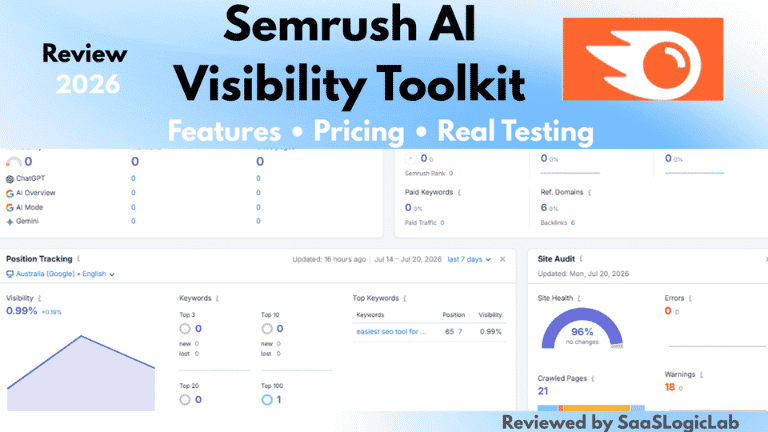
For a deeper breakdown of its AI visibility reports, prompt research, brand tracking, and pricing, read our complete Semrush AI Visibility Toolkit Review
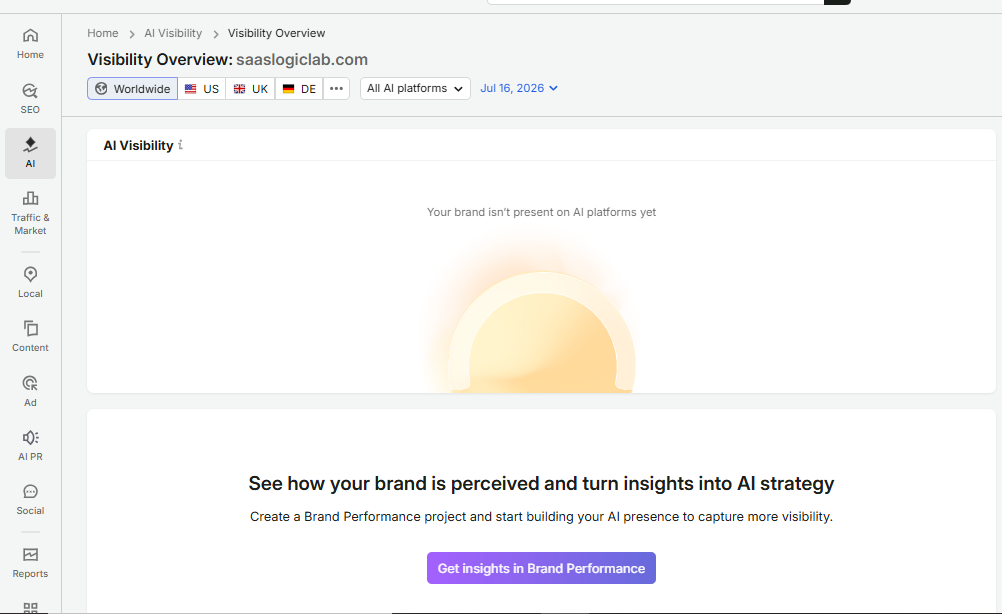
Semrush AI Search Toolkit dashboard showing AI Visibility, Prompt Research, Brand Performance, and AI Traffic insights during our hands-on testing.
Our testing showed that AI Search Toolkit is different from traditional SEO reports. Instead of tracking only Google rankings, it explains how brands appear in AI-generated answers. This helps businesses understand AI visibility, brand exposure, and new opportunities to improve content for AI search.
What This Report Shows
• AI Visibility across supported AI search platforms
• Brand mentions in AI-generated responses
• Prompt coverage and AI search opportunities
• Share of Voice across AI experiences
• Estimated AI referral trends
• Competitive AI visibility insights
What We Learned During Testing
Our testing showed that AI Search Toolkit is different from traditional SEO reports. Instead of tracking only Google rankings, it explains how brands appear in AI-generated answers. This helps businesses understand AI visibility, brand exposure, and new opportunities to improve content for AI search.
Pro Tip
Don’t treat AI Search Toolkit as a replacement for Google Search Console or traditional SEO reports. Use it alongside your existing SEO tools to understand how AI assistants mention your brand and discover opportunities that standard search reports cannot show.
Common Beginner Mistake
Many beginners expect AI Search Toolkit to show exact website rankings like Google. In reality, these reports focus on AI-generated answers, brand visibility, prompt coverage, and emerging search behavior rather than traditional keyword positions.
AI Traffic
AI Traffic estimates how much traffic websites receive from AI-powered platforms such as ChatGPT and Claude. Instead of focusing only on traditional search engines, this feature helps businesses understand how AI assistants are influencing website discovery and referral traffic.
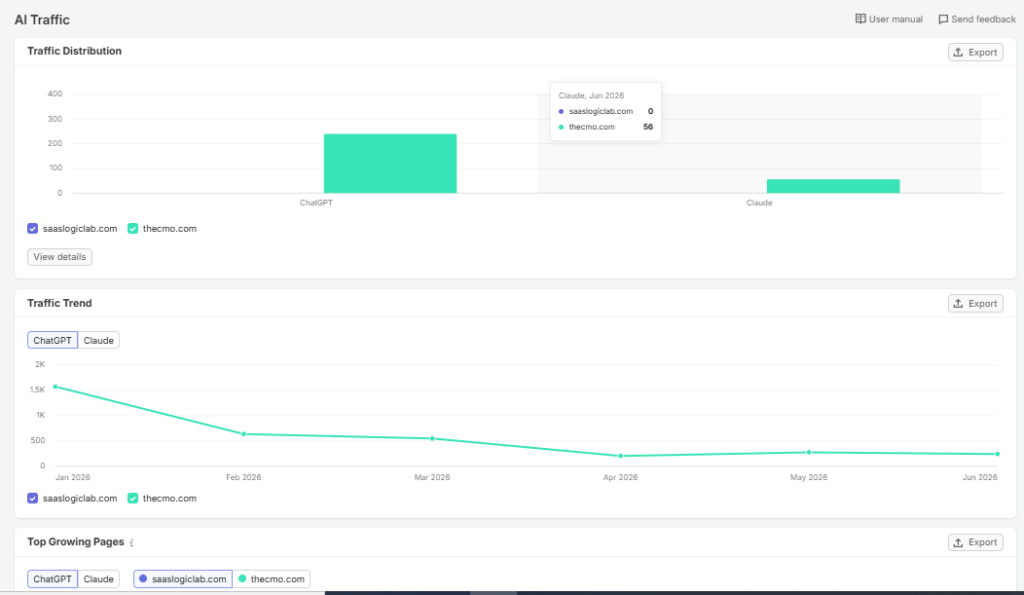
Semrush AI Traffic report comparing estimated AI referral traffic from ChatGPT and Claude during our hands-on testing.
During testing, we compared AI referral trends across different platforms to understand how websites may receive traffic from AI assistants. Although AI traffic estimates should not be treated as exact analytics, the report provided useful directional insights into emerging AI-driven discovery patterns and highlighted the growing importance of optimizing content for AI search experiences.
What This Report Shows
• Estimated AI referral traffic from platforms like ChatGPT and Claude
• AI traffic trends over time
• Comparison between different AI platforms
• Potential AI-driven website discovery
• Early indicators of AI search growth
• Directional insights rather than exact analytics
What We Learned During Testing
During testing, AI Traffic showed how websites can receive visitors from AI assistants instead of traditional search engines. The numbers are estimates, not exact analytics. However, the report highlighted which AI platforms generated more referrals and how AI-driven discovery is evolving. It also provided a broader view of search beyond Google.
Pro Tip
Use AI Traffic as a trend indicator, not as your primary traffic reporting tool. For accurate visitor numbers, continue using Google Analytics 4 and Google Search Console, while using AI Traffic to identify long-term changes in AI-powered discovery.
Common Beginner Mistake
Many beginners assume AI Traffic reports show the exact number of visitors coming from AI platforms. In reality, these figures are estimates designed to reveal overall trends and should always be validated with your own website analytics.
Prompt Research
Prompt Research helps users understand how AI platforms respond to specific topics and prompts. Instead of focusing only on traditional keywords, it reveals AI search demand, prompt volume, user intent, brand mentions, and source domains. This helps marketers optimize content for AI-generated answers and identify opportunities beyond traditional search engines.
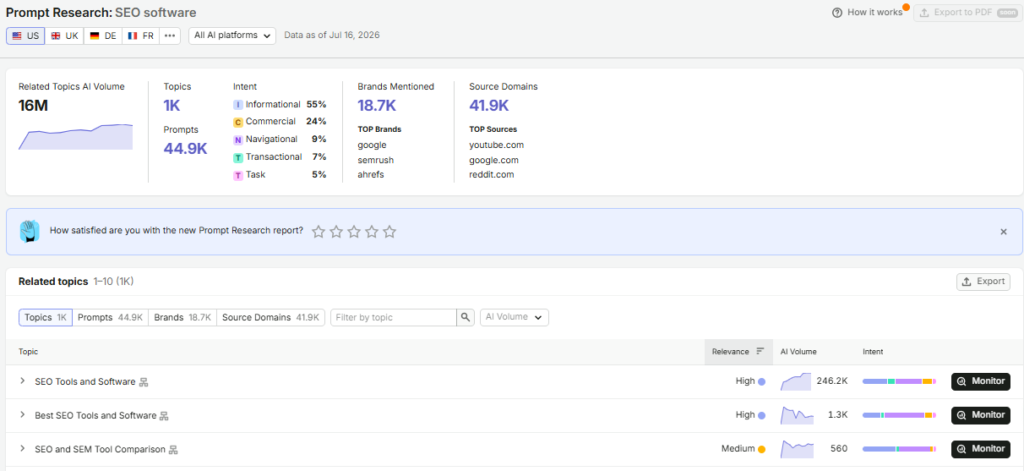
Semrush Prompt Research report showing AI prompt volume, user intent, brand mentions, and source domains during our hands-on testing.
We reviewed Prompt Research to understand how users search through AI assistants rather than traditional search engines. The report highlighted prompt volume, search intent distribution, top brands, and source domains, helping us identify AI-driven content opportunities and optimize content for emerging AI search behavior.
What This Report Shows
• Popular prompts people use in AI assistants
• AI search intent behind those prompts
• Brands most frequently mentioned
• Source websites referenced in AI answers
• Prompt volume and emerging AI search opportunities
• Content gaps that can improve AI visibility
What We Learned During Testing
Our testing showed that people ask AI assistants complete questions instead of short keywords. We also identified the brands that appeared most often in AI-generated answers and the websites used as trusted sources. These insights made it easier to plan content for both traditional SEO and AI search.
Pro Tip
When creating new content, don’t optimize only for keywords. Think about the actual questions people ask AI assistants. Writing content that directly answers those questions increases the chances of appearing in AI-generated responses as well as traditional search results.
Common Beginner Mistake
Many beginners assume AI users search exactly like Google users. In reality, AI searches are usually longer, more conversational, and more specific. Optimizing only for short keywords may cause you to miss valuable AI search opportunities.
Brand Performance
Brand Performance measures how a brand is represented across AI-powered search experiences. Instead of tracking only website rankings, it evaluates brand mentions, sentiment, share of voice, and competitive visibility, helping businesses understand how AI platforms perceive and recommend their brand.
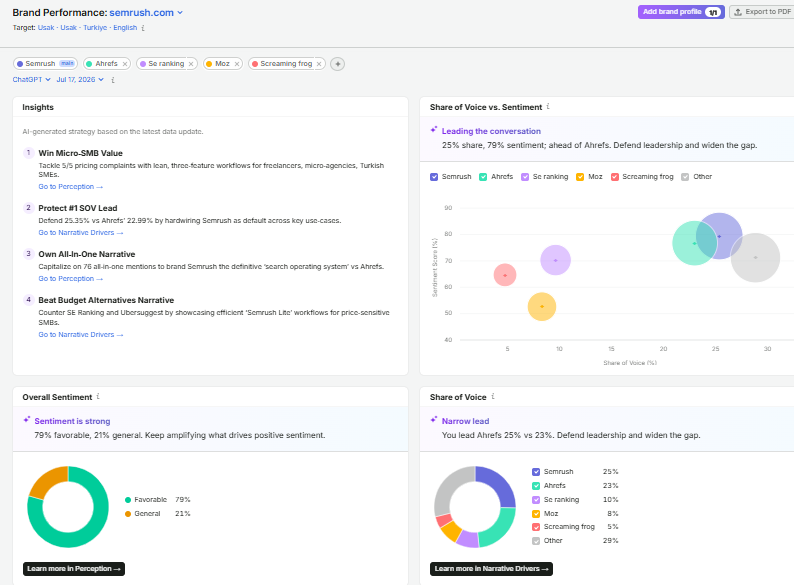
Semrush Brand Performance dashboard showing Share of Voice, brand sentiment, and AI-driven competitive insights during our hands-on testing.
We explored Brand Performance to evaluate how AI platforms compare brands within the same market. The report provided insights into share of voice, brand sentiment, competitive positioning, and AI-generated recommendations. These metrics help businesses understand how their brand is perceived and identify opportunities to strengthen visibility in AI-powered search experiences.
What This Report Shows
• Share of Voice across AI platforms
• Overall brand sentiment
• Competitor visibility
• AI-generated brand mentions
• Brand positioning within your industry
• Opportunities to improve AI visibility
What We Learned During Testing
During testing, Brand Performance showed that AI visibility is about more than simply being mentioned. It helped us understand how frequently a brand appears, whether those mentions are positive or negative, and how it compares with competitors. This provided a broader picture of online brand perception that traditional SEO reports cannot measure.
Pro Tip
Monitor Brand Performance regularly instead of checking it only once. As AI platforms update their knowledge and begin referencing new sources, your brand visibility and sentiment can change over time. Consistent monitoring helps you identify trends early and adjust your content strategy accordingly.
Common Beginner Mistake
Many beginners focus only on increasing brand mentions. However, the quality and context of those mentions matter just as much. A smaller number of positive, authoritative references is often more valuable than a large number of weak or irrelevant mentions.
Semrush MCP (Model Context Protocol)
Semrush MCP (Model Context Protocol) is one of the platform’s newest innovations, designed to bring trusted Semrush SEO data directly into AI assistants. Instead of switching between multiple dashboards, users can ask natural-language questions and receive keyword research, competitor insights, and SEO recommendations powered by Semrush data. This feature reflects the growing shift toward AI-assisted SEO workflows.
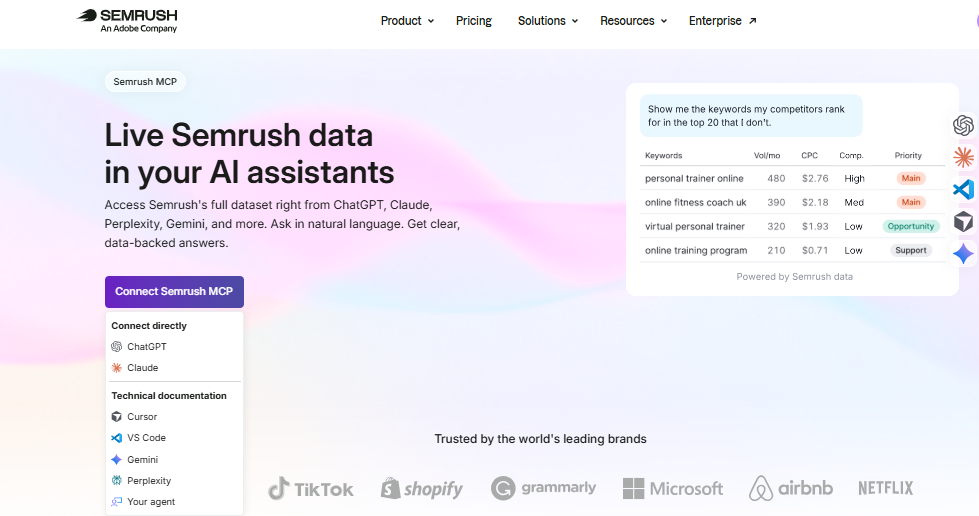
Semrush MCP interface demonstrating how trusted Semrush SEO data can be accessed through AI assistants using the Model Context Protocol.
Although we did not complete a full MCP connection during our testing, we reviewed the official Semrush documentation and product interface to understand how it works. MCP enables AI assistants such as ChatGPT, Claude, Gemini, Perplexity, and other supported platforms to access Semrush data through natural-language prompts, reducing manual research and making SEO workflows more efficient.
What This Report Shows
• AI assistants that support Semrush MCP
• Natural-language SEO workflows
• Direct access to trusted Semrush data
• Faster keyword and competitor research
• AI-assisted SEO recommendations
• Reduced manual switching between SEO tools
What We Learned During Testing
We did not complete a live MCP connection during testing. However, we reviewed the official documentation to understand how it works. MCP lets AI assistants retrieve trusted Semrush data through natural-language requests. This reduces manual research and makes SEO workflows more efficient.
Pro Tip
Use MCP to speed up research, but always verify important SEO decisions inside the Semrush dashboard. AI assistants can summarize data quickly, while the full reports provide the detail needed for technical analysis and strategic planning.
Common Beginner Mistake
Many beginners assume MCP replaces Semrush itself. In reality, MCP is designed to make Semrush data easier to access through AI assistants, not to replace the platform’s complete reports, tools, and workflows.
Semrush Ease of Use
Despite offering more than 50 SEO and digital marketing tools, Semrush has a clean and well-organized interface. The dashboard groups features into logical categories such as SEO, Advertising, Social, Content, Local, and Reports, making navigation easier once users become familiar with the platform.
During our testing, moving between Keyword Research, Site Audit, Backlink Analytics, Position Tracking, and the AI Search Toolkit felt smooth and consistent. Search, filters, and report layouts followed a similar design, which reduced the learning curve after a few sessions.
For complete beginners, however, the number of available tools can feel overwhelming. Many reports include advanced SEO metrics such as Authority Score, Keyword Difficulty, Share of Voice, and AI Visibility that require some understanding before they become useful. Fortunately, Semrush provides helpful tooltips, guides, and Semrush Academy courses that make learning much easier.
Overall, we found the interface modern, responsive, and suitable for both individual marketers and larger teams. Once users understand the basic workflow, navigating between reports becomes fast and intuitive.
### Ease of Use Rating
• Dashboard Design: ⭐⭐⭐⭐⭐ (5/5)
• Navigation: ⭐⭐⭐⭐⭐ (5/5)
• Beginner Friendliness: ⭐⭐⭐⭐☆ (4/5)
• Learning Curve: ⭐⭐⭐⭐☆ (4/5)
• Overall Ease of Use: ⭐⭐⭐⭐⭐ (4.8/5)
Semrush Data Accuracy
One of the most common questions people ask before buying Semrush is whether its data is accurate. The short answer is yes—but with an important limitation. Semrush does not use Google’s internal data. Instead, it estimates search volume, traffic, backlinks, and keyword rankings using its own databases, clickstream data, machine learning models, and crawling technology.
During our testing, keyword metrics such as search volume, keyword difficulty, and search intent were consistent and useful for content planning. Backlink data also helped us compare competitors and find new link opportunities. Traffic estimates should be treated as directional, not exact, because third-party SEO tools cannot access another website’s Google Analytics data.
While the subscription price is higher than many competitors, the platform delivers strong value for businesses, agencies, SaaS companies, and SEO professionals who use it regularly.
For a detailed comparison, read our Semrush vs Ahrefs guide to see how both tools compare in keyword research, backlink analysis, pricing, and overall value.
We also found that newly launched websites may initially show little or no data because Semrush needs time to crawl, process, and update its databases. This is completely normal and should not be confused with a problem in your website’s SEO performance.
Overall, we found Semrush highly reliable for SEO research, competitor analysis, keyword planning, backlink research, and trend analysis. For exact traffic, conversions, and user behavior, Google Analytics 4 and Google Search Console remain the primary source of truth.
What We Trust Most
• Keyword Research
• Keyword Difficulty (KD)
• Search Intent
• Backlink Analysis
• Competitor Comparisons
• Site Audit Reports
• Position Tracking
What Should Be Verified
• Estimated Organic Traffic
• AI Traffic Estimates
• Traffic Cost
• Newly Discovered Backlinks
• Very New Websites
• Low-volume Keywords
Our Verdict on Accuracy
For SEO decision-making, Semrush is one of the most reliable platforms available. However, like every third-party SEO tool, it should be used to identify trends, compare competitors, and prioritize opportunities rather than to measure exact website traffic. Combining Semrush with Google Search Console and Google Analytics provides the most complete picture of website performance.
Semrush Integrations
Semrush becomes much more powerful when connected with other marketing tools. Instead of working in isolation, it allows users to combine SEO data with analytics, reporting, advertising, and content workflows. During our testing, we found that these integrations help reduce manual work and make SEO reporting more efficient.
Google Search Console and Google Analytics 4 are the most useful integrations for most website owners. They let you compare Semrush data with your own website metrics and make better SEO decisions. Larger teams can also connect reporting, project management, and automation tools to simplify their workflow.
Popular Integrations
The most useful integrations for most users include
• Google Looker Studio
• Google Ads
• WordPress
• Zapier
• Trello
• Monday.com
Our Recommendation
If you’re just getting started, connect Semrush with Google Search Console and Google Analytics 4 first. These three tools work well together and provide a balanced combination of real website data and competitive SEO insights. As your business grows, you can add reporting and automation integrations to save time and improve collaboration.
Semrush Customer Support
A powerful SEO platform is only as useful as the support available when users encounter problems. During our review, we evaluated Semrush’s support resources, learning materials, and self-help documentation to understand how easily users can resolve common issues.
Semrush offers several support options, including the Help Center, Semrush Academy, email support, and live chat for eligible customers. It also provides knowledge base articles, video tutorials, webinars, and certification courses. These resources help both beginners and experienced marketers learn the platform and solve common SEO problems.
For most users, the documentation is detailed enough to solve common problems without contacting support. Beginners may need some time to become familiar with the platform, but the combination of Academy courses and step-by-step guides significantly reduces the learning curve.
Support Options
• Help Center
• Semrush Academy
• Email Support
• Live Chat (eligible plans)
• Knowledge Base
• Video Tutorials
• Webinars
• Certification Courses
Our Experience
We did not need to contact Semrush support during our testing. However, we reviewed the available documentation and learning resources. The Help Center and Semrush Academy explained SEO concepts clearly and provided useful guidance for both beginners and experienced users.
Semrush Security & Privacy
When using any SEO platform, protecting account data and business information is just as important as accessing powerful SEO tools. Semrush includes several security features designed to help individuals, agencies, and businesses manage their accounts safely while protecting sensitive marketing data.
The platform supports secure account authentication, encrypted connections (HTTPS), and user permission management for teams. Businesses can also control account access by assigning different roles to team members, reducing the risk of unauthorized changes.
Like most cloud-based SaaS platforms, Semrush continuously updates its infrastructure and security practices. However, users should also protect their own accounts by enabling two-factor authentication, using strong passwords, and limiting account access to trusted team members.
Key Security Features
• HTTPS encrypted connections
• Two-Factor Authentication (2FA)
• User and team permission management
• Secure cloud-based infrastructure
• Account activity monitoring
• Regular platform updates
Our Recommendation
For freelancers, keeping your account secure starts with enabling two-factor authentication and using a strong password. Agencies and larger teams should also review user permissions regularly to ensure that only authorized members have access to important projects and client data.
Semrush Pricing Plans (2026)
Semrush offers multiple subscription plans designed for freelancers, businesses, agencies, and large enterprises. While the platform is one of the more expensive SEO tools on the market, the pricing reflects the breadth of features included. Instead of paying separately for keyword research, technical SEO, backlink analysis, competitor research, rank tracking, and content optimization tools, Semrush combines them into a single platform.
| Plan | Starting Price | Best For |
| Pro | $139.95/month | Freelancers & Beginners |
| Guru | $249.95/month | Growing Businesses |
| Business | $499.95/month | Agencies & Large Teams |
| Enterprise | Custom Pricing | Large Organizations |
Prices may change over time. Please check the official Semrush website for the latest plans.
Which Semrush Plan Should You Choose?
Choosing the right Semrush plan depends on your goals rather than simply selecting the cheapest or most expensive option.
• Pro Plan — Best for freelancers, bloggers, beginners, and small businesses that need keyword research, site audits, competitor analysis, and rank tracking for a limited number of projects.
• Guru Plan — Best for growing businesses, in-house marketing teams, and professional SEO consultants who require historical data, content marketing tools, and higher project limits.
• Business Plan — Designed for SEO agencies, large companies, and businesses managing multiple websites with advanced reporting, API access, and larger data limits.
If you’re launching your first website, the Pro plan is usually enough. As your traffic, clients, or reporting requirements grow, upgrading to Guru or Business becomes a better long-term investment.
Is Semrush Worth the Price?
Semrush is one of the most expensive SEO platforms, but its value comes from replacing several separate tools with one integrated solution. Instead of paying for individual keyword research, backlink analysis, rank tracking, competitor research, and technical SEO tools, users can manage most of these tasks from a single dashboard.
For beginners with limited budgets, the subscription cost may feel high. However, freelancers, agencies, and businesses that actively use the platform often recover the cost through better SEO decisions, improved productivity, and time saved on manual research.
Pros & Cons
Pros
• Complete all-in-one SEO platform for keyword research, technical SEO, backlinks, content, and competitor analysis
• One of the largest keyword and backlink databases in the industry
• Excellent Site Audit tool with clear issue prioritization
• Accurate Position Tracking with daily keyword updates
• Powerful AI Search Toolkit for monitoring AI-driven search visibility
• Comprehensive competitor analysis that saves hours of manual research
• Detailed reporting, filters, and export options for agencies and marketing teams
• Regular feature updates with a strong learning ecosystem through Semrush Academy
Cons
• Premium pricing may not suit beginners or hobby websites
• The large number of tools can feel overwhelming for first-time users
• Some traffic and keyword metrics are estimated rather than exact
• Lower subscription plans include project and reporting limitations
• Certain advanced features are only available on higher-tier plans
• New users should expect a learning curve before using the platform efficiently
Who Should Buy Semrush?
Semrush is an excellent choice for users who rely on SEO as a core part of their marketing strategy. Whether you’re managing your own website or handling multiple client projects, the platform brings keyword research, technical SEO, competitor analysis, backlink monitoring, rank tracking, and AI search insights into one place.
It offers the greatest value to users who actively use its features on a regular basis. If you regularly publish content, monitor rankings, analyze competitors, or optimize websites, Semrush can save significant time while helping you make more informed SEO decisions.
Best For
• SEO Agencies managing multiple clients
• SaaS and B2B companies focused on organic growth
• Digital marketing teams
• Freelance SEO consultants
• Content marketers and publishers
• E-commerce businesses
• Website owners serious about long-term SEO
Who Should Skip Semrush?
Semrush isn’t the right choice for every website owner. If you’re just starting to learn SEO or have a very limited budget, paying for a premium platform may not provide enough value initially.
In most cases, beginners can build a solid SEO foundation using free tools such as Google Search Console, Google Analytics 4, and Google Keyword Planner. Once your website starts growing and SEO becomes a regular part of your workflow, upgrading to Semrush becomes a much smarter investment.
Not Ideal For
• Complete SEO beginners learning the basics
• Hobby or personal websites with no growth goals
• Very small businesses with limited marketing budgets
• Users who only need occasional keyword research
• Website owners who rarely publish or optimize content
• Businesses that can manage with Google’s free SEO tools
Our Verdict
After extensively testing Semrush across keyword research, competitor analysis, backlink auditing, technical SEO, rank tracking, AI search features, and reporting, we believe it remains one of the most complete SEO platforms available in 2026.
Its biggest advantage isn’t just the number of tools it offers—it’s how seamlessly those tools work together. Instead of switching between multiple SEO platforms, you can research keywords, audit your website, analyze competitors, monitor rankings, discover backlink opportunities, and measure performance from a single dashboard.
While the subscription price is higher than many competitors, the platform delivers strong value for businesses, agencies, SaaS companies, and SEO professionals who use it regularly. Beginners may find Google’s free SEO tools sufficient at first, but as websites grow, Semrush becomes a worthwhile investment that saves time and supports better SEO decisions.
You can also compare Semrush with other platforms in our complete guide to the best SEO tools for beginners, businesses, and agencies.
Overall, we confidently recommend Semrush to anyone serious about improving organic visibility, growing search traffic, and building a long-term SEO strategy.
| ⭐ Final Rating | ★★★★★ 4.9/5 Semrush is our top recommendation for SEO agencies, SaaS businesses, digital marketers, content teams, and website owners who need a powerful all-in-one SEO platform. Its combination of keyword research, technical SEO, competitor analysis, backlink intelligence, AI search tools, and reporting makes it one of the best long-term investments for serious SEO professionals. |