
Technical SEO Checklist: Complete Guide for 2026
Technical SEO Checklist: What This Guide Covers
Publishing great content doesn’t guarantee better rankings.
If search engines can’t crawl, render, or index your pages correctly, even your best content can struggle to perform. In many cases, the content itself isn’t the problem. Rankings remain limited because crawlability, indexing, rendering, or site performance issues prevent that content from working as intended.
Technical SEO is the foundation that supports every other SEO activity. It helps search engines access your website efficiently, understand its structure, and index the right pages while reducing technical problems that can limit visibility.
The real challenge isn’t finding technical SEO advice—it’s knowing which issues deserve immediate attention and which can wait.
Most technical SEO checklists try to cover everything, but not every issue deserves the same level of attention. Some problems have a direct impact on crawling, indexing, and visibility, while others can wait until the fundamentals are in place.
This guide focuses on the checks that deliver the greatest SEO value first. Instead of working through a long list without priorities, you’ll learn how to identify high-impact technical issues, verify them with the right tools, and fix them in a logical order that supports long-term organic growth.
Whether you’re managing a personal website, an ecommerce store, a SaaS business, or multiple client projects, this checklist is designed to help you build a stronger technical foundation before investing more time in content or link building.
What Is Technical SEO and Why Is It Important?
Technical SEO is the process of improving your website’s technical foundation so search engines can crawl, render, understand, and index your pages efficiently.
Unlike on-page SEO, which focuses on content optimization, or off-page SEO, which builds authority through backlinks, technical SEO ensures that search engines can properly access and process everything you’ve already created.
Without that foundation, even well-written content may struggle to reach its full ranking potential.
Technical SEO typically includes:
Crawling & Indexing
- Improving crawlability
- Optimizing XML sitemaps
- Configuring robots.txt correctly
Website Performance
- Improving Core Web Vitals
- Optimizing page speed
- Enhancing mobile usability
Technical Structure
- Managing canonical tags
- Fixing broken links
- Eliminating redirect chains
- Strengthening internal linking
- Resolving duplicate content
Advanced Technical SEO
- Implementing structured data (Schema Markup)
- Optimizing JavaScript rendering
Technical SEO isn’t about chasing every recommendation in an audit tool or fixing issues for the sake of getting a perfect score.
Its primary purpose is to remove the barriers that prevent search engines from accessing, understanding, and indexing your website correctly. Once those barriers are removed, your content, internal linking, and authority signals have a much better chance of performing as intended.
💡 Quick Take
Think of technical SEO as your website’s infrastructure. Content attracts visitors, backlinks build authority, and technical SEO ensures search engines can discover, understand, and index everything you’ve published.
Why Technical SEO Matters in 2026
Technical SEO has become more important as websites have grown larger and more complex. Modern sites publish content more frequently, rely heavily on JavaScript, and evolve continuously through redesigns, migrations, and new features. As that complexity increases, technical issues become harder to detect before they start affecting organic performance.
The challenge is that many of these problems remain invisible. Visitors may never notice them, but search engines can. By the time indexing gaps, crawl inefficiencies, or rendering issues appear in your reports, they’ve often been limiting your SEO performance for weeks or even months.
A page may never be indexed because of an incorrect canonical tag. Important content may remain undiscovered because internal linking is weak. Crawl budget can be wasted on low-value URLs while high-priority pages wait to be crawled. None of these problems are visible to your visitors, but all of them can limit organic growth.
That’s why technical SEO should be treated as an ongoing maintenance process rather than a one-time project. Every website changes over time, and its technical health needs to be reviewed regularly.
It should be part of every ongoing SEO strategy. Regular technical audits help you identify issues before they affect rankings, improve crawling efficiency, strengthen website performance, and ensure search engines can consistently access your most valuable content.
Ignoring technical SEO doesn’t always cause an immediate ranking drop. More often, it quietly limits the results of everything else you’re doing, including content creation, internal linking, and link building.
When the technical foundation is strong, search engines spend less time dealing with avoidable issues and more time crawling, understanding, and indexing the pages that actually matter. That gives every other part of your SEO strategy a stronger foundation.
Benefits of Technical SEO
A strong technical foundation doesn’t improve rankings on its own, but it removes the obstacles that often limit organic performance. When your website is technically sound, search engines can crawl, understand, and index your content more efficiently, making every other SEO effort more effective.
- Improve crawling and indexing
- Reduce crawl errors
- Speed up page loading
- Improve Core Web Vitals
- Strengthen mobile usability
- Prevent duplicate content issues
- Improve internal linking efficiency
- Support structured data and rich results
- Help new pages get indexed faster
- Build a scalable website that grows without technical debt
💡 Quick Take
Technical SEO Checklist: 20-Step Audit Process
Technical SEO audits are easier to manage when you work through them in a logical order. Instead of jumping between unrelated issues, start with the factors that affect crawling and indexing, then move on to performance, site structure, and advanced optimizations. This approach helps you resolve the most impactful problems first while building a stronger technical foundation.
Check Whether Google Can Crawl Your Website
Before reviewing rankings, keywords, or backlinks, confirm that Google can actually access the pages you expect to rank. If search engines can’t crawl those pages, they can’t properly evaluate, index, or return them in search results.
Crawlability is the starting point of every technical SEO audit. Until Googlebot can consistently access your important pages, improvements to content, internal linking, or authority signals are unlikely to deliver their full impact.
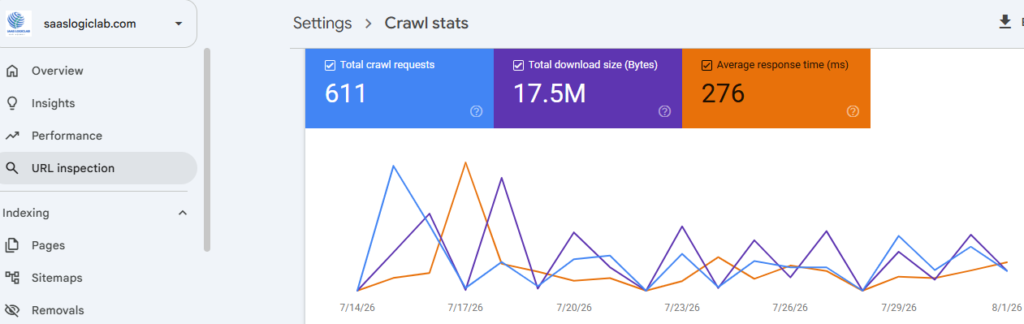
Common crawlability issues include:
- Incorrect robots.txt rules
- Blocked CSS or JavaScript files
- Broken internal links
- Server errors (5xx)
- DNS or hosting problems
- Pages requiring logins
- Poor internal linking
Google Search Console should be your first stop when checking crawlability. Start with the Page Indexing and Crawl Stats reports to see whether Google is discovering and accessing your pages as expected. If your website contains hundreds or thousands of URLs, run a full crawl with Screaming Frog or another site audit tool to uncover blocked pages, broken links, redirect issues, and other crawlability problems that are difficult to spot manually.
Why this matters
Crawlability determines whether search engines can access and process a page in the first place. If Google can’t crawl a page, it can’t evaluate the content, follow its internal links, or consider it for indexing. Every other SEO effort depends on this first step working correctly.
⭐ Expert Insight
Don’t assume Google can crawl every page just because your homepage is indexed. Many websites have important pages that remain undiscovered because of weak internal linking, crawl restrictions, or indexing directives.
Review Your robots.txt File
Your robots.txt file controls which parts of your website search engines are allowed to crawl. Although it’s only a small text file, a single incorrect directive can prevent Google from accessing important pages or the resources needed to render them correctly.
During technical SEO audits, it’s common to find websites accidentally blocking CSS files, JavaScript, staging environments, or entire directories. These mistakes often go unnoticed until indexing or visibility starts to decline.
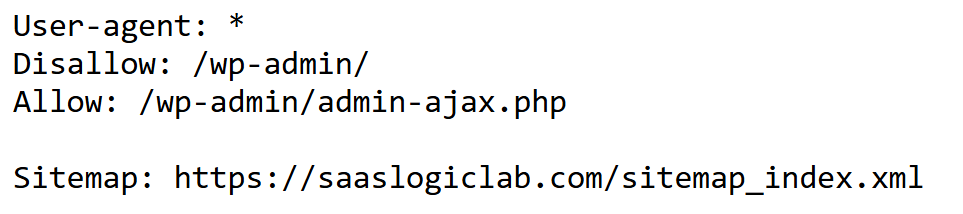
The goal isn’t to block as much as possible. It’s to prevent search engines from wasting crawl resources on low-value areas while keeping important pages and supporting resources fully accessible.
Common robots.txt issues include:
- Blocking important pages
- Blocking CSS or JavaScript files
- Incorrect Disallow rules
- Missing XML sitemap reference
- Using robots.txt instead of the noindex directive
- Leaving staging site rules after launch
Why this matters
If Google can’t crawl essential pages or resources, it may struggle to render your website correctly, understand page content, or discover new URLs. In some cases, a single incorrect rule can affect thousands of pages.
How to check
- Review your robots.txt file manually
- Check blocked resources in Google Search Console
- Crawl your website with Screaming Frog
- Confirm important URLs aren’t blocked
- Verify that your XML sitemap is referenced correctly
Useful tools
- Google Search Console
- Screaming Frog SEO Spider
- robots.txt Validator
- Semrush Site Audit
⭐ Expert Insight
Don’t block pages simply because you don’t want them to appear in search results. If a page should remain accessible but not be indexed, use the appropriate indexing directives instead of relying only on robots.txt.
Validate Your XML Sitemap
An XML sitemap acts as a roadmap for search engines by highlighting the pages you want them to discover and index. Although Google can find content through internal links, an accurate sitemap speeds up discovery, particularly on large websites or sites that publish new content frequently.
A useful sitemap contains only canonical, indexable URLs. Including redirected pages, errors, duplicates, or non-indexable content makes the sitemap less reliable and can waste crawl resources instead of helping search engines focus on your most important pages.
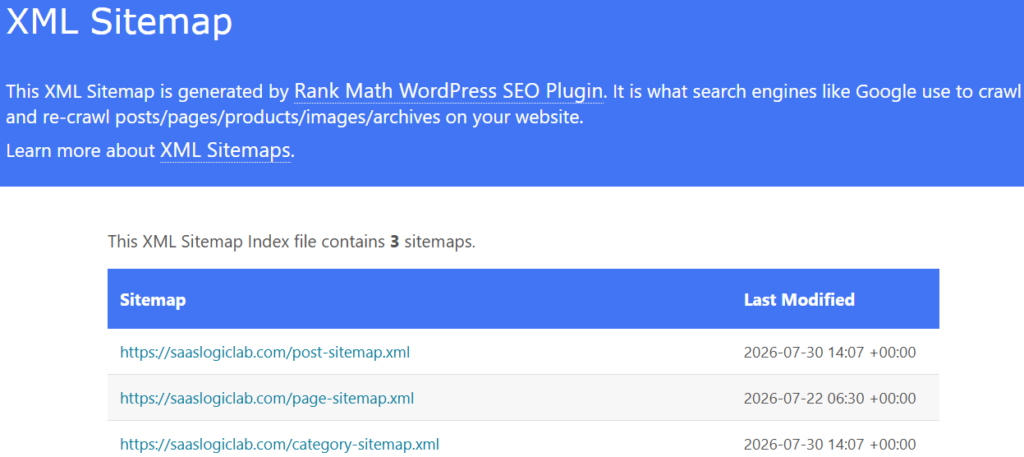
Common XML sitemap issues include:
- Missing XML sitemap
- Outdated sitemap
- Broken or redirected URLs
- Non-indexable pages included
- Orphan pages missing from the sitemap
- Multiple conflicting sitemaps
- Sitemap not submitted in Google Search Console
Why this matters
A sitemap doesn’t guarantee indexing, but it helps search engines discover new and updated content more efficiently. An inaccurate sitemap can waste crawl resources and create confusion about which pages should be indexed.
How to check
- Open your XML sitemap and review the listed URLs
- Check that only canonical, indexable pages are included
- Remove 404 pages, redirected URLs, and duplicate pages
- Submit your sitemap through Google Search Console
- Monitor the Sitemap report for processing errors
Useful tools
- Google Search Console
- Screaming Frog SEO Spider
- XML Sitemap Validator
- Rank Math or Yoast SEO (WordPress)
Editor’s Tip
Your XML sitemap should reflect the pages you want Google to index—not every URL on your website. If a page shouldn’t appear in search results, it generally shouldn’t be included in your sitemap.
Check Your Indexing Status
A page can be crawled without being indexed, which means it still won’t appear in search results. That’s why confirming your indexing status is one of the earliest checks in any technical SEO audit.
Start with the Page Indexing report in Google Search Console. Rather than focusing only on the number of indexed pages, review the reasons Google gives for excluding URLs. Those explanations usually point directly to the technical issue that needs attention.
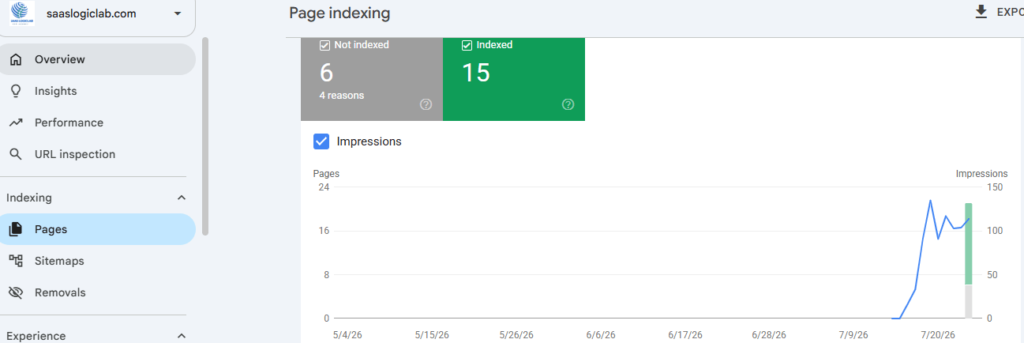
Common indexing issues include:
- Crawled – Currently Not Indexed
- Discovered – Currently Not Indexed
- Duplicate pages without a correct canonical
- Pages blocked by the noindex directive
- Soft 404 pages
- Redirected pages
- Server errors (5xx)
Why this matters
A page must be indexed before it can rank. If important pages remain outside Google’s index, they won’t generate organic traffic regardless of the quality of the content or backlinks pointing to them.
How to check
- Review the Page Indexing report in Google Search Console.
- Inspect important URLs using the URL Inspection Tool.
- Confirm the page returns a 200 OK status.
- Check that the page isn’t blocked by noindex or robots.txt.
- Verify the canonical tag points to the correct URL.
SEO tools you’ll need
- Google Search Console
- Screaming Frog SEO Spider
- Ahrefs Site Audit
- Semrush Site Audit
⭐ Expert Insight
Don’t request indexing for hundreds of pages at once. Fix the underlying issue first. If Google keeps excluding a page after multiple requests, there’s usually a technical reason—not an indexing delay.
Review Canonical Tags
Canonical tags tell search engines which URL should be considered the preferred version when similar or duplicate pages exist. They’re particularly important for ecommerce websites, filtered pages, and URLs created by parameters or tracking codes.
When the canonical tag points to the correct page, ranking signals stay consolidated and duplicate indexing issues are less likely. A wrong canonical, however, can cause Google to prioritize the wrong URL or ignore the page you actually want to rank.
Common canonical issues include:
- Self-referencing canonicals missing
- Canonical pointing to the wrong page
- Multiple canonical tags on one page
- Canonical loops
- Canonical pointing to a redirected or non-indexable URL
- Conflicting canonical and noindex directives
Why this matters
Incorrect canonical tags can split ranking signals, create duplicate content issues, and prevent Google from indexing the page you actually want to rank.
How to check
- Inspect the page source and review the canonical tag.
- Confirm it points to the preferred URL.
- Check that the canonical URL returns a 200 OK status.
- Ensure the canonical page isn’t redirected or blocked from indexing.
- Compare Google’s selected canonical URL with your preferred version in Google Search Console.
SEO tools you’ll need
- Google Search Console
- Screaming Frog SEO Spider
- Ahrefs Site Audit
- Semrush Site Audit
⭐ Expert Insight
A canonical tag is a signal—not a command. Google may choose a different canonical URL if your internal linking, redirects, or duplicate content send conflicting signals.
Fix Redirect Chains and Broken Links
Redirects become part of almost every website as content is updated, moved, or removed. The problem starts when those redirects build into long chains, loops, or leave behind broken internal links that waste crawl resources and frustrate visitors.
Regularly reviewing redirects keeps your site easier to crawl, improves the user experience, and ensures search engines reach the correct destination without unnecessary hops.
Common redirect issues include:
- 301 redirect chains
- Redirect loops
- Broken internal links (404)
- Internal links pointing to redirected URLs
- Mixed HTTP and HTTPS URLs
- Temporary (302) redirects used permanently
Why this matters
Every unnecessary redirect adds another step before users and search engines reach the final page. Long redirect chains waste crawl resources, slow down page loading, and increase the risk of crawling errors.
Broken internal links create dead ends for both users and search engines, making it harder to discover important content.
Verification steps
- Crawl your website using Screaming Frog.
- Identify all 3xx and 4xx status codes.
- Update internal links to point directly to the final destination URL.
- Replace unnecessary redirect chains with a single 301 redirect.
- Fix or remove broken internal links.
SEO tools you’ll need
- Screaming Frog SEO Spider
- Google Search Console
- Ahrefs Site Audit
- Semrush Site Audit
⭐ Expert Insight
Don’t just create another redirect on top of an existing one. Update your internal links so they point directly to the final URL. This reduces crawl waste and improves overall site efficiency.
Improve Your Website Architecture and Internal Linking
Website architecture determines how easily both users and search engines can reach your most important content. If valuable pages are buried deep in the site or receive very few internal links, they often take longer to be discovered and crawled.
The objective isn’t to create a more complex structure—it’s to make important content easier to access. Clear navigation, logical categories, and relevant internal links help search engines understand which pages deserve the most attention.
Common website architecture issues include:
- Orphan pages with no internal links
- Important pages buried too deep
- Weak internal linking
- Broken navigation
- Generic anchor text
- Too many clicks to reach important pages
- Duplicate category structures
Why this matters
Internal links help search engines discover new pages, understand relationships between topics, and distribute authority across your website. A poor website structure can leave valuable content isolated, making it harder to rank.
Verification steps
- Crawl your website using Screaming Frog.
- Identify orphan pages.
- Review your internal linking structure.
- Check how many clicks it takes to reach important pages.
- Ensure category and navigation pages link naturally to supporting content.
SEO tools you’ll need
- Screaming Frog SEO Spider
- Google Search Console
- Ahrefs Site Audit
- Semrush Site Audit
⭐ Expert Insight
Every important page should receive at least one contextual internal link from another relevant page. If Google can’t easily discover a page through your internal linking, neither can your visitors.
Optimize Core Web Vitals
Core Web Vitals measure how users actually experience your website by focusing on loading speed, responsiveness, and visual stability. These metrics help identify performance problems that affect both usability and search performance.
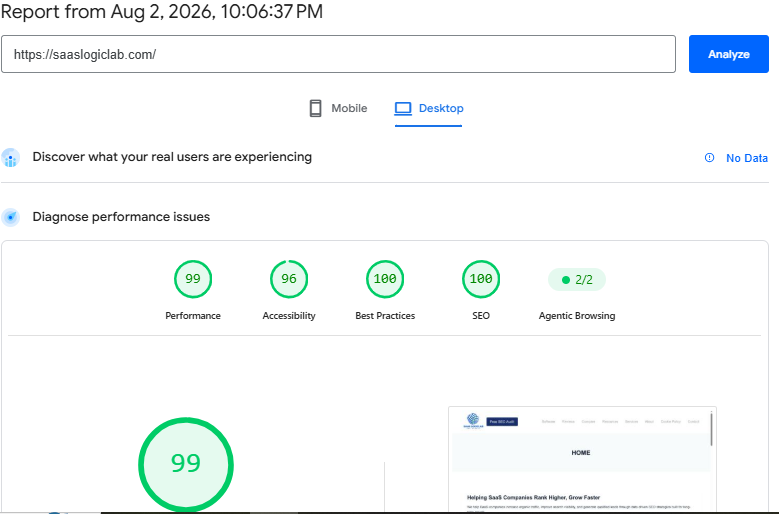
While poor Core Web Vitals don’t automatically prevent rankings, slow or unstable pages often create a weaker user experience, reduce engagement, and make your website less efficient to crawl.
Core Web Vitals include:
- Largest Contentful Paint (LCP)
- Interaction to Next Paint (INP)
- Cumulative Layout Shift (CLS)
Common performance issues include:
- Large, unoptimized images
- Render-blocking CSS and JavaScript
- Slow server response times
- Excessive third-party scripts
- Layout shifts during page loading
- Poor caching configuration
Why this matters
Fast websites improve user experience and make it easier for search engines to crawl more pages efficiently. While Core Web Vitals are only one ranking signal, poor performance can reduce the overall quality of your website.
Verification steps
- Test pages using Google PageSpeed Insights.
- Review the Core Web Vitals report in Google Search Console.
- Identify slow-loading resources.
- Optimize images, CSS, and JavaScript.
- Monitor performance after every major website update.
Suggested tools
- Google PageSpeed Insights
- Google Search Console
- Lighthouse
- GTmetrix
✅ Best Practice
Don’t chase a perfect PageSpeed score. Focus on improving real user experience and fixing the performance issues that have the biggest impact on loading speed and usability.
Improve Mobile Usability
Google evaluates the mobile version of your website when crawling and indexing pages, so a poor mobile experience can affect both usability and organic visibility. Problems that seem minor on a desktop often become much more noticeable on smaller screens.
Responsive design is only one part of mobile usability. Visitors should be able to read content comfortably, tap buttons without difficulty, complete forms, and navigate your website without unnecessary friction.
Common mobile usability issues include:
- Text that’s too small to read
- Clickable elements placed too close together
- Content wider than the screen
- Poor responsive layouts
- Slow mobile page speed
- Intrusive pop-ups
- Broken mobile navigation
Why this matters
Most searches now happen on mobile devices. A poor mobile experience can increase bounce rates, reduce engagement, and make it harder for Google to evaluate your pages positively.
Verification steps
- Review the Mobile Usability reports in Google Search Console.
- Test important pages on multiple screen sizes.
- Check responsive layouts manually.
- Measure mobile performance using PageSpeed Insights.
- Confirm that menus, buttons, and forms work correctly.
Suggested tools
- Google Search Console
- Google PageSpeed Insights
- Chrome DevTools
- BrowserStack (optional)
✅ Best Practice
Don’t rely only on responsive design. Always test your most important pages on a real mobile device before publishing major changes.
Implement Structured Data (Schema Markup)
Structured data provides search engines with additional context about your content, making it easier to interpret the information on a page. Although schema markup isn’t a direct ranking factor, it can improve your eligibility for rich results and enhance how your listings appear in search.
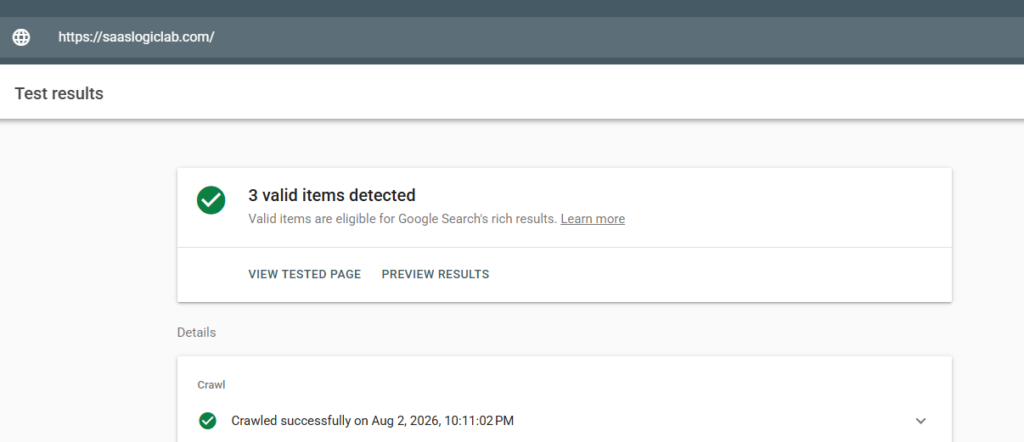
The type of schema you use should match the content on the page. Articles, products, FAQs, reviews, organizations, and breadcrumbs all require different structured data, so choosing the correct schema is just as important as implementing it correctly.
Common schema issues include:
- Missing structured data
- Invalid schema markup
- Required properties missing
- Incorrect schema type
- Multiple conflicting schema blocks
- Outdated structured data
Why this matters
Structured data provides additional context about your content. When implemented correctly, it helps search engines interpret your pages more accurately and may improve their appearance in search results.
Validation checklist
- Test pages using Google’s Rich Results Test.
- Validate structured data before publishing.
- Review schema errors in Google Search Console.
- Update schema whenever page content changes.
Suggested tools
- Google Rich Results Test
- Schema Markup Validator
- Google Search Console
- Rank Math or Yoast SEO
✅ Best Practice
Adding more schema types doesn’t automatically improve SEO. Use only the schema that accurately represents the content on the page.
Secure Your Website with HTTPS
HTTPS is the standard for every modern website, but simply enabling SSL doesn’t guarantee everything is configured correctly. Migrations, redesigns, and server updates often introduce technical issues that affect security and SEO without being immediately obvious.
Reviewing your HTTPS implementation helps ensure that every page, redirect, internal link, and canonical URL consistently uses the secure version of your website.
Common HTTPS issues include:
- Mixed content warnings
- HTTP pages still accessible
- Incorrect redirects
- Expired SSL certificates
- Internal links pointing to HTTP URLs
- Canonical tags using HTTP
Why this matters
Security is part of a healthy website. HTTPS protects user data and prevents browser security warnings that can reduce trust and increase abandonment.
Validation checklist
- Confirm every page loads over HTTPS.
- Redirect HTTP URLs to HTTPS using 301 redirects.
- Update internal links and canonical tags.
- Check for mixed content warnings.
- Monitor SSL certificate validity.
Suggested tools
- SSL Labs
- Google Search Console
- Screaming Frog SEO Spider
✅ Best Practice
After migrating to HTTPS, always update internal links, canonical tags, XML sitemaps, and redirects. Missing even one of these can create unnecessary indexing issues.
Check JavaScript Rendering
JavaScript powers many modern websites, but it can also introduce crawling and indexing challenges when important content depends on client-side rendering. Although Google can process JavaScript, rendering isn’t always immediate or consistent.
If key content, navigation, or internal links appear only after JavaScript executes, search engines may not discover or interpret the page the same way your visitors do. Testing rendered pages regularly helps catch these issues before they affect organic visibility.
Common JavaScript SEO issues include:
- Content loaded only after rendering
- Internal links generated with JavaScript
- Lazy-loaded content not accessible
- Render-blocking JavaScript
- Missing server-side rendering where needed
Why this matters
If Google can’t properly render your page, it may miss important content, links, or structured data. That can reduce indexing quality and limit search visibility.
Validation checklist
- Compare the rendered HTML with the page source.
- Use Google Search Console’s URL Inspection tool.
- Crawl the site with JavaScript rendering enabled in Screaming Frog.
- Test important pages after major frontend updates.
Suggested tools
- Google Search Console
- Screaming Frog SEO Spider
- Chrome DevTools
- Lighthouse
✅ Best Practice
If your website depends heavily on JavaScript, test rendering after every major release. A small frontend change can accidentally hide critical content from search engines.
Find and Fix Duplicate Content
Duplicate content makes it harder for search engines to determine which version of a page should appear in search results. Although it doesn’t usually trigger a manual penalty, it can split ranking signals and reduce crawling efficiency.
These issues often appear on ecommerce websites, blogs, filtered category pages, parameter-based URLs, and websites with inconsistent URL structures. Identifying the source of duplication is the first step toward choosing the right fix, whether that’s a canonical tag, redirect, or improved internal linking.
Common duplicate content issues include:
- HTTP and HTTPS versions
- WWW and non-WWW versions
- URL parameters
- Printer-friendly pages
- Pagination duplicates
- Category and tag page duplication
- Product variations with identical content
Why this matters
Duplicate content can split ranking signals across multiple URLs, reduce crawl efficiency, and cause Google to index a less important version of your page.
Audit process
- Crawl your website for duplicate titles and meta descriptions.
- Review canonical tags.
- Check Google’s selected canonical URL.
Search Google using:
site:yourdomain.com “unique sentence”
- Review duplicate content reports in your SEO audit tool.
Recommended SEO tools
- Screaming Frog SEO Spider
- Google Search Console
- Ahrefs Site Audit
- Semrush Site Audit
🔍 Quick Check
Not every duplicate page needs to be deleted. Sometimes a canonical tag, redirect, or better internal linking is the correct solution.
Optimize URL Structure
A well-structured URL gives both users and search engines a clearer understanding of what a page is about before it’s even opened. Simple, descriptive URLs are easier to crawl, share, and maintain over time.
Wherever possible, keep URLs short, readable, and consistent. Avoid unnecessary parameters, random strings, or frequent URL changes unless there’s a valid technical reason to make them.
Common URL structure issues include:
- Long URLs
- Auto-generated URLs
- Uppercase URLs
- Multiple URL versions
- Keyword stuffing
- Dynamic parameters where unnecessary
Why this matters
Clear URLs improve usability, simplify crawling, and reduce duplicate URL problems across large websites.
Audit process
- Review URLs during a site crawl.
- Check for duplicate URL versions.
- Ensure URLs remain consistent.
- Avoid changing URLs without a proper redirect strategy.
Recommended SEO tools
- Screaming Frog SEO Spider
- Google Search Console
- Semrush Site Audit
🔍 Quick Check
Don’t change existing URLs just to include more keywords. Stable URLs are usually better than unnecessary URL changes.
Audit Internal Links
Internal links shape how both users and search engines move through your website. A thoughtful internal linking strategy helps Google discover important pages, understand topical relationships, and pass authority where it matters most.
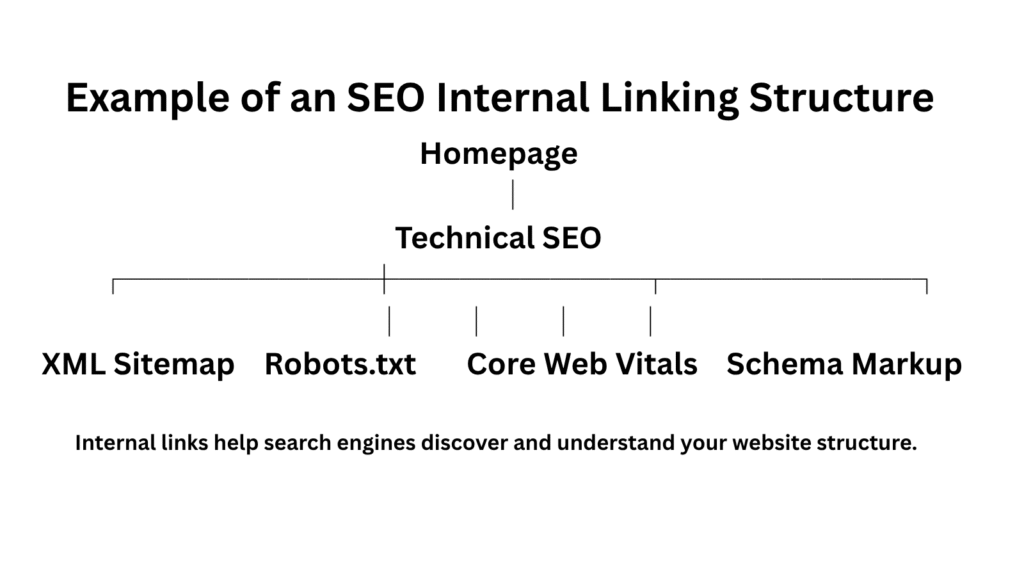
They also improve navigation for visitors by connecting related content naturally. Pages that receive few or no internal links are easier to overlook, even if the content itself is valuable.
Common internal linking issues include:
- Orphan pages
- Broken internal links
- Generic anchor text
- Too few contextual links
- Important pages receiving very few links
- Links pointing to redirected URLs
Why this matters
Internal links influence how search engines understand your website structure. They also help pass authority between related pages and improve crawl efficiency.
Audit process
- Crawl your website.
- Identify orphan pages.
- Review anchor text.
- Count internal links pointing to important pages.
- Update links that point to redirects.
Recommended SEO tools
- Screaming Frog SEO Spider
- Ahrefs Site Audit
- Semrush Site Audit
- Google Search Console
🔍 Quick Check
Every new article should link to relevant existing content, and existing articles should be updated to link back whenever appropriate. This strengthens topical authority over time.
Monitor Crawl Errors
Crawl errors are a normal part of managing any website, especially as content is updated, removed, or reorganized. The important part isn’t avoiding every error—it’s finding and fixing the ones that affect important pages before they begin impacting crawling or indexing.
Reviewing crawl reports regularly helps you catch broken URLs, server issues, and redirect problems early, keeping both users and search engines on the right path.
Common crawl errors include:
- 404 errors
- 500 server errors
- DNS failures
- Redirect errors
- Blocked resources
- Soft 404 pages
Why this matters
Crawl errors waste Google’s crawl resources and may prevent important pages from being discovered or updated.
Audit process
- Review Crawl Stats in Google Search Console.
- Check the Page Indexing report.
- Crawl your website regularly.
- Investigate recurring server errors.
Recommended SEO tools
- Google Search Console
- Screaming Frog SEO Spider
- Semrush Site Audit
- Ahrefs Site Audit
🔍 Quick Check
A few 404 pages isn’t a problem. The priority is fixing broken internal links and ensuring important URLs always return the correct response status.
Optimize Images for SEO and Performance
Images make content more engaging, but they can also become a major performance bottleneck when they’re not optimized correctly. Oversized files, missing alt text, and outdated image formats often increase loading times and reduce overall page efficiency.
Effective image optimization goes beyond compression. Using descriptive filenames, meaningful alt text, and modern formats helps search engines understand your content while improving loading performance for visitors.
Common image optimization issues include:
- Oversized image files
- Missing alt text
- Generic file names
- Images without compression
- Using outdated formats instead of WebP or AVIF
- Lazy loading implemented incorrectly
Why this matters
Optimized images improve page speed, enhance accessibility, and help search engines understand page content more effectively. Large images can negatively affect Core Web Vitals and user experience.
Audit process
- Review image sizes across important pages.
- Check for missing alt text.
- Identify images that slow page loading.
- Use modern image formats where supported.
- Test page performance after image optimization.
Recommended SEO tools
- Google PageSpeed Insights
- Lighthouse
- Screaming Frog SEO Spider
- ShortPixel or Imagify (WordPress)
⚠️ Common Mistake
Compress every image before uploading it. Reducing image size before it reaches your server is usually more effective than relying only on optimization plugins.
Review Structured Internal Navigation
Your navigation plays an important role in how search engines interpret your website’s structure. Menus, breadcrumbs, category pages, and footer links all help Google understand which pages are most important and how they’re connected.
Well-organized navigation also improves the user experience by making key content easier to find, reducing unnecessary clicks, and helping visitors move naturally through your website.
Common navigation issues include:
- Missing breadcrumbs
- Broken navigation menus
- Important pages hidden too deep
- Excessive menu links
- Inconsistent category structure
- Navigation links pointing to redirects
Why this matters
A logical navigation structure improves crawl efficiency and helps distribute authority across your website. It also creates a better user experience by making important pages easier to find.
How to verify
- Review your primary navigation.
- Check breadcrumb implementation.
- Ensure category pages are linked correctly.
- Test navigation on desktop and mobile devices.
- Confirm navigation links don’t point to redirects.
Useful tools
- Screaming Frog SEO Spider
- Google Search Console
- Chrome DevTools
⚠️ Common Mistake
Navigation should help users discover your most valuable content—not overwhelm them with dozens of unnecessary links.
Monitor Crawl Budget (Large Websites)
Crawl budget becomes important only when a website contains a large number of URLs. On larger websites, inefficient crawling can delay the discovery of new content while wasting resources on duplicate, filtered, or other low-value pages.
The objective is to guide search engines toward the pages that matter most by reducing unnecessary crawl paths and improving the overall efficiency of your site’s crawl activity.
Common crawl budget issues include:
- Large numbers of duplicate URLs
- Infinite filter combinations
- Parameter-based pages
- Broken redirects
- Thin archive pages
- Orphan pages
- Large numbers of low-value URLs
Why this matters
A well-managed crawl budget helps Google discover new content faster while ensuring important pages are crawled more frequently.
How to verify
- Review Crawl Stats in Google Search Console.
- Analyze crawl logs if available.
- Identify duplicate and low-value URLs.
- Improve internal linking to important pages.
- Remove unnecessary crawl paths where appropriate.
Useful tools
- Google Search Console
- Screaming Frog SEO Spider
- Log File Analyzer
- Semrush Site Audit
⚠️ Common Mistake
Most small websites don’t have a crawl budget problem. Focus on the crawl budget only after you’ve resolved more fundamental technical SEO issues.
Schedule Regular Technical SEO Audits
Technical SEO requires ongoing attention because every website changes over time. New pages are published, plugins and themes are updated, URLs change, and site structures evolve. Even well-maintained websites gradually develop technical issues if they’re not reviewed regularly.
Scheduling routine technical audits helps you detect problems early, maintain a healthy website, and prevent small issues from growing into larger SEO challenges.
Your audit checklist should include:
- Crawl errors
- Indexing issues
- XML sitemap health
- robots.txt review
- Redirects
- Broken links
- Core Web Vitals
- Structured data validation
- Internal linking
- HTTPS and security
Why this matters
Regular audits keep your website technically healthy and reduce the chances of small issues becoming larger SEO problems.
How to verify
- Perform a full technical audit every quarter.
- Review Google Search Console weekly.
- Monitor Core Web Vitals monthly.
- Re-crawl your website after major updates or migrations.
Useful tools
- Google Search Console
- Screaming Frog SEO Spider
- Semrush Site Audit
- Ahrefs Site Audit
- Google PageSpeed Insights
⚠️ Common Mistake
The best technical SEO audit is the one you perform consistently. Small issues are much easier to fix when they’re discovered early than after they begin affecting traffic and rankings.
Common Technical SEO Mistakes to Avoid
Technical SEO problems are often caused by small oversights rather than major mistakes. A missed redirect, an incorrect canonical tag, or an outdated sitemap can gradually reduce your website’s performance if these issues aren’t identified and resolved.
The following are some of the technical SEO mistakes that appear most frequently during website audits:
- Blocking important pages in robots.txt
- Using incorrect canonical tags
- Leaving broken internal links unresolved
- Creating long redirect chains
- Publishing duplicate content
- Ignoring Core Web Vitals
- Using outdated XML sitemaps
- Forgetting to monitor Google Search Console
- Poor internal linking between related content
- Not testing technical changes after website updates
Avoiding these issues won’t guarantee higher rankings, but it will help search engines crawl, understand, and index your website more efficiently.
⚠️ Common Mistake
Technical SEO problems usually grow over time. A five-minute check today can prevent weeks of troubleshooting later.
Best Technical SEO Tools
No single tool can identify every technical SEO issue. That’s why most SEO professionals combine multiple tools during a technical audit.
If you’re comparing the two leading all-in-one SEO platforms, see our detailed Semrush vs Ahrefs comparison.
| Tool | Best For |
| Google Search Console | Indexing, crawl errors, Core Web Vitals |
| Screaming Frog SEO Spider | Website crawling and technical audits |
| Semrush Site Audit | Automated technical health reports |
| Ahrefs Site Audit | Technical issues and internal linking |
| Google PageSpeed Insights | Core Web Vitals and page speed |
| Lighthouse | Performance and accessibility |
| Rich Results Test | Schema validation |
| Schema Markup Validator | Structured data testing |
⚠️ Common Mistake
If you’re just getting started, Google Search Console and Screaming Frog can identify most technical SEO issues without needing a large toolkit.
You can also explore our guide to the best SEO tools for beginners, businesses, and agencies.
Technical SEO Audit Checklist (Quick Reference)
Use this checklist during every technical SEO audit.
✅ Confirm Google can crawl important pages
✅ Review robots.txt
✅ Validate XML sitemap
✅ Check indexing status
✅ Review canonical tags
✅ Fix broken links
✅ Remove redirect chains
✅ Improve internal linking
✅ Optimize website architecture
✅ Improve Core Web Vitals
✅ Test mobile usability
✅ Validate structured data
✅ Check HTTPS implementation
✅ Review JavaScript rendering
✅ Fix duplicate content
✅ Optimize URLs
✅ Optimize images
✅ Review navigation
✅ Monitor crawl budget (large websites)
✅ Perform regular technical audits
Frequently Asked Questions
What is technical SEO?
Technical SEO focuses on optimizing your website so search engines can crawl, render, understand, and index your pages efficiently.
Is technical SEO a ranking factor?
Technical SEO itself isn’t a single ranking factor. Instead, it removes technical barriers that can prevent search engines from accessing and evaluating your content correctly.
How often should I perform a technical SEO audit?
For most websites, a complete technical SEO audit every three to six months is sufficient. Larger websites or frequently updated sites should review technical health more often.
Which tool is best for technical SEO?
Google Search Console is essential because it shows how Google views your website. For deeper technical audits, Screaming Frog, Semrush Site Audit, and Ahrefs Site Audit are among the most widely used tools.
Can technical SEO improve rankings?
Technical SEO creates the foundation for better rankings by helping search engines crawl and index your website more efficiently. However, content quality, search intent, and backlinks also play a major role.
Final Thoughts
Technical SEO isn’t about chasing perfect audit scores or fixing every warning your SEO tool reports. The goal is to remove the technical obstacles that prevent search engines from discovering, understanding, and indexing your content.
Start with the issues that have the biggest impact on crawling and indexing, then work through performance, website structure, and user experience. A technically healthy website gives every other part of your SEO strategy—from content creation to link building—a stronger foundation to succeed.
Remember that technical SEO is an ongoing process, not a one-time project. As your website grows, regular audits and continuous monitoring will help you identify problems early and keep your site performing at its best.
Need help identifying and fixing technical SEO problems? Explore our SEO services or contact our team for a website audit.