
Internal Linking Audit for SEO: A Practical Guide
Internal linking is one of the few SEO levers a site can control completely, yet it is often handled as an afterthought.
Most teams think about internal links at the end of the publishing process. An article is finished, a few related posts are added, and the page goes live. That approach works when a site has a small content library. It becomes much less reliable once a website starts accumulating service pages, feature pages, comparisons, reviews, product content, resource hubs, and hundreds of supporting articles.
At that scale, the problem is rarely a complete lack of links. The problem is usually distribution.
Some pages receive internal support from almost every new article. Others sit several levels deep in the site with one weak incoming link. Older content continues pointing through redirected URLs. New pages are published without any contextual links from existing content. Important commercial pages remain disconnected from the educational content that builds topical authority around them. In more serious cases, valuable URLs become orphan pages with no normal internal path leading to them at all.
An internal linking audit is designed to expose those weaknesses.
It is not simply a report showing how many links each page has. A useful audit examines how authority, relevance, crawl paths, search intent, and page priority are working together across the site. It helps answer a more important question: does the current internal structure support the pages that actually matter?
That distinction matters because two pages with the same number of incoming internal links can require completely different actions.
A low-value archive URL with one internal link may not deserve additional support. A high-intent comparison page with one internal link, thousands of search impressions, and an average position just outside page one is a very different situation. The raw metric is the same. The SEO opportunity is not.
This is where internal linking becomes more strategic.
A strong audit should help identify pages that are difficult to discover, poorly supported relative to their importance, linked through unnecessary redirects, buried too deeply in the architecture, or connected with weak and inconsistent anchor text. It should also surface opportunities that are not technically “errors” at all, such as an established article that could naturally support a newer page already showing ranking potential.
For SaaS websites, the internal structure has an additional job.
The content library and the commercial site cannot operate as two separate ecosystems.
A prospect may enter through an educational query, move into a deeper implementation guide, compare tools, read a product review, evaluate a use case, and only then become interested in a feature, service, trial, or consultation. Internal links help make that journey possible without forcing a commercial destination before the reader is ready.
The objective is not to push every blog visitor toward a pricing page.
It is to remove unnecessary dead ends.
A well-designed internal linking system gives search engines clearer relationships between pages while giving users a logical next step. It helps broad guides support narrower resources, allows established pages to strengthen newer content, connects problem-aware searches with solution-focused pages, and makes it easier to see which URLs deserve attention before the team spends time rewriting content or building more backlinks.
This guide focuses on that operating layer of SEO: how to run an internal link audit, find orphan and underlinked pages, identify stronger linking opportunities, review anchor text and crawl depth, use tools such as Screaming Frog, Semrush, Ahrefs, and Google Search Console intelligently, and prioritize changes based on search potential rather than crawler warnings alone.
The purpose is not to create more links.
It is to build a clearer internal structure around the pages most likely to drive rankings, qualified clicks, and meaningful business outcomes.
What Is an Internal Linking Audit?
An internal linking audit is a systematic review of how pages on the same website connect to one another. It looks beyond whether a link exists and evaluates whether the site’s internal structure reflects the relative importance, topical relationship, and purpose of its pages.
At a basic level, an internal link is any link from one URL on your domain to another URL on that same domain. Navigation menus, breadcrumbs, category pages, related-content modules, and footer links all contribute to the structure, but contextual links within page copy are particularly useful because the surrounding text helps establish why two pages are related.
An internal link audit examines that system as a whole.
For a small site, this may involve reviewing a few dozen URLs manually. On a larger SaaS site, the audit usually starts with a crawl and then combines that data with search performance, backlink information, and editorial review. The objective is to distinguish genuine structural weaknesses from metrics that merely look unusual in a spreadsheet.
That distinction is important.
A crawler might report that a page has only two incoming internal links. By itself, that tells you very little. If the page is an old announcement with no organic demand and no business value, two links may be more than enough. If the same page is a product comparison receiving 15,000 impressions and ranking between positions 11 and 15 for valuable queries, weak internal support deserves much closer attention.
The same principle applies to crawl depth. A URL sitting five clicks from the homepage is not automatically an SEO problem. Its importance determines whether that depth is reasonable. A low-priority archive and a revenue-relevant feature page should not be evaluated by the same standard.
A useful internal linking analysis therefore answers several different questions at once:
Which Pages Have No Incoming Internal Links?
These are potential orphan pages: URLs that exist but are not connected through the site’s normal internal linking structure.
Not every orphan page should be rescued. Some URLs are obsolete, duplicated, intentionally isolated, or no longer worth maintaining. The audit first determines whether the page belongs in the site before deciding where links should be added.
For an important page, however, having no incoming internal links is a meaningful structural weakness. An XML sitemap can help search engines discover a URL, but it does not replace a logical relationship with the rest of the website.
Which Important Pages Are Underlinked?
Orphan pages are the obvious case. Underlinked pages are often more interesting.
A page may already have one or two incoming links and therefore never appear in an orphan-page report. Yet its internal support may still be weak compared with its search opportunity or business importance.
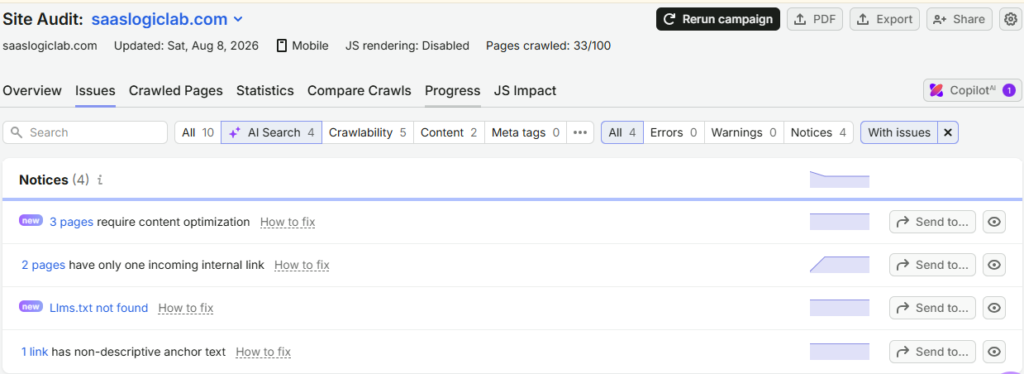
This is where crawl data becomes more useful when paired with Google Search Console.
If a URL is already earning impressions for relevant queries, ranking within striking distance of page one, and receiving little contextual support from related content, it becomes a stronger candidate for review. Instead of treating internal-link counts as an isolated metric, the audit connects them with evidence of actual search demand.
Are Internal Links Pointing to the Right URLs?
Websites change.
Slugs are updated, articles are consolidated, categories are reorganized, product pages move, and old URLs are redirected. Over time, internal links can continue pointing to destinations that are no longer preferred.
A link that passes through a 301 redirect may still get the user to the right page, but if you control the source page and already know the final destination, there is usually little reason to keep sending the internal link through the old URL.
Broken internal links require a different decision. Replacing every 404 with the homepage simply clears an error report; it does not preserve the meaning of the original link. The correct fix depends on what the reader was supposed to find at that destination.
Does the Anchor Text Describe the Destination?
Anchor text provides context before a user clicks.
Generic anchors such as “click here” can work in ordinary writing, but descriptive anchors are often more useful when they naturally explain what the destination contains. At the other extreme, repeatedly forcing the same exact-match keyword across dozens of pages can make otherwise good editorial copy feel manufactured.

An audit should therefore look for patterns rather than chasing an artificial anchor-text ratio.
The question is whether anchors accurately describe their destinations and read naturally within the surrounding sentence.
Are Related Pages Actually Connected?
Publishing several articles about the same subject does not automatically create a topic cluster.
Consider a site with separate resources covering internal linking, orphan pages, site architecture, anchor text, and internal link audits. If those pages barely reference one another, their topical relationship may be obvious to the editorial team but poorly represented in the site itself.
An internal linking audit exposes those gaps.
It can also reveal the opposite problem: pages being linked together merely because they share a broad category even when the relationship between them is weak. A useful content cluster is selective. It connects pages when one genuinely expands, supports, or advances the subject of another.
Internal Link Audit vs. Internal Link Checker
An internal link checker tool can tell you what exists.
An audit tells you what deserves action.
That difference prevents a common failure in technical SEO: treating every crawler warning as equally important.
A tool can identify a page with zero incoming links, another with 80, a redirected destination, and a URL at crawl depth six. It cannot decide, on those numbers alone, which change is most likely to matter for rankings or the business.
That requires context.
A mature internal linking audit therefore combines crawl evidence with search opportunity, page quality, topical relevance, and business priority. The result is not simply a cleaner spreadsheet. It is a ranked set of decisions about which pages should be better connected, which links should change, and which apparent “issues” can safely be left alone.
How to Run an Internal Linking Audit Step by Step
A useful internal linking audit begins with evidence, not assumptions.
The temptation is to open an SEO tool, sort URLs by the number of incoming links, and start fixing whatever appears at the top of the report. That is fast, but it also creates unnecessary work because a low internal-link count is not automatically a problem.
The better approach is to build a complete picture of the site first, then separate structural issues from genuine ranking opportunities.
1. Crawl the Website Before Changing Anything
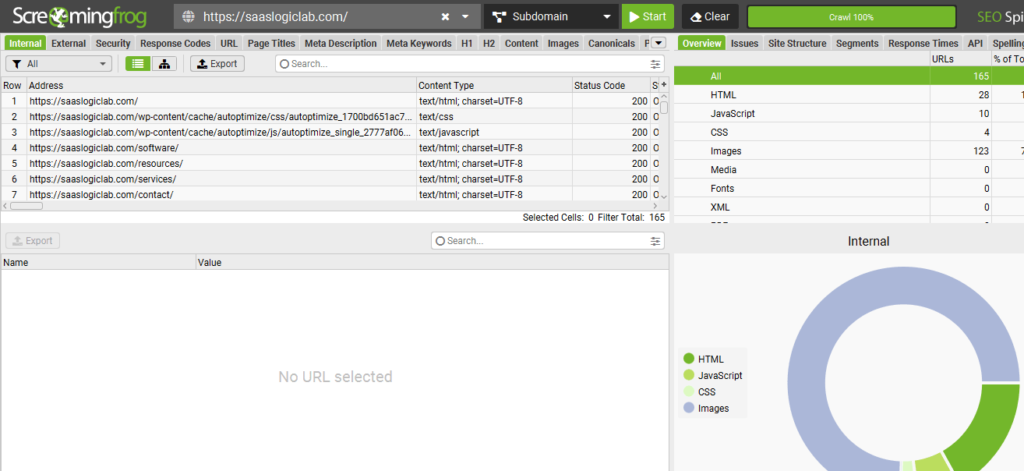
Start with a full crawl of the site using a tool that can report internal-link relationships, status codes, crawl depth, redirects, and anchor text.
For smaller sites, Screaming Frog is usually sufficient for the structural part of the audit. Semrush Site Audit and Ahrefs can add another view, particularly when you want to compare crawl findings with page authority, backlinks, or existing SEO data.
At this stage, do not start editing pages.
The first crawl is your baseline.
You want to understand:
- which URLs are currently discoverable through internal links;
- how many incoming and outgoing internal links important pages have;
- where broken links or redirects appear;
- how deeply pages sit within the crawlable structure;
- which anchors are being used;
- and which sections of the site appear poorly connected.
That baseline matters because once you begin changing links, it becomes harder to understand what the original architecture looked like.
2. Compare Crawl Data With Other URL Sources
A crawler can only discover what it can reach.
That becomes a problem when you are looking for orphan pages.
If no internal page links to a URL, a normal crawl may never find it. For that reason, the crawl should be compared with other reliable URL sources, such as the XML sitemap, Google Search Console, analytics data, or CMS exports.
The purpose is not to merge every URL list and assume that any mismatch is an SEO error.
It is to identify pages that appear to exist outside the normal internal structure and then investigate why.
For example, a URL found in the XML sitemap and Search Console but missing from the crawl may be:
- an important page that was accidentally disconnected;
- an outdated page that should no longer exist;
- a campaign landing page with a deliberately limited path;
- a duplicate URL;
- or a page that lost its incoming links during a redesign or migration.
Those cases require different decisions.
3. Find Orphan Pages, but Do Not Treat Them All the Same
An orphan page has no crawlable incoming internal links from the rest of the website.
This is one of the clearest structural issues an internal linking audit can uncover, but the fix should depend on the page’s value.
If the page is useful, current, indexable, and strategically important, the next step is to identify where it belongs within the site.
A guide about orphan pages, for example, might logically receive links from an SEO audit article, a technical SEO checklist, a site-architecture guide, or a broader internal linking resource.
The solution should be contextual.
Adding one random link from an unrelated article may remove the “orphan” label in a crawler, but it does not meaningfully integrate the page into the site.
If the page is outdated or duplicates another URL, strengthening it may be the wrong move entirely. Consolidation, redirection, removal, or another content decision may be more appropriate.
4. Identify Underlinked Pages With Real Search Potential
Orphan pages are easy to spot.
Underlinked pages are often more valuable.
A URL may already have one or two incoming internal links and therefore never trigger an orphan-page warning. Yet its support may still be weak relative to its importance.
This is where Google Search Console becomes especially useful.
Look for pages that already receive meaningful impressions and rank within reach of stronger positions, particularly when the queries clearly match the page’s intent.
A page averaging position 12 or 14 with thousands of impressions deserves a different level of attention from a page sitting at position 70 with almost no visibility.
Now compare that search opportunity with internal-link support.
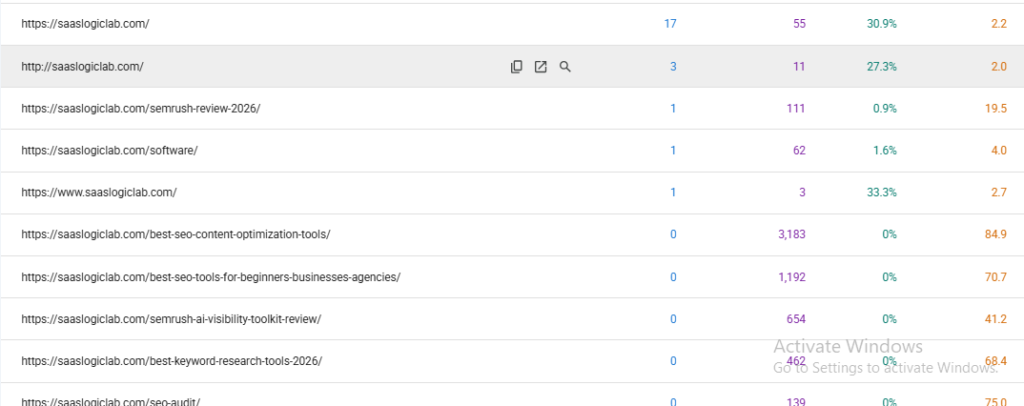
If the page has few relevant incoming links while several established pages discuss the same topic, you have found a practical optimization opportunity.
The logic is simple:
Google is already showing the page. The site may not be supporting it strongly enough.
That does not guarantee an internal link will produce a ranking increase. But it gives you a controlled variable worth testing before making larger changes.
5. Check Broken Internal Links
Broken internal links create dead ends for both users and crawlers.
They often appear after:
- URL changes;
- deleted articles;
- site migrations;
- category restructuring;
- product changes;
- content consolidation;
- or outdated editorial references.
For each broken link, identify the intended destination.
Do not automatically replace every 404 with the homepage.
If the original link pointed to a technical SEO guide and that guide has been replaced by a newer resource, update the link directly to the relevant replacement.
If no appropriate destination exists, removing or rewriting the reference may be cleaner than forcing an unrelated URL into the sentence.
6. Replace Internal Links That Point Through Redirects
Redirects are useful when URLs change, but your own internal links should usually point directly to the preferred destination when that destination is known.
Suppose an article still links to:
/old-seo-audit-guide/
which redirects to:
/seo-audit/
The redirect protects old bookmarks, backlinks, and previously indexed URLs.
Your own content does not need to keep using the outdated path.
Updating the internal link to the final URL keeps the architecture cleaner and prevents redirect chains from accumulating over time.
This matters particularly on older SaaS sites, where product names, comparison URLs, resource hubs, and documentation structures can change frequently.
7. Review Crawl Depth Based on Page Importance
Crawl depth is useful only when it is interpreted in context.
A page that sits several clicks from the homepage is not automatically weak.
The better question is whether an important page is unnecessarily difficult to reach.
A high-value comparison page, feature page, service page, or major content hub should usually have stronger paths than an old archive or low-priority support page.
If a strategic URL is buried deep in the structure, review whether it should receive links from:
- a relevant topic hub;
- an established supporting article;
- a category or resources page;
- a product or feature page;
- or another prominent page within the same subject.
The objective is not to flatten the entire website.
It is to make accessibility reflect importance.
8. Audit Anchor Text in Context
Anchor text should help the reader understand what they are about to open.
During the audit, look for three common problems:
Vague anchors such as “click here” or “read more” where a clearer description would help.
Misleading anchors where the text implies one destination but links to another.
Repeated exact-match anchors that make the site’s editorial language feel mechanically optimized.
If a page targets internal linking audit, natural anchors could include:
internal linking audit
audit your internal links
review your internal link structure
identify internal linking issues
check existing internal links
The point is not to manufacture variation.
The point is to let the sentence determine the wording.
9. Look for Missing Internal Linking Opportunities
A strong audit should not stop at errors.
Some of the best opportunities are pages where nothing is technically broken.
Suppose you recently published a dedicated internal linking audit guide.
Older content may already discuss:
- orphan pages;
- broken links;
- crawl depth;
- link equity;
- site architecture;
- SEO audits;
- or internal-link tools.
Those passages may now deserve a contextual link to the newer guide.
This is particularly useful when the source page already has backlinks, organic traffic, or established rankings.
New content should not have to build its internal support from zero simply because it was published later.
10. Prioritize Fixes by Opportunity, Not by Tool Severity
The final step is deciding what gets fixed first.
Crawler severity labels are useful for triage, but they should not dictate SEO priorities on their own.
A practical order is:
- broken internal paths affecting important pages;
- orphaned pages that are worth keeping;
- underlinked URLs already showing search potential;
- strategic pages buried too deeply;
- internal redirects and outdated destinations;
- weak anchor patterns;
- missing contextual opportunities across existing content.
Then add one more filter:
business value.
A page tied to product evaluation, qualified leads, trials, demos, or a valuable search journey may deserve attention even if its traffic is lower than a broad informational article.
That is the point where an internal linking audit stops being a technical cleanup and becomes a ranking strategy.
How to Find and Fix Orphan Pages
Orphan pages deserve their own place in an internal linking audit because they expose a problem that ordinary crawl reports can miss: a URL can exist, be indexable, appear in an XML sitemap, and even receive organic traffic while remaining disconnected from the website’s normal internal navigation.
In practical terms, an orphan page is a page with no crawlable incoming internal links from other pages on the site.
That definition is more useful than assuming an orphan page is simply a URL a crawler failed to find. A crawler can miss pages for several reasons. The audit needs to establish whether the page genuinely lacks internal links and, if it does, whether that is actually a problem.
Why Orphan Pages Appear
Orphan pages are rarely created deliberately. More often, they are a by-product of routine website changes.
A content team publishes a new article but never updates older posts to link to it. A navigation redesign removes the only path to a page. Two articles are consolidated and an internal reference disappears. A category structure changes. A product or feature page is replaced, but related content is not updated. An old campaign page remains indexable long after the campaign has ended.
SaaS sites are particularly susceptible because their architecture tends to evolve quickly. Features are renamed, integrations are added, comparison content expands, documentation changes, and editorial libraries grow independently of product pages.
Over time, URLs can fall out of the internal graph without anyone intentionally removing them.
How to Find Orphan Pages on a Website
A normal website crawl is not enough.
If a page has no incoming internal links, the crawler may have no path to discover it in the first place. Finding orphan pages therefore requires comparing the crawl against URL sources that do not depend on internal links.
A practical comparison usually includes:
Crawl data — URLs discovered by following the website’s internal links.
XML sitemap — URLs the site is explicitly presenting to search engines.
Google Search Console — pages Google has encountered or reported in search data.
Analytics data — pages that have received visits even if they are not currently connected through the crawlable structure.
CMS or database exports — useful when the publishing system contains URLs that other sources fail to expose.
The valuable part is the mismatch.
If a URL appears in the sitemap, Search Console, analytics, or CMS but not in the internal crawl, investigate it as a potential orphan.
This is also why an orphan page checker based only on a standard crawl can give an incomplete picture. The strongest process compares multiple inventories rather than relying on one source.
Finding Orphan Pages With Screaming Frog
Screaming Frog is useful for this work because crawl data can be combined with additional URL sources rather than evaluated in isolation.
The objective is to identify URLs known through sources such as a sitemap, Search Console, or analytics that were not reached through the normal internal crawl.
Once those URLs have been surfaced, inspect them manually.
The tool has found a discrepancy. It has not yet told you what to do with the page.
That distinction matters because an orphan-page report often contains a mixture of valuable content and URLs that should never be reintegrated.
An Orphan Page Is Not Automatically a Page Worth Saving
This is where many audits become mechanical.
A report contains 60 orphan URLs, so the team starts adding internal links to all 60.
That can make the architecture worse.
Before creating a single link, classify each page.
Ask:
Is the page still useful?
Is it indexable intentionally?
Does it satisfy a distinct search intent?
Is the content current?
Does another page already serve the same purpose?
Does it have impressions, clicks, backlinks, conversions, or other evidence of value?
Would a user reasonably need to reach it from another part of the website?
The answers determine the action.
When an Orphan Page Should Receive Internal Links
Suppose an orphan page contains a strong guide, targets a useful query, is still current, and has clear relevance to existing content.
That page should normally be integrated into the appropriate topic structure.
The next task is not to find any page that can link to it. It is to find the most relevant source pages.
If the orphan URL covers internal linking audits, likely source candidates might include a broader SEO audit, a technical SEO guide, an internal linking pillar, or an article discussing site architecture.
Read the actual paragraphs before adding the links.
A source page becomes valuable when the destination improves the explanation at that particular point in the content.
When an Orphan Page Should Be Consolidated
Sometimes the audit reveals an orphan URL that covers almost the same intent as a stronger existing page.
For example, a site might contain:
/internal-link-audit/
and:
/internal-linking-audit/
If both pages attempt to satisfy essentially the same search intent, giving each more internal links may reinforce the wrong architecture.
The first question should be whether both URLs deserve to exist.
If the content substantially overlaps, consolidation may produce a clearer result than trying to support two competing pages.
This is especially important when keyword research surfaces several variations of the same phrase. Search volume for internal link audit, internal linking audit, and related terms does not automatically justify separate URLs.
Keyword variations can belong to one page when the underlying intent is the same.
When an Orphan Page Should Be Redirected or Removed
An orphan page may also be:
an obsolete product page,
an expired campaign,
a duplicate article,
an outdated resource,
a test URL,
or content with no meaningful search or business purpose.
In those cases, adding internal links simply because the crawler flagged the URL is counterproductive.
If there is a genuinely equivalent replacement, a redirect may be appropriate.
If no replacement exists and the page no longer deserves to remain available, removal may be the cleaner decision.
The correct action depends on the page—not the audit label.
“Orphan Page Has No Incoming Internal Links” — What Should You Actually Fix?
SEO tools often describe the problem literally: the orphan page has no incoming internal links.
Technically, the obvious fix is to create one.
Strategically, that is incomplete.
An important page should not receive a token link merely to make a warning disappear. It should be positioned within the part of the website where it belongs.
That may mean links from multiple relevant resources. It may mean inclusion within a topic hub. It may expose a missing relationship between informational and commercial content. Or it may reveal that the URL itself should be consolidated.
The audit should resolve the structural reason the page became isolated, not just change the number in the report.
Are Orphan Pages Bad for SEO?
They can be, particularly when valuable pages are involved.
A page with no incoming internal links receives little support from the site’s internal link graph and is harder to discover through normal crawl paths. It also gives users no obvious route to reach the page from related content.
But “orphan page” should not be treated as a universal quality judgment.
An intentionally isolated utility URL and a high-value SEO landing page are not equivalent.
The SEO concern becomes stronger when the orphan page is:
indexable,
valuable,
topically important,
already receiving search impressions,
earning backlinks,
or part of a strategically important user journey.
Those are the URLs worth prioritizing.
Fix the Cause, Then Prevent It From Returning
The most efficient orphan-page strategy is preventive.
Whenever an important new article or landing page is published, the publishing workflow should answer two questions before the work is considered complete:
Which existing pages should the new URL link to?
Which existing pages should now link back to the new URL?
The second question is the one most teams miss.
A new article can contain excellent outgoing links and still receive no contextual support from the content that existed before it.
Building that backward connection at publication time is much easier than discovering hundreds of disconnected URLs during a future site audit.
For a growing SaaS content library, orphan-page prevention should therefore become part of publishing operations rather than a cleanup exercise reserved for technical SEO audits.
How to Find Internal Linking Opportunities That Can Actually Help Rankings
Fixing broken links and orphan pages cleans up the structure. Finding internal linking opportunities is different. This is where an audit moves from maintenance into active SEO work.
The strongest opportunities are rarely discovered by asking, “Where can I add another link?”
A better question is:
Which page already has evidence of search potential, and which existing pages are best positioned to support it?
That shift matters because most websites have far more possible internal links than useful ones. If every article about SEO links to every other SEO article, the site may become heavily interconnected without becoming meaningfully better organized.
The opportunity is not the link itself. It is the relationship between the source page, the destination, and the query the destination is trying to win.
Start With Pages Google Is Already Testing
Google Search Console is one of the most useful places to begin because it shows where visibility already exists.
Look for URLs receiving meaningful impressions for relevant queries but sitting outside the positions that generate consistent clicks. Pages around positions 8–20 can be particularly interesting, although there is no universal cutoff.
A page averaging position 13 for a commercially useful query is already giving you information: Google considers the URL relevant enough to surface it, but it has not yet secured a stronger position.
Before rewriting the article, changing the title, or building backlinks, inspect its internal support.
How many relevant pages link to it?
Where do those links come from?
Are the source pages themselves established?
Does the anchor context accurately describe the destination?
Are there older pages covering adjacent topics that never linked to this newer resource?
If the answers reveal weak support, internal linking becomes a reasonable variable to test.
This is more deliberate than adding links to pages simply because an SEO tool labels them “underlinked.”
Combine Impressions, Position, and Internal-Link Data
No single metric should determine priority.
Impressions show whether search demand is reaching the page.
Average position gives a rough indication of current visibility.
Incoming internal links show how strongly the site is connecting that page to the rest of its content.
Together, they create a more useful picture.
Consider two URLs:
Page A
12,000 impressions
Average position: 11.8
2 relevant incoming internal links
Page B
180 impressions
Average position: 58
1 incoming internal link
If both pages are equally relevant to the business, Page A is usually the more interesting internal-link opportunity.
It is already close enough to stronger visibility that modest improvements may matter. Page B may need better content, clearer intent alignment, more authority, or a completely different strategy before internal linking becomes the limiting factor.
This is why internal-link prioritization should be based on opportunity rather than scarcity alone.
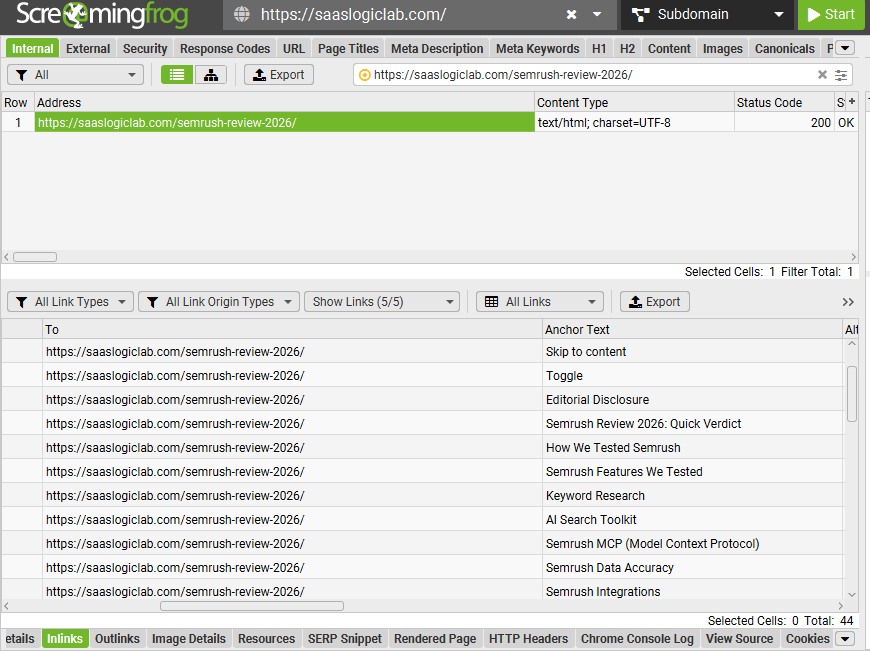
Find Source Pages With a site: Search
One of the simplest ways to find contextual opportunities requires no paid tool.
Use Google to search your own domain for the topic of the destination page.
For example:
site:example.com “internal linking”
or:
site:example.com “orphan pages”
or:
site:example.com “site architecture”
The results can surface older pages where the subject already appears.
Do not automatically add a link to every result.
Open the page and read the relevant section.
You are looking for passages where the target page would genuinely improve the reader’s next step.
This method is particularly useful after publishing a new resource because older articles cannot link to content that did not exist when they were written.
Search for Concepts, Not Just Exact Keywords
Exact-match searches can miss some of the best opportunities.
Suppose the destination targets internal linking audit.
Potential source pages may never use that exact phrase. They might discuss:
“finding broken internal links,”
“reviewing site architecture,”
“pages with no internal links,”
“crawl depth,”
or:
“technical SEO audit steps.”
Those sections can be more contextually relevant than a page that happens to contain the words “internal linking audit” once.
When searching for source pages, therefore, use the entire topic vocabulary rather than one target keyword.
This is also where the keyword research behind the article becomes useful operationally. Related terms are not only phrases to place in copy; they help reveal relationships between existing pages.
Use Ahrefs Internal Link Opportunities as a Discovery Layer
Ahrefs‘ internal link opportunity reporting can reduce the amount of manual searching required on larger sites.
The useful part is discovery.
If the tool identifies a source page, a keyword context, and a potential destination, treat that as a candidate—not an instruction.
Open the source page and inspect the paragraph.
Then ask:
Would I add this link if the SEO tool had never suggested it?
If the answer is yes, the opportunity is probably editorially sound.
If the sentence has to be rewritten awkwardly just to accommodate the anchor, or the destination only loosely relates to the discussion, skip it.
This human review becomes increasingly important when automated tools generate dozens or hundreds of suggestions.
Use Semrush to Identify Structural and Search Opportunities Separately
Semrush can contribute to the process from two directions.
Site Audit data can help identify structural weaknesses such as pages with limited internal support or problematic link paths. Organic keyword and position data can then help determine which of those pages have actual search potential.
Keep those two jobs separate.
A technical issue tells you something about the site’s structure.
Search data tells you whether the page represents an opportunity.
The most interesting URLs are often where the two overlap.
For example:
Weak internal support + strong impressions + near-page-one rankings + high topical relevance
is much more actionable than:
Weak internal support alone.
Find Strong Source Pages, Not Just Relevant Ones
Once a target page has been selected, the next question is where the new links should come from.
Topical relevance comes first, but source-page strength can help prioritize among several equally relevant candidates.
Look for pages that already have some combination of:
organic visibility,
external backlinks,
consistent traffic,
strong internal support,
or an important position within the topic architecture.
An established guide with backlinks and rankings may be a more valuable source than a newly published article with no visibility—provided both are genuinely relevant to the destination.
This does not mean every powerful page should be used to push authority toward whatever URL you want to rank.
Relevance remains the constraint.
A strong but unrelated source is not a better internal-link opportunity than a closely related page simply because it has more backlinks.
Look for Pages With External Backlinks but Weak Internal Distribution
Backlink data can reveal another useful pattern.
Some informational resources earn external links over time but do little to connect that authority with the rest of the site.
If a page has attracted quality backlinks, inspect its contextual outgoing links.
Does it connect to deeper resources within the same topic?
Have important pages been published since the article was last updated?
Are there places where readers would naturally benefit from those newer resources?
When the relationship is legitimate, updating established backlink-earning content can strengthen the wider cluster without manufacturing new links from unrelated pages.
Do Not Ignore Pages Already Ranking Well
Internal linking audits often focus entirely on weak pages.
High-performing pages deserve attention for a different reason: they can reveal where the site has already established relevance and authority.
Suppose an SEO audit guide consistently ranks and receives traffic. A newer internal-link audit article covers one part of that broader process in much greater depth.
If the older guide discusses internal links but does not reference the dedicated resource, the missing connection is worth reviewing.
The ranking page does not need to be “fixed.”
It may simply be an excellent source page.
This is an important distinction: internal linking optimization is not limited to repairing weak URLs. It also involves using strong content more intelligently.
Prioritize Contextual Links Over Forced Sitewide Placement
When a target page needs more support, it can be tempting to add it to the footer, sidebar, or a sitewide module because one change creates links from many pages.
That may increase the raw incoming-link count dramatically.
It does not create hundreds of equally meaningful contextual endorsements.
For content-driven SEO, a smaller number of carefully chosen links from relevant passages is generally more useful than inflating link counts through unrelated templates.
Sitewide navigation has legitimate purposes. It should reflect navigation and product priorities rather than being used as a shortcut whenever an article needs more internal links.
Build an Internal Link Opportunity Score
For larger content libraries, opportunities can be prioritized with a simple working model.
Evaluate each target page across five factors:
Search visibility — Is Google already showing the page?
Ranking proximity — Is it within realistic reach of stronger positions?
Internal support — Is the page weakly linked relative to its importance?
Source availability — Do relevant, established pages exist that could support it?
Business value — Would improved visibility attract the right audience or support a meaningful user journey?
You do not need a complicated mathematical formula.
The purpose of the score is to prevent the team from spending equal time on unequal opportunities.
A URL with strong signals across all five factors should normally move ahead of a page that is underlinked but otherwise has little evidence of potential.
Internal Linking Opportunity Example
Imagine a SaaS site has published a detailed guide targeting an audit-related query.
Search Console shows:
8,400 impressions in the last three months
Average position: 12.6
CTR: 0.7%
The crawl shows only two contextual incoming links.
Meanwhile, the site already has established pages covering technical SEO, on-page SEO, Search Console, and broader SEO audits. Each contains a section where internal linking is directly relevant.
That is a much stronger opportunity than simply searching the website for pages with the fewest links.
The team can review those source pages, add only the links that improve the surrounding explanation, document the change, and then measure the target URL over a meaningful period.
If visibility improves, the result provides evidence worth learning from.
If it does not, the team has still strengthened a legitimate structural relationship and can investigate other limiting factors instead of repeatedly adding more links.
That is the standard an internal linking opportunity should meet: a defensible editorial relationship backed by a clear SEO reason for prioritizing it.
How Internal Links Pass Link Equity — and Why Relevance Matters More Than Raw Link Counts
Internal linking is often discussed as a way to “pass authority” from one page to another. The idea is directionally useful, but it becomes misleading when it is reduced to a simple formula: find the strongest page on the site, add a keyword-rich link to the page you want to rank, and expect the target to improve.
That is not a sound internal linking strategy.
Links are part of how search engines discover pages, understand relationships between URLs, and evaluate the structure of a website. Internal links can also help distribute signals from pages that have accumulated external backlinks and prominence within the site. But link equity should be considered alongside relevance, architecture, crawlability, and page quality—not as a resource that can be mechanically moved around the site.
For an internal linking audit, the practical question is not:
Which page has the most authority to give away?
It is:
Which relevant pages are best positioned to support this destination, and does the link make sense in context?
What Is Link Equity in Internal Linking?
Link equity is a useful shorthand for the value that can flow through links between pages.
Consider a SaaS site with an established technical SEO guide that has earned external backlinks over several years. The company later publishes a focused guide about internal linking audits.
If the older technical SEO article already discusses internal-link analysis, linking from that discussion to the dedicated guide creates a logical relationship between the pages.
The source page is established.
The destination expands on the subject.
The anchor provides context.
The reader has a legitimate reason to follow the link.
That is a far stronger use of internal linking than adding the same destination to an unrelated high-authority article merely because the source has more backlinks.
External Backlinks and Internal Distribution Work Together
External backlinks point into the website from other domains. Internal links determine, in part, how pages within the site are connected after that authority arrives.
This makes backlink-earning content worth reviewing during an internal link analysis.
Suppose an older research article has earned links from reputable websites but has not been updated in two years. Since publication, the site has added several useful resources related to subjects already mentioned in the article.
Those new pages may have legitimate internal-link opportunities from the established resource.
This does not mean every page with backlinks should become an internal-link distribution hub. The source still needs to discuss the destination naturally.
The backlink profile helps prioritize which relevant source pages to review first. It does not override relevance.
Why Internal Link Count Alone Is a Weak Metric
Imagine two pages each receive ten incoming internal links.
The first receives links from ten closely related resources, with each link appearing inside a paragraph where the destination provides useful additional depth.
The second receives ten links from generic archive pages, unrelated posts, or repeated template elements.
The incoming-link count is identical.
The context is not.
This is why an internal link analysis based solely on the number of inlinks can produce poor decisions. Link counts can reveal anomalies, but they do not tell you whether the connections are strategically useful.
The same applies in the opposite direction.
A page with only three incoming internal links is not necessarily underlinked if those three links come from the most relevant and prominent pages in its topic cluster.
The audit needs to evaluate quality and purpose alongside quantity.
Do Not Try to Sculpt Link Equity With nofollow
One outdated approach to internal linking is to add nofollow attributes to ordinary internal links in an attempt to control where authority flows.
For normal editorial internal links, this is not a useful default strategy.
If a page is worth linking to for users and belongs in the site’s crawlable structure, the link would ordinarily remain a standard followable link. If a page should not be indexed or crawled for another reason, that issue should be addressed through the appropriate technical or architectural decision rather than trying to manage the entire site through internal nofollow patterns.
During an audit, unexpected nofollow attributes on important internal links are therefore worth investigating.
Do not remove them blindly.
Find out why they exist first.
Too Many Links Can Dilute Editorial Focus Before They Become a Numerical Problem
There is no universal number of internal links that makes a page “too heavily linked.”
A long technical guide can legitimately reference many supporting resources. A short product page may need very few.
The more useful test is editorial.
If almost every paragraph contains several competing links, users have difficulty understanding which destination matters. The page begins to function as a directory rather than a coherent resource.
This also makes internal-link prioritization less precise. If every related URL is linked from everywhere, the architecture communicates fewer meaningful distinctions between broad pillars, supporting guides, commercial pages, and secondary resources.
Internal links should therefore be selective enough that their purpose remains clear.
Page Importance Should Be Reflected Across the Architecture
Important pages tend to deserve stronger internal visibility, but importance should not be defined only by search volume.
For a SaaS site, a page may be important because it:
targets a high-intent query;
supports a major product category;
generates qualified trials or leads;
has earned significant external backlinks;
acts as the pillar for an important topic;
or connects informational search demand with a meaningful evaluation path.
Those signals can inform how prominently the page is connected within the site.
This does not mean adding the URL to every article.
It means ensuring that strategically important pages are not buried while low-value content accidentally receives stronger structural support.
Links From the Homepage Are Not a Universal Shortcut
The homepage is typically one of the most prominent pages on a website, which can make it tempting to link every SEO-priority URL directly from it.
That approach does not scale.
Homepage navigation should reflect the site’s major business and user priorities. Editorial resources should earn prominent placement when they genuinely belong there, not because the SEO team wants to shorten crawl depth for dozens of individual articles.
For most supporting content, a strong path through relevant hubs, categories, pillar pages, and contextual links creates a cleaner architecture.
The goal is not to make every page one click from the homepage.
The goal is to prevent strategically important pages from becoming unnecessarily difficult to reach.
Internal Links Should Reinforce Topic Relationships
Link equity becomes more useful as an SEO concept when it is paired with topical structure.
Suppose a site has a cluster containing:
Internal Linking for SEO
Internal Linking Audit
Orphan Pages
Anchor Text for Internal Links
Internal Linking Tools
Site Architecture
These pages should not all link to one another indiscriminately.
Instead, the broader internal linking resource might introduce the audit. The audit might point to the orphan-page guide when discussing isolated URLs. The orphan-page article might return readers to the full audit when they need a broader diagnostic process. A tools page could support the implementation sections where software becomes relevant.
The result is not a perfectly symmetrical network.
It is a network in which each connection has a reason.
How to Prioritize Link Equity Opportunities During an Audit
When several relevant source pages could link to the same target, review them in this order:
Topical fit. Does the source genuinely discuss the destination’s subject?
Editorial usefulness. Would the link help someone reading that specific passage?
Source prominence. Is the page already well connected within the site?
External authority. Has the source earned meaningful backlinks?
Organic performance. Does the page already attract search visibility or qualified traffic?
Freshness and quality. Is the source still a page you want users to rely on?
This prevents a common mistake: selecting the strongest source page first and trying to manufacture relevance afterward.
The source should qualify on relevance before authority becomes a deciding factor.
Link Equity Is a Prioritization Signal, Not the Strategy
A good internal linking strategy does not need to calculate how much “juice” each individual link transfers.
That level of precision is neither practical nor necessary for most editorial SEO work.
What matters is whether the site’s strongest and most relevant pages are helping users and crawlers discover the resources that logically depend on them.
During an internal linking audit, link equity can help answer which source pages deserve review first.
It should never become an excuse to place links where they do not belong.
The strongest internal link is usually not the one added from the page with the highest authority metric.
It is the one where relevance, page strength, user intent, and architecture all point toward the same destination.
Anchor Text for Internal Links: How to Make It Descriptive Without Over-Optimizing It
Anchor text is one of the few parts of an internal link that users can see before they click. It tells them what sits behind the link and gives search engines additional context about the relationship between the source page and the destination.
That makes anchor text useful for SEO, but it also makes it easy to overthink.
Some sites use vague anchors everywhere. Others move in the opposite direction and repeat the same target keyword every time a page is linked. Neither approach reflects how experienced editors normally connect related content.
The better standard is straightforward: the anchor should describe the destination accurately and fit the sentence naturally.
What Is Anchor Text in Internal Linking?
Anchor text is the clickable text attached to a hyperlink.
If an article says:
Run an internal linking audit before restructuring a large content library.
the words internal linking audit are the anchor text.
That anchor gives the reader a reasonable expectation of what the destination contains. It also establishes a clear contextual relationship between the page discussing the subject and the page dedicated to the audit.
Compare it with:
Click here to learn more.
The second version may still function perfectly well as a link, but it provides much less information about the destination.
This does not mean generic anchors are inherently harmful. It means descriptive wording is usually more useful when the sentence gives you a natural opportunity to use it.
Exact-Match Anchor Text Is Not Automatically a Problem
If the most natural description of a page is its target topic, using that phrase as an internal anchor can make sense.
A guide specifically about orphan pages can reasonably be linked with:
orphan pages
A page about technical SEO can naturally receive:
technical SEO checklist
And an internal-link audit guide can legitimately receive:
internal linking audit
The problem begins when the writing is repeatedly manipulated to force the same phrase.
Suppose 25 articles link to one destination and every editor has been instructed to use internal linking audit regardless of the sentence.
The result is not better editorial clarity. It is a visible pattern created for SEO rather than for communication.
Natural internal linking will usually produce variation without requiring a formula.
Use Partial-Match Anchors When the Sentence Calls for Them
The same destination can be described in several accurate ways.
For a page targeting internal-link auditing, reasonable anchors might include:
internal linking audit
audit your internal links
review the internal link structure
find internal linking issues
analyze existing internal links
identify weak internal links
The destination has not changed.
The language changes because the surrounding sentences have different purposes.
That is how anchor variation should emerge: from writing, not from a spreadsheet demanding a certain percentage of exact-match and partial-match anchors.
Do Not Build an Internal Anchor-Text Ratio
There is no useful editorial reason to prescribe something like:
30% exact match
40% partial match
20% branded
10% generic
for normal internal links.
That kind of framework creates precision without necessarily creating better content.
A site with hundreds of pages, multiple authors, product documentation, navigation links, category links, and contextual references will naturally develop a varied anchor profile.
The audit should focus on whether the anchors are clear, relevant, and accurate.
If a pattern looks excessively repetitive, investigate it.
Do not replace one artificial pattern with another.
Avoid Writing Sentences Just to Hold a Keyword
This is one of the easiest ways to make SEO content feel engineered.
Consider:
For more information about internal linking audit, read our internal linking audit guide.
The sentence exists almost entirely to create an anchor.
A stronger editorial version would introduce the destination because the reader actually needs it:
If the problem extends beyond one page, a full internal linking audit can reveal orphan URLs, broken paths, redirects, weak anchors, and underlinked content across the site.
The link now belongs to the explanation.
If the hyperlink were removed, the sentence would still be worth reading.
That is a useful test for contextual internal links.
Anchor Text Should Match the Destination’s Actual Scope
Descriptive does not mean aggressive.
An anchor can contain a relevant keyword and still be poor if it exaggerates what the destination provides.
For example, linking the words:
complete technical SEO audit
to a short article that only explains broken links creates a mismatch.
The anchor promises more than the destination delivers.
During an internal link audit, inspect questionable anchors alongside their target pages rather than evaluating the words in isolation.
Ask:
Would someone clicking this phrase get what the phrase led them to expect?
If not, either the anchor or the destination needs reconsideration.
Context Around the Anchor Matters
The words surrounding a link help establish why the destination is relevant.
A short anchor can therefore work well when the sentence already provides enough context.
For example:
Pages with no crawlable incoming links can disappear from the site’s normal navigation paths. Our guide to orphan pages explains how to find those URLs by comparing crawl data with sitemaps and other sources.
The anchor itself is only two words, but the surrounding copy makes the relationship clear.
This is why evaluating anchor text by extracting it into a spreadsheet has limits. The report can reveal patterns. Editorial review tells you whether those patterns actually make sense in context.
Avoid Using the Same Anchor for Different Intentions
Another problem appears when the same anchor points to different destinations across the site.
Suppose SEO audit sometimes links to a general audit guide, sometimes to a technical SEO checklist, and sometimes to an internal-link audit.
Those pages may be related, but they do not satisfy the same need.
Consistent destination logic makes the architecture easier to understand.
When one page is clearly the primary resource for a subject, anchors describing that subject should generally point there unless the context calls for a more specific destination.
This becomes increasingly important as content libraries grow and several pages begin discussing overlapping terminology.
Do Not Use Anchor Text to Compensate for Cannibalization
If two URLs target essentially the same search intent, changing their internal anchors is unlikely to solve the underlying architecture problem.
For example, separate pages targeting:
internal link audit
and:
internal linking audit
may compete because they address the same need—not because the wrong anchor variation was used.
The better question is whether both pages should exist.
If the intent substantially overlaps, consolidation may create a cleaner structure and a clearer internal destination.
Internal anchor optimization cannot repair a content strategy that has created unnecessary duplication.
Review Image Links and Non-Text Links Separately
Not every internal link uses visible text.
Logos, navigation icons, cards, and images can also link internally. When an image functions as a link, its alternative text can contribute to understanding the destination, while the surrounding interface provides additional context.
These links should be reviewed for usability and accessibility as well as SEO.
Do not turn image alt text into a hidden anchor-text optimization field.
Its primary job remains to describe the image appropriately.
Should Internal Links Be nofollow?
For ordinary editorial internal links, nofollow is generally not something you need to add routinely.
If you intentionally link users to another useful page on your own site and that page belongs in the normal crawlable architecture, there is usually no editorial reason to mark the link nofollow.
During an audit, however, you may discover internal nofollow links created by old templates, plugins, development decisions, or previous SEO work.
Investigate before changing them.
The question is not simply:
“Can I remove nofollow?”
It is:
“Why was this link marked this way, and should this destination participate normally in the site’s internal structure?”
That keeps technical decisions separate from assumptions.
Audit Anchor Text at the Page Level and Site Level
Individual anchors can look perfectly reasonable while the site-wide pattern still reveals a problem.
A useful review therefore works at two levels.
At the page level, check whether each important link makes sense in its paragraph.
At the site level, look for:
repeated exact-match anchors at unusual scale;
large numbers of vague anchors;
important pages receiving inconsistent descriptions;
anchors pointing to outdated URLs;
and the same topical phrase being distributed across competing destinations.
The first review protects editorial quality.
The second protects architectural consistency.
The Practical Anchor-Text Rule
You do not need a complicated anchor-text system for internal links.
Use the wording that best describes the destination at the moment the reader needs it.
If that wording happens to be an exact target keyword, there is no reason to replace it merely to manufacture variation. If a partial phrase fits the sentence better, use the partial phrase. If the page has already been linked naturally nearby, there may be no reason to link it again.
Anchor text works best when the SEO decision and the editorial decision lead to the same wording.
When they do not, clarity should win.
How Many Internal Links Should a Page Have?
There is no defensible universal number of internal links that every page should contain.
A 900-word product comparison, a 3,000-word tutorial, and an 8,000-word technical guide have different editorial requirements. Giving all three the same target—five links, ten links, or one link every 300 words—replaces judgment with a quota.
The more useful question is whether each internal link earns its place.
A link should normally do at least one of three things: help the reader understand a concept in greater depth, connect the current page to an important part of its topic structure, or provide a sensible next step that the current page cannot cover without losing focus.
Once those needs have been satisfied, adding more links simply to increase the count offers little value.
Why “One Internal Link Every X Words” Is a Weak Rule
Link-frequency formulas are attractive because they are easy to apply.
If the rule says one internal link every 300 words, a 3,000-word article needs ten links. The editor can count them, mark the task complete, and move on.
The problem is that relevance does not occur at fixed intervals.
One section may introduce four concepts that deserve deeper resources. The next 700 words may explain a single process completely and require no additional destination at all.
Forcing a link into the second section because a word-count threshold has been reached usually produces exactly the kind of internal linking that readers notice for the wrong reason.
This is especially common on SEO blogs where familiar phrases become links every time they appear, regardless of whether leaving the page would actually help the reader.
Internal links should follow the information architecture of the article, not its word count.
More Internal Links Are Not Automatically Better
A page with 30 internal links is not necessarily better optimized than a page with eight.
The number tells you very little without context.
Thirty links may be entirely reasonable in a long resource covering several distinct workflows. The same number on a short landing page could create a distracting experience and blur the page’s primary purpose.
The same principle applies to incoming links.
If an important URL receives three highly relevant contextual links from established pages in the same topic cluster, adding another 20 weak links simply to raise its inlink count is not automatically an improvement.
Internal linking audits should therefore avoid turning link totals into performance scores.
Counts are diagnostic signals. They are not targets.
Link Where the Reader Has a Reason to Leave the Current Explanation
The strongest placement usually appears when the current page reaches the boundary of what it needs to explain.
Suppose an SEO audit article briefly identifies orphan pages as a structural problem. Explaining every method for discovering and fixing orphan pages would pull the article away from its broader audit purpose.
That is an appropriate point to link to a dedicated orphan-page resource.
The source page stays focused.
The destination provides the depth.
The reader chooses whether that depth is relevant.
This relationship is far stronger than inserting an orphan-page link into an unrelated paragraph because the phrase happened to appear there.
Do Not Link Every Mention of a Topic
A long article may mention technical SEO, Google Search Console, or internal linking many times.
Those repeated mentions are not repeated linking opportunities.
Once a destination has been introduced clearly, linking to it again a few sentences later usually adds little. Repeated links may occasionally make sense when a very long page returns to a subject much later and the destination becomes useful again, but that should be an editorial decision rather than a default pattern.
This is particularly important when optimizing older content.
Search-and-replace workflows can make it tempting to find every occurrence of a keyword and attach the same destination. That is fast, but it ignores context—the part of internal linking that matters most.
Internal Links Near the Top of a Page Should Still Be Earned
Some SEO workflows deliberately try to place important internal links as early as possible in an article.
Prominence can matter, but it should not override the opening’s job.
An introduction needs to establish the problem, audience, and purpose of the page. Loading it with links to other resources before the reader understands why they are there can weaken the opening.
If an important related resource naturally belongs near the beginning, link it.
If the relevant context does not appear until a later section, wait.
A link does not become useful simply because it appears in the first 200 words.
Navigation Links and Contextual Links Should Not Be Counted as the Same Thing
A page may already contain dozens of internal links before the article body begins.
Header navigation, dropdown menus, breadcrumbs, footer links, category links, and other template elements all contribute to the site’s internal structure.
That does not mean the body needs fewer contextual links simply to keep the total below an arbitrary threshold.
Nor does a large navigation menu mean the page already has all the internal support it needs.
Template links and contextual editorial links perform different jobs.
Navigation helps users move through the major areas of the site. Contextual links connect specific ideas and resources within the content.
When reviewing link counts, distinguish between them.
How Many Internal Links Are Too Many?
There is no useful site-wide number.
The page itself usually tells you when the linking has become excessive.
Warning signs include paragraphs containing several competing links, the same destination appearing repeatedly within a short distance, anchors being added to phrases that do not need further explanation, or the article beginning to read like a directory rather than a coherent piece of content.
Another warning sign is editorial distortion.
If sentences are being rewritten primarily so another internal link can be inserted, the process has moved away from useful optimization.
For SaaS content, excessive linking can be particularly disruptive when every informational section is used to push a feature, comparison, service, or pricing page. The commercial relationship may be real, but timing matters. A reader researching a basic problem does not need a conversion path inserted into every paragraph.
A Better Standard for Internal Link Frequency
Instead of asking for a target number, review the completed page against four questions:
Coverage: Have important concepts that require deeper explanation been connected to the appropriate resources?
Architecture: Does the page support the pillar, cluster, or commercial pages it genuinely relates to?
User journey: Is there a sensible next step when the reader reaches a point where another resource would help?
Restraint: Would removing any of the links make no meaningful difference to the reader or the structure?
That final question is useful.
If a link can disappear without reducing clarity, navigation, topical connection, or strategic support, it may not have needed to be there.
How Many Internal Links Per Page for SEO?
For SEO, the answer remains contextual rather than numerical.
Add enough internal links to connect the page properly to the rest of the site, support important related URLs, and help readers continue their research. Stop when additional links no longer improve those relationships.
A short article may accomplish that with a handful of links.
A comprehensive guide may require considerably more.
Neither is under-optimized simply because it fails to meet a predetermined link count.
The audit should judge relevance, destination quality, placement, and structural purpose before it judges quantity.
That produces a much more useful internal linking system than trying to make every page satisfy the same number.
Internal Linking Tools: What to Use for Crawling, Analysis, and Opportunity Discovery
An internal linking audit becomes difficult to manage manually once a site grows beyond a modest number of pages. The problem is not that an editor cannot inspect individual links. It is that no one can reliably reconstruct an entire site’s link graph from memory.
Tools solve that visibility problem.
They can show which URLs link to a page, how deep a URL sits within the crawlable structure, where redirects or broken destinations exist, which pages appear to be orphaned, and where new internal links may be possible. What they cannot do reliably is decide whether a suggested relationship is editorially useful or strategically important.
That distinction should determine how internal linking tools are used.
The software should collect evidence and surface candidates. The final decision still belongs to someone who understands the content, search intent, site architecture, and business priorities.
Screaming Frog: Best for Crawling the Internal Link Structure
Screaming Frog is one of the most practical tools for a detailed internal link audit because it exposes the underlying structure rather than reducing it to a single health score.
A crawl can help identify:
incoming internal links
outgoing internal links
source and destination URLs
anchor text
status codes
redirects
broken links
crawl depth
and other structural information needed to understand how pages are connected.
For an audit, this is more useful than simply seeing that a page has “poor internal linking.”
You can inspect exactly where the links originate and decide whether those source pages make sense.
Screaming Frog is particularly useful when investigating a specific target URL. Instead of looking only at its total number of inlinks, review the actual source URLs and anchor text.
A page may show ten incoming links in a report, but closer inspection might reveal that most come from templates or weakly related pages. Another URL with four contextual links from closely related resources may have a much cleaner internal position.
The raw count is the beginning of the analysis, not the conclusion.
Screaming Frog for Orphan Pages
Screaming Frog also becomes valuable when crawl data is compared with URLs from other sources.
This matters because a standard crawl cannot reliably discover a page that has no internal path leading to it.
For an orphan-page investigation, compare URLs found through the crawl with URLs known through sources such as:
XML sitemaps
Google Search Console
analytics
or other reliable URL inventories.
A URL present in those sources but absent from the normal crawl becomes a candidate for manual investigation.
Do not assume every mismatch is an orphan-page SEO problem. The comparison identifies pages that deserve inspection; the page’s purpose determines the eventual action.
Semrush: Useful for Site-Wide Audit Signals and Prioritization
Semrush can complement crawler data by providing a broader site-audit view.
For internal linking work, its value is not simply the existence of an issue report. It is the ability to combine structural findings with the wider SEO picture of the domain.
Suppose the audit identifies several pages with weak internal support.
Instead of treating them equally, compare those URLs with their organic visibility and strategic importance.
A page receiving substantial impressions and sitting close to stronger rankings may deserve immediate review. A low-value page with no meaningful search demand may not.
This is the recurring principle behind the audit:
technical severity and SEO priority are not always the same thing.
Semrush can help surface the former. The editor or SEO strategist still has to determine the latter.
Ahrefs Internal Link Opportunities: Useful for Finding Candidate Links
The Ahrefs internal link opportunities workflow can help when the main challenge is discovery rather than diagnosis.
On a large content site, manually searching every existing article for potential source passages is slow. A tool can narrow the search by identifying pages and phrases that may have a relationship with another URL.
That is useful.
The mistake is treating every suggestion as something that should automatically be implemented.
Before accepting an opportunity, open the source page and read the surrounding paragraph.
Check:
Does the destination genuinely expand the subject?
Is it the best page for this intent?
Has the destination already been linked nearby?
Would the sentence still read naturally after the link is added?
Would an editor make this connection without seeing the SEO recommendation?
If not, skip it.
The value of the tool is that it reduces discovery time. It does not remove the need for editorial judgment.
Google Search Console: Best for Deciding Which Pages Deserve Attention
Google Search Console is not an internal linking software platform in the same sense as a crawler, but it can be more useful for prioritization than another list of link counts.
The Performance report shows whether a page is already earning:
impressions
clicks
query visibility
and rankings.
That data can change the order in which internal-link opportunities are addressed.
Suppose two pages each have three incoming internal links.
One receives almost no search visibility.
The other receives 20,000 impressions and ranks around position 11 for several relevant queries.
The second page deserves closer attention even though the internal-link metric is identical.
Search Console helps answer the question that a crawler cannot:
Which structurally weak pages are already demonstrating organic-search potential?
Use Search Console at the Query Level
Page-level averages can hide useful information.
Open the target URL in Search Console and inspect its queries.
You may find that the page ranks:
position 8 for one query,
position 13 for another,
position 19 for a valuable long-tail term,
and much lower for dozens of loosely related searches.
That is much more informative than seeing one average position for the entire URL.
If the strongest queries clearly match the page’s intent, the page may be a good candidate for stronger internal support.
If the queries reveal confused intent, adding more internal links may not be the first problem to solve.
Dedicated Internal Linking Software and WordPress Tools
There are also dedicated internal linking software products and WordPress tools designed to generate internal-link suggestions or automate parts of the process.
These can be useful when publishing at scale.
A content team managing hundreds or thousands of pages may benefit from software that identifies unlinked mentions, recommends destinations, or keeps a record of internal relationships.
The risk is automation without editorial control.
A keyword match does not necessarily represent a meaningful link.
The same phrase can have different meanings in different contexts, and several URLs may be topically related while only one satisfies the reader’s immediate need.
Automation is strongest when it reduces repetitive discovery work.
It becomes weaker when it is allowed to define the site architecture by itself.
What About an AI Internal Linking Tool?
An AI internal linking tool can go beyond exact keyword matching by attempting to understand semantic relationships between pages.
That can make suggestions more sophisticated, especially when the source paragraph does not contain the destination’s exact target keyword.
But semantic similarity is still not the same as editorial necessity.
Two articles may discuss closely related concepts without needing to link to one another. A tool may also recommend a broad pillar when a narrower guide would be a better destination, or a commercial page when the reader is still at an informational stage.
AI can improve candidate discovery.
It should not be given automatic authority over:
destination selection
anchor wording
commercial placement
or topic architecture.
Those decisions require a view of the site that extends beyond textual similarity.
Internal Linking Audit Tools vs. Internal Linking Suggestion Tools
It helps to separate two jobs that are often grouped together.
An internal linking audit tool helps diagnose the existing structure.
You use it to find things such as:
broken internal links,
redirected links,
orphan-page candidates,
crawl-depth problems,
incoming-link patterns,
and structural weaknesses.
An internal linking suggestions tool focuses on possible new relationships.
It helps answer:
Where could this target page receive another relevant contextual link?
The first identifies problems.
The second identifies opportunities.
A complete workflow usually needs both functions, whether they come from one platform or several.
A Practical Tool Stack for Internal Link Analysis
You do not need every SEO platform on the market.
For most sites, the workflow can remain relatively lean:
Crawler — understand the existing internal structure.
Google Search Console — identify pages and queries already showing search potential.
Backlink/SEO platform — evaluate stronger source pages and discover additional opportunities.
Manual editorial review — approve the relationship, destination, placement, and anchor.
That final step is not optional.
A tool can tell you that Page A contains a phrase related to Page B.
It cannot fully determine whether sending the reader from A to B improves the experience, supports the correct search intent, and fits the architecture you are trying to build.
How to Choose the Best Internal Linking Tool
The best internal linking tools depend on the problem you are trying to solve.
If you need a detailed technical map of the website, prioritize crawling and export capabilities.
If you are trying to find orphan pages, make sure the workflow can compare crawl data with other URL sources.
If the challenge is discovering contextual opportunities across a large content library, suggestion and semantic-analysis features become more useful.
If prioritization is the problem, combine link data with Search Console rather than buying another tool that produces a longer issue list.
For a SaaS content operation, the strongest setup is rarely the tool that automates the most links.
It is the setup that makes it easier to answer four questions accurately:
Which page needs support?
Which existing page should provide it?
Where does the relationship make sense in the copy?
Is this important enough to work on now?
Once those questions are clear, the software has done its job.
Site Architecture and Internal Linking: Build a Structure That Reflects Page Importance
Internal links work best when they reinforce an architecture that already makes sense.
A site can contain thousands of technically valid internal links and still have a weak structure. This usually happens when links are added page by page without a clear view of how the content library, commercial pages, and broader site hierarchy fit together.
For a SaaS site, the challenge becomes more pronounced as the business grows. The website may contain product and feature pages, use cases, integrations, comparisons, reviews, documentation, templates, resource hubs, and educational content targeting different stages of search intent. If those sections evolve independently, important pages can become difficult to reach even though the site appears heavily interlinked.
A sound internal link structure gives those relationships a hierarchy.
Site Architecture Is More Than URL Structure
URL structure can make a site easier to understand, but folders alone do not establish meaningful relationships between pages.
Consider:
/resources/seo/internal-linking/
/resources/seo/orphan-pages/
/resources/seo/site-architecture/
The URLs suggest that these pages belong to the same broad subject. But if none of them links to the others, that relationship is only partially represented in the site’s actual navigation.
The opposite can happen as well.
Two URLs may live in completely different directories yet have a strong editorial relationship. A technical SEO guide in the resources section may naturally reference a relevant product capability or service page elsewhere on the site.
Architecture therefore depends on both hierarchy and actual links.
Build Topic Clusters Around Search Intent, Not Keyword Variations
Keyword research often produces several phrases that describe essentially the same need.
For example:
internal link audit
internal linking audit
internal link analysis
internal linking analysis
Those terms may have different search volumes or difficulty scores, but that does not automatically justify four separate pages.
If the search intent substantially overlaps, one authoritative resource can cover the cluster naturally.
Creating separate pages for every variation can fragment internal links, divide external backlinks, and leave search engines with several similar URLs competing for the same purpose.
A cleaner architecture begins by deciding which searches deserve distinct pages.
For this topic, a broader structure might eventually include:
Internal Linking for SEO — broad pillar
Internal Linking Audit — diagnostic process
Orphan Pages — specific structural problem
Internal Linking Tools — software-selection intent
Anchor Text for Internal Links — focused implementation question
SaaS Internal Linking Strategy — specialized application
Each page has a distinct job.
Related keyword variations can then be mapped to the appropriate page instead of creating unnecessary URLs.
Pillar Pages Should Provide Direction, Not Contain Everything
A pillar page should establish the broader subject and make deeper resources easy to discover.
It does not need to absorb every possible subtopic.
If a broad internal linking guide contains a concise explanation of orphan pages, it can direct readers to a dedicated orphan-page resource for the complete workflow.
Likewise, the orphan-page article does not need to repeat the entire internal linking strategy. It can return readers to the broader guide when the problem extends beyond isolated URLs.
This creates depth without duplication.
It also makes future content easier to plan because each new page needs a distinct role before it is added to the cluster.
Parent and Supporting Pages Should Reinforce One Another
A common topic-cluster mistake is to create a pillar page that links to every supporting article while the supporting pages never link back into the broader structure.
The result looks organized from the pillar but fragmented from everywhere else.
Internal relationships should work where they are editorially useful in both directions.
For example:
Internal Linking for SEO → Internal Linking Audit
because the broader guide introduces auditing.
And:
Internal Linking Audit → Internal Linking for SEO
when a reader needs the broader strategy rather than another diagnostic step.
That does not mean every parent and child page requires reciprocal links.
The relationship should still be justified by the copy.
The objective is to avoid a structure where supporting content behaves like isolated endpoints.
Avoid a Completely Flat Architecture
A flat architecture attempts to keep a large number of pages equally close to the homepage.
For a small site, this may not create an obvious problem. On a growing SaaS website, it quickly becomes difficult to communicate hierarchy.
If dozens of feature pages, hundreds of resources, comparisons, templates, and integration pages all receive similar structural treatment, the site provides fewer signals about which sections and pages carry greater importance.
Hierarchy helps organize that complexity.
Broad sections can lead into topic hubs, which lead into major resources and more specialized supporting pages.
Contextual links can then create useful shortcuts between related URLs without destroying the underlying structure.
Avoid Making Important Pages Unnecessarily Deep
The opposite problem is excessive depth.
An important page should not require users or crawlers to move through a long chain of categories and subcategories simply because the site’s taxonomy allows it.
This is where crawl depth becomes useful as a diagnostic measure.
The popular advice that every page must be reachable within three clicks is too rigid for many websites. A site with 50 pages and a site with 500,000 URLs cannot be judged by exactly the same standard.
A better question is:
Is this page deeper than its importance justifies?
If a high-value comparison page, product page, major pillar, or strong organic opportunity sits unusually deep while less important URLs are much easier to reach, the architecture deserves review.
Use Contextual Links to Shorten Meaningful Paths
Hierarchy does not mean users must always navigate one level at a time.
Suppose a technical SEO article discusses orphan pages. The site’s formal hierarchy might place the dedicated orphan-page guide several levels away.
A contextual link can connect those pages directly because the relationship is meaningful.
This is one reason contextual internal links are so useful: they allow a structured site to remain flexible.
The hierarchy explains where a page belongs.
Contextual links explain how it relates to other information.
Breadcrumbs Reinforce Hierarchy, but They Do Not Replace Contextual Links
Breadcrumbs can help users and search engines understand a page’s position within the broader site.
For example:
Home → Resources → SEO → Internal Linking
That is useful structural information.
But a breadcrumb cannot explain that a particular paragraph about orphan URLs has a deeper guide available, or that a technical audit process connects directly with an internal-link analysis.
Breadcrumbs communicate hierarchy.
Contextual links communicate relationships.
A mature site architecture often needs both.
Navigation Should Reflect User and Business Priorities
Main navigation has limited space.
Trying to use it as an SEO shortcut by adding every page the team wants to rank usually creates a poor navigation experience and weakens the hierarchy it is supposed to communicate.
For SaaS sites, primary navigation may need to prioritize areas such as:
products or features,
solutions,
use cases,
pricing,
resources,
and other major business destinations.
Deeper editorial relationships can be handled through hubs, contextual links, breadcrumbs, and relevant category structures.
A supporting SEO article does not need a header link simply because the team considers it important.
It needs a strong path through the part of the site where users would reasonably expect to find it.
Internal Architecture Should Reflect Business Importance Without Distorting Intent
SEO content and commercial content should not live in completely separate systems.
At the same time, every informational article should not be treated as an excuse to push a commercial page.
The relationship depends on intent.
A broad educational guide may naturally lead to a more specific implementation resource.
That implementation resource may lead to a tool comparison.
A comparison may make a product review relevant.
A problem-aware SaaS article may have a legitimate relationship with a feature or service page.
Those paths become useful when they reflect the reader’s progression rather than a predetermined conversion funnel imposed on every page.
The architecture should make commercial destinations discoverable when they become relevant, not force them into unrelated sections.
Review Architecture as the Content Library Grows
Site architecture is not a one-time setup.
At 30 pages, most relationships are easy to remember.
At 300 pages, overlapping topics begin to appear.
At 3,000 pages, old redirects, forgotten resources, inconsistent anchors, unnecessary depth, duplicate intent, and orphan pages can accumulate without anyone noticing.
Periodic internal linking audits should therefore examine the architecture itself, not only individual link errors.
Look for clusters that have grown beyond their original structure, pages that have become strategically important, older resources that should now connect to newer content, and multiple URLs competing for the same search intent.
The site should evolve as its content does.
A useful architecture is not the one with the shortest possible path to every URL.
It is the one where page hierarchy, topical relationships, search intent, and business importance remain understandable as the website scales.
Internal Linking for SaaS: Connect SEO Content to the Buyer Journey Without Turning Every Article Into a Sales Page
Internal linking on a SaaS website has to solve two problems at the same time.
The first is familiar SEO work: helping search engines discover pages, understand relationships between topics, and recognize which URLs carry greater importance within the site.
The second is commercial. SaaS websites rarely publish content purely for pageviews. Organic search is expected to contribute to product discovery, qualified traffic, trials, demos, leads, or another measurable business outcome.
That does not mean every blog post needs a link to pricing.
In fact, forcing commercial links into content before they become relevant is one of the easiest ways to weaken both the article and the user journey.
A stronger SaaS internal linking strategy follows the reader’s progression from the problem they searched for toward the next decision they are actually ready to make.
Start With Search Intent, Not the Conversion Page
Consider someone searching for:
how to find orphan pages
That person has a specific technical problem.
Their immediate need is probably not a sales page. They need to understand how orphan pages are identified, which data sources should be compared, and what to do with the URLs once they are found.
A useful internal path might therefore look like:
Orphan Pages Guide → Internal Linking Audit → Internal Linking Tools
For another visitor evaluating software, the journey may begin much later:
Internal Linking Tools → Tool Comparison → Detailed Review → Product
Both journeys can eventually have commercial value.
But they should not be forced into the same sequence.
The purpose of internal linking is to make the next relevant decision available, not to push every visitor toward the final conversion step immediately.
Map SaaS Pages by Their Role in the Journey
Before building internal links, it helps to understand what job each page performs.
A SaaS content library will often contain several distinct types of pages:
Educational resources explain concepts and problems.
How-to guides help readers perform a task.
Templates and checklists help readers execute that task more efficiently.
Tool roundups introduce possible solutions.
Comparison pages help readers evaluate alternatives.
Reviews provide deeper analysis of a specific product.
Use-case pages show how a solution applies to a particular problem, team, or workflow.
Feature pages explain what the product can do.
Pricing pages support purchase evaluation.
Service pages support buyers looking for expert implementation rather than software.
These page types should not be treated as isolated SEO categories.
Internal links can connect them when the user’s intent naturally progresses from one to another.
Build Informational Paths Before Commercial Paths
A common SaaS SEO mistake is to connect every informational article directly to the same money page.
That creates a technically connected site but a poor decision path.
Suppose someone lands on a beginner guide explaining internal linking.
A more useful sequence may be:
Internal Linking Fundamentals
↓
Internal Linking Strategy
↓
Internal Linking Audit
↓
Internal Linking Tools
↓
Relevant Tool Comparison or Review
The reader moves from understanding the subject to diagnosing the problem and then evaluating possible solutions.
A commercial destination becomes relevant because the reader’s intent has changed.
That is fundamentally different from placing a “start your free trial” link halfway through a definition the visitor has only just begun to understand.
Commercial Pages Need Internal Support Too
SaaS content teams often invest heavily in educational content because it provides a larger pool of keyword opportunities.
Over time, the blog can become well connected while feature, use-case, service, or comparison pages receive comparatively little contextual support.
That creates an artificial divide between the content generating visibility and the pages closer to business outcomes.
During an internal link audit, review important commercial URLs alongside articles.
Ask:
Which informational pages discuss the problem this feature solves?
Which tutorials naturally reach the point where a product capability becomes relevant?
Which comparison or review pages should connect to deeper product information?
Which high-performing articles currently end without a useful next step?
The answer is not necessarily to add a commercial link.
But when the relationship is genuine, ignoring it simply because one URL is “blog content” and the other is “product content” wastes part of the site’s architecture.
Feature Pages Should Not Become Generic Internal-Link Targets
The opposite mistake is just as common.
Once a SaaS company decides that feature pages need more internal links, editors may be instructed to insert them across every loosely related article.
That inflates the link count without improving the reader’s experience.
A feature page should receive contextual links from content where the feature represents a credible next step.
For example, an article explaining a manual workflow may naturally introduce software that automates part of that workflow.
An article discussing a completely different problem should not link to the feature merely because the page needs more inlinks.
The commercial importance of a destination does not remove the requirement for relevance.
Use Comparison and Review Content as Decision Bridges
Comparison and review pages occupy an important position in many SaaS search journeys.
A reader searching for a broad educational question may not be ready to compare products.
Someone searching for:
best internal linking tools
has moved considerably closer to evaluation.
A reader searching:
Tool A vs Tool B
or:
Is Tool A worth it?
is further along again.
Internal linking should recognize those differences.
Educational content can introduce tool-selection resources when software becomes relevant. Tool roundups can lead into detailed comparisons. Comparisons can link to individual reviews when readers need deeper evidence about a particular option.
This creates a natural progression without forcing every page to perform every stage of the buying journey.
Connect Product-Led Content Back to Educational Resources
Internal linking should not work only from informational pages toward commercial ones.
Feature pages, use-case pages, and other product-led content can also link back to educational resources when those resources help users understand the underlying problem.
Suppose a feature page discusses automatically identifying orphan pages.
A link to a rigorous guide explaining what orphan pages are, why they occur, and how they should be evaluated can strengthen the experience for someone who needs more context before evaluating the feature.
That relationship also prevents the blog from becoming a one-way feeder into the commercial site.
The strongest SaaS architectures allow users to move according to their needs rather than according to the department that owns the page.
Internal Links Can Reveal Missing Funnel Content
An audit can expose more than missing links.
Sometimes there is no appropriate destination to link to.
Imagine a high-performing informational article repeatedly reaches a point where readers need help comparing solutions, but the site has no useful comparison or tool-selection resource.
That is not an internal-link placement problem.
It is a content gap.
Likewise, several educational articles may explain problems solved by the product, yet the website may lack a clear use-case page connecting those problems with the relevant capability.
Internal-link planning can therefore reveal missing content between search intent stages.
This is particularly useful for SaaS SEO because traffic growth alone does not guarantee that visitors have somewhere meaningful to go next.
Prioritize Commercial Pages by Relevance and Business Value
Not every product-related URL deserves the same internal support.
A mature SaaS website may contain dozens or hundreds of:
features,
integrations,
use cases,
comparison pages,
templates,
industry pages,
and solution pages.
Trying to strengthen all of them simultaneously usually creates indiscriminate linking.
Prioritize pages where several signals align:
the page satisfies a distinct search or user intent;
it represents a meaningful business opportunity;
relevant supporting content already exists;
the destination is strong enough to deserve additional visibility;
and the connection can be made without distorting the source content.
This keeps business value in the prioritization model without allowing it to override editorial relevance.
Avoid Creating a Funnel That Exists Only on a Whiteboard
SEO strategies often illustrate the buyer journey as a clean sequence:
Awareness → Consideration → Decision → Conversion
Real users are less orderly.
Someone can discover a SaaS company through a comparison query and later read an educational guide.
An existing customer may land on a beginner article.
A technical decision-maker and a marketing manager may follow completely different paths through the same content library.
Internal architecture should accommodate those movements.
Instead of forcing users through one predetermined funnel, build strong relationships between pages that answer adjacent needs.
The resulting network can still support conversions, but it does so by making relevant choices available rather than prescribing one route.
Measure Whether Internal Links Support Deeper Engagement
Rankings are only one way to evaluate SaaS internal linking.
Where analytics implementation allows it, examine whether organic visitors move from entry pages into other strategically relevant areas of the site.
Useful journeys might include:
Educational article → Deeper technical guide
Guide → Tool roundup
Tool roundup → Comparison
Comparison → Review
Problem-focused article → Relevant feature
Resource → Service page
Commercial evaluation → Trial, demo, or consultation
The objective is not to maximize the number of pages viewed per session.
A user who finds the answer immediately may have had an excellent experience.
Instead, look for evidence that users who do need another step can find it.
SaaS Internal Linking Should Connect Topics and Decisions
The most effective SaaS internal linking systems do not separate SEO architecture from the buyer journey.
They connect both.
Topic relationships help search engines and readers understand how the content library is organized.
Decision relationships help qualified visitors move from learning about a problem to evaluating the next appropriate solution.
Neither should be manufactured.
A page should not receive a link merely because it needs more authority, and a commercial page should not receive one merely because it is valuable to the business.
The strongest connection is the one where topical relevance, search intent, editorial usefulness, and commercial logic all agree that the destination is the reader’s next reasonable step.
Common Internal Linking Mistakes That Weaken SEO
Most internal linking problems are not caused by a complete absence of links. They develop gradually as a site grows and different teams publish, update, consolidate, and remove pages without reviewing how those changes affect the wider structure.
That is why a site can look well connected at first glance and still contain important pages with weak support, inconsistent destinations, or links that no longer serve a clear purpose.
The following problems are worth checking during an internal linking audit because they affect more than a crawler score. They can make the site harder to navigate, blur topical relationships, and direct internal support toward pages that no longer deserve it.
Linking to a Page Simply Because the Keyword Appears
Keyword matching is not the same as contextual relevance.
Suppose an article contains the phrase SEO tools. That does not automatically mean the phrase should link to a roundup of SEO software. The paragraph may be discussing a technical process where sending the reader to a commercial tool list would interrupt rather than improve the explanation.
This problem becomes more common when internal links are added through automated rules or bulk search-and-replace workflows.
Before creating the link, read the paragraph without thinking about SEO.
If the destination genuinely helps someone understand, perform, or evaluate what is being discussed, the relationship is defensible.
If the only reason for the link is that the words happen to match, leave it alone.
Adding Links to Hit a Target Number
A requirement such as “every article must contain ten internal links” is easy to manage but difficult to justify editorially.
Some pages may naturally need more.
Others may need fewer.
Once editors are required to hit a quota, the final links tend to be the weakest because they are being added to satisfy the process rather than the reader.
A better publishing standard is to verify that the page is connected to the appropriate broader topic, relevant supporting resources, and any legitimate next-stage content.
If those relationships require six links, six may be enough. If they require fifteen, fifteen may be appropriate.
The count should describe the finished structure, not dictate it.
Linking Every Exact-Match Keyword
A related mistake is turning every occurrence of a target phrase into an anchor.
A long guide may mention internal linking audit several times. That does not mean every occurrence should point to the same destination.
Repeated links within a short distance add little navigational value and make the copy feel mechanically optimized.
Introduce the destination where it becomes useful.
If the article returns to the subject much later and the resource again becomes relevant, another link may make sense. The decision should come from context rather than keyword frequency.
Using the Same Exact-Match Anchor Everywhere
Exact-match internal anchors are not inherently problematic. Forced repetition is.
If dozens of source pages have been edited specifically so they can all use the same target keyword as anchor text, the site begins to reflect an SEO template rather than natural editorial language.
Allow the sentence to determine the anchor.
A page about internal-link auditing might naturally receive anchors such as:
internal linking audit
audit your internal links
review the site’s internal link structure
or:
find internal linking issues
There is no need to manufacture variation, but there is equally no reason to suppress it when the writing produces it naturally.
Using Generic Anchors When the Destination Needs Context
“Click here,” “read more,” and “learn more” are not automatically bad links.
The problem appears when the anchor leaves the reader guessing even though a more descriptive phrase would fit naturally.
For example:
See our guide to finding orphan pages for the complete workflow.
is more informative than:
Click here for the complete workflow.
The first version tells the reader what the destination contains before the click.
That is the standard to optimize for: clarity, not a blanket ban on particular phrases.
Linking to the Wrong Page Because Several URLs Cover Similar Topics
As a content library expands, multiple pages often begin using the same terminology.
A technical SEO checklist may discuss internal links.
An SEO audit may discuss them.
An orphan-page guide may discuss them.
A dedicated internal linking audit may cover the subject comprehensively.
If editors choose destinations based only on keyword overlap, the same anchor can begin pointing to different URLs across the site.
That weakens destination consistency and can expose a deeper problem: several pages may be competing for the same search intent.
Before adding a link, identify the page that best satisfies the reader’s need at that point.
If two pages appear equally suitable because their purpose is almost identical, review the content strategy before adding more links to either one.
Creating Keyword Cannibalization and Trying to Fix It With Internal Links
Internal linking cannot compensate for unnecessary content duplication.
Suppose a site publishes separate articles for:
internal link audit
internal linking audit
and:
internal link analysis
even though each article answers essentially the same question.
Changing anchors between those URLs does not give them meaningfully different purposes.
If the intent overlaps substantially, consolidation may be the cleaner solution.
Keyword research should help identify the language people use around a topic. It should not automatically produce one page for every keyword variation.
Forgetting Incoming Links When Publishing New Content
This is one of the most common editorial workflow failures.
A new article is written carefully and includes links to several existing resources. From the new page’s perspective, the internal linking looks complete.
But nothing on the existing site points back to it.
The article may appear in the sitemap, category archive, or latest-post feed, yet receive no meaningful contextual support from the established content library.
Every important publication should therefore include a second step:
review older relevant pages and identify where the new resource now deserves a link.
This is particularly valuable when older pages already have rankings, backlinks, or consistent traffic.
Treating an XML Sitemap as a Replacement for Internal Links
An XML sitemap helps search engines discover URLs.
It does not establish the same contextual relationships as links within the site.
If an important page appears only in the sitemap and has no normal incoming internal links, the structural problem has not been solved.
The page should be connected where it logically belongs—assuming, of course, that the page deserves to remain part of the site.
Sitemaps support discovery.
They do not replace architecture.
Fixing Every Orphan Page by Adding a Random Link
An orphan-page report can create pressure to get the count down to zero.
That is the wrong objective.
Some orphan pages should be reintegrated. Others should be consolidated, redirected, removed, or intentionally left outside normal editorial paths depending on their purpose.
For pages worth keeping, the source link should also make sense.
Adding an unrelated link simply to change an audit status from “orphaned” to “linked” solves the report, not the website.
Pointing Internal Links Through Old Redirects
Redirects are necessary when URLs change, but old internal references should not be preserved indefinitely when the preferred destination is already known.
If:
/old-guide/
redirects to:
/new-guide/
update relevant internal links to /new-guide/ where practical.
This becomes more important when one redirect eventually points into another and a chain begins to develop.
The redirect can remain in place for external links and historical URLs. Your own site should generally use the current destination.
Replacing Broken Links With the Homepage
This is a convenient way to remove a 404 from a crawler report, but it often destroys the original meaning of the link.
If a sentence references a detailed technical guide and that guide no longer exists, the homepage is rarely an equivalent replacement.
Find the closest genuinely relevant resource.
If no replacement exists, rewrite or remove the reference.
An internal link should solve the reader’s need, not merely return a 200 status code.
Assuming Every Important Page Belongs in the Main Navigation
A page can be strategically important without deserving a place in the header.
Navigation has to serve the entire website.
Adding every SEO-priority article, comparison, feature, and landing page to the main menu eventually makes the navigation less useful and the hierarchy less clear.
Important supporting pages can receive strong paths through topic hubs, relevant category pages, breadcrumbs, and contextual links.
Navigation should reflect major user and business priorities, not function as an emergency solution for weak internal support.
Linking Unrelated High-Authority Pages to Priority URLs
Another common tactic is to identify the pages with the most backlinks or strongest authority metrics and use them to support whichever URLs the team wants to rank.
Source strength matters only after relevance has been established.
A highly linked article about an unrelated subject does not become a good source simply because it can theoretically pass more value.
Start with topical fit.
Among equally relevant source pages, authority and existing performance can help determine which opportunities deserve attention first.
Over-Automating Internal Linking
Automation can be useful for large websites.
It can identify unlinked mentions, find semantically related pages, and reduce the manual work required to review thousands of URLs.
The risk appears when suggestions become automatic publishing decisions.
A tool does not necessarily know:
which of several similar URLs should be the primary destination;
whether the reader is ready for a commercial page;
whether an anchor sounds awkward in the sentence;
whether a page is scheduled for consolidation;
or whether the suggested relationship supports the intended architecture.
Use automation to narrow the search space.
Keep editorial control over the final link.
Ignoring Internal Links After a Migration or Content Consolidation
Site migrations, redesigns, and content consolidation can change hundreds of relationships at once.
Redirect maps may protect old URLs, but the internal architecture can still remain dependent on those redirects long after the migration is complete.
After significant structural changes, recrawl the site and inspect:
broken internal destinations;
redirected internal links;
unexpected crawl-depth changes;
orphaned pages;
and important pages that lost incoming links.
A migration is not complete simply because every old URL redirects successfully.
The internal structure needs to reflect the new site as well.
Making Internal Linking a One-Time Project
The final mistake is treating internal linking as something that can be “finished.”
Every new article changes the set of possible relationships within the site. Every deleted page removes relationships. Every new feature, comparison, integration, or resource creates potential paths that did not exist before.
For a growing SaaS website, the most sustainable approach is to make internal linking part of publishing and maintenance:
new pages link to the best existing resources;
relevant older pages are reviewed for incoming-link opportunities;
important structural changes are recrawled;
and search performance is periodically used to identify pages that deserve stronger support.
That prevents the site from waiting for a large technical audit before obvious internal-link gaps are addressed.
The best internal linking systems are not created through one aggressive optimization campaign. They are maintained as the content library evolves.
How to Measure Whether Internal Linking Changes Improve SEO Performance
An internal linking audit is incomplete if the work ends when the links are added.
The difficult part comes afterward: determining whether the changes actually improved anything.
That is harder than it sounds because internal linking rarely operates in isolation. Rankings can move because competitors changed, backlinks were gained or lost, Google reevaluated the page, search demand shifted, content was updated, or an algorithmic change affected the result.
The answer is not to avoid measurement.
It is to document the changes carefully enough that the signal is easier to interpret.
Establish a Baseline Before You Add the Links
Before changing a priority page, record its current performance.
At minimum, capture:
organic clicks
impressions
CTR
average position
important queries and their positions
number of relevant incoming internal links
the source pages currently providing those links
If the page has a commercial purpose, include the relevant business metric as well—trials, demo requests, qualified leads, sign-ups, or another conversion that the page is expected to influence.
The baseline does not need to become a complicated reporting system.
It needs to tell you what the page looked like before the intervention.
Without that reference point, a ranking improvement several weeks later is easy to notice but difficult to evaluate.
Measure Important Queries, Not Just the URL Average
Google Search Console’s average position can hide what is happening underneath.
A page may rank for hundreds of queries at very different positions. If several low-value queries appear or disappear, the URL-level average can move even while the keywords you actually care about remain stable.
For a page being strengthened through internal links, inspect the query set before making changes.
Suppose the target page currently shows:
| Query | Impressions | Position |
| internal link audit | 3,900 | 12.4 |
| internal linking audit | 2,100 | 13.1 |
| internal link analysis | 850 | 16.7 |
| how to audit internal links | 620 | 10.9 |
Those queries provide a much cleaner baseline than one average position for the entire URL.
After the internal-link changes have had time to be recrawled and evaluated, compare the same query group.
You are looking for a pattern, not one keyword moving two positions on one day.
Document Exactly What Changed
“Improved internal linking” is too vague to be useful later.
Record the actual intervention.
For example:
Target page: /internal-linking-audit/
New incoming contextual links: 4
Source pages: technical SEO guide, SEO audit guide, orphan-page article, site-architecture guide
Anchor text: record the actual anchors used
Redirected internal link updated: 1
Date implemented: August 8, 2026
Now, if the page changes materially over the following weeks, you have something concrete to evaluate.
This becomes even more important when several people work on the site. Without a change log, one person may be measuring an internal-link test while another rewrites the title, changes the introduction, builds backlinks, and updates half the article.
At that point, attribution becomes extremely weak.
Do Not Judge the Result the Next Day
Internal-link changes are not a real-time ranking switch.
Search engines need to recrawl the source pages, encounter the new relationships, process those changes, and reevaluate the relevant URLs. The time required will vary by site and page.
Daily monitoring can therefore create more noise than insight.
For most editorial tests, compare performance over a meaningful window rather than reacting to the first movement you see.
The exact period should reflect how frequently the site is crawled and how much search data the page generates. A high-impression page can provide useful evidence sooner than a page receiving only a handful of impressions each week.
The important point is consistency.
Do not call the test successful because the ranking rose for two days, or unsuccessful because nothing moved immediately.
Watch Impressions Before Obsessing Over Clicks
Clicks are the outcome most site owners want, but they are not always the first metric to change.
A page may begin appearing for more queries or move into stronger positions while clicks remain modest.
That can show up first as increased impressions.
Suppose a page moves from position 18 to position 11.
It may receive considerably more exposure without yet entering the positions that generate a strong click-through rate.
That is still useful information.
It suggests that visibility has changed even if the traffic payoff has not fully arrived.
This is particularly relevant for newer or lower-authority sites where ranking gains may happen in stages rather than through an immediate jump into the top three results.
Separate Ranking Problems From CTR Problems
Internal linking can support discoverability, structure, and ranking potential.
It cannot solve every organic-search problem.
If a page reaches position 4 and generates substantial impressions but receives an unusually weak CTR, adding another ten internal links may not be the most useful next action.
The issue may now be related to:
the title;
the search snippet;
intent alignment;
SERP features;
brand recognition;
or the competitiveness of the result itself.
Likewise, a page ranking at position 45 may have an excellent title and still receive almost no clicks because visibility is the limiting factor.
Measurement should tell you when the problem has changed.
SEO optimization becomes inefficient when the same tactic is applied after it has stopped addressing the bottleneck.
Compare Similar Time Periods
Search demand is not static.
If you compare a high-demand week with a low-demand week, impressions and clicks may fall even while rankings improve.
Where possible, compare equivalent periods and inspect the query-level position data alongside raw traffic.
Also note significant events that could distort the comparison:
major content updates;
site migrations;
new backlinks;
technical outages;
seasonality;
large SERP changes;
or major search updates.
You will not eliminate every external variable.
The purpose is to avoid attributing an obvious unrelated change to the internal-link work.
Check Whether Google Has Recrawled the Changed Pages
If a new internal link has not yet been recrawled, it is too early to draw conclusions from it.
For important tests, confirm that the relevant source and destination pages have been revisited rather than assuming implementation immediately became part of Google’s evaluated version of the site.
This is especially important on sites where older articles are crawled infrequently.
A change made to an established but rarely updated source page may take longer to enter the search engine’s current view of the structure than a change on a frequently crawled page.
Measure at the Cluster Level When Several Pages Are Changed Together
Not every internal-link project targets one URL.
Sometimes the objective is to improve an entire topic cluster.
For example, you might reorganize relationships between:
a broad internal linking guide;
an internal linking audit;
an orphan-page resource;
an anchor-text guide;
an internal-link tools page;
and a site-architecture article.
In that case, measuring only one destination gives an incomplete picture.
Track the cluster collectively as well.
Has total organic visibility across those URLs changed?
Are more relevant queries entering useful ranking ranges?
Did one page improve while another decline?
Are two URLs beginning to compete for the same terms?
Did the revised architecture clarify which page ranks for which intent?
This last question is particularly important because more internal links are not automatically beneficial if they reinforce overlapping pages that should have been consolidated.
Look for Cannibalization After Structural Changes
Internal-link optimization can expose existing intent conflicts.
Suppose two articles both rank intermittently for internal linking audit.
After the audit, one receives stronger internal support and begins ranking consistently while the other falls away for that query but continues performing for its own distinct terms.
That may represent a healthier result.
Traffic did not necessarily increase on every URL, but the site now has a clearer primary destination for the query.
The objective is not to make every page rank for every related keyword.
It is to establish the right page for each search intent.
Measure User Movement Where It Matters
For SaaS sites, rankings are only part of the outcome.
If an internal link was deliberately added to support a useful next step in the buyer journey, evaluate whether users actually take that path.
For example:
SEO guide → technical audit
technical audit → tool comparison
comparison → detailed review
problem-focused content → relevant feature
service-related guide → consultation page
You do not need to treat every internal-link click as a conversion.
The more useful question is whether qualified users can progress naturally when they need more information.
A page can improve its rankings while still sending readers toward irrelevant destinations. That would be an SEO gain with a weak user journey.
The two should be measured separately.
Do Not Credit Internal Linking for Every Positive Movement
If rankings rise after new internal links are added, it is tempting to declare the test successful.
Be careful.
If the article was also rewritten, gained external backlinks, improved its Core Web Vitals, changed its title, and benefited from rising search demand during the same period, internal linking cannot reasonably receive all the credit.
This is why controlled changes are valuable.
When possible, strengthen the internal support of selected pages without simultaneously changing every other major ranking variable.
SEO will never become a perfect laboratory, but cleaner tests produce better decisions.
What If Rankings Do Not Improve?
No movement does not automatically mean the internal links were useless.
First confirm that:
the links are crawlable;
the source pages have been recrawled;
the destination remains indexable;
the links are contextually relevant;
the target page satisfies the query;
and enough time and data have accumulated to evaluate the result.
If those conditions are satisfied and performance remains unchanged, investigate other limiting factors.
The page may need stronger content.
Competitors may have substantially better authority.
The query may require a different format.
The URL may be cannibalized by another page.
The title and snippet may be suppressing clicks.
Or the page may simply be much further from competitive rankings than the initial internal-link analysis suggested.
The correct response is not to keep adding links indefinitely.
Internal linking is one ranking lever among several.
Turn the Audit Into an Ongoing Testing Loop
A useful internal linking workflow eventually becomes cyclical:
Identify an opportunity → establish the baseline → make a defensible change → document it → allow recrawling and enough data → measure the result → decide the next action.
Over time, this creates something more valuable than a generic list of internal-link best practices.
It creates evidence from your own website.
You may learn that pages already ranking between positions 8 and 15 respond particularly well when supported by established topic-cluster pages. You may find that some commercial pages gain little from broad informational links but perform better when linked from high-intent comparisons. You may discover that orphan-page fixes improve discovery but rarely move rankings until the content itself is updated.
Those findings should shape the next audit.
The purpose of measurement is not to prove that internal linking always works.
It is to determine where internal linking is actually the constraint—and where your next SEO effort should go instead.
Internal Linking Workflow for New and Existing Content
The easiest time to build a useful internal link is when the relationship between two pages is already visible to the editor.
The hardest time is six months later, when the site has published another hundred URLs and someone has to reconstruct those relationships from a crawl export.
For that reason, internal linking should not live exclusively inside the technical SEO audit process. A mature content operation treats it as part of publishing, updating, and content maintenance.
This matters particularly for SaaS websites, where the content library can expand quickly across educational articles, product-led content, comparisons, reviews, use cases, integrations, and feature pages. Every new URL changes the set of relationships that may make sense across the site.
The workflow needs to account for those changes without turning every publication into a full-site audit.
Before Writing: Define the Page’s Role
Internal linking decisions become easier when the page has a clear purpose before the draft begins.
For each planned URL, establish:
Primary search intent — What does the searcher actually want from this page?
Primary topic — What subject should this URL become the main destination for?
Parent topic — Which broader resource or section does it belong under?
Supporting topics — Which narrower resources may need to be referenced?
Business role — Is the page primarily educational, evaluative, commercial, or a bridge between stages?
This prevents a common problem later: several pages being written around closely related keywords without anyone deciding which URL owns which intent.
If the site already has a page serving substantially the same purpose, the right decision may be to improve that page rather than publish another one.
During Writing: Add Links Only When the Destination Improves the Section
Writers should know what relevant resources exist, but they should not be required to insert a predetermined number of links.
As the article develops, mark places where another page genuinely provides useful depth.
If a section briefly discusses a subject already covered comprehensively elsewhere, link to the deeper resource rather than reproducing the entire explanation.
This keeps pages focused and helps prevent topic clusters from becoming collections of articles that repeat one another.
The same principle applies to commercial content.
If a feature, comparison, review, or service becomes relevant to the reader at that point in the article, the link can be appropriate. If it requires a forced transition, it probably belongs elsewhere.
Before Publishing: Review Outgoing Internal Links
Once the draft is complete, review every contextual internal link as an editor rather than simply checking that links exist.
For each one, confirm:
Destination — Is this the best page for the reader’s need?
Relevance — Does the source passage genuinely relate to the destination?
Anchor — Does the clickable wording accurately describe what the reader will find?
Status — Does the destination resolve directly to the preferred live URL?
Duplication — Has the same destination already been linked nearby without a good reason to repeat it?
Intent — Is the link appropriate for the stage of the reader’s journey?
This review often removes links as well as adding them.
That is healthy.
The objective is not to maximize the outgoing-link count before publication.
Before Publishing: Find Incoming Links From Existing Content
This is the step most publishing workflows miss.
The new page can link to older content during drafting because those destinations already exist.
Older pages cannot automatically link back to something that had not been published when they were written.
Without a deliberate backward-linking step, the new article can launch with several outgoing links and almost no contextual incoming support.
Search the existing site for passages related to the new page.
Google’s site: operator can help:
site:example.com “target topic”
You can also search the CMS, crawl exports, or internal-link opportunity tools.
Do not look only for the exact target keyword. Search related concepts and problems as well.
For a new internal linking audit guide, relevant older passages may discuss:
orphan pages;
broken links;
SEO audits;
crawl depth;
site architecture;
anchor text;
or technical SEO workflows.
Review each candidate manually and update only the passages where the new page improves the reader’s options.
Do Not Wait for the New Page to Rank Before Supporting It
There is a circular problem in waiting for Search Console data before adding any incoming internal links.
A new page needs to become part of the site architecture from the beginning.
Search-performance data becomes useful later for deciding whether the page deserves additional support.
At publication, establish the obvious relationships.
After the page accumulates impressions and rankings, use real search data to determine whether further internal-link optimization deserves priority.
This creates two distinct stages:
Structural linking at publication
followed by:
performance-based optimization after data exists.
Keeping those stages separate prevents both underlinking and premature over-optimization.
After Publishing: Record the Initial Internal Support
For strategically important content, maintain a lightweight record of the initial setup.
You do not need a complicated database.
A content sheet can record:
URL
primary intent
parent topic
date published
initial incoming contextual links
important outgoing destinations
and commercial role, where relevant.
This becomes increasingly useful as the library grows.
When a page later shows ranking potential, you can quickly see whether internal support was ever established rather than rebuilding its history from scratch.
Revisit New Pages After Search Data Accumulates
Once the page begins generating meaningful Search Console data, evaluate it again.
Look at:
impressions;
important queries;
average positions for those queries;
clicks;
CTR;
and whether the page is ranking for the intent it was designed to satisfy.
Now compare that performance with the internal-link structure.
If the page is already approaching competitive positions but remains lightly supported, review additional source opportunities.
If the page receives impressions for unexpected queries, the issue may be intent or content alignment rather than internal linking.
If two pages begin competing for the same terms, adding more links to both may make the architecture less clear.
The second review should be driven by evidence, not by the assumption that every page needs more links after publication.
Update Internal Links When Content Is Refreshed
Content refreshes are natural opportunities to improve the internal structure.
When an older article is updated, ask what has changed elsewhere on the site since it was last edited.
New resources may now provide better destinations.
Old links may point through redirects.
A previously linked article may have been consolidated.
A commercial page may now exist for a problem the article discusses.
The page itself may also have become an important source for newer content.
This turns content refreshing into more than a date change or paragraph rewrite. It keeps the article integrated with the current site rather than the version of the site that existed when it was first published.
Include Internal Links in Content Consolidation
When two or more pages are merged, the work does not end with selecting a preferred URL and implementing redirects.
Review the internal links pointing to the old pages.
Where practical, update relevant source pages so they link directly to the consolidated destination.
Then inspect the outgoing links from the pages being merged.
Some may still belong in the new version.
Others may have become redundant because the consolidated article now covers that subject itself.
Content consolidation changes the link graph.
Treat internal-link cleanup as part of the consolidation rather than a separate future task.
Add an Internal-Link Check to Site Migrations
Migrations create similar risks at a larger scale.
Redirect testing is essential, but a migration can technically succeed while leaving the new site dependent on thousands of internal redirects.
After launch, crawl the new site and compare the structure with the intended architecture.
Review:
broken internal links;
links pointing through redirects;
unexpected changes in crawl depth;
pages that lost important incoming links;
new orphan-page candidates;
and navigation or breadcrumb changes affecting important sections.
The redirect map protects old paths.
It does not guarantee that the new internal structure is correct.
Schedule Full Audits Based on Change, Not an Arbitrary Calendar
There is no universal rule that every website needs a complete internal linking audit every month or every quarter.
Audit frequency should reflect how quickly the site changes.
A SaaS company publishing several resources each week, launching new features, and regularly consolidating content will need more frequent structural reviews than a small site publishing a handful of pages each year.
Full audits become particularly useful after:
large publishing cycles;
site migrations;
major redesigns;
navigation changes;
content consolidation;
product restructuring;
or significant changes to the site’s taxonomy.
Between those events, the publishing workflow should prevent obvious problems from accumulating.
Create Ownership Across SEO and Editorial Teams
Internal linking often fails because responsibility is ambiguous.
Writers assume SEO will add links later.
SEO assumes writers connected the article during drafting.
Developers manage navigation and redirects without knowing which editorial relationships matter.
Product teams launch new pages without informing the content team.
A workable process assigns responsibilities.
Editorial teams can own contextual relevance and natural anchor placement.
SEO can own crawl analysis, prioritization, search-performance review, and architecture.
Developers can handle technical implementation where templates, navigation, redirects, or rendering are involved.
The exact division will vary by organization.
What matters is that internal linking is not everyone’s responsibility in theory and nobody’s responsibility in practice.
Build a Workflow That Scales Without Automating Judgment Away
As the content library grows, some automation becomes useful.
Tools can:
surface unlinked mentions;
flag broken destinations;
identify redirects;
find orphan-page candidates;
suggest related URLs;
and monitor changes in crawl structure.
Those tasks are well suited to software.
The final editorial decision is not.
The scalable model is therefore not:
automatically add every suggested internal link.
It is:
automatically find more plausible candidates, then spend human attention only where a decision is required.
That distinction allows a SaaS site to maintain thousands of relationships without letting keyword matching or semantic similarity determine the architecture.
A sustainable internal linking workflow ultimately has three layers:
Publishing discipline prevents obvious gaps.
Periodic auditing catches structural problems that accumulate anyway.
Search-performance analysis identifies pages where better internal support may produce the greatest return.
When those layers work together, internal linking stops being a cleanup task performed after rankings decline and becomes part of how the site is built and maintained.
Internal Linking Checklist: What to Review Before You Finish the Audit
A checklist is most useful at the end of an internal linking audit, not at the beginning.
If it becomes the strategy, teams tend to optimize for completion: remove every warning, increase every low link count, and make every row in the spreadsheet look clean. The site may finish with fewer crawler issues without becoming meaningfully better organized.
By this stage, the major decisions should already have been made. You know which pages matter, which URLs are orphaned or underlinked, where contextual opportunities exist, and how the content architecture is supposed to work.
The checklist is the final control.
It catches implementation errors before the audit is closed.
Crawl and Indexability
Start by confirming that the pages you are strengthening can actually participate in the site’s normal search architecture.
For each priority URL, verify that it:
- returns the intended HTTP status;
- is accessible through crawlable internal links;
- is not unintentionally blocked from crawling;
- is not unintentionally set to noindex;
- uses the intended canonical URL;
- and resolves directly to the preferred version of the page.
Internal links cannot compensate for an indexability decision that prevents the destination from functioning as intended.
Likewise, adding more links to a URL that canonicalizes elsewhere may simply reinforce the wrong destination.
Technical eligibility comes first.
Orphan Pages
Review URLs discovered through your sitemap, Search Console, analytics, CMS, or other inventories but not through the normal crawl.
For each potential orphan page, decide whether it should be:
integrated, consolidated, redirected, removed, or intentionally left separate.
Do not mark the issue complete simply because one incoming link has been added.
For pages worth retaining, check whether they now have a logical position within the site’s architecture and whether the source links are genuinely relevant.
An orphan-page audit is complete when the page’s role has been resolved—not when a crawler count changes from zero to one.
Underlinked Priority Pages
Review important URLs that technically have incoming links but may not have enough meaningful support for their role.
Give particular attention to pages that combine several signals:
meaningful Search Console impressions;
rankings within realistic reach of stronger positions;
high business value;
clear topical relevance to established content;
and relatively weak contextual incoming support.
These are usually more interesting than simply sorting the crawl export from lowest to highest inlinks.
The audit should tell you which pages are under-supported relative to their opportunity, not merely which pages have the smallest number.
Broken Internal Links
Every important broken internal link should have an explicit resolution.
The options are usually straightforward:
update the destination;
replace it with a genuinely equivalent resource;
remove the link;
or rewrite the passage if the original reference is no longer necessary.
Avoid sending broken links to the homepage simply to produce a successful status code.
The replacement should preserve the purpose of the original reference.
Internal Redirects
Review links that point to redirected URLs.
Where the final preferred destination is known, update relevant internal links directly.
Pay particular attention to redirect chains created by repeated URL changes.
A page that once moved from A to B and later from B to C may leave old articles still pointing to A. The redirects may technically work, but the internal structure now depends on unnecessary hops.
The live site should increasingly reflect the current architecture rather than its migration history.
Incoming and Outgoing Contextual Links
For each strategically important page, review both directions.
Incoming: Which existing pages help users and crawlers reach this URL?
Outgoing: Which deeper or adjacent resources does this page help users discover?
A page can have excellent outgoing internal links and still be poorly supported if nothing relevant points back to it.
Conversely, a page may receive many incoming links while offering no useful continuation once the reader arrives.
Healthy internal architecture is not just about receiving support. It is about participating meaningfully in the wider content system.
Anchor Text
Review important anchors in their actual paragraphs.
Check whether the wording:
accurately represents the destination;
fits naturally into the sentence;
provides enough context for the reader;
and avoids unnecessary repetition across nearby links.
Then review site-level patterns.
If one target URL receives the same exact-match anchor at unusual scale, investigate whether the pattern was created mechanically.
If the same anchor phrase points to several competing URLs, determine whether destination ownership has become unclear.
The goal is consistency of meaning, not uniformity of wording.
Crawl Depth
Compare crawl depth with page importance.
Do not attempt to force every URL within an arbitrary number of clicks from the homepage.
Instead, flag cases where an important page is substantially harder to reach than its role would suggest.
Review whether a more appropriate path should exist through:
a topic hub;
a parent resource;
a relevant category;
navigation;
breadcrumbs;
or contextual links from established pages.
Depth should reflect hierarchy rather than happen by accident.
Topic Clusters
Inspect important clusters as systems rather than collections of individual URLs.
For each cluster, confirm that:
the broad resource is identifiable;
supporting pages serve distinct intents;
important relationships are represented through links;
supporting content is not unnecessarily isolated;
and multiple pages are not competing for essentially the same query simply because keyword variations were treated as separate topics.
If two pages cannot be given distinct roles, the problem may require consolidation rather than additional internal links.
SaaS Commercial Paths
For SaaS sites, review how informational and commercial sections interact.
Check whether relevant educational content can lead naturally toward:
tool-selection content;
comparisons;
reviews;
use cases;
feature pages;
services;
or another appropriate decision-stage resource.
Then review the relationship in reverse.
Commercial pages may benefit from educational links when users need deeper context about the problem being solved.
Do not measure success by the number of links pointing toward money pages.
The test is whether those connections appear at moments when the reader’s intent makes them useful.
New Content
For recently published pages, confirm that internal linking was handled in both directions.
The new page should link to relevant established resources.
Relevant established resources should also have been reviewed for opportunities to link back to the new page.
This simple step prevents a large share of future orphan and underlinking problems.
If a content team adopts only one operational change from the audit, this is one of the most valuable.
Old Content
Review established pages that have not been updated since newer resources were published.
Older high-performing content is particularly important because it may have:
external backlinks;
stable rankings;
consistent organic traffic;
and strong internal prominence.
Those pages can become valuable sources for newer resources that genuinely extend subjects already discussed in the copy.
Do not add links merely because the old page is powerful.
Use its strength only where relevance already exists.
Internal Linking Tools
Confirm that tools were used for the jobs they perform well.
A crawler should help map the existing structure.
Search Console should help identify search opportunity.
Backlink and SEO platforms can help prioritize stronger source pages and surface potential relationships.
Internal-link suggestion software can accelerate discovery.
None of those tools should be allowed to make final editorial decisions automatically.
If a suggested link does not survive manual review, reject it.
Link Placement
Review where important contextual links appear.
They should sit where the destination becomes useful—not where an SEO template says a link should appear.
Avoid concentrating links unnaturally in introductions simply to place them “high on the page.”
Avoid dumping a collection of unrelated links at the end of an article to satisfy a quota.
Avoid linking a destination repeatedly within a short section unless each occurrence serves a distinct purpose.
Placement should follow the reader’s need for additional information.
Navigation, Footer, and Sitewide Links
Separate sitewide navigation decisions from contextual SEO decisions.
A page should not be added to the main navigation simply because it needs stronger internal support.
Likewise, adding a target URL to a footer can dramatically increase its raw inlink count without creating the same contextual relationship as links from relevant content.
Navigation and footer links should serve legitimate sitewide navigation needs.
Use contextual links to express specific editorial relationships.
Image Links
If images, cards, logos, or other visual elements function as internal links, confirm that their destination is correct and their implementation remains accessible.
Do not use image alt text as a hidden anchor-text optimization field.
Alt text should describe the image appropriately.
The link itself should exist because the visual element genuinely functions as navigation.
Mobile and JavaScript-Dependent Links
Important internal links should remain usable in the versions of the site that users and search engines can access.
Pay particular attention to links introduced through interactive components, accordions, dynamically rendered related-content modules, or JavaScript-heavy navigation.
The audit should verify the actual rendered implementation rather than assuming that a link configured inside a CMS is necessarily available in the intended form.
This is especially important when critical pages depend primarily on dynamically generated paths.
Final Search Performance Baseline
Before closing the audit, record the baseline for pages where internal-link changes are intended to support organic performance.
For priority URLs, capture:
clicks
impressions
CTR
important queries
query-level positions
and the internal-link changes made
Where relevant, record the commercial outcome the page is expected to support.
Without a baseline, the next audit will tell you what the structure looks like then.
It will not tell you whether the work completed now made a measurable difference.
Final Internal Linking Audit Checklist
Before marking the project complete, you should be able to answer yes to the questions that matter:
Can important pages be reached through normal crawlable paths?
Have valuable orphan pages been resolved appropriately?
Have underlinked pages been prioritized using search and business evidence rather than link counts alone?
Have broken and redirected internal destinations been reviewed?
Do important anchors accurately describe their destinations?
Does crawl depth broadly reflect page importance?
Are topic clusters connected without creating unnecessary duplication?
Do new pages receive relevant incoming links from older content?
Are SaaS commercial pages connected only where user intent makes the relationship legitimate?
Have automated link suggestions been reviewed by a human?
Have significant changes been documented so their impact can be measured later?
If those questions can be answered confidently, the audit has done more than remove technical warnings.
It has left the site with a clearer structure and a repeatable process for keeping that structure intact as new content is published.
Frequently Asked Questions About Internal Linking for SEO
Does Internal Linking Help SEO?
Yes, but not because adding an internal link automatically produces a ranking increase.
Internal links help search engines discover pages, understand how URLs relate to one another, and navigate the structure of a website. They also give site owners a way to connect established pages with newer or strategically important resources.
The ranking value depends heavily on the relationship.
A contextual link from an established technical SEO guide to a dedicated internal linking audit is easy to justify because the topics overlap and the destination provides additional depth. A link from an unrelated article added only because the target page needs “more authority” has a much weaker rationale.
Internal linking is therefore best viewed as part of the site’s architecture rather than an isolated ranking trick.
It can strengthen the conditions under which a page competes, but it cannot compensate indefinitely for weak content, mismatched search intent, poor indexability, or insufficient authority in a competitive SERP.
Are Internal Links Good for SEO?
Internal links are generally beneficial when they make the website easier to crawl, understand, and navigate.
They can help:
- expose pages that would otherwise be difficult to discover;
- establish relationships between broader and narrower topics;
- connect newer resources with established content;
- distribute internal prominence across important pages;
- provide descriptive context through anchor text;
- and give users a logical path into deeper information.
The qualification matters: useful internal links are good for SEO; indiscriminate internal linking is not a strategy.
Adding hundreds of irrelevant links, repeating the same destination unnecessarily, or forcing commercial pages into informational content can increase the number of links without improving the architecture.
What Is the Difference Between Internal Links and External Links?
An internal link connects one page on a domain to another page on the same domain.
For example:
example.com/seo-audit/
linking to:
example.com/internal-linking-audit/
is an internal link.
An external link points from your website to a different domain.
The two serve different editorial and SEO purposes.
Internal links help organize your own website and connect related resources within it. External links are useful when another source provides evidence, documentation, research, data, or information that should not be reproduced or claimed without support.
A strong article can use both.
The decision should be based on what the reader needs rather than an arbitrary internal-to-external-link ratio.
How Do I Find Internal Links on a Website?
For a small website, individual links can be inspected manually, but a crawler becomes much more efficient as the site grows.
Tools such as Screaming Frog can crawl the website and report the internal links discovered between URLs. For a particular destination, you can inspect its incoming links to see which pages currently point to it.
For a complete audit, however, do not rely exclusively on the crawl.
A crawler discovers pages by following available paths. If a page has no incoming internal links, it may never enter the crawl in the first place.
That is why orphan-page analysis should compare crawl data with other URL sources such as XML sitemaps, Search Console, analytics, or the CMS.
If the question is not “What links already exist?” but rather “Where could I add a relevant internal link?”, search the existing content for the target topic and related concepts.
A simple query such as:
site:example.com “internal linking”
can surface candidate source pages for manual review.
How Do I Check Internal Links for a Specific Page?
Start with the target URL rather than the entire site.
Use a crawler or internal-link analysis tool to inspect its inlinks—the pages currently linking to that URL.
Then review:
the source URLs;
anchor text;
link placement;
status of the destination;
and whether the source pages are genuinely related to the target.
Do not stop at the number of incoming links.
If a priority page has 15 inlinks but nearly all of them come from templates or weakly related pages, the raw count may overstate its contextual support.
The reverse is also possible: a page with relatively few inlinks may be well supported if they come from the strongest and most relevant pages in its cluster.
How Do I Find Internal Linking Opportunities?
Begin with the page you want to support.
Search the existing website for pages discussing the target topic, close variations, related problems, and concepts that naturally lead into the destination.
You can use:
Google site: searches;
CMS search;
Screaming Frog exports;
Semrush;
Ahrefs internal link opportunities;
or dedicated internal linking software.
Then manually review the suggested source passages.
The best opportunity is not simply a page containing the target keyword. It is a passage where the destination gives the reader something useful that the current page does not need to explain in full.
For ranking-focused work, combine this process with Search Console. Pages already earning substantial impressions and sitting near stronger positions can be particularly useful targets for additional internal-link analysis.
What Is an Internal Link Checker?
An internal link checker is a tool or feature that identifies links between pages on the same website.
Depending on the software, it may report:
incoming internal links;
outgoing internal links;
broken links;
redirects;
anchor text;
crawl depth;
or pages receiving few links.
An internal link checker is useful for collecting data.
It is not the same as an internal linking strategy.
The tool can show that a page has one incoming link. It cannot determine from that number alone whether the page deserves ten more, should be consolidated with another URL, or should no longer exist.
That decision requires context.
What Is an Internal Link Analysis?
An internal link analysis examines how links are distributed across a website and what those relationships indicate about the site’s structure.
It can include:
inlink and outlink counts;
source and destination pages;
anchor patterns;
crawl depth;
orphan-page candidates;
redirects;
broken links;
and relationships between topic clusters.
An internal linking audit uses that analysis to make decisions.
In practice, the terms often overlap. The useful distinction is that analysis describes what exists, while an audit should determine what needs to change and why.
What Is an Orphan Page in SEO?
An orphan page is a URL with no crawlable incoming internal links from other pages on the website.
The page may still be known through an XML sitemap, Search Console, analytics, backlinks, or another source.
That is why a standard website crawl alone is not sufficient for finding every orphan page.
Not every orphan page needs to be linked.
The audit should first determine whether the URL is current, useful, distinct, indexable by intention, and worth integrating into the website.
If it is valuable, find relevant existing pages that should naturally connect to it.
If it duplicates another resource or no longer serves a purpose, consolidation, redirection, or removal may be more appropriate than adding links.
How Many Internal Links Should a Page Have?
There is no universal number.
The appropriate amount depends on the length, purpose, depth, and structure of the page.
A comprehensive guide may legitimately contain many contextual links because it introduces numerous subjects that have dedicated supporting resources. A short landing page may need very few.
Avoid formulas such as one internal link every 200 or 300 words.
Instead, add a link when the destination:
provides useful additional depth;
supports a meaningful topic relationship;
or gives the reader a sensible next step.
Stop when additional links no longer improve the page or the architecture.
Can Too Many Internal Links Hurt SEO?
The more immediate risk is usually not a specific numerical SEO penalty. It is loss of focus.
If every paragraph contains several links, the page becomes harder to read and the architecture becomes less selective. Important destinations compete with minor ones, and links begin appearing because they can be added rather than because they should be added.
A long resource can naturally contain many internal links.
The warning sign is not the number itself.
It is when the page starts behaving like a directory instead of an article.
Should Internal Links Open in a New Tab?
For ordinary internal navigation, there is usually no need to force every link into a new browser tab.
Users generally expect links within a website to behave like normal navigation and can choose to open a new tab themselves when they want one.
There may be interface-specific exceptions, but “all internal links must open in a new tab” is not a useful SEO rule.
This is primarily a usability decision rather than an internal-link ranking tactic.
Should Internal Links Be nofollow?
Ordinary editorial internal links generally do not need nofollow.
If you are deliberately directing users toward another useful, crawlable page on your own website, a normal link is usually appropriate.
If an audit discovers nofollow on important internal links, investigate why it was added before changing anything.
The attribute may have come from a template, plugin, development decision, or an older SEO implementation.
The correct response is to understand the underlying reason rather than bulk-removing attributes simply because an audit tool flagged them.
Do Internal Links Help New Pages Get Indexed?
Internal links can help search engines discover new URLs through normal crawl paths and establish where those pages fit within the site.
That makes them an important part of publishing.
A sitemap can also expose the URL, but the two mechanisms should not be treated as substitutes.
An important new page should normally become part of the website’s actual structure, receiving relevant incoming links from existing pages rather than relying solely on its sitemap entry.
Indexing itself is not guaranteed merely because an internal link exists. Search engines still evaluate the page and other technical and quality factors.
Can Internal Linking Fix a Page That Is Not Ranking?
Sometimes internal support is part of the problem. Often it is not the only problem.
Internal linking is particularly worth investigating when a strong, relevant page already receives impressions or ranks within realistic reach of better positions but has weak support from related content.
If the page is poorly written, satisfies the wrong intent, competes with another URL, has technical indexing problems, or faces competitors with substantially stronger signals, adding more internal links may have limited impact.
That is why the audit should diagnose before prescribing.
A page should receive more internal links because the evidence suggests internal support is weak—not because rankings are disappointing and internal linking is the easiest thing to change.
How Often Should You Audit Internal Links?
Audit frequency should reflect how quickly the website changes.
A SaaS company publishing several articles each week, launching new product pages, changing features, consolidating content, and expanding topic clusters may need internal-link reviews much more frequently than a small static website.
A full audit is particularly valuable after:
a migration;
major redesign;
navigation change;
large content consolidation;
taxonomy change;
or substantial publishing expansion.
Between larger audits, internal linking should remain part of the normal publishing and content-refresh workflow.
That is more effective than allowing structural debt to accumulate and trying to repair everything once or twice a year.
Conclusion: Internal Linking Should Be a System, Not a Cleanup Task
Internal linking is easy to underestimate because the individual action is simple: one page links to another.
The difficulty appears at scale.
As a website grows, new content is published, old URLs change, pages are consolidated, product sections expand, and search opportunities shift. Without a deliberate system, the internal structure gradually stops reflecting which pages are most useful, most relevant, or most important.
That is why an internal linking audit should go beyond finding pages with low inlink counts.
A useful audit identifies orphan pages, broken paths, outdated redirects, weak anchor patterns, unnecessary crawl depth, disconnected topic clusters, and pages that deserve stronger support based on actual search opportunity.
More importantly, it determines what should happen next.
An orphan page may need internal links, but it may also need consolidation or removal.
A page with only a few incoming links may be perfectly supported, while another with the same number could represent a major ranking opportunity.
A high-authority source page may be useful for internal linking, but only when the destination genuinely belongs in the discussion.
And a SaaS commercial page may deserve stronger internal support without needing to be inserted into every informational article.
The strongest decisions come from combining different types of evidence:
crawl data shows how the website is currently connected;
Google Search Console shows where search visibility and ranking opportunities already exist;
backlink data helps identify established source pages;
keyword and intent research clarifies what each URL should own;
and editorial review determines whether the relationship actually makes sense for the reader.
That last layer matters.
Internal linking software, crawlers, SEO platforms, and AI tools can make discovery dramatically faster. They can surface candidate pages and patterns that would be difficult to find manually. But the goal should not be to automate as many links as possible.
The goal is to make better decisions faster.
For a growing SaaS website, the most sustainable approach is therefore continuous.
When a new page is published, connect it to the relevant existing content and review older pages that should now link back to it.
When content is refreshed, check whether newer and better destinations have become available.
When URLs change, update important internal links rather than relying permanently on redirects.
When Search Console reveals a page gaining impressions near competitive positions, inspect whether the site’s internal structure is supporting that opportunity.
And when the site undergoes a migration, redesign, consolidation, or major publishing expansion, audit the architecture again.
Internal linking will not replace strong content, technical accessibility, external authority, or search-intent alignment.
It should not be expected to.
Its role is to ensure that the pages you have already invested in are not operating as isolated documents.
A strong internal structure makes relationships visible.
It helps users move from one useful answer to the next. It helps search engines discover and interpret the site’s content. It gives established pages a logical way to support newer resources. And for SaaS businesses, it can connect informational search demand with evaluation and commercial pages without sacrificing editorial quality.
The objective is not to create the largest possible number of internal links.
It is to make every important page discoverable, contextually connected, and appropriately supported within the wider site architecture.
That is what turns internal linking from routine SEO housekeeping into a scalable part of organic growth.