12 Best SEO Agency Software Tools for 2026: Tested for Real Agency Workflows
Running an SEO agency creates a very different software problem from doing SEO for a single website.
You are not just researching keywords or checking rankings. You may be managing multiple client websites, running technical audits, monitoring hundreds or thousands of keywords, analyzing competitors, building content workflows, tracking backlinks, proving results, and turning all of that data into reports clients can actually understand.
That is why the best SEO agency software is not necessarily the tool with the longest feature list.
The better question is:
Which software helps your agency deliver its services accurately, efficiently, and profitably across multiple clients?
For some agencies, that may mean using an all-in-one platform such as Semrush. For others, a combination of specialized tools for crawling, rank tracking, reporting, and first-party search data can make more sense.
Budget matters too. A $300 monthly tool can be expensive for a freelancer managing two clients but relatively inexpensive for an agency managing 30 accounts. The real cost therefore needs to be considered alongside cost per client, time saved, reporting requirements, team access, and the SEO services you actually sell.
In this guide, we compare 12 SEO software tools from an agency perspective—not simply by counting features. We look at where each tool fits into a real SEO workflow, what type of agency it makes sense for, where it falls short, and when paying for it is actually justified.
Already comparing SEO tools for general use? Our broader Best SEO Tools guide covers options for beginners, businesses, freelancers, and agencies. This guide focuses specifically on agencies managing SEO work across multiple clients.
Best SEO Agency Software at a Glance
| Tool | Best For | Ideal Agency Use |
| Semrush | Best overall | Research, competitors, tracking, audits |
| Ahrefs | Backlinks & competitor research | Link and organic competitive analysis |
| AgencyAnalytics | Client reporting | White-label dashboards and reports |
| Screaming Frog | Technical SEO | Deep client-site crawling and audits |
| SE Ranking | Affordable all-in-one | Small and growing agencies |
| Google Search Console | First-party search data | Queries, pages, indexing and search performance |
| Google Analytics 4 | Traffic & conversions | Measuring organic user behavior and outcomes |
| Surfer SEO | Content optimization | Content teams and optimization workflows |
| Keyword.com | Rank tracking | Dedicated client keyword monitoring |
| Majestic | Specialized backlink analysis | Link-focused SEO workflows |
| Rank Math | WordPress SEO | Agencies managing WordPress websites |
| ChatGPT | AI-assisted workflows | Research, analysis and workflow acceleration |
Important: there is no universal winner for every agency.
The right stack depends on your client count, services, reporting requirements, team size and budget. That concern also appears in practitioner discussions: agency software recommendations often change according to budget and the number of campaigns being managed rather than simply which platform has the most features.
What Is SEO Agency Software?
SEO agency software is a tool—or combination of tools—used to manage SEO work across multiple clients.
A normal website owner might only need to check rankings, find a few keywords and monitor Google Search Console.
An agency has a broader problem.
It may need to:
- manage multiple websites and projects
- research competitors for different industries
- track large keyword sets
- crawl client websites
- monitor backlinks
- optimize content
- give different team members access
- integrate multiple data sources
- automate repetitive tasks
- create client-facing reports
- prove whether SEO work is producing results
This distinction matters.
A powerful SEO tool can still be a poor agency tool if managing 20 clients inside it becomes expensive, reporting is weak, permissions are limited, or the workflow requires too much manual work.
That is why this guide evaluates software based on agency operations, not just SEO functionality.
What Should an SEO Agency Look for in SEO Software?
Multi-Client and Multi-Project Management
The first question should not be:
“How many SEO features does this tool have?”
Ask:
“What happens when I add my 10th, 20th or 50th client?”
Project limits, tracked keywords, crawl allowances, reporting limits and additional user costs can completely change the economics of a platform as an agency grows.
Accurate and Useful SEO Data
More data does not automatically mean better data.
Agencies need information that can lead to decisions: keyword opportunities, ranking changes, crawl problems, backlink movements, competitor gaps and actual Google search performance.
This is also why third-party platforms should generally be used alongside first-party sources such as Google Search Console rather than treated as replacements for them.
White-Label Client Reporting
Reporting becomes much more important for an agency than for an individual SEO.
Clients usually do not want access to ten different SEO platforms. They want to understand:
What changed? What did you do? What improved? What needs attention next?
White-label dashboards, scheduled reports, integrations and customizable reporting therefore have real operational value. Agency-focused practitioner discussions specifically mention white-label custom reports as a useful agency requirement.
Team Collaboration and User Seats
A cheap subscription can become expensive once several strategists, writers, technical SEOs or account managers need access.
Check:
included users → additional seat cost → permissions → project access → collaboration options
before choosing a platform.
Workflow Automation
Automation should reduce repetitive work rather than replace SEO judgment.
Useful examples include scheduled rank tracking, automated client dashboards, recurring site monitoring and data integrations.
The question is not whether a platform says it has “AI” or “automation.”
The question is how many hours of repetitive agency work it actually removes.
Integrations
An agency stack rarely consists of one platform.
SEO data may need to move between Google Search Console, GA4, Looker Studio, reporting software, spreadsheets, crawlers, WordPress and other systems.
Good integrations can therefore be more valuable than another isolated feature.
Scalability
Software that works perfectly with three clients can become painful with thirty.
Before committing, consider:
project limits + keyword limits + crawl limits + reporting limits + API/data limits + users
together.
Cost per Client
This is one of the most overlooked metrics when comparing SEO agency software.
Suppose your stack costs $300 per month.
With 3 clients:
$300 ÷ 3 = $100 software cost per client
With 30 clients:
$300 ÷ 30 = $10 per client
Same software. Completely different economics.
That is why we will not judge the tools below only by their monthly subscription price.
We will judge them by the agency value they can produce for that cost.
12 Best SEO Software Tools for Agencies in 2026
The best SEO software for an agency depends on the work the agency actually delivers.
An agency focused on technical SEO may get more value from a powerful crawler than from an advanced content platform. A content-focused agency may prioritize keyword research, content optimization, and collaboration. An agency managing dozens of clients may care more about automated reporting, project limits, and cost per client.
For that reason, we are not ranking these tools simply by the number of features they offer.
Each tool below is evaluated around a specific role in an agency workflow, including research, technical SEO, rank tracking, reporting, content optimization, backlink analysis, and performance measurement.
1. Semrush — Best All-in-One SEO Agency Software
Why We Picked It
Semrush is our best overall choice for agencies that want to handle several core SEO tasks inside one platform.
Its main advantage is not that it replaces every specialized SEO tool. It does not. The advantage is workflow consolidation.
An agency can use Semrush for keyword research, competitor analysis, technical audits, position tracking, backlink research, content research, and ongoing project monitoring without constantly moving between separate platforms.
That becomes more valuable when you are managing multiple client campaigns.
Instead of looking at Semrush as one large collection of features, an agency can organize it around the client lifecycle:
Research → Audit → Strategy → Execution → Tracking → Reporting
For a smaller agency, this can reduce the number of separate subscriptions needed. For a larger agency, it can provide a common SEO data environment for different team members.
Best Agency Features
For agency workflows, some Semrush features are more important than others.
Keyword Magic Tool helps teams build keyword sets for different clients, analyze intent, evaluate difficulty, and discover related opportunities.
Organic Research is useful during competitor analysis and client acquisition because agencies can investigate which keywords and pages are already generating search visibility for competing websites.
Keyword Gap helps compare a client against competitors and identify topics competitors rank for that the client does not.
Site Audit provides a repeatable way to crawl client websites and monitor technical SEO issues over time.
Position Tracking allows agencies to monitor selected keywords instead of relying only on estimated organic visibility.
Backlink Analytics and Backlink Gap support competitor backlink research and link opportunity discovery.
These features cover a large portion of the recurring research and monitoring work involved in an SEO campaign.
How Agencies Can Use Semrush
The strongest way to use Semrush is not to open individual tools whenever you need them.
Build a repeatable client workflow.
For example, when onboarding a new SEO client, an agency could:
- Analyze the client’s existing organic visibility.
- Identify the client’s actual search competitors.
- Compare keyword gaps against those competitors.
- Run an initial technical site audit.
- evaluate the backlink profile and competitor gaps.
- Build the target keyword set.
- Add priority keywords to Position Tracking.
- Monitor changes as SEO work is implemented.
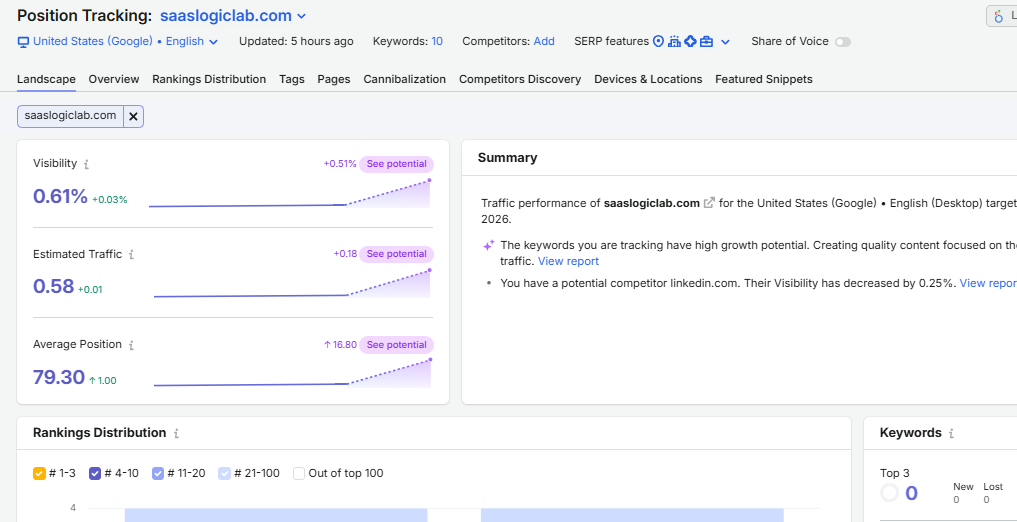
This turns Semrush from a collection of SEO tools into an operational system for the campaign.
It also creates consistency. If every client goes through roughly the same baseline research process, strategists are less likely to skip important checks when workload increases.
Pros and Cons
Pros
- Covers several major SEO workflows in one platform
- Strong keyword and competitor research capabilities
- Useful for both initial audits and ongoing campaign monitoring
- Supports multiple projects
- Combines keyword, technical, backlink, and ranking data
- Can reduce dependence on several separate SEO subscriptions
- Suitable for agencies offering multiple SEO services
Cons
- Can become expensive as agency requirements increase
- The number of tools and reports can overwhelm new users
- Agencies focused on one specialist service may not need the entire platform
- Dedicated tools can still be stronger for certain individual jobs
- Account, project, keyword, and user limits matter more as an agency scales
Pricing and Agency Value
Semrush should not be evaluated only by asking whether its monthly subscription is expensive.
For an agency, the more useful question is:
How much paid work can we perform with it, and across how many clients?
If an agency uses Semrush only for occasional keyword research, paying for a large platform may be difficult to justify.
If the same subscription contributes to competitor research, keyword strategy, audits, backlink analysis, rank tracking, prospect research, and campaign monitoring across several paying clients, the economics change.
This is where the cost-per-client calculation from earlier becomes useful.
Agencies should compare the plan they need against:
number of active clients + projects + tracked keywords + team users + reporting requirements
rather than choosing a plan based only on the advertised starting price.
Best For / Skip If
Semrush is best for:
Agencies managing multiple SEO services and wanting keyword research, competitor intelligence, audits, backlinks, and tracking inside a relatively unified workflow.
Consider skipping it if:
Your agency performs only one narrow SEO service, has very few clients, or can meet its current needs with free and lower-cost specialist tools.
A new freelancer with two small clients, for example, should not automatically buy an expensive all-in-one platform simply because established agencies use it.
2. Ahrefs — Best for Backlink and Competitor Research
Why We Picked It
Ahrefs is one of the strongest choices for agencies that need to understand why competitors are ranking and where their organic authority is coming from.
While Semrush works well as a broader all-in-one agency platform, Ahrefs becomes especially useful when the workflow depends heavily on competitor research, backlinks, content gaps, and organic search analysis.
For an agency, that matters during both client acquisition and ongoing SEO work.
Before creating a strategy, you often need to answer questions such as:
Who are the client’s real organic competitors?
Which pages are bringing those competitors the most search traffic?
What topics are competitors ranking for that the client has not covered?
Which websites are linking to competitors but not to the client?
Ahrefs gives agencies several ways to investigate those questions without treating keyword research, content research, and backlink analysis as completely separate activities.
Best Agency Features
Site Explorer is the core competitive research tool. Agencies can analyze a client’s domain or competitor to investigate organic keywords, top-performing pages, backlinks, referring domains, and changes in search visibility.
Keywords Explorer helps with keyword discovery, ranking difficulty analysis, SERP research, traffic potential, and identifying related search opportunities.
Content Gap is particularly useful for agency strategy. Instead of starting keyword research from scratch, teams can compare a client against relevant competitors and find topics those competitors already rank for.
Site Audit can crawl client websites and identify technical SEO problems. For agencies already using a dedicated crawler such as Screaming Frog, it may not replace the entire technical workflow, but it provides another useful layer of ongoing site monitoring.
Rank Tracker allows teams to monitor selected keywords over time and compare visibility against competitors.
Link Intersect is valuable for link-building research because it can identify websites linking to competing domains but not to the client.
Content Explorer can help agencies investigate successful content within a topic, evaluate backlink patterns, and find pages or publishers relevant to content and outreach research.
How Agencies Can Use Ahrefs
Ahrefs becomes more useful when competitor research is turned into a repeatable process.
For example, an agency onboarding a new client could:
- Analyze the client’s current organic search footprint.
- Identify competing domains based on actual keyword overlap.
- Review competitors’ highest-performing pages.
- Compare keyword and content gaps.
- Analyze referring domains and backlink gaps.
- Identify link opportunities through Link Intersect.
- Review the client’s technical health.
- Add priority keywords to ongoing rank tracking.
This gives the strategist a clearer picture of the competitive environment before deciding what content to create, which pages to improve, or where link acquisition effort may be justified.
The important point is that competitor data should lead to an action.
Finding 5,000 keywords a competitor ranks for is not the strategy.
Finding the small group of relevant opportunities that match the client’s services, authority, search intent, and ability to compete is.
Pros and Cons
Pros
- Strong backlink and referring-domain research
- Excellent for organic competitor analysis
- Useful Content Gap and Link Intersect workflows
- Helps uncover competitor pages driving search visibility
- Combines keyword, content, backlink, and competitor research
- Useful for both client audits and ongoing strategy
- Strong fit for agencies where competitive research is a major part of the service
Cons
- Can be expensive for smaller agencies
- Usage limits need to be considered when several team members are working across clients
- Agencies may still need separate reporting or workflow tools
- Some capabilities overlap with other all-in-one SEO platforms
- Not every agency needs its depth of backlink research
Pricing and Agency Value
Ahrefs makes the most financial sense when its competitive and backlink data is being used across several active client campaigns.
An agency using it only to check Domain Rating or occasionally inspect backlinks is unlikely to get the full value from the subscription.
The economics become stronger when the same platform contributes to:
prospect research → competitor analysis → keyword strategy → content gaps → backlink opportunities → rank monitoring
across multiple paying clients.
Agencies should therefore evaluate the required Ahrefs plan against their actual workload, including the number of users, projects, tracked keywords, reports, and research activity.
The important metric is not simply:
“How much does Ahrefs cost?”
It is:
“How much useful client work can our team produce from that subscription?”
Best For / Skip If
Ahrefs is best for:
Agencies where competitor research, backlink analysis, content gaps, and organic opportunity discovery are central parts of the SEO service.
It is particularly useful when the agency needs to understand not only what competitors rank for, but which pages and links appear to support that visibility.
Consider skipping it if:
Your agency has a limited budget, does very little backlink or competitive research, or already gets enough of this data from another platform.
A small agency should not pay for both Ahrefs and Semrush automatically. There is significant overlap, and the additional subscription should solve a real workflow or data need.
We will compare that decision separately later in this guide.
3. AgencyAnalytics — Best for White-Label Client Reporting
Why We Picked It
SEO work and SEO reporting are two different problems.
An agency may use Semrush, Ahrefs, Google Search Console, GA4, rank trackers, and other platforms to do the actual work. But giving clients access to every one of those tools usually creates more confusion than clarity.
Clients generally want a simpler answer:
What improved, what declined, what work was completed, and what should happen next?
That is where AgencyAnalytics fits into an agency stack.
Rather than trying to replace specialist SEO platforms, it focuses on bringing marketing data into client-facing dashboards and reports. This makes it particularly useful for agencies managing multiple accounts and spending too much time manually collecting metrics every week or month.
Best Agency Features
White-label dashboards allow agencies to present performance data under their own branding instead of sending clients through several third-party platforms.
Automated reporting can reduce the repetitive work involved in preparing recurring client reports.
SEO integrations allow agencies to bring data from tools such as Google Search Console, Google Analytics, rank tracking platforms, and other marketing sources into a more centralized reporting environment.
Custom dashboards help agencies show different information to different clients. A local SEO client may care about different KPIs than a SaaS company or ecommerce business.
Rank tracking and SEO reporting can be incorporated into client dashboards so ranking movement is presented alongside other performance metrics rather than as an isolated spreadsheet.
Client and campaign organization becomes increasingly valuable as the number of accounts grows.
The main advantage is not that AgencyAnalytics produces more SEO data.
It is that it can make existing data easier to organize, explain, and deliver to clients.
How Agencies Can Use It
Consider an agency managing 15 clients.
Without a centralized reporting workflow, the account manager may need to:
- Open Google Search Console.
- Export clicks, impressions, CTR, and query data.
- Open GA4.
- collect organic traffic and conversion data.
- Open a rank tracker.
- collect ranking changes.
- Pull additional metrics from other SEO platforms.
- Move everything into a spreadsheet or presentation.
- Format the report.
- Repeat the process for the next client.
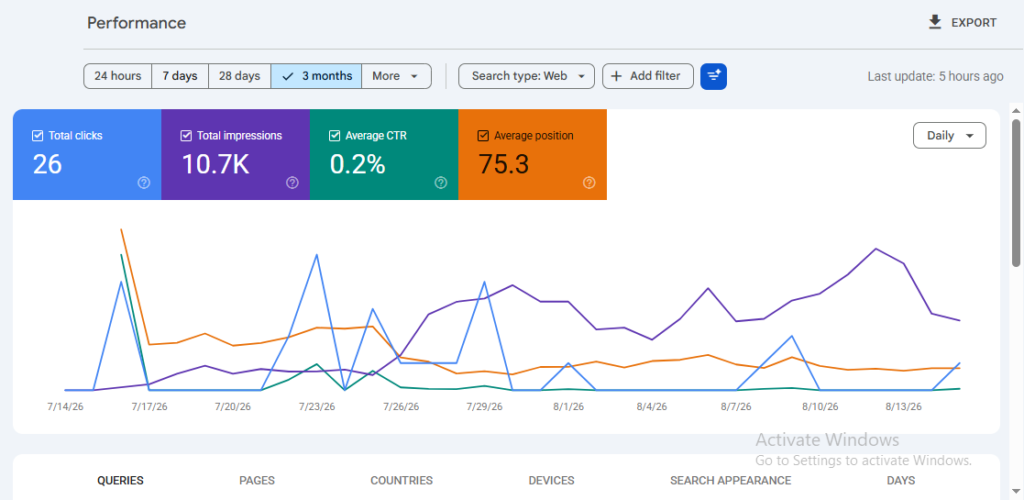
That workflow may be manageable with two clients.
At 15 or 30 clients, reporting itself can become a significant operational cost.
AgencyAnalytics can centralize much of that data and automate parts of the delivery process.
But automation should not mean sending clients a dashboard with no explanation.
A useful agency report should still answer:
What happened?
Why does it matter?
What did we do?
What are we doing next?
The dashboard delivers the data. The agency still needs to provide the interpretation.
Pros and Cons
Pros
- Built around agency reporting workflows
- White-label dashboards and reports
- Useful for managing reporting across multiple clients
- Can combine data from different marketing platforms
- Reduces repetitive manual reporting work
- Makes client-facing data easier to organize
- Useful as agencies scale their client base
Cons
- It does not replace dedicated SEO research platforms
- Agencies may still need Semrush, Ahrefs, Screaming Frog, or other specialist tools
- Another subscription increases total software cost
- Small agencies with only a few clients may not need dedicated reporting software
- Automated reports still require human analysis and context
Pricing and Agency Value
AgencyAnalytics should be evaluated differently from a keyword research or backlink tool.
Its value is largely tied to time saved and reporting scalability.
Suppose an agency spends one hour preparing each monthly client report.
With 20 clients, that can mean roughly 20 hours of reporting work every month before considering revisions, calls, or additional analysis.
If a reporting platform removes a meaningful portion of that repetitive work, the subscription may be easier to justify than its price alone suggests.
The better calculation is:
software cost vs. reporting hours saved + number of clients served
rather than simply comparing its monthly price with another SEO tool.
Best For / Skip If
AgencyAnalytics is best for:
Agencies managing enough clients that manual reporting has become repetitive, agencies that want branded client dashboards, and teams pulling performance data from several different marketing platforms.
It can be particularly valuable when clients expect regular reporting and account managers need a consistent reporting process.
Consider skipping it if:
You manage only a small number of clients and can comfortably handle reporting through Google Search Console, GA4, Looker Studio, or spreadsheets.
It may also be unnecessary if another platform in your existing stack already provides reporting that fully meets your client requirements.
Do not add dedicated reporting software simply because larger agencies use it.
Add it when reporting has become an operational bottleneck.
4. Screaming Frog — Best for Technical SEO Audits
Why We Picked It
Screaming Frog is not the easiest SEO tool in this list, but for agencies doing serious technical SEO work, that is not necessarily a weakness.
Its value comes from giving teams direct access to crawl data.
Instead of relying only on a platform that summarizes technical issues into a health score, agencies can crawl a client website and inspect the underlying URLs, status codes, redirects, canonical tags, metadata, internal links, structured data, directives, and other technical elements in detail.
That makes Screaming Frog especially useful when the job is not simply:
“Tell me if the site has SEO issues.”
The job is:
“Show me exactly where the problem exists, how widespread it is, and which URLs need attention.”
For agencies working on migrations, large sites, ecommerce stores, JavaScript-heavy websites, or recurring technical audits, that level of detail can be much more useful than a simplified dashboard.
Best Agency Features
Website crawling is the core function. Agencies can crawl a client site and analyze SEO elements across large groups of URLs.
Status code analysis helps identify broken pages, redirect chains, unnecessary redirects, and other response-code issues.
Internal linking data can help uncover orphaned or weakly linked pages, crawl-depth problems, and sections of a site receiving little internal authority.
Canonical analysis helps identify pages with missing, conflicting, or unexpected canonical tags.
Metadata extraction allows teams to review titles, meta descriptions, headings, and other on-page elements at scale.
Duplicate content signals can help identify repeated page elements and patterns that may require closer investigation.
Structured data validation supports audits of schema implementation across multiple URLs.
JavaScript rendering is useful when important content or links depend on client-side rendering.
Custom extraction allows technical SEOs to collect specific elements from pages when a normal crawl report is not enough.
API integrations can combine crawl information with other data sources, which can make prioritization more useful for larger audits.
How Agencies Can Use Screaming Frog
The biggest mistake with technical SEO tools is exporting every warning and calling it an audit.
A crawler can surface hundreds or thousands of issues.
That does not mean every issue deserves the same priority.
For example, an agency may crawl a client’s website and find:
- hundreds of redirected internal links
- missing meta descriptions
- duplicate headings
- canonical inconsistencies
- orphaned pages
- broken internal links
- pages buried several clicks deep
- indexability conflicts
The useful work begins after the crawl.
The agency needs to separate:
Critical issues → meaningful opportunities → low-priority cleanup → harmless warnings
A practical technical workflow could look like this:
- Crawl the full client website.
- Review indexability and status codes first.
- Identify broken links and redirect problems.
- Check canonicals, directives, and duplicate patterns.
- Review crawl depth and internal linking.
- Investigate templates creating repeated issues at scale.
- Validate structured data where relevant.
- Prioritize fixes by SEO impact, not by issue count.
- Re-crawl after implementation to confirm the changes.
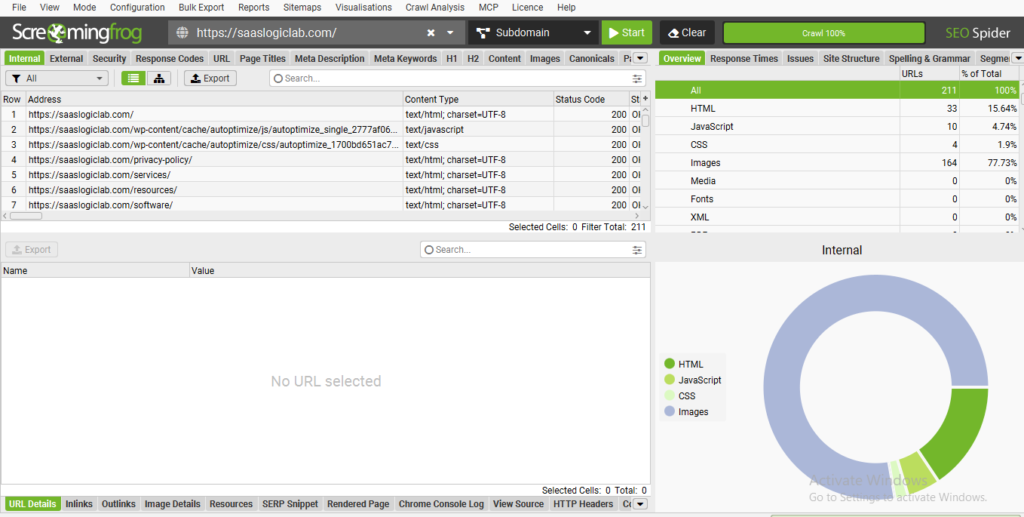
This makes Screaming Frog valuable not because it produces a long list of errors, but because it gives technical teams enough raw data to make better decisions.
Pros and Cons
Pros
- Deep technical crawl data
- Strong for large-scale URL analysis
- Useful for migrations and complex technical audits
- Flexible filtering and custom extraction
- Good for internal linking and architecture analysis
- Helps agencies verify fixes through repeat crawls
- Works well alongside GSC and analytics data
Cons
- Learning curve is higher than many cloud-based SEO platforms
- Raw crawl data can overwhelm inexperienced users
- It does not automatically tell you which issue matters most
- Client reporting requires additional interpretation or reporting tools
- Large or complex crawls may require more setup and computing resources
Pricing and Agency Value
Screaming Frog should be evaluated based on how often the agency performs technical work.
For an agency selling technical SEO audits, site migrations, architecture reviews, internal linking audits, or large-scale website diagnostics, the software can become part of the core delivery process.
For an agency that only performs basic keyword research and content work, it may be used much less frequently.
Its agency value comes from the ability to reuse the same crawler across different client projects and create repeatable audit processes.
A single license can support many types of technical investigations, which can make the cost relatively easy to justify for teams performing technical SEO regularly.
Best For / Skip If
Screaming Frog is best for:
Technical SEO agencies, consultants performing detailed audits, teams working on migrations, and agencies managing websites where URL-level analysis matters.
It is particularly useful when simplified site-health scores do not provide enough information to diagnose the actual issue.
Consider skipping it if:
Your agency rarely performs technical SEO, works only with very small and simple websites, or already has another crawler that fully covers your needs.
It is also a poor choice if the team expects the software to automatically decide which SEO fixes should be prioritized.
The crawler provides evidence.
The strategist still has to interpret it.
5. SE Ranking — Best Affordable All-in-One SEO Platform for Agencies
Why We Picked It
Not every agency needs the most expensive SEO stack from day one.
A smaller agency may need keyword research, rank tracking, competitor analysis, website audits, backlink monitoring, and reporting, but paying for several separate platforms can quickly eat into margins.
That is where SE Ranking becomes interesting.
It brings many of the everyday SEO functions an agency needs into one platform, making it a practical option for teams that want broad coverage without immediately building an expensive multi-tool stack.
The trade-off is important.
A more specialized platform may provide deeper data for a particular task. But an agency does not always need maximum depth in every area.
Sometimes the better business decision is having enough capability across the workflow at a cost that still makes sense per client.
Best Agency Features
Rank Tracking allows agencies to monitor client keyword positions across search engines, locations, and devices.
For agencies providing monthly SEO retainers, this can become one of the most frequently used parts of the platform.
Website Audit helps identify technical and on-page issues across client websites, giving teams a starting point for prioritizing improvements.
Competitive Research can be used to investigate competing domains, organic keywords, paid search activity, and pages attracting search traffic.
Keyword Research helps teams discover opportunities, evaluate keywords, and expand client content strategies.
Backlink tools provide backlink monitoring and competitive link research without requiring a separate platform for every basic link-analysis task.
Reporting features are particularly relevant for agencies because SEO data eventually needs to be communicated to clients rather than simply collected internally.
Agency-oriented workflows make the platform more suitable for managing multiple projects than tools built primarily for individual website owners.
The overall strength is not one individual feature.
It is having research → tracking → auditing → competitive analysis → backlinks → reporting available within the same general environment.
How Agencies Can Use SE Ranking
Consider a small agency managing eight clients.
The team could use SE Ranking to:
- Create a separate project for each client.
- Add priority keywords to rank tracking.
- Run an initial website audit.
- Identify the client’s organic competitors.
- Research keyword opportunities.
- Monitor important backlinks.
- Track changes throughout the campaign.
- Build recurring performance reports.
That reduces the need to move between several subscriptions for routine SEO work.
But there is an important distinction between convenience and depth.
If a client requires an advanced technical investigation, the agency may still open Screaming Frog.
If the campaign depends heavily on detailed backlink research, Ahrefs may provide a more specialized workflow.
SE Ranking does not have to replace every specialist tool to be useful.
For many agencies, its job is to handle the repeatable everyday SEO workload while specialist tools are added only when a project actually requires them.
Pros and Cons
Pros
- Broad all-in-one SEO functionality
- Strong fit for small and growing agencies
- Rank tracking built into the core workflow
- Website auditing and competitor research
- Backlink monitoring
- Agency reporting capabilities
- Can reduce the number of separate subscriptions required
- Easier starting point for agencies building their first serious tool stack
Cons
- Specialist tools may provide greater depth in individual areas
- Advanced technical audits may still require a dedicated crawler
- Link-focused agencies may want deeper backlink research
- Costs can increase as projects, users, keywords, and reporting requirements grow
- Agencies should check plan limits carefully before scaling
Pricing and Agency Value
SE Ranking becomes most attractive when you evaluate the combined workflow, rather than comparing one feature at a time.
Suppose a small agency separately pays for:
rank tracking + keyword research + site auditing + competitor research + reporting
Even relatively inexpensive individual tools can create a large combined monthly bill.
An all-in-one platform can reduce that fragmentation.
But agencies should still calculate the real cost at the plan level they actually need.
Do not compare platforms using only the cheapest advertised price.
Check:
How many client projects can we manage?
How many keywords can we track?
How often are rankings updated?
How many team members need access?
What reporting features are included?
What happens to the price when we add more clients?
That gives a much more realistic picture of agency value.
Best For / Skip If
SE Ranking is best for:
Freelancers, small SEO agencies, and growing teams that want a broad SEO platform without immediately paying for several premium specialist tools.
It can also make sense for agencies whose everyday work revolves around rank tracking, audits, keyword research, competitor monitoring, and client reporting.
Consider skipping it if:
Your agency already has a mature specialist stack and needs maximum depth from dedicated tools rather than consolidation.
For example, a technical SEO agency may rely more heavily on Screaming Frog, while a link-focused agency may place greater value on Ahrefs.
In those cases, replacing specialist tools simply to have everything inside one dashboard may not improve the workflow.
6. Google Search Console — Best Free First-Party SEO Data for Agencies
Why We Picked It
Most SEO platforms estimate what is happening in search.
Google Search Console shows agencies what is actually happening to a client’s website in Google Search.
That distinction matters.
An agency can use third-party tools to estimate keyword rankings, competitor traffic, search volume, and visibility. Those tools are valuable for research, but they cannot replace the first-party performance data available inside Google Search Console.
For an agency, GSC helps answer practical questions such as:
Which queries are actually generating impressions?
Which pages are gaining or losing clicks?
Where is a client appearing in Google but receiving a weak CTR?
Has Google indexed an important page?
Are there crawl or indexing problems affecting visibility?
This makes GSC less of a competitor to Semrush or Ahrefs and more of a foundation that should sit underneath the rest of the agency’s SEO stack.
Best Agency Features
Performance Reports show clicks, impressions, CTR, and average position across queries, pages, countries, devices, dates, and search appearances.
For agencies, this is useful for finding opportunities that third-party keyword research may never surface.
A page, for example, might already receive impressions for dozens of long-tail queries that were never included in the original keyword strategy.
Query and Page Analysis allows teams to move beyond headline traffic numbers and investigate which specific pages and searches are driving changes.
URL Inspection helps verify whether Google can index a URL and provides information about the indexed version of a page.
Page Indexing Reports help agencies identify patterns affecting crawling and indexing across a client website.
Sitemaps provide another way to monitor whether important URLs are being discovered and processed.
Core Web Vitals reporting can highlight groups of URLs experiencing real-user performance problems that deserve further investigation.
Links reporting provides Google’s own view of selected internal and external link information.
The important point is that GSC should not be treated as just another dashboard.
It is a source of evidence that can influence what an agency works on next.
How Agencies Can Use Google Search Console
A useful agency workflow starts with looking for opportunities and problems, not simply exporting the same monthly numbers.
For example, suppose a client page has:
18,000 impressions → 120 clicks → average position 8.4
The page is already visible.
Creating another article targeting the same topic may not be the best first move.
The agency could instead investigate:
- Which queries are generating those impressions?
- Are the highest-impression queries aligned with the page’s search intent?
- Is CTR weak relative to the page’s visibility?
- Has the page lost clicks or positions recently?
- Are competing queries being served by multiple client URLs?
- Could the title, content, internal links, or search-intent alignment be improved?
- Did performance improve after the changes?
This turns GSC into a decision-making tool rather than a reporting tool.
Agencies can also use it to discover striking-distance opportunities.
A page already appearing around positions 8–20 for relevant queries may sometimes offer a more realistic short-term opportunity than creating another page around a completely new keyword.
Pros and Cons
Pros
- Free
- First-party Google Search performance data
- Shows actual queries generating impressions and clicks
- Useful for page-level SEO analysis
- Helps diagnose indexing issues
- Valuable for measuring changes after optimization
- Can uncover keywords that third-party research missed
- Essential alongside paid SEO platforms
Cons
- Does not provide full competitor research
- Not designed as a traditional keyword research platform
- Historical data and reporting workflows have limitations
- Large datasets can become difficult to analyze manually
- Does not replace a dedicated crawler
- Does not explain automatically why rankings changed
- Client reporting may require another dashboard or reporting layer
Pricing and Agency Value
Google Search Console is free, but that does not mean its agency value is low.
In fact, it can become more valuable after an agency starts paying for other SEO platforms.
Semrush or Ahrefs can help answer:
“Where could this client compete?”
Screaming Frog can help answer:
“What technical problems exist on the website?”
Google Search Console helps answer:
“What is Google actually showing, indexing, and sending traffic to?”
Those are different questions.
The strongest agency workflow often comes from combining them rather than trying to choose one source.
Best For / Skip If
Google Search Console is best for:
Every agency managing websites that depend on organic Google Search.
It should be especially important for agencies working on content optimization, indexing, CTR improvement, search performance analysis, and ongoing SEO measurement.
Should you skip it?
For normal Google SEO work, no.
You may use other tools more frequently for competitor research, crawling, or keyword discovery, but replacing Search Console completely with third-party estimates would remove an important source of first-party data.
The limitation is not whether you should use GSC.
The limitation is expecting GSC to do jobs it was never designed to do.
7. Google Analytics 4 (GA4) — Best for SEO Traffic and Conversion Measurement
Why We Picked It
Rankings and clicks are useful, but clients ultimately care about what happens after someone reaches the website.
That is where Google Analytics 4 fits into an agency SEO stack.
Google Search Console can show which queries and pages generate clicks from Google Search. GA4 helps agencies understand what those visitors do after arriving.
For example:
Did organic visitors engage with the website?
Which landing pages brought valuable traffic?
Did visitors sign up, submit a form, request a demo, make a purchase, or complete another important action?
Which SEO pages contribute to business outcomes rather than traffic alone?
This matters because an agency can increase organic traffic without necessarily improving the client’s business.
A page generating 10,000 visits and no meaningful actions may be less valuable than a page generating 500 highly relevant visits that consistently produce leads.
GA4 helps make that distinction.
Best Agency Features
Organic Traffic Analysis helps agencies understand how much traffic is coming from organic search and how that traffic behaves after landing on the website.
Landing Page Reports can reveal which SEO pages attract users and what happens after those sessions begin.
This is particularly useful when comparing informational content, commercial pages, product pages, and other organic landing pages.
Event Tracking allows agencies to measure important user interactions rather than relying only on pageviews.
Depending on the client’s business, useful events might include:
- form submissions
- demo requests
- account registrations
- downloads
- important button clicks
- purchases
- other meaningful interactions
Key Events and Conversion Measurement help connect SEO traffic with outcomes the client actually values.
Traffic Acquisition Reports provide context around organic search compared with other acquisition channels.
Engagement Data can help agencies investigate whether visitors are interacting with the content they land on.
Explorations and Custom Analysis provide more flexibility when standard reports are not enough for a particular client question.
The value is not in collecting every available metric.
It is in identifying the metrics that connect SEO activity to the client’s goals.
How Agencies Can Use GA4
Consider two client pages.
Page A
10,000 organic sessions
Few meaningful actions
Page B
1,500 organic sessions
35 qualified demo requests
If the agency reports only traffic, Page A looks like the stronger SEO asset.
From a business perspective, Page B may be far more valuable.
That changes how an agency should think about content performance.
A practical workflow could be:
- Identify important organic landing pages.
- Measure the traffic reaching those pages.
- Define the actions that matter to the client’s business.
- Track those actions correctly.
- Compare performance across landing pages.
- Identify pages attracting traffic but producing weak outcomes.
- Investigate whether the problem is traffic quality, search intent, page experience, or conversion path.
- Use the findings to prioritize future SEO and CRO work.
This moves reporting beyond:
“Organic traffic increased.”
toward:
“Organic search generated more of the actions the business actually cares about.”
Pros and Cons
Pros
- Free for most standard agency use cases
- Helps connect SEO traffic with website behavior
- Useful for landing-page analysis
- Event-based measurement
- Can track important business actions
- Works naturally alongside Google Search Console
- Useful for SEO reporting beyond rankings and clicks
- Can support ROI-focused conversations with clients
Cons
- Setup quality directly affects data quality
- The interface can be confusing for new users
- Incorrect event or conversion configuration can produce misleading reports
- Does not provide traditional keyword research
- Does not replace Google Search Console for query-level organic search data
- Attribution should not be treated as perfectly simple or absolute
- Requires interpretation rather than simply exporting headline metrics
Pricing and Agency Value
For most agencies, standard GA4 does not add another monthly SEO software subscription.
Its real cost is implementation and analysis time.
Poorly configured analytics can be worse than having less data because the agency may make decisions based on events or conversions that are not being measured correctly.
Before building complicated dashboards, agencies should therefore make sure the fundamentals are reliable:
What constitutes a meaningful action?
Is it being tracked correctly?
Can we distinguish useful organic outcomes from vanity metrics?
Once those foundations are in place, GA4 can add an important business layer to SEO reporting without substantially increasing software costs.
Best For / Skip If
GA4 is best for:
Agencies that need to understand what organic visitors do after reaching a client’s website.
It is especially useful for SaaS, lead-generation, ecommerce, and other businesses where SEO performance needs to be connected with measurable actions.
Should you skip it?
For most client websites, no.
But agencies should not install GA4 and automatically assume the job is finished.
If events, key actions, and business goals have not been configured properly, collecting more analytics data will not automatically produce better decisions.
Google Search Console vs GA4 for Agencies
These tools should not be treated as alternatives.
They answer different parts of the SEO journey.
Google Search Console:
Search → query → impression → ranking → click
Google Analytics 4:
Landing → behavior → engagement → action → business outcome
A useful agency workflow connects both.
For example:
GSC identifies a page gaining clicks for a commercial query.
GA4 then helps determine whether those visitors are taking the action the client wants.
That creates a much stronger performance story than rankings or traffic alone.
8. Surfer SEO — Best for Content Optimization Workflows
Why We Picked It
Agencies producing SEO content at scale face a different problem from agencies focused mainly on technical SEO or backlinks.
The challenge is not simply writing more articles.
It is maintaining a repeatable optimization process across multiple writers, editors, clients, and topics without turning every content brief into hours of manual SERP analysis.
That is where Surfer SEO fits into an agency stack.
Surfer analyzes competing search results and turns that information into content recommendations that writers and editors can work with while creating or updating a page.
For an agency, the main value is workflow consistency.
Instead of every writer using a different method to decide what a page should cover, the agency can build a more standardized optimization process.
But there is an important limitation:
A content score is not a ranking guarantee.
Surfer can guide optimization. It cannot replace search-intent analysis, original research, subject knowledge, useful examples, internal linking, technical SEO, or editorial judgment.
Best Agency Features
Content Editor is the core workflow for optimizing individual pages.
It provides recommendations based on the target query and competing content, helping writers understand relevant terms, topics, headings, and content coverage.
SERP-based analysis gives teams a structured starting point for understanding what currently ranks around a topic.
Content scoring provides writers and editors with a common optimization benchmark.
That can be useful when several people are producing content for the same client.
Content auditing and optimization workflows can also help agencies revisit existing pages rather than treating content optimization as something that happens only before publication.
Collaboration workflows make the tool more relevant for agencies where strategists create the direction and writers or editors handle execution.
The biggest agency advantage is therefore not simply:
“Surfer tells us which keywords to add.”
It is:
“Surfer gives the content team a repeatable optimization framework across multiple client projects.”
How Agencies Can Use Surfer SEO
Suppose an agency needs to produce 20 articles per month across several clients.
Without a standardized process, each writer may approach optimization differently.
One writer analyzes five competitors.
Another uses only a keyword list.
Another focuses heavily on word count.
Another simply writes around the primary keyword.
The result can be inconsistent.
A more structured workflow could look like this:
- Confirm the target keyword and search intent.
- Review the live SERP manually.
- Identify the page type Google is rewarding.
- Create the Surfer Content Editor.
- Review suggested topics and terms.
- Remove recommendations that do not fit the actual intent.
- Build the content brief.
- Write the page around the user’s problem—not the score.
- Use Surfer during editing to identify meaningful coverage gaps.
- Add original examples, experience, screenshots, data, or expert input.
- Review internal linking and on-page SEO.
- Publish and measure actual performance through GSC and GA4.
The order matters.
Starting with a score and blindly optimizing toward it can produce content that technically satisfies recommendations but reads unnaturally.
The SERP and user intent should control the page.
The optimization tool should support that decision, not make it.
Pros and Cons
Pros
- Useful for repeatable content optimization
- Helps standardize workflows across writers
- SERP-based recommendations
- Useful for both new and existing content
- Makes content briefs easier to operationalize
- Helpful for agencies producing content at scale
- Gives editors a shared optimization reference
Cons
- Content scores can encourage over-optimization if followed blindly
- Does not replace manual search-intent analysis
- Recommendations still require editorial judgment
- Another subscription may be difficult to justify for low-volume content teams
- Strong optimization does not compensate for weak originality or expertise
- Agencies still need separate tools for technical SEO, backlinks, and broader competitive research
Pricing and Agency Value
Surfer’s value depends heavily on content volume.
An agency producing two articles per month has a very different use case from an agency producing fifty.
If the tool saves meaningful research and editing time across dozens of client pages, its cost can be distributed across that production volume.
For example, the useful calculation is not only:
“What does Surfer cost each month?”
Instead ask:
How many client pages do we optimize each month?
How much strategist/editor time does it save per page?
How many team members need to use the workflow?
Does it improve consistency enough to reduce revisions?
If an agency barely produces SEO content, the economics become much weaker.
Best For / Skip If
Surfer SEO is best for:
Agencies producing or updating SEO content regularly, especially when multiple writers and editors need to follow a consistent optimization process.
It is particularly useful when content production has grown beyond the point where a strategist can manually guide every article from beginning to end.
Consider skipping it if:
Your agency produces very little content, already has a strong optimization platform in its stack, or expects the software to replace SERP analysis and editorial judgment.
It may also be unnecessary if your content workflow already produces strong results without another optimization layer.
Do not add Surfer simply because competitors use it.
Add it when content optimization has become a repeatable agency workflow that needs to scale.
9. Keyword.com — Best for Dedicated Rank Tracking
Why We Picked It
Rank tracking sounds simple until an agency starts managing rankings across multiple clients, locations, devices, and hundreds or thousands of keywords.
At that point, checking whether a keyword moved from position 8 to position 6 is only one small part of the job.
Agencies need to understand:
Which campaigns are gaining or losing visibility?
Which priority keywords are moving?
Are rankings changing differently by location or device?
Which competitors are gaining ground?
Can ranking progress be communicated clearly to the client?
Keyword.com is different from broad all-in-one platforms because rank tracking is much closer to its core purpose.
That makes it particularly relevant for agencies that want dedicated keyword monitoring rather than treating rank tracking as one feature inside a much larger SEO suite.
Best Agency Features
Keyword Rank Tracking allows agencies to monitor selected search terms over time and follow changes in search positions.
Location-Based Tracking is useful for agencies working with businesses where rankings vary significantly by geographic market.
A client ranking well nationally does not necessarily mean it performs equally well in every target city or region.
Device Tracking helps separate desktop and mobile performance when those SERPs behave differently.
Competitor Tracking gives agencies context around ranking movement.
A client’s position dropping is more useful when you can also see whether a specific competitor moved above it.
Historical Ranking Data helps teams look beyond daily fluctuations and evaluate longer-term movement.
Shareable and Client-Facing Reporting can make ranking data easier to communicate without manually rebuilding reports every month.
The core benefit is focus.
Keyword.com does not need to replace your keyword research, backlink, crawling, or analytics tools to earn a place in the stack.
Its job is to answer:
“How is our tracked search visibility changing?”
How Agencies Can Use Keyword.com
The biggest mistake agencies make with rank trackers is adding every keyword they can find.
More tracked keywords do not automatically produce better reporting.
Imagine a client has 2,000 tracked keywords.
If 1,500 have little commercial or strategic importance, the dashboard becomes noisy.
A better workflow is to organize tracking around the client’s actual SEO strategy.
For example:
- Identify the client’s priority pages.
- Map the main keyword groups to those pages.
- Separate informational and commercial keywords where useful.
- Add relevant competitors.
- Configure the correct locations and devices.
- Establish the starting ranking baseline.
- Monitor meaningful movement over time.
- Investigate significant gains and losses.
- Compare ranking changes with GSC clicks and impressions.
- Report movement in the context of business priorities.
This last part is important.
A rank tracker tells you where a tracked keyword appears.
Google Search Console can then help show whether actual impressions and clicks changed.
GA4 can help show what happened after users reached the website.
Those datasets become much more useful when connected.
Pros and Cons
Pros
- Dedicated focus on rank tracking
- Useful for agencies managing multiple keyword campaigns
- Location and device-specific monitoring
- Competitor visibility tracking
- Historical ranking data
- Useful for recurring client reporting
- Can complement GSC rather than replace it
Cons
- Adds another subscription to the agency stack
- Does not replace full keyword research platforms
- Does not replace technical crawling or backlink analysis
- Tracking unnecessary keywords can increase cost and reporting noise
- Rankings alone do not prove SEO success
- Agencies still need first-party data to validate actual search performance
Pricing and Agency Value
The economics of a dedicated rank tracker depend heavily on how many keywords actually need monitoring.
An agency should not automatically track every keyword discovered during research.
Instead, consider:
number of clients × priority keywords per client × tracking frequency × locations/devices
For example, an agency with 20 clients tracking 100 strategically important keywords per account has a very different requirement from a freelancer managing three small websites.
This also means cost per tracked keyword should not be viewed in isolation.
A cheaper plan is not better if the data or tracking setup does not match the campaign.
And a larger plan is wasted money if thousands of keywords are being tracked simply because the allowance exists.
Best For / Skip If
Keyword.com is best for:
Agencies where rank tracking is a major client deliverable, teams managing substantial keyword sets, and campaigns requiring location, device, competitor, or historical ranking visibility.
It can also make sense when the rank-tracking functionality inside an existing all-in-one platform is no longer flexible enough for the agency’s workflow.
Consider skipping it if:
You manage only a small number of keywords and the tracking included with Semrush, Ahrefs, SE Ranking, or another existing platform already meets your needs.
Adding a dedicated rank tracker just to duplicate data you already have increases stack cost without necessarily improving decisions.
Rank Tracking vs Google Search Console
These should not be treated as interchangeable.
A rank tracker monitors the keywords you deliberately choose to track.
Google Search Console shows queries for which Google actually generated impressions for the site.
That creates an important difference.
Your tracker might contain 500 target keywords.
GSC may reveal hundreds of additional long-tail searches you never thought to track.
At the same time, a dedicated tracker can provide structured monitoring for strategically important keywords, competitors, locations, and devices.
A stronger agency workflow is therefore:
Keyword.com → monitor planned targets
GSC → discover and validate actual Google Search performance
Then use both datasets when deciding whether a page is improving.
10. Majestic — Best Specialized Backlink Analysis Tool
Why We Picked It
Majestic is a specialist tool.
It is not trying to be your keyword research platform, technical crawler, content optimizer, analytics system, and reporting suite at the same time.
Its focus is links.
That makes it relevant for agencies where backlink analysis, link prospect evaluation, competitor link research, and authority assessment are regular parts of client work.
The distinction matters because agencies do not always need another all-in-one platform.
Sometimes they need a tool that goes deeper into one specific part of the workflow.
Majestic is best considered in that context.
If your agency rarely works with backlinks, it may add unnecessary complexity and cost.
But if link analysis is central to your SEO service, Majestic provides specialized metrics and link intelligence that can add another perspective beyond general SEO platforms.
Best Agency Features
Site Explorer provides an overview of a domain or URL’s backlink profile.
Agencies can use it when reviewing a new client, evaluating competitors, or investigating a potential link source.
Trust Flow is Majestic’s proprietary metric designed to estimate the quality and trust signals associated with links pointing toward a site.
Citation Flow focuses more on the strength or quantity of link signals.
These metrics are more useful together than in isolation.
A high number should not automatically be interpreted as:
“This is a good website for a backlink.”
The actual website, relevance, linking page, traffic, context, and link placement still need to be reviewed.
Topical Trust Flow adds another useful dimension by showing the topical categories associated with a site’s backlink profile.
For agencies evaluating link opportunities, topical relevance can matter more than simply chasing a high authority metric.
Backlink History can help teams investigate how a domain’s link profile has changed over time.
Referring Domain Analysis helps identify the websites contributing links rather than focusing only on the total backlink count.
Link Context can provide additional information about where a backlink appears within a page.
Clique Hunter can help identify sites linking to several competitors, which may surface potential link opportunities worth investigating.
How Agencies Can Use Majestic
Suppose an agency is starting a link-building campaign for a client.
The wrong workflow would be:
- Find websites with high metrics.
- Collect email addresses.
- Send outreach to all of them.
That approach ignores relevance and actual link quality.
A more useful workflow could be:
- Analyze the client’s current backlink profile.
- Identify the strongest relevant referring domains.
- Compare the client with several organic competitors.
- Look for domains linking to multiple competitors.
- Check topical relevance.
- Review the actual linking pages manually.
- Evaluate whether the site has real editorial value.
- Remove irrelevant, suspicious, or low-quality prospects.
- Prioritize opportunities that make sense for the client’s niche.
- Track how the backlink profile changes over time.
Majestic can support the research stage.
It should not make the final link-quality decision for the agency.
That still requires human review.
Pros and Cons
Pros
- Specialized backlink research
- Useful Trust Flow and Citation Flow metrics
- Topical Trust Flow adds relevance context
- Strong referring-domain analysis
- Useful for competitor backlink research
- Can help discover shared competitor link sources
- Suitable for link-focused agency workflows
- Provides another backlink dataset for deeper investigations
Cons
- Narrower use case than all-in-one SEO platforms
- Does not replace keyword research or technical SEO software
- Proprietary metrics should not be treated as Google ranking metrics
- Link prospects still require manual quality checks
- May duplicate functionality already available in Ahrefs or Semrush
- Harder to justify for agencies that do little link building
Pricing and Agency Value
Majestic should not be judged by asking whether it has more overall features than Semrush or Ahrefs.
That is the wrong comparison.
The better question is:
“Does our agency perform enough backlink research to justify a dedicated link intelligence tool?”
For an agency running regular competitor backlink analysis, link audits, digital PR research, or link prospecting across multiple clients, specialized data may justify another subscription.
For an agency managing five clients but doing almost no active link work, probably not.
There is also a duplication problem to consider.
If you already pay for Ahrefs and its backlink workflow covers everything your team needs, adding Majestic simply to obtain another authority metric may not create enough additional value.
A specialist tool should solve a specialist problem.
Best For / Skip If
Majestic is best for:
Agencies with backlink analysis or link acquisition as a meaningful part of their SEO service.
It can be especially useful when teams want to evaluate competitor link profiles, topical relevance, referring domains, and overlapping link sources in more depth.
Consider skipping it if:
Your agency focuses mainly on content, technical SEO, local SEO, or on-page optimization and performs little backlink research.
You should also consider skipping it when Ahrefs, Semrush, or another existing platform already gives your team enough backlink information to make decisions.
Do not build a larger tool stack simply to collect more metrics.
Majestic vs Ahrefs for Agencies
There is substantial overlap, but the role each tool can play is different.
Ahrefs provides backlink research inside a broader organic competitive research workflow that also includes keywords, pages, content opportunities, and rank tracking.
Majestic is more specialized around link intelligence.
If your agency wants one platform covering broader competitor research, Ahrefs will usually make more sense.
If backlink analysis itself is a major service and the team wants an additional specialized dataset and metrics such as Trust Flow and Topical Trust Flow, Majestic becomes easier to justify.
For many small agencies, paying for both will be unnecessary.
11. Rank Math — Best WordPress SEO Plugin for Agencies
Why We Picked It
For agencies managing WordPress websites, SEO does not stop after the strategy is created.
Someone still has to implement it.
Titles and meta descriptions need to be edited, schema needs to be configured, redirects need to be managed, XML sitemaps need to work correctly, indexing settings need to be controlled, and on-page elements need to be reviewed before pages go live.
Rank Math helps handle many of those tasks directly inside WordPress.
That gives it a different role from tools such as Semrush, Ahrefs, or Screaming Frog.
Those platforms can help an agency research, diagnose, or discover SEO opportunities.
Rank Math helps the team implement many SEO settings on the website itself.
For agencies managing several WordPress client sites, keeping those implementation tasks inside a consistent plugin workflow can reduce unnecessary complexity.
Best Agency Features
SEO Setup and Configuration provides a structured way to configure important SEO settings when onboarding a WordPress website.
Title and Meta Controls allow teams to manage search titles, descriptions, templates, and indexing settings across different content types.
Schema Markup gives agencies options for implementing structured data without manually coding every page.
That can be useful across articles, products, local businesses, and other supported page types, although the final markup should still be validated rather than assumed to be correct because a plugin generated it.
XML Sitemaps help manage the URLs being surfaced through WordPress-generated sitemaps.
Redirection Manager can make routine redirect implementation easier when URLs are removed or changed.
404 Monitoring can help surface requests reaching missing URLs that may deserve investigation.
On-Page SEO Checks provide editors and writers with guidance while working inside WordPress.
Search Console and Analytics integrations can bring selected performance information closer to the WordPress workflow.
For an agency, the real advantage is consolidation.
Instead of using separate WordPress plugins for every small SEO implementation task, one plugin can cover a substantial portion of the everyday workflow.
How Agencies Can Use Rank Math
Consider an agency publishing and optimizing content across several WordPress client sites.
A practical workflow could be:
- Configure the site’s global SEO settings.
- Review indexability for posts, pages, categories, and other content types.
- Configure XML sitemaps.
- Set appropriate title and meta templates.
- Implement required schema.
- Optimize individual pages before publication.
- Add or update internal links.
- Manage redirects when URLs change.
- Monitor relevant 404s.
- Validate important pages after implementation.
The last step matters.
A WordPress SEO plugin can make implementation easier, but it should not become the agency’s only quality-control system.
For example, enabling schema inside Rank Math does not prove that Google sees exactly what you expect.
Changing a canonical does not prove the entire site architecture is correct.
Creating a redirect does not prove there are no internal links still pointing toward the old URL.
That is why implementation should eventually be checked with the appropriate external tools.
Rank Math implements. Screaming Frog verifies. GSC shows how Google is processing and surfacing the site.
Those are complementary jobs.
Pros and Cons
Pros
- Strong range of WordPress SEO controls
- Useful free version
- Schema functionality built into the plugin
- XML sitemap management
- Redirect and 404 monitoring tools
- Convenient for on-page implementation
- Can reduce the need for several separate WordPress SEO plugins
- Suitable for agencies managing multiple WordPress websites
Cons
- Only relevant to WordPress websites
- More features can also mean more configuration decisions
- Incorrect settings can affect indexing or other important SEO elements
- On-page scores should not be treated as ranking guarantees
- Does not replace technical crawling
- Does not replace keyword, backlink, or competitor research platforms
- Agencies still need to verify important implementations
Pricing and Agency Value
Rank Math’s agency value depends heavily on how many WordPress websites the team manages and which features it actually needs.
For a freelancer managing one simple site, the free version may cover much of the basic implementation workflow.
For an agency managing multiple WordPress clients, paid functionality can become more relevant when it saves time across repeated tasks and provides features the team would otherwise need from additional plugins or manual processes.
But agencies should avoid paying simply because a premium version exists.
Ask:
Which paid feature will enter our actual client workflow?
How many sites will use it?
Does it replace another paid plugin or manual process?
Will the team actually use the additional functionality?
That is a better measure of value than comparing feature counts.
Best For / Skip If
Rank Math is best for:
Agencies managing WordPress websites and wanting a broad set of SEO implementation controls inside the CMS.
It can be particularly useful when teams want one consistent workflow for metadata, schema, sitemaps, redirects, and routine on-page implementation across client sites.
Consider skipping it if:
Your clients do not use WordPress.
You should also avoid switching an existing client from another established SEO plugin simply because Rank Math has more features on paper.
A plugin migration creates its own implementation risk.
If the existing setup works correctly and covers the client’s requirements, changing plugins should solve a specific problem rather than satisfy a tool preference.
Rank Math vs Yoast for Agencies
Both can handle the core job of managing WordPress SEO settings.
The decision should therefore be based on the agency’s workflow rather than assuming one plugin automatically produces better rankings.
Rank Math can be attractive to agencies wanting a broader collection of SEO features inside one plugin.
Yoast may make sense when a client already has a stable Yoast setup or when the team prefers its existing workflow.
The important point is:
The plugin itself is not the SEO strategy.
Neither Rank Math nor Yoast can compensate for weak content, poor search intent, bad site architecture, technical problems, or a lack of authority.
For agencies, consistency and correct implementation matter more than repeatedly changing plugins.
12. ChatGPT — Best AI Assistant for SEO Agency Workflows
Why We Picked It
ChatGPT is different from almost every other tool in this list.
It is not a traditional SEO platform.
It does not replace Google Search Console for first-party search performance data, Screaming Frog for crawling, Ahrefs for backlink research, or a dedicated rank tracker for monitoring keyword positions.
Its value comes from what happens between those tools.
SEO agencies constantly turn raw information into decisions and deliverables. They analyze keyword exports, organize competitor findings, build content briefs, classify search intent, review page structures, summarize audits, prepare client explanations, and turn research into repeatable workflows.
Those tasks can consume significant time even when the underlying SEO data already exists.
ChatGPT can help accelerate that layer of agency work.
The distinction is important:
SEO tools provide the data. ChatGPT can help an agency work with that data.
Best Agency Features
Research Organization can help turn scattered notes, keyword lists, competitor findings, and other supplied research into a structured working document.
Keyword Classification can assist with grouping keywords by topic, funnel stage, page type, or search intent when the agency provides the underlying keyword dataset.
Content Brief Development can help convert SERP research, target keywords, audience requirements, and competitor observations into structured briefs for writers.
Content Review can be used to identify repetition, weak explanations, missing sections, unclear wording, or inconsistencies before content reaches the final editorial stage.
Data Interpretation can help teams work through exports and reports from SEO platforms, provided the actual data is supplied.
Client Communication can turn technical findings into explanations that are easier for non-SEO stakeholders to understand.
Workflow Documentation is particularly useful for agencies building SOPs for recurring processes such as content production, on-page reviews, audits, reporting, or outreach.
Custom Analysis also makes the tool useful across different agency departments instead of limiting it to one SEO function.
How Agencies Can Use ChatGPT
The weakest way to use an AI assistant is:
“Write me an SEO article about X.”
That removes most of the research and decision-making context that determines whether the output is actually useful.
A stronger agency workflow looks more like this:
SEO data → human research → AI-assisted analysis → human decision → execution → verification
For example, an agency preparing a new content page could first collect:
- target keywords
- search intent
- current SERP results
- competitor headings
- People Also Ask questions
- relevant first-party data
- existing site content
- internal linking opportunities
ChatGPT can then help organize that information into a content structure.
The strategist still decides whether that structure makes sense.
The same principle applies to technical SEO.
An agency might export crawl findings from Screaming Frog and use ChatGPT to help categorize or explain them.
But ChatGPT should not be treated as evidence that a technical issue exists.
The crawler provides the evidence.
The SEO professional verifies the issue.
The AI helps process or communicate the findings.
Pros and Cons
Pros
- Useful across multiple SEO workflows
- Can reduce repetitive research and documentation work
- Helpful for organizing large amounts of supplied information
- Strong for briefs, outlines, SOPs, summaries, and client explanations
- Can support content, technical, research, and reporting teams
- Flexible enough to adapt to different agency processes
- Useful beyond SEO-specific tasks
Cons
- Not a replacement for dedicated SEO databases
- Can produce incorrect information
- Output quality depends heavily on the context and data provided
- Generic prompts often produce generic content
- AI-generated recommendations still require verification
- Should not be treated as a source of live rankings, backlinks, search volume, or crawl data without an appropriate connected source
- Poor workflows can encourage agencies to produce more content without improving its quality
Pricing and Agency Value
The useful way to evaluate ChatGPT for an agency is not simply by asking how many SEO features it includes.
Instead, measure the operational effect.
Suppose a repeatable research and briefing process normally requires two hours.
If a well-designed AI-assisted workflow reduces part of that manual processing while maintaining the agency’s quality standard, the value comes from the time recovered across multiple clients.
But that calculation only works if the saved time is real.
Generating a draft quickly and then spending longer correcting unsupported claims, generic recommendations, or inaccurate details is not efficiency.
Agencies should therefore measure:
time saved + quality maintained + errors introduced + human review required
rather than simply measuring how quickly AI produces an output.
Best For / Skip If
ChatGPT is best for:
Agencies that already have reliable SEO research processes and want to make analysis, documentation, content planning, reporting, and repetitive knowledge work more efficient.
It becomes significantly more useful when teams provide real inputs rather than asking it to invent the research.
Do not rely on it if:
You need authoritative SEO metrics that should come from dedicated sources.
It should not replace Search Console data, analytics, crawl results, backlink databases, rank trackers, or direct SERP research.
It is also a poor substitute for an SEO strategist when the underlying problem requires business judgment rather than text generation.
Where ChatGPT Fits in an Agency Stack
ChatGPT works best as a layer across the stack rather than as the center of it.
For example:
Semrush or Ahrefs → competitive research
Screaming Frog → technical crawl data
Google Search Console → actual Google search performance
GA4 → user behavior and conversions
AgencyAnalytics → client reporting
ChatGPT → analysis, organization, documentation, and workflow assistance
This separation keeps the roles clear.
It also reduces one of the biggest risks of AI-assisted SEO: allowing generated information to be mistaken for verified data.
Best SEO Agency Software by Workflow
Choose tools by the job they need to perform, not by brand name. A practical agency mapping is:
• Keyword research & competitor analysis — Semrush or Ahrefs
• Technical SEO audits — Screaming Frog
• Content optimization — Surfer SEO
• Rank tracking — Keyword.com or SE Ranking
• Backlink analysis — Ahrefs or Majestic
• Client reporting — AgencyAnalytics
• Search performance — Google Search Console
• Traffic & conversion measurement — Google Analytics 4
• WordPress SEO — Rank Math
• AI-assisted workflows — ChatGPT
The goal is not to collect every tool. Build the smallest stack that reliably covers the services your agency sells.
Best SEO Tool Stack by Agency Size
There is no single “perfect” SEO stack for every agency.
The right stack changes as the agency grows.
A solo consultant with three clients should not build the same software stack as an agency managing 40 accounts with separate technical, content, outreach, and reporting teams.
The better approach is to build the stack in layers.
Start with the tools needed to deliver the service reliably.
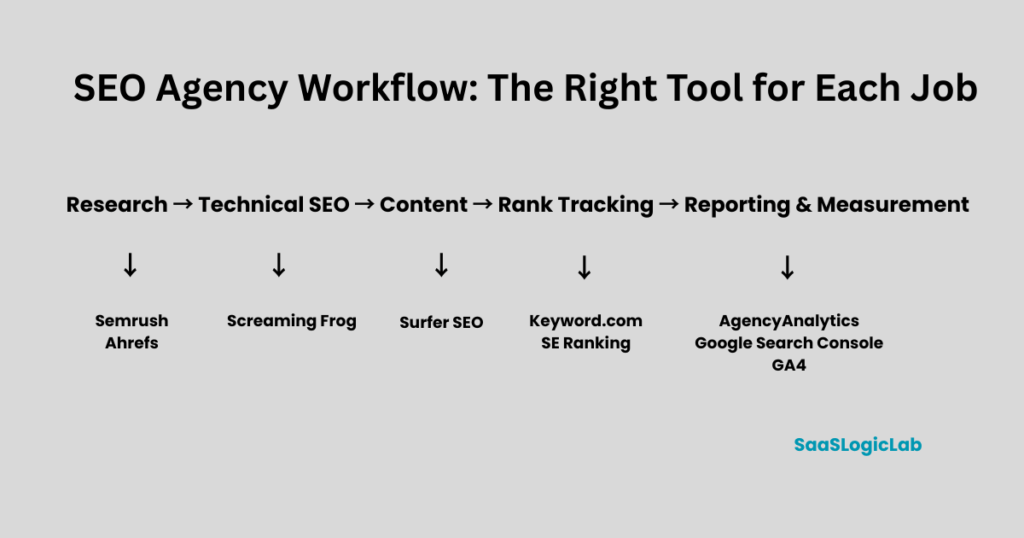
Then add specialist software only when the workload, client expectations, or reporting requirements justify it.
That principle is becoming even more important in 2026 because agency software is expanding beyond traditional SEO into AI search visibility, automated workflows, multi-channel reporting, and agent-assisted research. AI-search services have quickly become one of the strongest new client-demand areas for agencies.
Freelancer or Solo SEO Consultant
A solo consultant should optimize for:
low software cost + broad capability + simple workflows
A practical starting stack could be:
Google Search Console — first-party search performance
GA4 — traffic and conversion measurement
Screaming Frog Free/Paid — technical crawling
Rank Math — WordPress implementation, where relevant
ChatGPT — research organization, briefs, analysis, and documentation
Then add one paid research platform only when the client workload justifies it.
For example:
Semrush OR Ahrefs
not automatically both.
The biggest mistake at this stage is building an impressive tool stack before building enough recurring revenue to support it.
A solo consultant with three clients does not need twelve subscriptions.
The goal should be:
the smallest stack that can deliver the promised service reliably.
Small SEO Agency
Once an agency starts managing several clients, the problem changes.
The team now needs more consistency.
A practical stack could be:
SE Ranking — rank tracking, research, audits, and basic reporting
Google Search Console — actual Google Search performance
GA4 — traffic and conversions
Screaming Frog — deeper technical analysis
ChatGPT — workflow support and documentation
At this stage, the agency should also begin thinking about:
- project limits
- user seats
- reporting automation
- recurring audits
- client dashboards
- cost per client
The key question becomes:
Can this stack still work when the agency doubles its client count?
If not, the software may be cheap today but expensive operationally later.
Growing SEO Agency
A growing agency usually needs stronger research, technical depth, and reporting.
A more mature stack could look like:
Semrush — core research and competitive analysis
Screaming Frog — technical crawling
AgencyAnalytics — client reporting
Google Search Console — first-party search data
GA4 — traffic and conversion measurement
ChatGPT — analysis and workflow assistance
Then add specialists only where the service model requires them.
For example:
Ahrefs if backlink and competitive research is especially important.
Keyword.com if rank tracking has become a major client deliverable.
Surfer SEO if the agency operates a high-volume content production workflow.
This is the stage where the agency should stop asking:
“What is the best SEO tool?”
and start asking:
“Which part of our delivery process is now the bottleneck?”
That bottleneck should determine the next software purchase.
Established or Multi-Client Agency
Larger agencies need more than feature depth.
They need:
scale + permissions + automation + reporting + governance
A typical stack may include:
Semrush and/or Ahrefs — core research
Screaming Frog — technical analysis
AgencyAnalytics — white-label reporting
Dedicated rank tracking — where necessary
GSC + GA4 — first-party performance data
Content optimization platform — if content is a major service
AI workflow layer — for research, reporting, monitoring, and repetitive analysis
At this level, API access, integrations, user permissions, project limits, and automation can become as important as keyword or backlink data.
That direction is already visible in 2026. SEO platforms are moving toward integrated SEO + AI-search workflows, while newer agent-based systems are being positioned around continuous monitoring and multi-step task automation.
All-in-One SEO Software vs Specialized SEO Tools
One of the biggest software decisions an SEO agency has to make is whether to rely on one all-in-one platform or build a stack from several specialized tools.
At first, an all-in-one platform looks like the obvious choice.
One login. One subscription. One dashboard.
Keyword research, competitor analysis, backlinks, rank tracking, site audits, and sometimes reporting can all sit inside the same ecosystem.
But convenience and depth are not the same thing.
A platform can perform ten SEO tasks reasonably well while a specialized tool may perform one of those tasks significantly better. This is why many agency stacks in 2026 are moving toward a hybrid model: one core platform plus specialist tools only where deeper capability is actually needed.
When an All-in-One SEO Platform Makes More Sense
An all-in-one platform is usually the better starting point when an agency needs broad SEO capabilities but wants to keep its stack manageable.
For example, one platform may cover:
keyword research → competitor research → backlink analysis → site auditing → rank tracking → reporting
That reduces tool switching and can make onboarding new team members easier.
It can also reduce an overlooked agency cost:
workflow fragmentation.
Five inexpensive tools are not necessarily cheaper than one expensive platform if your team spends hours exporting CSV files, moving data between dashboards, maintaining logins, and rebuilding reports.
For a small or growing agency, consolidation can therefore have real operational value.
All-in-one software generally makes the most sense when:
- your services cover several areas of SEO
- one platform handles most client work adequately
- your team needs a consistent workflow
- you want fewer subscriptions and logins
- advanced specialist capabilities are not yet necessary
But there is a limit.
You should not force every SEO task through one platform simply because you are already paying for it.
When Specialized SEO Tools Make More Sense
Specialized tools become useful when a particular part of SEO is important enough that additional depth produces better work or saves meaningful time.
Technical SEO is a good example.
An all-in-one platform may provide a useful site audit, but an agency performing detailed technical audits may still want a dedicated crawler such as Screaming Frog.
The same logic can apply to:
rank tracking → dedicated rank tracker
client reporting → dedicated reporting platform
content optimization → dedicated content platform
backlink research → deeper link-analysis platform
AI visibility → dedicated AI-search monitoring
The decision should therefore be based on the service being delivered—not on collecting more software.
A specialist tool is justified when:
the additional capability improves a client deliverable, removes a workflow bottleneck, or saves enough time to justify its cost.
If it does none of those things, it is probably another subscription rather than an agency asset.
All-in-One vs Specialized SEO Tools: Quick Comparison
| Factor | All-in-One Platform | Specialized Tools |
| Setup | Simpler | More complex |
| Number of logins | Lower | Higher |
| SEO coverage | Broad | Narrower per tool |
| Feature depth | Good across many areas | Usually deeper in a specific area |
| Team onboarding | Easier | More training required |
| Data consistency | More centralized | Multiple data sources |
| Reporting | Often built in | May require integration |
| Workflow management | Simpler | Can become fragmented |
| Customization | More limited | More flexible |
| Cost control | Easier initially | Depends on number of tools |
| Best for | Generalist agencies | Agencies needing specialist depth |
The important distinction is that specialized does not automatically mean better.
If your agency only needs basic rank tracking, buying an advanced dedicated rank tracker may add cost without materially improving your service.
Likewise, if a core platform already provides everything your team needs for competitor research, adding another research platform just because its database is different may create unnecessary overlap.
The Hidden Cost of Tool Overlap
This is where agency software stacks often become inefficient.
Imagine an agency paying for:
Semrush + Ahrefs + SE Ranking + a dedicated rank tracker + a reporting platform
There may be valid reasons for that stack.
But there is also substantial functional overlap.
Several of those platforms may already provide:
- keyword research
- competitor analysis
- backlink data
- rank tracking
- site auditing
- reporting
The agency can end up paying multiple times for similar capabilities.
The correct question is therefore not:
“Is this a good SEO tool?”
It is:
“What does this tool give us that our existing stack cannot already do well enough?”
If there is no strong answer, the tool probably should not be added.
A Better Model: Core + Specialist + Data
For most agencies, we prefer a three-layer approach.
Layer 1 — First-Party Data
Google Search Console + GA4
These tell the agency what is actually happening on the client’s website and in Google Search.
Layer 2 — Core SEO Platform
Semrush, Ahrefs, SE Ranking, or another suitable platform.
This becomes the main environment for research, competitive intelligence, tracking, and general SEO analysis.
Layer 3 — Specialist Tools
Add these only where the agency’s services require deeper capabilities.
For example:
Screaming Frog → technical SEO
AgencyAnalytics → client reporting
Keyword.com → dedicated rank tracking
Surfer SEO → content optimization
Majestic → specialized backlink research
This produces a much cleaner purchasing rule:
Start broad. Identify the bottleneck. Add depth only where the bottleneck exists.
Current 2026 agency-stack guides increasingly reflect this hybrid approach rather than recommending that agencies buy every major SEO platform available.
How Much Should an Agency Spend on SEO Software?
There is no useful answer such as:
“Every SEO agency should spend $300 per month on software.”
The right budget depends on what the agency sells, how many clients it manages, and whether the software saves enough time or improves enough client work to justify its cost.
A $300 monthly stack could be excessive for a freelancer with two small clients.
The same $300 could be inexpensive for an agency managing 25 recurring accounts.
So instead of looking only at subscription price, agencies should measure three things:
software cost → cost per client → value created
Software Cost per Client
A simple calculation gives much better context:
Monthly SEO software cost ÷ active SEO clients = software cost per client
For example, imagine an agency spends $400 per month across its SEO stack.
With 4 clients:
$400 ÷ 4 = $100 per client
With 10 clients:
$400 ÷ 10 = $40 per client
With 25 clients:
$400 ÷ 25 = $16 per client
The software did not become cheaper.
The agency became better able to distribute that fixed cost across revenue-generating accounts.
This is why looking at subscription price alone can lead to poor software decisions.
Freelancer or Solo Consultant Budget
A freelancer should usually keep the stack lean.
Free tools can already cover a significant part of the workflow:
Google Search Console for search performance
GA4 for traffic and conversions
Screaming Frog Free for smaller crawls
WordPress SEO plugins where required
One paid research platform can then be added when client revenue supports it.
The mistake is subscribing to Semrush, Ahrefs, a dedicated rank tracker, a content optimizer, and a reporting platform before there is enough client work to require them.
At this stage, software should solve an existing problem—not a problem the freelancer hopes to have later.
Small Agency Budget
A small agency has different priorities.
Once several client accounts are being managed, paying for software that reduces repetitive work becomes easier to justify.
The agency may need:
a core SEO platform + technical crawler + first-party analytics + reporting capability
But even here, every subscription should have a clear role.
If two tools perform essentially the same task and the team cannot explain why both are required, there is probably unnecessary overlap.
A useful monthly software review is simply:
What do we use?
Which client deliverable depends on it?
How frequently does the team use it?
What happens if we cancel it?
Those four questions can expose subscriptions that look important but contribute very little to actual delivery.
Growing Agency Budget
For a growing agency, the cheapest stack is not necessarily the most profitable stack.
Time becomes increasingly expensive.
Suppose a reporting platform costs $200 per month but saves the team 15 hours of manual reporting.
If those 15 hours can be redirected toward strategy, implementation, client communication, or additional accounts, the subscription may produce far more value than its monthly price suggests.
This introduces another useful metric:
Software ROI = cost saved + time saved + additional delivery capacity
Not every benefit can be measured perfectly, but agencies should at least think this way before purchasing or cancelling software.
When Expensive SEO Software Is Actually Worth It
Higher-priced software becomes easier to justify when it does at least one of the following:
- replaces substantial manual work
- supports multiple paying clients
- improves an important client deliverable
- provides data the existing stack cannot provide adequately
- reduces reporting or analysis time
- allows the agency to handle more accounts without adding equivalent labor
- supports a service clients are specifically paying for
For example, paying more for advanced reporting can make sense if your agency produces dozens of recurring client reports.
It makes far less sense if you manage three clients and manually reviewing their performance takes an hour each month.
The feature is the same.
The economic value of the feature is different.
Calculate Break-Even Before Adding Another Tool
Before adding a new subscription, ask:
How much additional value does this tool need to create to pay for itself?
Imagine a specialist platform costs $150 per month.
If it allows your agency to retain one profitable client, sell an additional service, or eliminate more than $150 worth of recurring labor, the economics may work.
If the team uses it twice a month for information already available elsewhere, it probably does not.
This gives agencies a simple purchasing framework:
Need → Client Value → Time Saved → Cost per Client → Break-Even → Buy or Skip
That is much stronger than buying software because another agency includes it in its “SEO stack.”
Do Not Confuse More Tools With a More Advanced Agency
A large software stack can look impressive.
It can also indicate poor operations.
If an agency has six platforms providing keyword data, four tools generating reports, and three different content optimization systems, adding another subscription probably will not solve the underlying workflow problem.
Software maturity is not measured by the number of tools.
It is measured by how efficiently those tools support delivery.
A mature agency may deliberately use fewer tools because it understands exactly what each platform is responsible for.
Build the Budget Around Services, Not Trends
This becomes especially important as AI-search and AI visibility products expand.
A new AI-search platform may be useful.
But “AI is growing” is not enough reason to buy it.
Ask instead:
Do our clients need this data?
Are we selling AI visibility/AEO/GEO as a service?
Will someone on the team actually use the platform?
Can our existing stack already answer most of the client’s questions?
If the answer to those questions is no, waiting may be the better business decision.
The same principle applies to any new category of SEO software.
A Simple Agency Software Budget Rule
Instead of setting one universal percentage of agency revenue for software, use this rule:
Every paid tool should either help deliver a service, improve a measurable client outcome, reduce meaningful labor, or increase delivery capacity.
If it does none of those things, reconsider the subscription.
The objective is not to build the cheapest possible SEO stack.
It is to build the most economically efficient stack for the agency you have today, while leaving room to expand as client count and services grow.
SaaSLogicLab Recommendation
Start learning.
Use first-party Google data as the foundation, choose one strong core SEO platform based on your primary services, and add specialist software only when a specific workflow justifies it.
Then review the stack as the agency grows.
A tool that makes no financial sense at five clients may become extremely valuable at twenty.
And a tool that was essential for five clients may become redundant after the agency changes its workflow.
Software spending should scale with operational need—not with the number of tools competitors say an agency should own.
How to Choose the Right SEO Software for Your Agency
Choosing SEO software should start with your agency’s workflow—not with a list of popular tools.
Two agencies can manage the same number of clients and still need completely different software.
A technical SEO agency may depend heavily on crawling, log analysis, and site monitoring. A content-focused agency may care more about keyword research, briefs, optimization, and publishing workflows. An agency serving local businesses may need local rank tracking and review management that a SaaS-focused agency barely uses.
So before comparing platforms, map what your agency actually needs to deliver.
A practical framework is:
Clients → Services → Required Data → Reporting → Team → Budget → Stack
Step 1: Start With Your Clients
First, look at the clients you manage today.
Consider:
- how many active SEO clients you have
- how many websites each client operates
- average website size
- how many keywords you need to track
- whether clients operate locally, nationally, or internationally
- how frequently performance needs to be reported
This immediately eliminates some tools.
For example, a platform that works well for five small websites may become expensive when you need 40 projects and thousands of tracked keywords.
Do not choose software for the agency you hope to become.
Choose software that handles your current workload comfortably while giving you reasonable room to grow.
Step 2: Map the Services You Actually Sell
Next, list your recurring SEO services.
For example:
Keyword research
Competitor analysis
Technical SEO
Content strategy
Content optimization
Link analysis
Rank tracking
Local SEO
SEO reporting
AI search visibility
Now separate them into two groups:
Core services — work most clients pay you for.
Occasional services — work only some clients need.
Your strongest software investment should support the first group.
If technical SEO represents a major part of your revenue, a capable crawler may be more valuable than an expensive content optimization platform.
If reporting across dozens of accounts consumes significant staff time, reporting automation may deserve priority.
The stack should follow the service model.
Step 3: Identify the Data Required to Deliver Those Services
Now ask what information your team actually needs.
For example:
Search performance: Google Search Console
Traffic and conversions: GA4
Keyword opportunities: Semrush, Ahrefs, SE Ranking, or another research platform
Technical crawl data: Screaming Frog or another crawler
Backlink intelligence: Ahrefs, Semrush, Majestic, or another link database
Rank tracking: core platform or dedicated tracker
Content optimization: specialist platform when required
This step prevents a common purchasing mistake.
Agencies often compare tools by the total number of features even though they regularly use only a fraction of them.
Instead, compare platforms against a list of required data and workflows.
Step 4: Decide What Clients Actually Need to See
The best internal SEO tool is not automatically the best client reporting tool.
Your SEO team may need hundreds of crawl issues, ranking movements, keyword opportunities, and competitor metrics.
A client may only need to understand:
Are we improving?
What produced the improvement?
What are you working on next?
That distinction matters.
Do not automatically expose every metric simply because your software tracks it.
Determine:
reporting frequency → KPIs → dashboard requirements → branding → automated delivery → commentary
Then decide whether reporting inside your core SEO platform is sufficient or whether a dedicated reporting layer is justified.
Step 5: Account for the Team
Software selection changes once several people need to use it.
Suppose Platform A costs less than Platform B.
That does not necessarily make Platform A cheaper if additional user seats significantly increase the final price.
Before buying, calculate:
Base subscription + required users + projects + tracking limits + add-ons = real agency cost
Also consider permissions.
An account manager may need reporting access without needing every technical feature. A content writer may need access to content workflows but not confidential client projects.
As teams grow, access control becomes an operational requirement rather than a minor feature.
Step 6: Set the Budget After Defining the Requirements
Budget should come after the previous steps.
Otherwise, agencies often make one of two mistakes.
They either buy the cheapest platform and later discover that it cannot support their workflow…
or buy the most advanced platform and pay for capabilities they never use.
Instead, define the minimum capabilities required and compare the total cost of obtaining them.
A $250 platform that replaces three $100 subscriptions could actually reduce costs.
A $100 platform that requires three additional tools could end up being the expensive option.
Compare the stack, not just individual subscription prices.
Step 7: Check for Feature Overlap
Before purchasing another tool, compare it against what you already have.
Create a simple matrix:
| Capability | Current Tool | New Tool | Real Gap? |
| Keyword research | Covered | Covered | No |
| Rank tracking | Basic | Advanced | Maybe |
| Technical crawling | Limited | Advanced | Yes |
| Reporting | Covered | Covered | No |
| AI visibility | Missing | Included | Depends on service |
The last column is the important one.
A new feature is not automatically a real gap.
If your clients do not need it and your team does not use it to deliver work, filling that gap creates cost rather than value.
Step 8: Test the Workflow, Not Just the Feature List
A software trial should simulate actual agency work.
Do not spend the entire trial clicking through menus.
Take one representative client and perform a real workflow:
Create project → research keywords → analyze competitors → run audit → track rankings → connect data → create report
Then measure:
How long did it take?
Where did you need another tool?
Could another team member understand the workflow?
Was the resulting data actionable?
Could you repeat this efficiently across 20 clients?
That tells you far more than a comparison page containing 100 feature checkmarks.
Step 9: Build the Smallest Stack That Covers the Workflow
After completing the previous steps, the final stack should be relatively easy to identify.
For example, imagine a small agency provides:
keyword research + content strategy + technical SEO + tracking + monthly reporting
It might initially require:
one core SEO platform + GSC + GA4 + Screaming Frog
If reporting becomes a bottleneck, add dedicated reporting software.
If content production scales significantly, add a content optimization platform.
If backlink analysis becomes a major service, consider deeper link intelligence.
The stack expands because the business develops a requirement, not because another tool becomes popular.
The 7-Question Agency Software Test
Before paying for any new SEO platform, answer these seven questions:
- Which client service will this tool support?
- What problem in our existing workflow does it solve?
- Can our current software already solve that problem?
- How many clients will actually use the capability?
- How much team time will it save?
- What will it cost per active client?
- What would happen if we did not buy it?
If you cannot answer the first two clearly, you probably do not need the tool yet.
SaaSLogicLab Recommendation
Do not start by choosing between Semrush, Ahrefs, SE Ranking, or any other platform.
Start by documenting your agency workflow.
Then choose software around it.
The strongest agency stack is not the one with the most recognizable logos. It is the one where every tool has a defined job, minimal unnecessary overlap, and a cost that makes sense relative to the client work it supports.
Do Agencies Need Semrush and Ahrefs Together?
Semrush and Ahrefs are two of the most capable SEO platforms available, which creates an expensive question for agencies:
Do you actually need both?
For most small SEO agencies, the answer is no.
There is substantial overlap between the two platforms. Both can support keyword research, competitor analysis, backlink research, rank tracking, site auditing, and organic search analysis.
Paying for both only makes sense when the additional data or workflow capability produces enough value to justify the duplication.
When One Platform Is Enough
If your agency mainly provides:
- keyword research
- SEO strategy
- competitor research
- content planning
- routine technical audits
- rank monitoring
- general backlink analysis
one strong platform can usually cover most of the research workflow.
The better approach for a smaller agency is often:
Choose one as the core platform and spend the remaining budget on capabilities that platform does not cover well enough.
For example, that budget might be more useful for a technical crawler, client reporting system, or another specialist tool than for a second overlapping SEO suite.
When Semrush Makes More Sense as the Core Platform
Semrush can make sense when an agency wants broad functionality inside one ecosystem.
An agency may use it across keyword research, competitive research, position tracking, site auditing, backlink analysis, content workflows, and other marketing research.
That breadth matters when several team members perform different SEO tasks.
Instead of building separate workflows for every service, the agency can centralize a large portion of its research inside one platform.
This is particularly useful for a generalist SEO agency that needs reasonable depth across many different SEO activities.
When Ahrefs Makes More Sense as the Core Platform
Ahrefs can be particularly useful for agencies whose workflows depend heavily on:
backlink research, competitor link analysis, organic competitor research, content opportunities, and link prospecting.
For an agency focused heavily on competitive research or link-driven SEO, that emphasis may make Ahrefs the more natural core research platform.
But this still does not mean the agency automatically needs Semrush as well.
The decision should come back to the same question:
What important client work can we not perform adequately with our current platform?
When Using Both Can Make Sense
There are situations where paying for both platforms is reasonable.
1. Competitive Research Is a Major Deliverable
Third-party SEO platforms maintain their own databases and methodologies.
That means keyword estimates, backlinks, traffic estimates, and other metrics can differ between platforms.
For high-value competitive research, using more than one dataset can sometimes provide additional context.
The purpose is not to decide which tool is always “correct.”
It is to avoid treating one third-party estimate as absolute truth.
2. Backlink Research Is a Core Service
If backlink analysis, link gap research, digital PR, or link acquisition represents a significant part of agency revenue, deeper access to multiple link datasets may justify the additional subscription.
An occasional backlink check probably does not.
A recurring paid client service might.
3. Different Teams Prefer Different Workflows
A larger agency may have:
content strategists → Semrush
while:
off-page specialists → Ahrefs
If both teams use the platforms frequently and the tools improve delivery, the overlap may be economically acceptable.
4. The Cost per Client Becomes Small
Suppose the combined additional software cost is substantial for an agency with four clients.
That same cost distributed across 40 profitable accounts becomes much easier to justify.
This is why the answer changes as an agency grows.
The question is not simply:
“Can we afford both?”
It is:
“Does the additional capability create more value than its cost across our client portfolio?”
When Using Both Does Not Make Sense
There are also clear situations where subscribing to both is unnecessary.
Do not buy both simply because:
they are the two biggest names in SEO software.
Do not buy both because:
another agency uses both.
And do not maintain both subscriptions if your team consistently uses one while barely opening the other.
That is tool overlap, not capability.
For a small agency, the money may create more value elsewhere:
Core platform + Screaming Frog + first-party Google data + reporting
can be operationally stronger than:
Semrush + Ahrefs
with weak technical or reporting infrastructure.
Never Use Either as Your Only Source of Truth
There is another important distinction.
Semrush and Ahrefs provide third-party estimates and proprietary metrics.
For your own client websites, first-party data should still play a central role.
Use:
Google Search Console for actual Google Search queries, impressions, clicks, CTR, and average position.
Use:
GA4 for on-site traffic behavior and configured conversion measurement.
Then use Semrush or Ahrefs to expand what first-party data cannot tell you directly, such as competitor intelligence and broader market research.
A practical agency data model therefore looks like:
GSC + GA4 = what is happening on the client’s property
Semrush/Ahrefs = what may be happening across the competitive search landscape
They solve related but different problems.
Semrush + Ahrefs Decision Matrix
| Agency Situation | Semrush | Ahrefs | Both? |
| Freelancer starting out | ✓ | Optional alternative | No |
| Small general SEO agency | ✓ | Optional alternative | Usually no |
| Content-focused agency | ✓ | Optional | Usually no |
| Link-building/off-page agency | Optional | ✓ | Sometimes |
| Technical SEO agency | Optional | Optional | Usually no |
| Competitive intelligence-heavy agency | ✓ | ✓ | Potentially |
| Large full-service SEO agency | ✓ | ✓ | Can make sense |
The table is deliberately not declaring one platform universally superior.
Your service mix should determine the decision.
SaaSLogicLab Recommendation
For freelancers and small agencies, choose Semrush or Ahrefs—not automatically both.
For a generalist agency needing a broad platform across multiple SEO workflows, Semrush can make a strong core option.
For an agency particularly dependent on backlink and competitive research, Ahrefs can be the better fit.
Larger agencies can justify both when separate datasets and workflows are being used consistently across enough client accounts.
The important point is that having both is not an upgrade by itself.
It becomes an upgrade only when your agency can explain exactly what the second platform contributes.
For a complete feature-by-feature comparison—including keyword research, backlinks, technical SEO, pricing, and other differences—see our Semrush vs Ahrefs comparison. This section is intentionally focused only on whether an agency should pay for both.
Free vs Paid SEO Agency Software
An SEO agency does not need an expensive software stack from day one.
Many essential SEO tasks can be handled with free tools. The problem starts when the agency grows and those free workflows begin creating limitations in scale, speed, competitive research, automation, or reporting.
So the real question is not:
“Are paid SEO tools better than free tools?”
It is:
“At what point does staying with free tools start costing the agency more than upgrading?”
What Can an Agency Do With Free SEO Tools?
A surprisingly large amount.
A basic free stack can include:
Google Search Console for search performance, indexing, queries, clicks, impressions, CTR, and page-level search data.
Google Analytics 4 for organic traffic, landing-page performance, user behavior, events, and conversions.
PageSpeed Insights for Core Web Vitals and performance diagnostics.
Screaming Frog Free for crawling smaller websites within its free crawl limit.
Google Trends for understanding search-interest patterns and comparing topics.
Free WordPress SEO plugins such as Rank Math or Yoast for basic on-page implementation.
Together, these tools can support real client SEO work.
A freelancer managing a few smaller websites should therefore not assume that professional SEO requires an expensive stack immediately.
The limitation is usually not whether free tools contain useful data.
The limitation is how efficiently that data can be used across multiple clients.
Where Free Tools Start to Break Down
Imagine managing one website.
Opening Search Console, checking GA4, crawling the site, reviewing rankings manually, and building a report may be manageable.
Now repeat that workflow across:
5 clients → 10 clients → 20 clients → 40 clients
The underlying SEO work has not fundamentally changed.
The operational burden has.
Free tools can become limiting when the agency needs:
- larger crawl capacity
- broader competitor intelligence
- historical competitor data
- scalable keyword tracking
- backlink databases
- multiple projects
- scheduled reporting
- white-label dashboards
- team access
- workflow automation
- faster cross-client analysis
At this point, paid software is not simply buying “more SEO features.”
It can be buying operational capacity.
When Should an Agency Upgrade to Paid SEO Software?
Do not upgrade because your agency reaches an arbitrary number of clients.
Upgrade when a measurable bottleneck appears.
A useful trigger is:
Upgrade when the cost of doing something manually becomes greater than the cost of software that can reliably handle it.
For example, suppose monthly reporting takes your team 12 hours.
If a paid reporting platform reduces that to three hours, you have recovered nine hours every month.
Now the subscription can be evaluated against the value of those nine hours.
That is a much better purchasing decision than:
“Other agencies use this tool, so we probably need it too.”
Five Signs You Have Outgrown Your Free Stack
1. Manual reporting is consuming too much time.
If team members repeatedly export, combine, format, and explain the same metrics every month, reporting automation may have become worthwhile.
2. You cannot research competitors deeply enough.
GSC tells you a great deal about your own verified property.
It does not replace competitive intelligence platforms.
If competitor research becomes a core client deliverable, a paid research platform becomes easier to justify.
3. Rank tracking has become operationally important.
Checking a handful of keywords is different from monitoring thousands of keywords across clients, locations, devices, or markets.
Scale changes the requirement.
4. Free usage limits are affecting delivery.
If crawl limits, project limits, history, exports, or other restrictions regularly prevent the team from completing work efficiently, the free version may no longer be truly “free” from an operational perspective.
5. Multiple team members need a repeatable workflow.
A collection of free tools can work well for one experienced SEO.
It becomes harder when several people need consistent processes, permissions, shared projects, and standardized reporting.
Best Free SEO Agency Stack
For a freelancer or very small agency, we would start with something close to:
Search performance → Google Search Console
Traffic & conversions → GA4
Technical checks → Screaming Frog Free
Performance → PageSpeed Insights
WordPress implementation → Rank Math or Yoast Free
Then add manual processes where the workload remains manageable.
This stack has an important advantage beyond price:
It forces the agency to understand the underlying SEO data before relying heavily on automated recommendations.
The First Paid Tool We Would Add
There is no universal answer.
The first paid tool should solve the agency’s biggest bottleneck.
If the problem is:
Research → consider a broader SEO research platform.
Technical crawling → upgrade the crawler.
Rank tracking → add scalable tracking.
Reporting → add reporting automation.
Content production → consider a content optimization platform.
Backlink research → invest in deeper backlink intelligence.
This means two agencies with identical revenue could reasonably make completely different first software purchases.
Free + Paid Is Usually Better Than Free vs Paid
Agencies should not think of this as a binary choice.
Paid platforms do not make Google Search Console or GA4 obsolete.
A stronger model is often:
First-party free data + paid competitive intelligence + specialist software where required
For example:
GSC + GA4 + Semrush + Screaming Frog
could be enough for one agency.
Another might use:
GSC + GA4 + Ahrefs + AgencyAnalytics
because its services and reporting requirements are different.
The objective is not to replace free tools.
It is to add paid capabilities around the gaps that free tools cannot efficiently cover.
Free vs Paid: Quick Decision
| Situation | Better Starting Choice |
| Learning SEO | Free |
| Freelancer with a few small clients | Mostly free |
| Small agency with basic services | Free + one core paid tool |
| Multiple recurring SEO clients | Paid core platform |
| Heavy technical SEO | Paid specialist crawler may be justified |
| Large-scale rank tracking | Paid tracking |
| Frequent client reporting | Reporting automation |
| Advanced competitor research | Paid research platform |
| Large/multi-team agency | Integrated paid stack |
| New AI-search requirement | Add only when commercially justified |
SaaSLogicLab Recommendation
Start with free tools where they provide the data you actually need.
Then watch for bottlenecks.
The moment a paid platform can save meaningful team time, unlock required data, improve a client deliverable, or increase the number of accounts your team can handle, evaluate the upgrade.
Do not measure software maturity by how much your agency spends.
Measure it by whether every tool has a clear role in producing client value.
A free tool that your team uses every day is more valuable than a $300 subscription nobody needs.
Our Recommended SEO Agency Stack for 2026
After comparing individual tools, agency sizes, free versus paid software, and overlapping platforms, our recommendation is not to build the biggest stack possible.
The better approach is to build a stack in layers.
Each layer should solve a different agency problem:
Measure → Research → Diagnose → Execute → Track → Report
This workflow-based approach also matches a broader pattern across current 2026 agency stacks: agencies increasingly combine a core research platform with specialist crawling, tracking, and reporting rather than expecting one product to handle everything equally well.
Core Layer 1: Google Search Console + GA4
These should form the measurement foundation.
Google Search Console tells you how a verified client property is performing in Google Search: queries, pages, clicks, impressions, CTR, indexing information, and related search diagnostics.
GA4 answers a different question: what happens after users reach the website?
Together they help connect:
search visibility → organic visits → user behavior → conversions
Third-party SEO estimates are useful for research, but they should not replace first-party client data.
Our recommendation: use both for virtually every client where access is available.
Core Layer 2: One Primary Research Platform
For most agencies, choose:
Semrush OR Ahrefs
—not automatically both.
This becomes the main competitive intelligence layer for work such as:
keyword opportunities → competitor research → content gaps → backlink research → market analysis
Which one you choose should depend on your service mix and workflow.
The important part is having a defined primary research environment instead of paying for several overlapping platforms without a clear reason.
Core Layer 3: Screaming Frog for Technical SEO
Research platforms and first-party analytics cannot replace a dedicated crawl when deeper technical investigation is required.
Screaming Frog therefore fits a different layer of the stack.
Use it to investigate areas such as:
status codes → redirects → canonicals → metadata → internal linking → crawl depth → directives → duplicate elements → structured technical patterns
Current 2026 agency-stack comparisons continue to separate dedicated crawling from general research platforms for exactly this reason.
For agencies selling technical SEO, this layer becomes particularly important.
Core Layer 4: Rank Tracking Based on Client Need
This is where we would not automatically add another subscription.
First ask whether the rank tracking inside your existing core platform is sufficient.
If it is, use it.
If rank tracking becomes a major client deliverable—with large keyword sets, multiple locations, devices, markets, or frequent updates—a dedicated tracker can become justified.
That might mean adding a specialist platform such as Keyword.com or another dedicated tracker.
The rule remains:
Specialize only when the general tool becomes the bottleneck.
Core Layer 5: Client Reporting
A five-client agency may be perfectly capable of building reports using its existing tools.
At larger scale, that can change quickly.
Once reporting becomes repetitive and time-consuming, a dedicated platform such as AgencyAnalytics can act as the reporting layer rather than another research tool.
Its role is different:
collect → organize → visualize → automate → communicate
AgencyAnalytics itself supports integrations with GSC, GA4 and multiple third-party SEO platforms, which illustrates why reporting should be treated as a separate layer instead of forcing one SEO research platform to handle the entire client communication workflow.
Optional Layer: Content Optimization
Do not automatically add Surfer SEO—or any content optimization platform—to every agency stack.
Add one when content production is a significant recurring service.
For an agency publishing or optimizing dozens of client pages every month, structured content workflows can justify another specialist platform.
For an agency primarily performing technical SEO, the same subscription may provide little value.
This is another place where service mix should control software selection.
Optional Layer: Specialized Backlink Intelligence
The same applies to Majestic, additional backlink platforms, or a second major research suite.
If link analysis is central to what clients pay for, deeper backlink intelligence can be valuable.
If backlinks are checked occasionally, the capability already available in your primary research platform may be enough.
Do not turn an occasional task into a permanent subscription without calculating its value.
The 2027-Ready Layer: AI Search and Automation
The next evolution of the agency stack is unlikely to replace the layers above.
It is more likely to sit on top of them.
Current 2026 agency-tool discussions are already incorporating AI-search visibility alongside traditional rank tracking, reporting, crawling, and competitive research.
That creates two emerging requirements.
AI visibility measurement
Agencies may increasingly need to understand whether clients are being surfaced or cited across AI-driven discovery experiences.
Workflow automation
AI-assisted systems can increasingly help organize research, analyze datasets, identify changes, prepare reports, and reduce repetitive operational work.
But we would apply exactly the same purchasing rule here as everywhere else:
Do not add an AI tool because AI is important. Add it when it solves a measurable agency problem.
The strongest 2027-ready stack will probably not be the agency with the most AI subscriptions.
It will be the agency that connects reliable search data, competitive intelligence, technical analysis, client outcomes, and automation into one repeatable workflow.
SaaSLogicLab Recommended Stack
For a general SEO agency, our preferred structure is:
Foundation: GSC + GA4
Research: Semrush or Ahrefs
Technical: Screaming Frog
Tracking: Existing platform first; specialist tracker when required
Reporting: Existing reporting first; AgencyAnalytics when scale justifies it
Content: Specialist optimization platform only for content-heavy agencies
Backlinks: Additional specialist data only for link-heavy services
AI Search: Add when measurement becomes part of the client deliverable
This is deliberately not a “buy everything” recommendation.
The goal is to have one clear owner for every major workflow without paying multiple platforms to solve the same problem.
A lean six-tool stack that your team understands deeply can be considerably more useful than a 15-tool stack full of overlapping features.
Frequently Asked Questions
What is the best SEO software for agencies?
There is no single best platform for every SEO agency because agencies sell different services and operate at different scales.
For an agency that wants broad keyword research, competitor analysis, rank tracking, site auditing, and other SEO capabilities in one environment, Semrush is one of the strongest all-in-one choices.
Agencies focused heavily on backlink and competitor research may prefer Ahrefs, while agencies prioritizing automated client reporting may get more value from AgencyAnalytics.
The best choice is the software that matches the services your agency actually sells rather than the platform with the largest feature list.
What SEO tools do agencies actually need?
Most agencies need capabilities in five core areas:
search performance data, analytics, competitive research, technical crawling, and reporting.
A practical starting stack could therefore include Google Search Console, GA4, one primary research platform such as Semrush or Ahrefs, and Screaming Frog.
Rank tracking, content optimization, dedicated reporting, and deeper backlink tools can then be added when client requirements justify them.
The goal is not to own every SEO tool. It is to make sure every important workflow is covered.
What is the best free SEO software for agencies?
Google Search Console is one of the most important free SEO tools an agency can use because it provides first-party Google Search performance data for verified client properties.
However, it does not replace an entire agency stack.
Combine it with GA4 for traffic and conversion measurement, PageSpeed Insights for performance diagnostics, and tools such as the free version of Screaming Frog for smaller technical crawls.
An agency can operate surprisingly far with free software before scale makes paid tools necessary.
Is Semrush worth it for an SEO agency?
It can be, particularly when an agency uses several parts of the platform rather than paying for it to perform one task.
Keyword research, competitive research, position tracking, site auditing, backlink analysis, and other workflows can potentially be consolidated inside the same platform.
But value depends heavily on utilization.
If an agency pays for Semrush while primarily using one or two basic features, a cheaper or more specialized tool may provide better economics.
The useful calculation is not simply the monthly subscription price.
It is:
subscription cost ÷ number of clients actively benefiting from the platform
For a deeper evaluation of the platform itself, see our Semrush Review 2026.
Is Ahrefs or Semrush better for agencies?
Neither is automatically better.
Semrush generally makes more sense when an agency wants a broad all-in-one workflow across multiple SEO activities.
Ahrefs can be particularly valuable for agencies where backlink research and organic competitor analysis are major parts of the work.
Small agencies usually do not need to subscribe to both immediately.
Choose one as the primary research platform first. Add the second only when its additional capabilities solve a real workflow or data requirement.
We have compared the two platforms in detail in our Semrush vs Ahrefs guide.
What is the best SEO reporting software for agencies?
For agencies that need dedicated client dashboards and automated reporting, AgencyAnalytics is built specifically around agency reporting workflows.
But a dedicated reporting platform is not necessary for every agency.
A freelancer with three clients may be able to handle reporting with existing analytics and SEO tools. An agency managing dozens of recurring reports has a very different operational problem.
Reporting software becomes valuable when it reduces enough recurring manual work to justify its cost.
What is the best rank tracking software for agencies?
There is no reason to purchase a dedicated rank tracker before checking whether the tracking included with your primary SEO platform meets your requirements.
For agencies where rank tracking itself is a major deliverable, a specialist solution such as Keyword.com may make sense.
Consider the number of tracked keywords, clients, locations, devices, update frequency, reporting requirements, and historical data before deciding.
What is the best technical SEO tool for agencies?
For deep website crawling, Screaming Frog SEO Spider remains one of the most useful specialist tools for technical SEO workflows.
It can help agencies investigate status codes, redirects, canonicals, metadata, internal linking, crawl depth, directives, and many other site-level signals.
However, technical SEO should not depend on a crawler alone.
Crawl findings should be evaluated alongside Search Console, analytics, server or platform information where available, and manual investigation.
What SEO software should a small agency use?
A small agency should usually prioritize coverage over quantity.
A sensible starting setup is:
Google Search Console + GA4 + one primary SEO research platform + Screaming Frog
If budget is limited, start with free tools and introduce paid software around the biggest operational bottleneck.
Do not copy the software stack of a 50-person agency when you manage five clients.
Your economics and workflow requirements are different.
How much should an SEO agency spend on tools?
There is no useful universal monthly number.
Software spending should be evaluated relative to:
client count + revenue + services offered + employee time saved + software cost per client
For example, a $400 monthly stack costs $100 per client when serving four clients but only $10 per client when supporting forty.
That does not automatically make the second situation profitable, but it shows why subscription price alone is a poor way to evaluate agency software.
Can an agency run SEO using only free tools?
Yes—particularly at a small scale.
Free tools can provide search performance data, analytics, performance testing, basic crawling, and many implementation capabilities.
What becomes difficult is scale.
Competitive intelligence, large keyword sets, automated reporting, historical datasets, extensive crawling, team collaboration, and multi-client management are areas where paid platforms can become increasingly useful.
So the question eventually changes from:
“Can we do this for free?”
to:
“Is doing this manually still the most profitable way to operate?”
Do agencies need multiple SEO tools?
Usually yes, but not because more tools automatically produce better SEO.
Different platforms solve fundamentally different problems.
Google Search Console provides first-party search data. GA4 measures website behavior and conversions. A crawler investigates technical architecture. Competitive research platforms estimate markets and competitors. Reporting software organizes information for clients.
Trying to force one platform to replace all of those functions can create gaps.
At the same time, excessive overlap wastes money.
A strong agency stack therefore follows a simple principle:
Use multiple tools for different jobs—not multiple tools for the same job without a clear reason.
Final Verdict: Which SEO Agency Software Should You Choose?
There is no SEO platform that is the best at every part of an agency workflow.
The right choice depends on what your agency sells, how many clients you manage, where your team spends time, and which tasks create the biggest operational bottlenecks.
Here is the simplest way to make the decision:
| Agency Need | Our Pick | Why |
| Best Overall SEO Agency Software | Semrush | Broad coverage across research, competitors, tracking, audits and other recurring SEO workflows |
| Best for Backlink & Competitor Research | Ahrefs | Strong fit for agencies doing deep link and organic competitor analysis |
| Best for Client Reporting | AgencyAnalytics | Built around dashboards, recurring reports and multi-client reporting workflows |
| Best for Technical SEO | Screaming Frog | Dedicated crawling gives agencies much deeper technical visibility |
| Best Affordable All-in-One | SE Ranking | Useful option for smaller agencies that need broad functionality without immediately building an expensive stack |
| Best Free First-Party Search Data | Google Search Console | Shows how verified client properties actually perform in Google Search |
| Best for Traffic & Conversion Measurement | Google Analytics 4 | Connects organic acquisition with user behavior and business outcomes |
| Best for Content Optimization | Surfer SEO | Useful when content production and optimization are major agency services |
| Best for Dedicated Rank Tracking | Keyword.com | Better suited when keyword monitoring itself becomes an important client deliverable |
| Best Specialized Backlink Tool | Majestic | Adds specialist link intelligence for backlink-heavy workflows |
| Best for WordPress SEO | Rank Math | Practical implementation layer for agencies managing WordPress websites |
| Best AI Workflow Assistant | ChatGPT | Can accelerate research, analysis, ideation and repetitive workflow tasks when used with human review |
Our Overall Pick: Semrush
If we had to choose one paid platform for a general SEO agency, Semrush would be our overall pick.
That does not mean it is the strongest tool at every individual task.
Its advantage is coverage.
An agency can use the same core environment for several recurring activities instead of immediately purchasing separate software for keyword research, competitive analysis, rank tracking, site auditing and other SEO workflows.
That consolidation matters when a team is managing multiple clients.
But we would not treat Semrush as the entire agency stack.
First-party measurement should still come from tools such as Google Search Console and GA4, while deeper technical investigations can justify a dedicated crawler such as Screaming Frog.
One Rule Before Buying Another SEO Tool
Before purchasing anything else, ask:
What problem will this tool solve that our current stack cannot solve efficiently?
If the answer is unclear, you probably do not need another subscription yet.
If the answer is specific—for example, “our team spends eight hours every month manually creating client reports”—then the software can be evaluated against a measurable cost.
That is a much stronger buying framework than choosing software because another agency uses it.
The Bottom Line
The best SEO agency software is not the platform with the most dashboards, the largest feature list, or the highest monthly price.
It is the software that helps your agency make better SEO decisions, deliver work efficiently, prove results to clients, and remain profitable as the number of accounts grows.
For most agencies, we would build around:
GSC + GA4 for first-party measurement
Semrush or Ahrefs for research
Screaming Frog for technical crawling
and then add specialist tools only when the workflow justifies them.
A smaller, well-designed stack is usually more valuable than paying for several platforms whose features overlap.
Build around the work your agency actually performs—not around the number of tools you can afford.