
On-Page SEO Checklist: Complete Guide for 2026
Why On-Page SEO Matters More in 2026
On-page SEO checklist helps ensure every page is fully optimized for search engines, users, and AI-powered search before publishing.
Most pages don’t struggle because they lack keywords. They struggle because they optimize the wrong things.
It’s common to see websites rewrite title tags, tweak meta descriptions, or add more keywords after rankings decline. Yet the real issue often lies elsewhere. The page may no longer match search intent, fail to answer the user’s question completely, or provide little value compared to what’s already ranking.
That’s why on-page SEO in 2026 looks very different from the checklists many marketers still follow.
Optimizing a page today isn’t about checking off a list of outdated SEO rules. It’s about creating a page that is easy for search engines to understand, useful for readers to consume, and trustworthy enough to deserve visibility in both traditional search results and AI-generated answers.
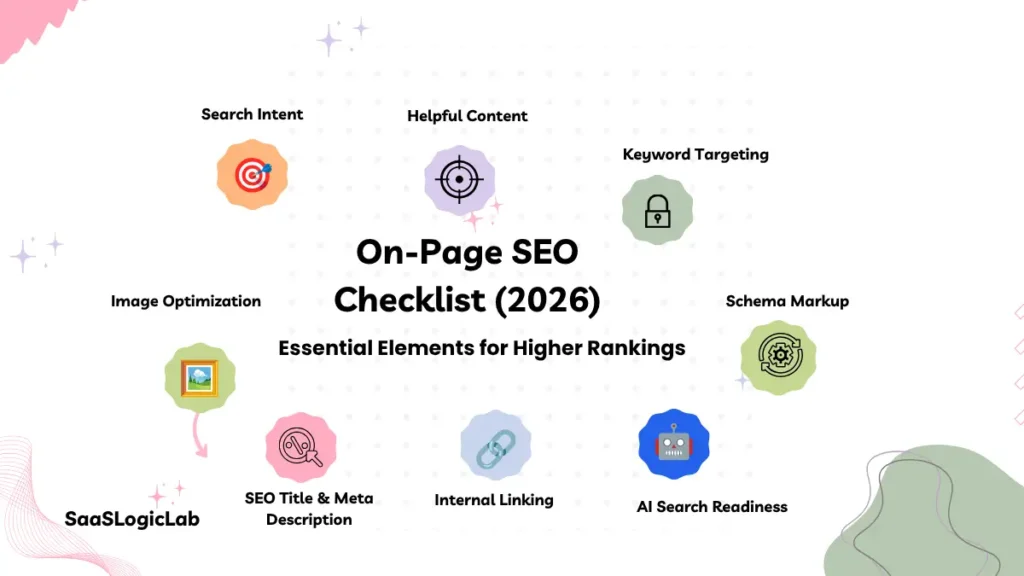
This guide walks through the complete on-page SEO process used to optimize pages before and after publication. Instead of focusing only on individual ranking factors, you’ll learn how each element works together—from keyword targeting and page structure to internal linking, content quality, user experience, and AI search readiness.
Whether you’re optimizing a SaaS landing page, a product comparison, a blog post, or a complete content hub, the same principle applies:
A well-optimized page doesn’t simply target a keyword. It solves the searcher’s problem better than every competing result.
Throughout this guide, we’ll also point out outdated advice that no longer deserves your attention, explain where many websites lose rankings despite following SEO checklists, and show you how to prioritize improvements that actually move the needle.
Keyword research comes before page optimization. If you haven’t validated your target keyword yet, our guide to the Best Keyword Research Tools for SEO Professionals, Agencies & Businesses (2026) will help you build a stronger foundation.
Likewise, on-page SEO works best when it’s supported by a strong technical foundation. If crawling, indexing, rendering, or Core Web Vitals issues prevent search engines from accessing your pages correctly, even high-quality content can struggle to rank. Before optimizing individual pages, review our Technical SEO Checklist (2026): Complete Audit Guide for Better Rankings.
What On-Page SEO Really Means in 2026
Most on-page SEO guides still teach optimization as a checklist of individual tasks. Add your keyword to the title tag. Write a meta description. Use an H1. Insert internal links. Compress images. While these recommendations are still relevant, treating them as isolated ranking factors misses how modern search engines evaluate content.
Today, on-page SEO is about helping search engines understand what your page is about, who it is for, and why it deserves to rank over competing pages. Every optimization—from the page title to the final internal link—should work together to satisfy the same search intent.
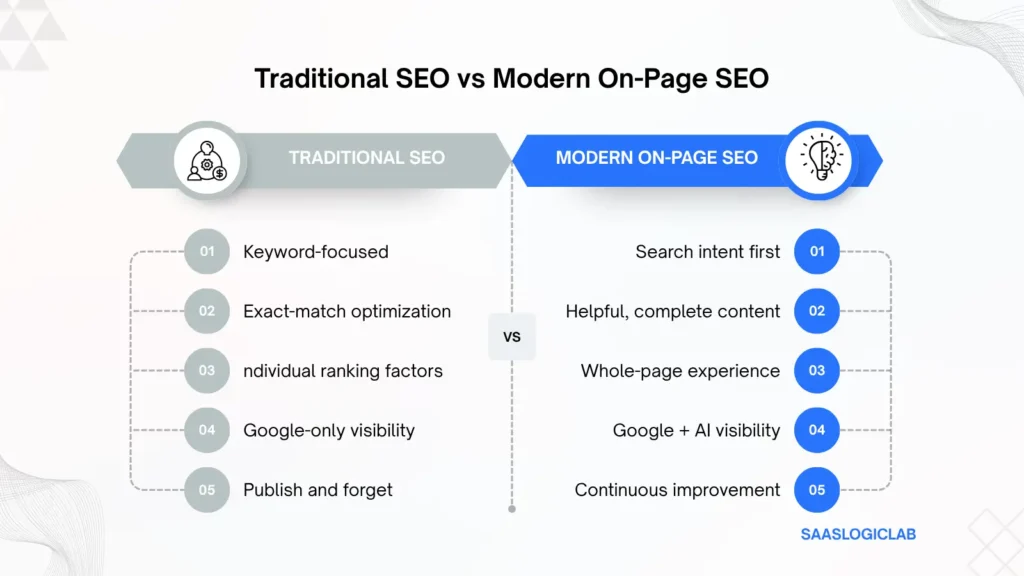
This shift is one of the biggest reasons many websites fail to improve their rankings despite following traditional SEO checklists. The problem usually isn’t that they skipped a meta tag or forgot an image alt attribute. More often, the page doesn’t fully answer the user’s question, lacks original insights, or provides a weaker experience than the pages already ranking on the first page.
Modern on-page SEO is no longer designed exclusively for Google’s ten blue links. Pages are now evaluated across traditional search, AI-generated answers, and increasingly conversational search experiences.
Choosing the right SEO platform also plays an important role in modern optimization. Whether you’re researching keywords, auditing competitors, tracking rankings, or improving on-page content, using the right tool can significantly reduce manual work and improve decision-making. If you’re comparing available options, our Best SEO Tools for Beginners, Businesses & Agencies (August 2026) guide explains which platforms are best suited for different SEO workflows.
Your content may also be evaluated for AI-powered search experiences such as Google AI Overviews, ChatGPT, Perplexity, Gemini, and other answer engines. These systems look beyond individual keywords and increasingly favor pages that provide clear structure, factual accuracy, complete answers, and demonstrable expertise.
That doesn’t mean keywords have become irrelevant. It means keywords are no longer enough on their own.
None of these signals work in isolation. Strong rankings usually come from dozens of small improvements that reinforce one another rather than a single optimization.
| Traditional On-Page SEO | Modern On-Page SEO |
| Focuses on keywords | Focuses on search intent |
| Optimizes individual elements | Optimizes the entire page experience |
| Targets Google rankings | Targets Google and AI search visibility |
| Measures keyword placement | Measures content quality, usefulness, and topical coverage |
| Relies on SEO formulas | Prioritizes user satisfaction and information gain |
One misconception that continues to appear in SEO communities is that every ranking problem can be solved through on-page optimization. In reality, many ranking issues originate elsewhere. If Google can’t crawl or index your pages efficiently, or if your website has broader technical limitations, improving headings and keyword placement alone won’t deliver meaningful results.
For that reason, treat on-page SEO as one part of a larger optimization strategy rather than the entire strategy. Technical health, site architecture, authority, and content quality all influence how well an optimized page performs over time. Likewise, after making on-page improvements , our SEO Audit: How to Perform a Complete Website Audit provides a practical framework for identifying issues that affect organic performance before you start optimizing individual pages.
Likewise, after making on-page improvements, monitor how Google interprets those changes using Google Search Console Guide (2026): Better Rankings. Reviewing impressions, clicks, average position, and indexing data helps confirm whether your optimizations are improving visibility or whether the page requires additional refinement.
The most effective way to think about on-page SEO today is this:
Every element on a page should help users accomplish their goal faster while making it easier for search engines to understand, trust, and confidently recommend that page.
That principle shapes every section in this guide. Rather than optimizing isolated SEO elements, you’ll learn how to optimize an entire page—from choosing the right keyword and matching search intent to structuring content, strengthening internal links, improving readability, and preparing pages for both traditional search results and AI-generated answers.
Modern SEO also relies on the right toolkit. Platforms like Semrush and Ahrefs make it easier to identify content gaps, analyze competitors, monitor rankings, and uncover optimization opportunities before publishing.
Before You Optimize Any Page
Most on-page SEO advice starts with title tags, headings, or keyword placement.
That’s a mistake.
Long before you optimize a page, Google has already started evaluating something far more important: whether your page is the right answer for the searcher’s problem.
You can write the perfect title tag, structure your headings flawlessly, and mention your target keyword in all the right places. None of those improvements will matter if the page itself targets the wrong audience, satisfies the wrong search intent, or fails to offer anything more valuable than what’s already ranking.
This is where many SEO campaigns quietly lose momentum.
Teams spend weeks tweaking on-page elements while overlooking the decision that has the greatest impact on rankings—whether the page deserves to exist in its current form at all.
Before touching a single heading, ask yourself a simple question:
If Google removed every ranking signal except usefulness, would this page still deserve to appear on the first page?
That question changes how you approach on-page SEO.
Instead of asking, “Where should I place my keyword?”, you begin asking:
- Does this page solve the right problem?
- Is this the best format for the query?
- Have I answered the questions readers actually care about?
- Am I adding something competitors haven’t already covered?
Those are the questions that separate pages that rank briefly from pages that continue earning traffic for months or even years.
Think of on-page SEO as the final layer of optimization—not the starting point.
The foundation is built much earlier through keyword research, search intent analysis, content planning, and understanding exactly what users expect when they perform a search.
Only after those decisions are correct does it make sense to optimize titles, headings, URLs, images, internal links, and every other on-page element covered in this guide.
Throughout this section, we’ll walk through the same pre-optimization framework we use before publishing or updating any page. Whether you’re working on a new article or improving an existing one, these checks help ensure you’re optimizing the right page for the right keyword with the right objective before investing time in tactical SEO improvements.
Because the truth is simple:
Great on-page SEO doesn’t begin inside WordPress. It begins long before you publish your first sentence.
Define the Primary Goal of the Page
Every high-performing page has one thing in common: it knows exactly what job it’s supposed to do.
That sounds obvious, yet it’s one of the most overlooked principles in on-page SEO.
Many pages fail because they try to satisfy everyone at once. A single article attempts to educate beginners, sell a product, compare competitors, answer FAQs, and generate leads—all on the same page. The result is content that feels unfocused to readers and difficult for search engines to interpret.
Google doesn’t reward pages for covering everything. It rewards pages that solve a specific problem exceptionally well.
Before you optimize a title tag or rewrite a paragraph, define the page’s primary objective.
Ask yourself:
- Is this page designed to educate?
- Is it helping users compare products or services?
- Is it answering a specific question?
- Is it encouraging visitors to request a demo or make a purchase?
- Is it intended to become a long-term evergreen resource?
The answer should be one objective—not five.
For example, someone searching for “on-page SEO checklist” isn’t looking for a sales pitch about SEO software. They’re looking for a practical framework they can apply immediately. If the page spends more time promoting tools than solving the user’s problem, it creates a disconnect between expectation and experience.
This is one reason many pages struggle to hold their rankings. They may attract the initial click, but they fail to deliver what users expected to find.
The best-performing pages maintain a clear purpose from the introduction to the conclusion. Every heading, example, table, and recommendation supports that single objective instead of competing with it.
Before moving to the next step, ask yourself one final question:
If someone reads only this page, will they successfully accomplish the task they searched for?
If the answer is no, don’t optimize the page yet. Refine its purpose first.
Because when the goal of a page is unclear, every SEO improvement that follows becomes less effective.
Why This Matters
On-page SEO isn’t just about making pages easier for search engines to understand. It’s about making your intent unmistakably clear.
A page with a single, well-defined purpose creates a better experience for users, stronger topical relevance for search engines, and a clearer path toward conversions.
Everything else—keywords, headings, internal links, schema, and metadata—works better when the page already knows exactly what it’s trying to achieve.
Understand the Search Intent Before You Optimize Anything
Choosing the right keyword is only half the job.
Understanding why someone searches for that keyword is what determines whether your page has a realistic chance of ranking.
This is where many SEO strategies begin to fall apart.
A team spends hours researching keywords, finds one with attractive search volume, writes a comprehensive article, optimizes every heading, and publishes the page with confidence. A few weeks later, the rankings barely move.
The immediate reaction is usually to rewrite the title tag, add more keywords, or expand the content.
In most cases, none of those changes address the real problem.
The page doesn’t match the search intent.
Search engines don’t rank pages simply because they contain the right keywords. They rank pages that satisfy the expectation behind those keywords. Before you optimize a single sentence, you need to understand what users actually expect to find when they perform that search.
Take the keyword “on-page SEO checklist.”
At first glance, it seems straightforward.
But look closely at the current search results, and a clear pattern emerges.
Almost every top-ranking page offers a practical, step-by-step implementation guide rather than a short definition, opinion piece, or product landing page. That tells you exactly what search engines believe users want.
Ignoring those patterns means you’re competing against the algorithm instead of working with it.
Before creating or updating any page, spend a few minutes studying the search results.
Ask yourself:
- What type of pages dominate the first page?
- How comprehensive are they?
- What questions do they answer?
- What important questions do they ignore?
- Where can your content provide additional value instead of repeating the same information?
Those answers are often more valuable than keyword volume alone.
This is also why keyword research should never happen in isolation. Search volume tells you how many people search for a topic, but search intent explains what those people expect to accomplish once they arrive.
If you haven’t validated your target keyword yet, our Best Keyword Research Tools for SEO Professionals, Agencies & Businesses (2026) guide explains how to evaluate search volume, keyword difficulty, and search intent before investing time in content creation.
Another mistake we frequently see is optimizing an existing page for a completely different search intent.
For example, turning an informational guide into a commercial landing page simply because rankings have declined rarely produces better results. More often, it confuses both users and search engines.
Instead of changing the purpose of the page, ask a better question:
Has the search intent changed, or does this topic deserve a separate page?
That single decision can prevent unnecessary content rewrites and reduce the risk of keyword cannibalization as your website grows.
If you’re managing a large content library, reviewing your existing pages through a structured SEO Audit: How to Perform a Complete Website Audit often reveals pages competing for the same intent, outdated articles that no longer satisfy user expectations, and opportunities to consolidate overlapping content before creating something new.
The goal isn’t to produce more pages.
The goal is to produce the right page for the right search intent.
Because once the intent is correct, every optimization that follows—titles, headings, internal links, content depth, and metadata—becomes significantly more effective.
Why This Matters
Search intent is the foundation of modern on-page SEO.
When your page aligns with what users expect, every other optimization reinforces that relevance. When it doesn’t, even perfect on-page SEO often struggles to overcome the mismatch.
The strongest pages don’t just target the right keyword.
They become the most helpful answer to the reason behind the search.
Build Your Page Around One Primary Keyword (Not Ten)
One of the fastest ways to weaken a page is trying to rank it for every keyword you discover during research.
It sounds like a smart strategy.
After all, if one keyword can bring traffic, wouldn’t targeting ten keywords bring even more?
In practice, the opposite usually happens.
When a page tries to target multiple unrelated topics, its focus begins to disappear. The introduction becomes too broad, headings drift into different directions, and the content starts answering questions that belong on entirely different pages.
Instead of becoming the best resource for one search intent, the page becomes an average resource for several.
That’s rarely enough to outperform established competitors.
Every page should have one primary keyword that defines its purpose.
Everything else should support that topic rather than compete with it.
For example, this article targets “on-page SEO checklist” as its primary keyword.
Related phrases such as:
- on-page SEO guide
- on-page SEO best practices
- on-page SEO tips
- page optimization checklist
- SEO page optimization
naturally reinforce the topic because they all satisfy the same search intent.
However, trying to optimize the same page for unrelated queries like technical SEO checklist, off-page SEO checklist, or SEO audit checklist would dilute the page’s topical relevance.
Each of those topics deserves its own dedicated resource.
That’s exactly why we’ve published a separate Technical SEO Checklist (2026): Complete Audit Guide for Better Rankings instead of combining every SEO checklist into a single article. Keeping each guide focused allows readers to find the exact information they need while helping search engines understand the purpose of every page more clearly.
The same principle applies to keyword variations.
You don’t need a separate section for every keyword your research tool suggests.
Instead, identify the questions those keywords represent and answer them naturally within the content.
Search engines have become significantly better at understanding context, entities, and semantic relationships. Repeating the exact keyword dozens of times no longer creates an advantage. In fact, forcing keywords into every heading often makes content less helpful and more difficult to read.
A better approach is to organize your content around topics rather than keyword repetition.
Cover the subject comprehensively, answer related questions, include relevant terminology, and write in a way that sounds natural to your audience.
If you’ve already researched your target keywords, the next step isn’t finding more variations.
It’s deciding which keyword deserves its own page and which variations belong together.
This decision becomes even more important as your website grows.
Publishing multiple articles that target nearly identical search intent often creates internal competition, making it harder for search engines to determine which page should rank.
Rather than creating another article every time you discover a new keyword, ask yourself a simple question:
Does this keyword represent a new search intent, or is it simply another way people describe the same problem?
That one question can prevent dozens of unnecessary articles and help maintain a cleaner, more scalable content strategy.
If you’re unsure whether a keyword deserves a new page, reviewing your existing content before publishing is often the better decision. Our SEO Audit: How to Perform a Complete Website Audit explains how to identify overlapping pages, content gaps, and opportunities to strengthen existing assets instead of creating unnecessary duplicates.
In the next section, we’ll move from keyword selection to one of the most overlooked ranking factors in modern SEO—creating page titles that earn both visibility and clicks.
Write a Title Tag That Earns the Click
A page can rank well and still underperform.
That usually happens when the title tag explains the topic but gives the searcher no compelling reason to choose it over the results around it.
Many websites treat title tags as a place to insert the primary keyword and stop there. The keyword appears, the character count looks acceptable, and the task is marked complete.
Technically, the page may be optimized.
Editorially, it is weak.
Your title tag has two jobs. It should help search engines understand the page, but it also needs to persuade a real person that your result is the most relevant option on the page.
Those goals are connected, but they are not identical.
A title such as:
On-Page SEO Checklist
is clear, but it offers little differentiation.
A stronger version adds context and a reason to click:
On-Page SEO Checklist (2026): A Step-by-Step Guide
The primary topic remains obvious, but the reader now knows the content is current, practical, and structured around implementation.
The strongest title tags usually combine three elements:
- The topic being covered
- The format or benefit the reader will receive
- A reason the result feels more useful or current than competing pages
That does not mean every title needs a year, a number, or an exaggerated promise. Those additions only work when they improve clarity.
A year can signal freshness for a fast-changing topic, but adding “2026” to an evergreen definition page may feel unnecessary. Numbers can make a checklist easier to understand, but forcing “47 proven tactics” into a title creates expectations the content may not satisfy.
The title should reflect the actual value of the page, not manufacture urgency that the page cannot support.
Keep the Primary Topic Easy to Recognize
The main keyword should usually appear naturally in the title, particularly when the query is specific.
That helps users confirm that the page matches what they searched for. It also prevents the title from becoming so creative that the actual subject is difficult to identify.
However, placing the keyword at the beginning is not an absolute rule.
Compare these two titles:
On-Page SEO Checklist: How to Optimize Every Important Page Element
How to Optimize Every Important Page Element: An On-Page SEO Checklist
Both communicate the same topic. The first is easier to scan in a crowded search result because the primary phrase appears immediately. The second may still work, but the user has to read further before confirming relevance.
For most informational content, clarity should win.
Do Not Write for a Character Counter
SEO tools often recommend keeping title tags below a specific character limit. That guidance can be useful, but it should not become the editing strategy.
Search results are displayed by width, not by a universal character count. Some letters occupy more space than others, and Google may display titles differently across devices.
The practical goal is not to hit an exact number.
It is to make sure the most important information appears before the title is likely to be truncated.
Put the topic and main value early. Remove words that add no meaning. Avoid repeating the brand name when the website already displays it clearly or when the extra text pushes the useful part of the title out of view.
A title should be concise because concise titles are easier to understand, not because a plugin turns green at 59 characters.
Should the SEO Title and H1 Be the Same?
They can be, but they do not have to be.
The SEO title appears in search results and needs to compete for attention. The H1 appears on the page and needs to introduce the content clearly once the visitor arrives.
Sometimes the same wording works perfectly in both places.
In other cases, a slightly shorter title performs better in search while a more descriptive H1 creates a stronger opening on the page.
For example:
SEO title:
On-Page SEO Checklist (2026): Step-by-Step Guide
H1:
On-Page SEO Checklist (2026): The Complete Step-by-Step Guide to Higher Rankings
The promise remains consistent, but each version is adapted to where it appears.
What you should avoid is creating a disconnect.
If the search result promises a complete checklist and the H1 introduces a general discussion about digital marketing, the visitor immediately questions whether they opened the right page.
The title and H1 do not need to match word for word. They do need to describe the same page.
Expect Google to Rewrite Some Titles
Writing a title tag does not guarantee that Google will display it exactly as written.
Search engines may generate a different version using the H1, visible page content, anchor text, or other signals when they believe another title better represents the page or the query.
That does not make title optimization pointless.
A clear, accurate title gives search engines a stronger starting point and improves the likelihood that the displayed title reflects your intended message.
Frequent rewrites can also reveal a problem. The title may be too long, overly promotional, stuffed with keywords, inconsistent with the H1, or poorly aligned with the actual content.
Do not react to every rewrite by immediately changing the title. First check whether the displayed version is inaccurate or harmful.
Sometimes Google produces a reasonable alternative. Sometimes it removes the strongest part of the value proposition. The right response depends on the result, not on the fact that a rewrite occurred.
Avoid Changing Titles After Every Ranking Movement
A title tag is easy to edit, which makes it an attractive target whenever performance fluctuates.
That does not mean it is the cause.
Rankings can move because competitors improved their content, search intent shifted, backlinks changed, Google reevaluated the query, or the page has broader quality problems.
Repeatedly rewriting the title without evidence makes it difficult to understand which change helped or hurt.
Use performance data before making adjustments.
Instead of guessing which titles might perform better, many SEO professionals compare top-ranking pages using dedicated SEO tools. Features such as SERP analysis, title comparison, and keyword reporting make it easier to identify patterns before rewriting important pages. Our Ahrefs Review (2026): Is It Worth the Money? explains how these features work in real-world SEO workflows.
Professional SEO tools can also help compare SERP titles, identify keyword opportunities, and analyze competing pages before making title changes.
If a page receives strong impressions but a weak click-through rate, the title may deserve attention. If impressions have collapsed, the problem may be relevance, indexing, competition, or the page itself rather than the wording shown in search.
Our Google Search Console Guide (2026): Better Rankings explains how to review impressions, clicks, CTR, and average position together instead of judging a title from one metric in isolation.
The better approach is controlled editing:
- Identify the specific problem.
- Change one meaningful element.
- Record the date.
- Allow enough time for the result to stabilize.
- Compare performance before making another change.
That creates evidence.
Constant editing creates noise.
Strong and Weak Title Examples
| Weak title | Why it underperforms | Stronger direction |
| On-Page SEO | Too broad and unclear | On-Page SEO Checklist (2026): Step-by-Step Guide |
| Best SEO Tips Ever | Vague and exaggerated | 15 On-Page SEO Improvements That Strengthen Existing Pages |
| SEO Checklist Guide Complete | Awkward and keyword-driven | Complete On-Page SEO Checklist for Better Rankings |
| Learn Everything About SEO | Does not match a focused query | How to Optimize a Webpage for Search: On-Page SEO Checklist |
| On-Page SEO Checklist 2026 Best Guide Tips | Repetitive and unnatural | On-Page SEO Checklist (2026): Practical Optimization Guide |
The difference is not clever wording.
It is precision.
A strong title tells the reader what the page covers, what they will gain, and why the result fits the search better than the alternatives around it.
Once the title earns attention, the meta description has a different job: turning that attention into a click without repeating the same promise.
Write a Meta Description That Increases Click-Through Rate
Ranking on the first page doesn’t guarantee traffic.
Every search result competes for one thing before a visitor even reaches your website—the click.
That’s where the meta description plays its role.
Unlike the title tag, which introduces the topic, the meta description gives users a reason to choose your page over every other result surrounding it. Think of it as your page’s short sales pitch. It doesn’t directly improve rankings, but it often influences whether someone clicks your result or scrolls to the next one.
Many websites either ignore meta descriptions completely or make the opposite mistake by stuffing them with keywords. Neither approach helps.
A good meta description should answer one simple question:
“Why should someone visit this page instead of another result?”
If it can’t answer that question within a few sentences, it probably needs to be rewritten.
Write for Humans First
One of the biggest misconceptions in SEO is that every keyword variation needs to appear inside the meta description.
In reality, readers don’t decide to click because they counted how many times a keyword appeared.
They click because the result looks relevant, trustworthy, and useful.
A stronger meta description focuses on the value readers will receive rather than repeating the primary keyword unnecessarily.
Compare these examples.
Weak Example
Learn about on-page SEO checklist, on-page SEO guide, on-page SEO tips, and on-page SEO best practices in this complete on-page SEO checklist.
Better Example
Learn how to optimize titles, headings, URLs, images, internal links, and content using a practical on-page SEO checklist designed for higher rankings in 2026.
The second version sounds like it was written for people—not search engines.
Every Meta Description Should Set the Right Expectation
A common mistake is promising more than the page actually delivers.
If your description promises a complete framework, the article should genuinely provide one.
If it says readers will learn a step-by-step process, the content should guide them through every stage without leaving important gaps.
Overpromising may increase clicks initially, but disappointed visitors often leave quickly when the page doesn’t match the expectation created in search results.
Consistency builds trust.
Trust encourages engagement.
Engagement supports long-term organic performance.
Include a Clear Benefit
Users rarely click because a page simply exists.
They click because they expect to solve a problem.
Your meta description should communicate that benefit as clearly as possible.
Instead of describing the article, explain what readers will gain from reading it.
For example:
- Learn a complete optimization workflow.
- Avoid common on-page SEO mistakes.
- Improve rankings with practical implementation steps.
- Build pages that perform better in Google and AI search.
Those outcomes are more compelling than simply saying the article discusses on-page SEO.
Keep It Natural
SEO plugins often display character counters, but writing should never revolve around reaching an exact number.
Some descriptions are effective in 130 characters.
Others need slightly more space.
Instead of chasing a perfect length, focus on clarity.
Remove unnecessary words.
Avoid repeating the page title.
Write in complete sentences.
Most importantly, make sure the first sentence communicates the primary value immediately.
If the description gets shortened in search results, users should still understand what the page offers.
Understand That Google May Rewrite It
One of the most common questions in SEO communities is:
“Why isn’t Google showing my meta description?”
The answer is simple.
Google may generate its own description when it believes another section of your page better matches the user’s search query.
That doesn’t mean writing a meta description is a waste of time.
A well-written description still gives search engines a strong summary of your page and frequently appears when it closely matches the search intent.
The goal isn’t to control every search result.
The goal is to provide the best possible option when your description is displayed.
Before You Publish
Ask yourself three questions.
- Does this description accurately represent the page?
- Does it explain the value readers will receive?
- Would you click this result if you saw it beside five competing pages?
If the answer to any of those questions is no, rewrite it before publishing.
A meta description won’t rescue a weak page.
But when paired with a strong title and genuinely helpful content, it often becomes the difference between earning an impression and earning a visitor.
The next step is making sure that visitors immediately understand where they are by creating a clean, descriptive, and search-friendly URL structure.
Create SEO-Friendly URLs That Stay Relevant for Years
A URL is one of the first signals both users and search engines see, yet it’s often treated as an afterthought.
Many websites publish a page, accept the automatically generated URL, and never think about it again. Others make the opposite mistake by stuffing every keyword variation into the slug, hoping it will improve rankings.
Neither approach is ideal.
A well-structured URL doesn’t rank because it’s longer or contains more keywords. It performs well because it immediately tells users and search engines what the page is about.
The best URLs are simple enough to understand without opening the page.
For example, compare these two URLs:
Poor Example
yourdomain.com/blog/seo-guide-checklist-best-on-page-seo-tips-2026-for-google-ranking
Better Example
yourdomain.com/on-page-seo-checklist/
The second URL is shorter, easier to remember, easier to share, and remains relevant even after the calendar changes.
Keep URLs Focused on the Main Topic
One of the most common questions website owners ask is whether every keyword should appear in the URL.
The answer is no.
Your URL only needs to communicate the primary topic of the page.
Trying to include every keyword variation creates unnecessary complexity without adding meaningful value.
Instead of this:
/on-page-seo-checklist-guide-best-practices-tips-2026
Use this:
/on-page-seo-checklist/
Simple URLs are easier for users to understand and easier to maintain over time.
Avoid Dates Unless They’re Necessary
Many publishers include the publication year directly in the URL.
That decision often creates problems later.
Imagine publishing:
/on-page-seo-checklist-2026/
The following year, you’ll update the content for 2027, but the URL still references 2026. Changing the URL later requires redirects, can affect existing backlinks, and creates unnecessary maintenance.
A better approach is to keep the URL evergreen while updating the article title and content as needed.
For example:
URL
/on-page-seo-checklist/
H1
On-Page SEO Checklist (2026): The Complete Step-by-Step Guide to Higher Rankings
This approach keeps the page current without changing its permanent address.
Make URLs Readable
Visitors should understand where they’re going before they click.
Remove unnecessary words such as:
- the
- and
- of
- complete
- ultimate
- best
Those words rarely improve clarity.
Instead, focus on the core topic.
Good URL slugs are:
- Short
- Descriptive
- Easy to read
- Easy to remember
If someone copies your URL into an email or shares it on social media, it should still make sense without additional context.
Don’t Change URLs Without a Good Reason
Another common mistake is changing URLs every time content is updated.
Updating the article is good.
Changing the URL usually isn’t.
Every URL accumulates signals over time, including backlinks, internal links, and historical performance.
Changing that address without a compelling reason introduces unnecessary risk.
If the current URL accurately represents the topic, leave it alone.
Only consider changing a URL when:
- It no longer reflects the content.
- It contains obvious errors.
- It’s excessively long or confusing.
- A proper redirect strategy is already in place.
Otherwise, updating the page itself is usually the better decision.
If you’re planning a large content refresh or restructuring older articles, review your existing URLs before making changes. A structured SEO Audit: How to Perform a Complete Website Audit helps identify outdated URLs, redirect chains, broken internal links, and other issues that can affect long-term organic performance.
Use Hyphens, Not Underscores
This question appears regularly in SEO discussions.
The answer hasn’t changed.
Separate words with hyphens (-) rather than underscores (_).
For example:
Good
/on-page-seo-checklist/
Avoid
/on_page_seo_checklist/
Hyphens improve readability and have long been the standard convention for SEO-friendly URLs.
Keep Your URL Consistent with the Page
Your title, H1, content, and URL should all communicate the same topic.
If your URL says “on-page-seo-checklist” but the page primarily discusses technical SEO, both users and search engines receive mixed signals.
Consistency strengthens topical relevance.
Confusion weakens it.
Before publishing, ask yourself one simple question:
Can someone understand exactly what this page is about just by reading the URL?
If the answer is yes, you’re probably on the right track.
A clean URL won’t make a weak page rank.
But it removes unnecessary friction, improves clarity, and creates a stronger foundation for every other on-page optimization that follows.
Structure Your Content with Headings That Guide Both Readers and Search Engines
A great article isn’t difficult to read because the topic is complex.
It’s difficult to read because the information isn’t organized.
This is where heading structure becomes one of the most underestimated parts of on-page SEO.
Many people think headings exist primarily for search engines.
They don’t.
Headings exist to help readers understand the flow of your content. Search engines simply benefit from that same structure because it makes the page easier to interpret.
When someone lands on your article, they rarely begin by reading every word.
Instead, they scan.
Their eyes move from the title to the subheadings, looking for the section that answers their question. If the structure feels confusing or overwhelming, many visitors leave before reading the first paragraph.
Search engines observe those same signals indirectly. Pages that create a better reading experience often keep users engaged longer because visitors can quickly find the information they need.
A well-structured page improves comprehension before it improves SEO.
Every Page Needs One Clear H1
Your H1 is the main headline of the page.
It tells both readers and search engines what the page is about.
Every page should have one primary H1 that accurately reflects the topic.
That doesn’t mean it must be identical to the SEO title.
The title tag is written for search results.
The H1 is written for people who have already clicked.
They can be the same, but they don’t have to be.
The important part is consistency.
If your title promises an On-Page SEO Checklist, your H1 shouldn’t suddenly introduce a completely different topic like technical SEO or digital marketing strategy.
The promise made in search should continue naturally once the reader reaches the page.
Use H2s to Organize Major Topics
Think of H2 headings as chapters in a book.
Each one should introduce a major idea that supports the overall purpose of the page.
In this guide, examples include:
- Understanding search intent
- Writing effective title tags
- Creating SEO-friendly URLs
- Optimizing images
- Building internal links
Each section answers a different part of the same overall question.
That’s exactly how a reader expects the information to flow.
If one H2 starts discussing backlinks while another explains image optimization, the page begins to lose focus.
Every heading should move the reader one logical step closer to completing the task.
Use H3s to Break Down Complex Topics
Not every section needs H3 headings.
But when a topic contains multiple ideas, examples, or workflows, H3s make the content easier to navigate.
For example, instead of writing one long section about title tags, you can separate it into:
- Why title tags matter
- Writing better titles
- Common mistakes
- Google title rewrites
Readers immediately understand what each subsection covers.
Large blocks of uninterrupted text become much easier to consume.
Don’t Create Headings Just for Keywords
One mistake we often see is creating unnecessary headings simply because a keyword research tool suggests another variation.
For example:
On-Page SEO Tips
On-Page SEO Best Practices
On-Page SEO Guide
On-Page SEO Strategy
If every heading discusses the same concept, the page becomes repetitive instead of comprehensive.
Search engines are far better at understanding related language than they were a few years ago.
Rather than creating multiple headings for similar keywords, build headings around questions, workflows, or user problems.
That creates a stronger reading experience while naturally covering semantic variations throughout the content.
Make Your Headings Useful
A heading should prepare the reader for what comes next.
Compare these examples.
Weak Heading
Images
The reader has no idea what they’ll learn.
Better Heading
Optimize Images Without Slowing Down Your Website
Now the benefit is immediately clear.
Descriptive headings improve readability because they reduce uncertainty.
Visitors don’t have to guess what’s inside each section.
Keep the Structure Logical
Your headings should tell a story.
A reader should understand the overall process simply by scanning the page.
Ask yourself:
- Does each heading build naturally on the previous one?
- Are related topics grouped together?
- Does the article follow the same sequence someone would use in real life?
If the answer is no, the issue usually isn’t the writing.
It’s the structure.
One practical exercise is to collapse all the paragraphs and look only at the headings.
If the article still makes sense, you’ve probably built a strong outline.
If it doesn’t, reorganize the structure before adding more content.
Editing an outline is much easier than rewriting an entire article.
Don’t Obsess Over Multiple H1 Myths
For years, SEO discussions focused on whether multiple H1 tags would destroy rankings.
In reality, most ranking problems have nothing to do with the number of H1s on a page.
A page is far more likely to struggle because it fails to satisfy search intent, lacks original insights, or delivers a poor user experience.
Instead of worrying about theoretical issues, focus on creating a logical heading hierarchy that helps readers understand the content.
That’s where the real value lies.
If you’re publishing content at scale, maintaining a consistent heading structure across your website also makes future content audits significantly easier. During a comprehensive SEO Audit: How to Perform a Complete Website Audit, inconsistent heading hierarchies, duplicate topics, and weak content organization often become much easier to identify and improve.
Ultimately, headings are not decorations.
They’re the framework that holds your content together.
When the structure is clear, readers stay engaged, search engines understand the topic more confidently, and every other on-page optimization becomes easier to implement.
Optimize Your Content for People Before Search Engines
No amount of technical optimization can rescue content that fails to help the reader.
You can write the perfect title tag, build a flawless heading structure, compress every image, and create an excellent internal linking strategy. If the content itself doesn’t answer the user’s question better than competing pages, rankings rarely improve for long.
This is where many SEO strategies go wrong.
Teams often spend more time optimizing pages than improving them.
They adjust keyword placement, rewrite metadata, and experiment with different heading variations while leaving the actual content almost unchanged.
From Google’s perspective, nothing meaningful has improved.
The page still provides the same information everyone else has already published.
That’s why modern on-page SEO is no longer about writing more content.
It’s about publishing better content.
Answer the Question Completely
Every search begins with a problem.
Your page exists to solve it.
Unfortunately, many articles answer only the first question and ignore everything that naturally follows.
Take this guide as an example.
If we simply listed twenty on-page SEO tasks, the article would technically answer the keyword.
But readers would still leave wondering:
- Which optimizations matter most?
- Which mistakes should they avoid?
- Which tasks have the biggest impact?
- What should they do before optimizing a page?
- How do they know whether the optimization worked?
A complete page anticipates those questions instead of waiting for the reader to search again.
The goal isn’t to make the article longer.
The goal is to remove the need for another search.
Depth Is More Valuable Than Length
A common belief in SEO is that longer content automatically ranks better.
It doesn’t.
Length is a by-product of solving a topic thoroughly—not the reason a page performs well.
A focused 2,500-word guide can outperform an unfocused 8,000-word article if every section delivers useful information.
Publishing unnecessary paragraphs simply to increase the word count usually creates the opposite effect.
Readers become overwhelmed.
Important information becomes harder to find.
Engagement drops.
Instead of asking,
“How many words should this article contain?”
Ask,
“Have I completely solved the reader’s problem?”
That question leads to better content every time.
Add Something Competitors Don’t
Creating high-quality content becomes much easier when you can identify topical gaps before publishing. Modern content optimization platforms analyze competitor coverage, semantic relevance, readability, and content depth to help writers produce more comprehensive pages. We compared the leading platforms in our 15 Best SEO Content Optimization Tools for Agencies (2026 Guide).
This is where many websites miss their biggest opportunity.
Most articles covering the same topic explain the same concepts in slightly different words.
That’s not enough to earn long-term visibility.
Before publishing, ask yourself:
- What original experience can I include?
- Can I simplify something competitors made confusing?
- Can I test a workflow instead of repeating theory?
- Can I answer questions other guides ignored?
- Can I share practical recommendations based on real implementation?
Readers remember original insights.
Search engines reward pages that contribute new value instead of recycling existing information.
For this guide, our research extended beyond traditional SEO blogs. We analyzed recurring questions from SEO communities and discussions among marketers to identify the challenges that standard on-page SEO checklists often overlook. Those insights shaped both the structure of this article and the practical recommendations you’ll find throughout the guide.
Write Like an Expert, Not a Textbook
Readers don’t want to study SEO terminology.
They want solutions.
Instead of filling paragraphs with definitions, explain concepts through practical examples and real-world scenarios.
For example, saying,
“Search intent is the purpose behind a search query.”
is technically correct.
Showing how a page fails because it targets the wrong intent is significantly more useful.
Experience makes information easier to understand.
It also makes your content more memorable.
Remove Anything That Doesn’t Help the Reader
One habit separates exceptional content from average content.
Editors remove unnecessary information.
Writers often want to include everything they know.
Editors focus on what the reader actually needs.
If a paragraph doesn’t improve understanding, answer a question, support an argument, or help the reader complete the task, it probably doesn’t belong on the page.
Every unnecessary sentence increases the effort required to find valuable information.
Clear content almost always outperforms crowded content.
Keep Updating Instead of Starting Over
Publishing a page isn’t the end of the optimization process.
Search behavior changes.
Competitors improve their content.
New questions appear.
Search engines evolve.
The strongest pages continue improving because they’re reviewed and updated over time rather than abandoned after publication.
Instead of creating a new article every time rankings fluctuate, evaluate whether the existing page can be expanded, refreshed, or strengthened first.
A structured SEO Audit: How to Perform a Complete Website Audit helps identify outdated content, declining pages, and opportunities to improve existing assets before investing resources in creating new ones.
The most successful SEO strategies don’t produce the highest number of articles.
They consistently produce the highest quality answers.
Because in modern search, content doesn’t win by being longer.
It wins by being more useful, more trustworthy, and more complete than every alternative available.
Optimize Images for Search Visibility Without Slowing Down Your Website
Images make content easier to understand.
Poorly optimized images make websites slower.
The challenge isn’t deciding whether to use images—it’s learning how to use them without sacrificing performance.
Many publishers still think image optimization begins and ends with adding ALT text.
In reality, modern image SEO involves much more than accessibility.
Every image on a page should support one of two goals:
- Help readers understand the content more quickly.
- Reinforce the topic without reducing page performance.
If an image accomplishes neither, it probably doesn’t belong on the page.
Use Images That Add Value, Not Decoration
One mistake that appears on countless websites is filling articles with generic stock photos.
A handshake.
A laptop.
Someone pointing at a chart.
These images rarely improve the reader’s understanding of the topic.
Instead, use visuals that explain something.
For example, in an on-page SEO guide, readers benefit far more from:
- Workflow diagrams
- Before-and-after optimization examples
- SERP screenshots
- Internal linking diagrams
- Title tag examples
- Search Console reports
- Comparison tables converted into graphics
Every image should answer a question the text alone cannot explain as effectively.
If removing the image doesn’t reduce the value of the article, the image probably wasn’t necessary.
Compress Images Before Uploading
Large image files are one of the most common reasons pages become unnecessarily slow.
Uploading a 4 MB screenshot simply because WordPress can resize it doesn’t solve the problem.
Visitors still download far more data than they need.
Before uploading any image:
- Export it at an appropriate size.
- Compress it without noticeable quality loss.
- Choose a modern image format whenever possible.
A faster page creates a better experience for users while also supporting Core Web Vitals performance.
If your website already suffers from slow loading times, our Technical SEO Checklist (2026): Complete Audit Guide for Better Rankings explains how image optimization fits into a broader technical SEO strategy.
Write ALT Text for People, Not Search Engines
ALT text exists primarily to describe images for users who rely on screen readers.
SEO is a secondary benefit.
A common mistake is turning ALT text into another place to repeat keywords.
For example:
Poor ALT Text
On-page SEO checklist SEO guide SEO optimization checklist.
That description helps nobody.
A better version simply explains what the image shows.
For example:
Better ALT Text
Workflow showing the complete on-page SEO optimization process from keyword research to final publishing.
If someone cannot see the image, the ALT text should help them understand its purpose.
That’s the standard to aim for.
Name Image Files Clearly
Search engines don’t rely solely on filenames, but descriptive filenames still provide useful context.
Compare these examples.
Poor
IMG_4839.webp
Better
on-page-seo-checklist-workflow.webp
The second filename immediately communicates what the image represents.
Keep filenames:
- Short
- Descriptive
- Relevant to the page
- Written with hyphens instead of spaces
Place Images Where They Improve Understanding
Readers shouldn’t scroll through several paragraphs before discovering the visual that explains the topic.
Place diagrams, screenshots, and examples close to the content they support.
For example:
- A title tag example should appear immediately after the title optimization section.
- A heading hierarchy diagram belongs beside the heading structure discussion.
- An internal linking illustration should appear where internal linking is explained.
Images should reinforce the surrounding content—not interrupt it.
Don’t Forget Mobile Users
An image that looks perfect on a desktop monitor may create a frustrating experience on a mobile device.
Before publishing, check:
- Does the image remain readable on smaller screens?
- Can users understand charts without zooming?
- Are labels still visible?
- Does the image push important content too far down the page?
Optimizing for mobile isn’t only about responsive layouts.
It’s about making sure every visual remains useful regardless of screen size.
Every Image Should Earn Its Place
Before uploading any image, ask yourself one question:
If I removed this image today, would the article become less useful?
If the answer is no, the image is probably decorative rather than informative.
The strongest pages don’t contain more images.
They contain better images.
Each visual supports the reader, explains a concept more clearly, and strengthens the overall experience without slowing the page down.
When images become part of the learning process instead of simple decoration, they contribute to better engagement, clearer communication, and stronger on-page SEO.
Build an Internal Linking Strategy That Strengthens Your Entire Website
Most website owners think of internal links as simple navigation.
Search engines don’t.
Every internal link helps search engines understand how your content is connected, which pages deserve the most attention, and how authority flows across your website. A well-planned internal linking strategy doesn’t just improve crawlability—it helps users discover related content, increases engagement, and strengthens your topical authority over time.
Yet internal linking is still one of the most neglected parts of on-page SEO.
Many publishers either forget to add internal links altogether or add them randomly after publishing, with little consideration for relevance or user intent.
Both approaches waste one of the few ranking signals you control completely.
Every Internal Link Should Have a Purpose
Adding more internal links isn’t the goal.
Adding useful internal links is.
Before linking to another page, ask yourself:
- Does this resource genuinely help the reader?
- Does it answer the next logical question?
- Does it support the topic being discussed?
- Would I still add this link if SEO didn’t exist?
If the answer is no, don’t add it.
Internal links should improve the reading experience first.
SEO benefits follow naturally.
Think Like a Reader, Not a Search Engine
Readers don’t experience your website one page at a time.
They move through a journey.
Someone reading this guide may naturally want to learn:
- How to perform a complete website audit.
- Which keyword research tool to use.
- How to monitor SEO performance.
- Which SEO platform fits their workflow.
Those aren’t distractions.
They’re logical next steps.
That’s why internal links should feel like recommendations from an experienced editor—not advertisements inserted for ranking purposes.
For example, before optimizing any page, understanding keyword selection is essential. Our Best Keyword Research Tools for SEO Professionals, Agencies & Businesses (2026) guide helps you evaluate search intent, competition, and keyword opportunities before you begin writing.
Similarly, if rankings remain stagnant despite following every recommendation in this guide, the issue may extend beyond on-page SEO. A structured SEO Audit: How to Perform a Complete Website Audit can help uncover technical issues, content gaps, and indexing problems that aren’t visible from page-level optimization alone.
Notice how both links naturally continue the reader’s learning journey.
That’s exactly how internal linking should work.
Use Descriptive Anchor Text
Anchor text tells both readers and search engines what they should expect after clicking a link.
Generic phrases like:
- Click here
- Learn more
- Read this
- Visit this page
provide almost no context.
Instead, use anchor text that accurately describes the destination.
For example:
Weak
Learn more about SEO.
Better
Learn how to identify technical issues with a complete SEO Audit.
Clear anchor text improves usability while reinforcing topical relationships across your website.
Link to Relevant Pages—Not Every Page
A common mistake on large websites is trying to link every article to every other article.
More links don’t automatically create a stronger internal linking strategy.
Relevance matters far more than quantity.
Every link should make sense within the surrounding discussion.
For example, mentioning Core Web Vitals naturally supports a link to your Technical SEO Checklist (2026): Complete Audit Guide for Better Rankings.
Discussing keyword selection creates a logical opportunity to reference your Best Keyword Research Tools for SEO Professionals, Agencies & Businesses (2026).
Talking about performance monitoring naturally leads readers toward your Google Search Console Guide (2026): Better Rankings.
Those relationships feel helpful because they are.
Build Topic Clusters, Not Isolated Articles
One article rarely establishes topical authority on its own.
Search engines gain confidence when they see multiple high-quality pages covering closely related topics and supporting one another through logical internal links.
Think of this article as one chapter within a much larger SEO knowledge base.
For example:
- This guide explains on-page SEO.
- The Technical SEO Checklist focuses on crawling, indexing, and website performance.
- The SEO Audit Guide shows how to evaluate an entire website.
- The Google Search Console Guide explains how to measure performance after implementation.
Each article solves a different problem while strengthening the others.
That’s how topical authority grows.
Review Internal Links Regularly
Internal linking isn’t something you finish once.
Every new article creates new opportunities to strengthen older pages.
Whenever you publish fresh content, review your existing articles and ask:
- Which pages should link to this new resource?
- Which older articles deserve an update?
- Are there important pages with very few internal links?
- Have any links become outdated or broken?
Small improvements made consistently create a far stronger website than a single large update once a year.
Internal Links Should Feel Invisible
The best internal linking strategy is the one readers barely notice.
They click because the next resource genuinely helps them continue solving their problem—not because they feel pushed toward another page.
When every link serves a clear purpose, users explore more content, search engines understand your website more effectively, and every article contributes to the authority of the pages around it.
That’s the difference between publishing individual articles and building a knowledge base that continues growing stronger with every new piece of content.
Use External Links to Improve Credibility—Not Rankings
One of the oldest SEO myths is that linking to other websites causes you to lose rankings.
It doesn’t.
In reality, well-placed external links help readers verify information, explore important concepts in greater depth, and understand that your content is supported by reliable sources rather than unsupported opinions.
The key isn’t how many external links you use.
It’s why you’re using them.
Every external link should strengthen the reader’s understanding of the topic—not distract them from it.
Link When It Adds Context
Not every statement requires a citation.
But whenever you’re referencing official documentation, industry standards, research, or technical specifications, linking to the original source improves transparency.
For example, if you’re discussing:
- Structured data
- Core Web Vitals
- Robots.txt
- XML Sitemaps
- Search documentation
Readers benefit from being able to verify the original guidance themselves.
That builds trust.
Trust matters just as much as optimization.
Choose Authority Over Popularity
Not every high-traffic website is the best source.
Whenever possible, prioritize original sources instead of secondary interpretations.
For example:
- Official documentation
- Industry standards
- Product documentation
- Original research
- Academic studies
If Google publishes guidance about crawling, linking to the original documentation is generally more valuable than linking to a blog that summarizes it.
Likewise, if you’re referencing Schema Markup, linking to the official Schema documentation provides readers with the most accurate and up-to-date information.
Readers appreciate transparency.
Search engines appreciate accuracy.
Both contribute to stronger content quality.
Don’t Link Just Because Everyone Else Does
Many articles include external links simply because competing pages do the same.
That’s not a strategy.
Every outbound link should answer one question:
Does this help the reader understand something they couldn’t learn from this page alone?
If the answer is no, leave it out.
Unnecessary links interrupt the reading experience and add little value.
Quality always matters more than quantity.
Open External Links in a New Tab
When readers choose to explore an external resource, they shouldn’t lose their place in your article.
Opening external links in a new browser tab allows them to review additional information without abandoning your content entirely.
It’s a small usability improvement, but one that creates a smoother reading experience.
Don’t Overload Every Section with References
Adding five external links to every paragraph doesn’t make an article more trustworthy.
It makes it harder to read.
Use external references where they naturally support the discussion.
The goal is to reinforce important points—not overwhelm the reader with citations.
Well-placed references feel helpful.
Poorly placed references feel distracting.
Build Trust Before Asking for Trust
Readers are far more likely to trust your recommendations when they can see that your conclusions are based on credible information rather than unsupported claims.
That doesn’t mean hiding behind dozens of citations.
It means using reliable references whenever they genuinely strengthen the content.
The most authoritative articles don’t constantly tell readers they’re trustworthy.
They demonstrate it through accurate explanations, practical experience, and responsible sourcing.
That’s exactly what modern on-page SEO is about.
Not proving you’re an expert.
Helping readers feel confident that they’re learning from one.
Implement Schema Markup to Help Search Engines Understand Your Content
Writing high-quality content is only part of the equation.
Search engines also need to understand what your content represents.
That’s exactly where schema markup becomes valuable.
Think of schema as additional context that helps search engines interpret your page more accurately. While your content explains information to readers, schema provides structured information that search engines can process more efficiently.
Many website owners assume schema is a ranking factor that automatically pushes pages higher in search results.
It isn’t.
Schema doesn’t guarantee better rankings.
What it does is reduce ambiguity.
It helps search engines identify whether your page is an article, a product, an FAQ, a review, a breadcrumb trail, or another type of content. That clearer understanding can improve how your pages appear in search and make them eligible for enhanced search features when appropriate.
Choose the Right Schema for the Right Page
One of the most common mistakes is adding every available schema type simply because an SEO plugin allows it.
More schema doesn’t create better SEO.
Relevant schema does.
Ask yourself:
What type of page am I publishing?
The answer determines which structured data actually makes sense.
For example:
- A blog post should typically use Article schema.
- An FAQ section can use FAQPage schema when it genuinely contains questions and answers.
- A product page should use Product schema.
- A software review should include the appropriate review-related structured data where applicable.
The goal isn’t to maximize the number of schema types.
It’s to accurately describe the content that’s already on the page.
Schema Should Reflect the Visible Content
Another mistake is marking up information that users can’t actually see.
For example, adding FAQ schema without displaying the questions on the page or using review schema where no review exists creates inconsistencies between the structured data and the visible content.
Search engines expect structured data to reflect reality.
Schema should support your content—not replace it.
If a section doesn’t exist for readers, it shouldn’t exist in your structured data either.
Keep Your Structured Data Accurate
Schema isn’t something you configure once and forget forever.
Every time a page changes, review whether the structured data still represents the current version.
For example:
- Have you updated the author?
- Has the publish date changed?
- Did you remove an FAQ section?
- Did you add new content that deserves structured markup?
Keeping structured data aligned with your content reduces inconsistencies and helps maintain trust.
Don’t Chase Every Rich Result
Many publishers become obsessed with earning rich results.
While enhanced search appearances can improve visibility, they shouldn’t become the primary objective.
Focus on creating the best possible page first.
Then use structured data to describe that page accurately.
Schema supports great content.
It doesn’t replace it.
Validate Before Publishing
One small mistake in your structured data can prevent search engines from interpreting it correctly.
That’s why validation should become part of your publishing workflow.
Before publishing or updating an important page, verify that your structured data is free from errors and reflects the visible content accurately.
The validation process takes only a few minutes, but it can prevent unnecessary issues later.
Think of Schema as Context, Not a Shortcut
Schema helps search engines understand your page.
It doesn’t convince them that the page deserves to rank.
That’s still the job of your content.
Helpful content, clear structure, strong internal linking, and a positive user experience remain the foundation of on-page SEO.
Schema simply makes it easier for search engines to interpret those strengths.
When used correctly, structured data doesn’t try to manipulate search engines.
It helps them understand exactly what you’ve already created.
And in modern SEO, clarity almost always performs better than complexity.
Optimize for AI Search Without Forgetting Traditional SEO
Search has changed.
People no longer rely exclusively on Google’s list of blue links to find answers. Increasingly, they ask questions directly in AI-powered search experiences and expect complete, trustworthy answers within seconds.
That shift has led many website owners to ask the wrong question.
“How do I optimize my content for AI?”
The better question is:
“What kind of content would an AI system feel confident recommending?”
The answer isn’t a secret optimization technique or a new ranking hack.
It’s the same qualities that have always defined exceptional content—clarity, accuracy, expertise, and usefulness.
The difference is that AI systems evaluate those qualities in new ways.
Write for Questions, Not Just Keywords
Traditional SEO often focused on ranking for individual keywords.
AI search is much more conversational.
Users ask complete questions.
They compare products.
They request recommendations.
They look for explanations instead of isolated keywords.
Instead of writing content that targets only a phrase like:
On-page SEO checklist
Think about the questions behind that search.
For example:
- What is the most important on-page SEO factor?
- Which optimization should I complete first?
- Does keyword density still matter?
- How do I optimize pages for AI search?
- Which on-page mistakes hurt rankings the most?
When your content answers those natural follow-up questions, it becomes more useful for both readers and AI-powered search experiences.
Make Important Answers Easy to Find
AI systems don’t read content the way humans do.
They identify key ideas, headings, lists, tables, and concise explanations to understand a page more efficiently.
That doesn’t mean writing robotic content.
It means organizing information logically.
Good practices include:
- Clear headings
- Short introductory summaries
- Step-by-step explanations
- Comparison tables
- Practical examples
- Well-structured FAQs
The easier your information is to understand, the easier it is for both readers and search systems to interpret.
Demonstrate Experience Instead of Repeating Information
One trend we’ve noticed while reviewing SEO content is that many articles explain the same concepts using nearly identical wording.
AI systems can already summarize common knowledge.
What they can’t easily replace is genuine experience.
Whenever possible, include:
- Practical workflows
- Real implementation examples
- Original observations
- Lessons learned from testing
- Mistakes you’ve seen repeatedly
Those insights create information gain.
They also make your content far more valuable than another article that simply repeats existing advice.
Keep Facts Accurate and Current
AI search rewards reliable information.
Outdated recommendations, unsupported claims, and factual inconsistencies reduce confidence in your content.
That’s why updating important pages matters just as much as publishing new ones.
As SEO evolves, revisit your highest-performing articles to ensure screenshots, workflows, recommendations, and examples still reflect current best practices.
As AI-powered search continues to evolve, it’s becoming increasingly important to measure how often your content appears inside AI-generated answers—not just traditional search results. Our Semrush AI Visibility Toolkit Review (2026) explains how businesses can monitor AI visibility across Google AI Overviews, ChatGPT, Perplexity, and other emerging search platforms.
If you’re reviewing older content, a structured SEO Audit: How to Perform a Complete Website Audit helps identify pages that need updates before declining performance becomes a larger problem.
Build Authority Across Related Topics
AI systems don’t evaluate pages entirely in isolation.
They also consider the broader context of your website.
A single excellent article is valuable.
A collection of interconnected, high-quality resources is even stronger.
For example, this guide naturally connects with topics such as:
- Keyword research
- Technical SEO
- Website audits
- Google Search Console
- Content optimization
Together, these resources create a more complete knowledge base than any single page could provide on its own.
That’s one reason internal linking remains essential—not only for navigation but also for reinforcing topical relationships across your content.
Don’t Write for AI
Perhaps the biggest mistake appearing in SEO discussions today is trying to write specifically for AI systems.
That mindset usually produces content that feels unnatural, repetitive, and overly optimized.
Instead, write for the person asking the question.
Make the answer accurate.
Make it complete.
Make it easy to understand.
If your content genuinely helps readers accomplish their goal, it already aligns with the direction modern search is moving.
The future of on-page SEO isn’t about choosing between Google and AI search.
It’s about creating content that deserves visibility wherever people search for answers.
Because regardless of how search evolves, the pages that consistently earn attention will always be the ones that provide the clearest, most trustworthy, and most useful answers.
Measure, Test, and Continuously Improve Your On-Page SEO
Publishing an optimized page isn’t the finish line.
It’s the beginning of the next phase.
One of the biggest differences between websites that continue growing and those that slowly lose visibility is what happens after an article goes live.
Many publishers hit the publish button, request indexing, and immediately move on to the next piece of content.
Months later, they wonder why rankings have stalled.
The answer is usually simple.
The page was published.
It was never improved.
Modern on-page SEO isn’t a one-time task.
It’s an ongoing optimization process driven by real performance data—not assumptions.
Rankings Tell Only Part of the Story
One of the most common mistakes is evaluating success based on keyword rankings alone.
A page can move from Position 9 to Position 5 while generating very little additional traffic.
Another page may remain in Position 2 but experience a significant increase in clicks because its title and meta description became more compelling.
Looking at rankings without considering user behavior often leads to the wrong conclusions.
Instead, evaluate pages using multiple signals together.
Ask questions like:
- Are impressions increasing?
- Is the click-through rate improving?
- Are users spending more time on the page?
- Which queries are generating new impressions?
- Has organic traffic become more consistent over time?
Those metrics reveal far more than rankings alone.
If you’re tracking performance after publishing, our Google Search Console Guide (2026): Better Rankings explains how to interpret impressions, clicks, CTR, average position, and indexing data to make smarter optimization decisions.
Update Pages Before Rankings Decline
One pattern appears on almost every growing website.
The highest-performing pages are rarely the newest.
They’re the pages that have been reviewed, refined, and expanded over time.
Waiting until traffic drops significantly often means competitors have already improved their own content.
Instead, review important pages regularly.
Look for:
- Outdated screenshots
- Obsolete recommendations
- Missing examples
- New industry developments
- Questions users now ask that weren’t relevant when the article was first published
Small updates performed consistently are usually more effective than complete rewrites every few years.
Let Real Data Shape Your Decisions
One reason SEO becomes frustrating is that many optimization decisions are based on opinions.
“I think this title is better.”
“I think this introduction should rank.”
“I think users prefer shorter content.”
Instead of guessing, let data guide your next action.
If impressions are increasing but clicks remain low, improve the title and meta description.
If users leave quickly, review whether the introduction matches the search intent.
If rankings stagnate despite strong engagement, investigate technical issues, internal linking, or competing content elsewhere on the site.
Every optimization should solve a measurable problem—not simply change something because it feels outdated.
Don’t Ignore Older Content
Many publishers focus exclusively on creating new articles.
Over time, older content begins losing relevance.
Statistics become outdated.
Examples no longer reflect current best practices.
Screenshots stop matching the latest interface.
Search intent evolves.
Eventually, competitors publish more comprehensive resources.
That’s why content maintenance should become part of your publishing workflow rather than an occasional project.
If you’re unsure where to begin, a structured SEO Audit: How to Perform a Complete Website Audit helps identify declining pages, outdated content, internal linking opportunities, and technical issues that may be limiting your organic growth.
Often, improving an existing page produces faster results than publishing an entirely new article.
On-Page SEO Is Never Truly Finished
One misconception that still exists in SEO is that pages become “fully optimized.”
They don’t.
Search engines evolve.
Competitors improve.
User expectations change.
Your content should evolve alongside them.
The strongest websites treat every important page as a living asset rather than a finished project.
Publishing starts the process.
Continuous improvement is what keeps rankings.
Before considering any page complete, ask yourself one final question:
If I searched for this keyword today, would I honestly choose my own article over every competing result?
If the answer is yes, you’ve built something worth maintaining.
If the answer is no, you already know where the next optimization should begin.
Because the goal of on-page SEO isn’t simply to rank.
It’s to remain the best answer long after the page is published.
Common On-Page SEO Mistakes That Hurt Rankings
Most pages don’t fail because one important SEO element is missing.
They fail because dozens of small mistakes accumulate over time.
A title tag is slightly misleading.
Search intent has shifted.
Internal links haven’t been updated.
Images slow the page.
Content becomes outdated.
None of these issues seem serious in isolation.
Together, they quietly reduce a page’s ability to compete.
That’s why successful SEO isn’t just about implementing best practices.
It’s also about identifying and eliminating the mistakes that prevent good content from reaching its full potential.
Mistake 1: Optimizing for Keywords Instead of Search Intent
This is still the most common on-page SEO mistake.
Many publishers build an article around a keyword rather than the problem behind that keyword.
The page contains the right phrases.
The headings look optimized.
The metadata is complete.
Yet the content never answers what users actually wanted to know.
Modern search engines reward relevance, not keyword repetition.
If the page doesn’t satisfy the user’s objective, stronger optimization alone won’t fix the problem.
Always optimize for intent first.
Keywords should support that objective—not replace it.
Mistake 2: Publishing Content That Adds Nothing New
Search results are already filled with articles explaining basic SEO concepts.
Publishing another version of the same advice rarely creates a competitive advantage.
Before publishing, ask yourself:
- What original insight am I adding?
- What practical example have I included?
- Which question am I answering that competitors ignored?
- What experience am I sharing that AI-generated summaries cannot replicate?
If the answer is “nothing,” the article probably isn’t ready yet.
Readers don’t need another copy.
They need a better answer.
Mistake 3: Treating On-Page SEO as a One-Time Task
Many websites optimize a page once and never review it again.
Months later:
- Statistics become outdated.
- Screenshots no longer match current interfaces.
- Competitors publish stronger content.
- Search intent evolves.
Meanwhile, the page slowly loses visibility.
SEO isn’t maintenance-free.
The strongest pages improve continuously rather than remaining unchanged for years.
Mistake 4: Ignoring Internal Links
Publishing a new article without connecting it to existing content is like building a new room without adding a door.
Readers struggle to discover related resources.
Search engines receive fewer signals about how pages relate to one another.
Every important article should both:
- Link to relevant existing resources.
- Receive links from other relevant pages.
That’s how topical authority develops naturally over time.
Mistake 5: Chasing SEO Scores Instead of User Experience
SEO plugins provide useful recommendations.
They’re not ranking algorithms.
Achieving a perfect optimization score doesn’t guarantee better rankings.
Some of the highest-performing pages on the web fail multiple plugin recommendations.
Why?
Because readers don’t evaluate green checkmarks.
They evaluate usefulness.
Instead of asking,
“How do I achieve a score of 100?”
Ask,
“Does this page genuinely deserve to rank above every competing result?”
That question leads to far better decisions.
Mistake 6: Creating Multiple Pages for the Same Intent
As websites grow, it’s common to publish similar articles targeting slightly different keyword variations.
Over time, those pages begin competing with each other.
Instead of strengthening topical authority, they divide it.
Before publishing another article, review your existing content.
Ask yourself:
- Does this topic already exist?
- Should this become an update instead?
- Am I solving a genuinely different search intent?
If the answer is no, improving the existing page is usually the smarter decision.
Our SEO Audit: How to Perform a Complete Website Audit explains how to identify overlapping content, keyword cannibalization, and consolidation opportunities before they begin affecting organic performance.
Mistake 7: Forgetting That SEO Is Ultimately About People
Algorithms evolve.
Ranking factors change.
Search interfaces continue developing.
One principle has remained remarkably consistent.
Pages that genuinely help people tend to outperform pages designed primarily to manipulate search engines.
That’s why every optimization decision should begin with the same question:
Will this make the page more useful for the person reading it?
If the answer is yes, you’re usually moving in the right direction.
If the answer is no, reconsider the change before implementing it.
Because the biggest on-page SEO mistake isn’t forgetting a meta description or missing an ALT attribute.
It’s forgetting that every optimization exists to improve the experience of the person behind the search.
Final On-Page SEO Checklist Before You Publish
By this point, you’ve optimized your keyword strategy, aligned the page with search intent, improved the title, refined the content, strengthened internal linking, optimized images, implemented schema, and prepared the page for both traditional and AI search.
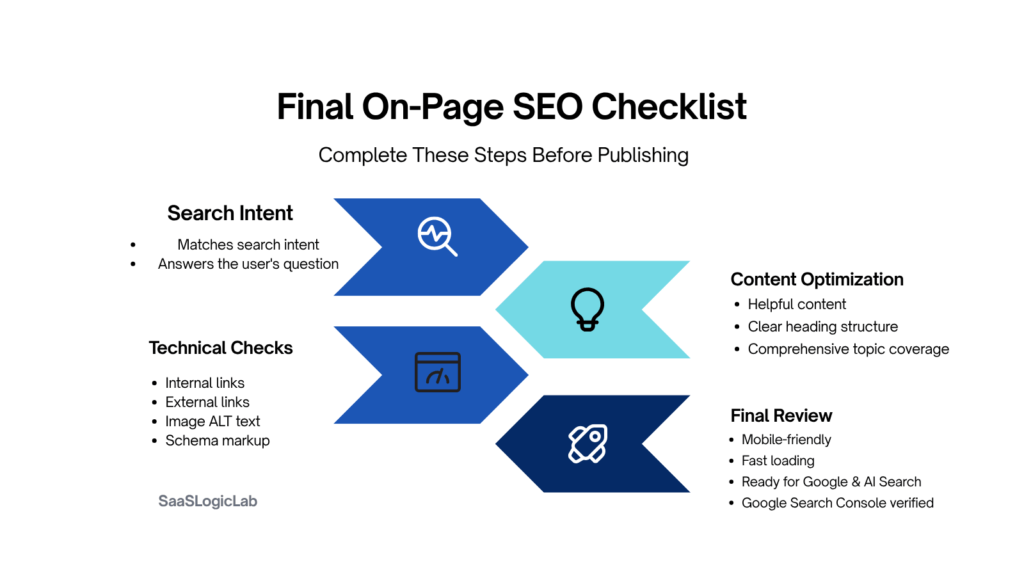
Now comes the final review.
This is the stage many publishers skip because the article already looks finished.
But appearance and readiness aren’t the same thing.
A page can contain excellent content while still overlooking small issues that quietly reduce its performance after publication.
The final review is your opportunity to catch those issues before search engines—and your readers—do.
Think of this checklist as the quality control process every important page should pass before it goes live.
Content Quality
Before publishing, ask yourself:
- Does the page completely satisfy the search intent?
- Have all major user questions been answered?
- Is the information accurate and up to date?
- Have you included original insights instead of repeating competitor content?
- Would you confidently recommend this page over every competing result?
If any answer is “no,” continue improving the content before publishing.
SEO Essentials
Confirm that every critical on-page element is complete.
✓ Primary keyword naturally integrated
✓ Clear H1
✓ Optimized title tag
✓ Compelling meta description
✓ Clean URL structure
✓ Logical heading hierarchy
✓ Relevant internal links
✓ Helpful external references
✓ Optimized image filenames
✓ Descriptive ALT text
✓ Appropriate schema markup
Optimization isn’t about checking boxes.
It’s about making sure every element supports the same search intent.
Technical Review
Even excellent content can struggle if technical issues prevent search engines from understanding or accessing the page.
Before publishing, verify that:
- The page is indexable.
- Canonical tags are correct.
- Images load properly.
- Mobile formatting looks clean.
- Core Web Vitals aren’t negatively affected.
- No broken internal or external links exist.
If you’re publishing on a larger website, these checks should already be part of your standard workflow. Our Technical SEO Checklist (2026): Complete Audit Guide for Better Rankings explains these technical reviews in much greater detail.
User Experience Review
Now read the article one final time—but don’t read it like an SEO.
Read it like your audience.
Ask yourself:
- Does the introduction immediately explain why this page matters?
- Is the content easy to scan?
- Do headings naturally guide readers through the topic?
- Are examples practical?
- Do tables improve understanding?
- Are unnecessary paragraphs removed?
- Does every section provide value?
Good SEO begins with a good reading experience.
Internal Linking Review
Before publishing, review your internal links one final time.
Every important page should connect readers to the next logical resource.
Ask yourself:
- Have I linked to the most relevant supporting articles?
- Do anchor texts describe the destination naturally?
- Are links placed where readers genuinely need additional context?
- Have I avoided adding links simply for SEO purposes?
A strong internal linking strategy turns individual articles into a connected knowledge base rather than isolated pieces of content.
Performance Tracking
Publishing isn’t the final step.
Monitoring performance is.
After your page is indexed, track:
- Impressions
- Clicks
- Click-through rate
- Average position
- Queries generating traffic
- Indexing status
Those insights reveal what should be improved next.
Our Google Search Console Guide (2026): Better Rankings walks through the exact reports we use to monitor content performance after publication and identify opportunities for continuous optimization.
One Final Question
Before clicking Publish, ask yourself something no SEO plugin can answer.
If this article disappeared tomorrow, would the internet lose something genuinely useful?
If the answer is yes, you’ve probably created something worth ranking.
If the answer is no, don’t rush to publish.
Improve it until the answer changes.
Because successful on-page SEO isn’t measured by how many optimization tasks you completed.
It’s measured by whether your page becomes the best resource available for the people searching for it.
Conclusion: On-Page SEO Is About Building Better Pages—Not Better Checklists
On-page SEO has evolved far beyond adding keywords to headings and optimizing a few meta tags.
Today’s highest-performing pages succeed because they solve real problems, match search intent, provide original value, and create an experience that keeps readers engaged from the first paragraph to the last.
Every optimization covered in this guide—from keyword selection and title tags to internal linking, schema markup, image optimization, and AI search readiness—serves the same purpose:
Helping users find the best possible answer while making it easier for search engines to understand and trust your content.
That’s why successful on-page SEO isn’t built around shortcuts.
It’s built around consistency.
Every page you publish should answer these questions confidently:
- Does this page satisfy the search intent better than competing results?
- Does it provide information readers can’t easily find elsewhere?
- Is the content organized clearly and easy to navigate?
- Does every optimization improve the user experience instead of simply chasing rankings?
If the answer is yes, you’ve already done more than optimize a webpage.
You’ve created a resource worth recommending.
The reality is that algorithms will continue changing.
AI search will continue evolving.
Ranking signals will become more sophisticated.
But one principle remains remarkably stable:
The pages that consistently earn visibility are the ones that deliver the greatest value to the people searching for answers.
Focus on building those pages, and many individual SEO decisions become much easier.
Treat every article as a long-term asset rather than a one-time publishing task.
Review it.
Improve it.
Expand it.
Keep it current.
Because the strongest organic growth rarely comes from publishing the most content.
It comes from publishing the most useful content—and making it better over time.
Building that long-term SEO strategy also requires choosing the right software stack. If you’re still deciding between the industry’s leading platforms, our detailed Semrush vs Ahrefs comparison and complete Semrush Review (2026) can help you choose the best solution for your workflow, budget, and business goals.
Whether you’re optimizing your first blog post or managing hundreds of pages across a growing website, use this checklist as an ongoing framework rather than a one-time process.
The goal isn’t to complete an SEO checklist.
The goal is to become the page every other SEO checklist has to compete with.
Frequently Asked Questions (FAQs)
What is an on-page SEO checklist?
An on-page SEO checklist is a structured framework that helps ensure every important element of a webpage is optimized before publication. It typically includes keyword targeting, search intent, title tags, meta descriptions, headings, URLs, internal linking, image optimization, schema markup, and content quality checks.
What is the most important on-page SEO factor?
There isn’t a single ranking factor that guarantees success. However, matching search intent and creating genuinely useful content have a greater long-term impact than optimizing individual elements like keyword density or meta tags.
Does keyword density still matter in 2026?
Not in the way many people believe.
Modern search engines understand context, entities, and semantic relationships. Instead of repeating the same keyword, focus on covering the topic comprehensively using natural language and relevant supporting terms.
How often should I update on-page SEO?
Review your most important pages regularly, especially if rankings, traffic, or search behavior change. Updating outdated examples, refreshing statistics, improving internal links, and expanding useful sections often produces better results than publishing duplicate content.
Can on-page SEO improve AI search visibility?
Yes—but indirectly.
AI-powered search systems favor content that is well-structured, accurate, comprehensive, and easy to understand. Optimizing for users first naturally improves the likelihood that your content can be understood and referenced by AI-driven search experiences.
What’s the difference between on-page SEO and technical SEO?
On-page SEO focuses on optimizing the content and visible elements of an individual page, including titles, headings, content quality, images, and internal links.
Technical SEO focuses on the website’s infrastructure, including crawling, indexing, Core Web Vitals, site speed, structured data, XML sitemaps, robots.txt, and other factors that help search engines access and understand your website efficiently.
For the best results, both should work together rather than being treated as separate strategies.